Twin Shot 2 - Good & Evil

Seele01-Flash
By
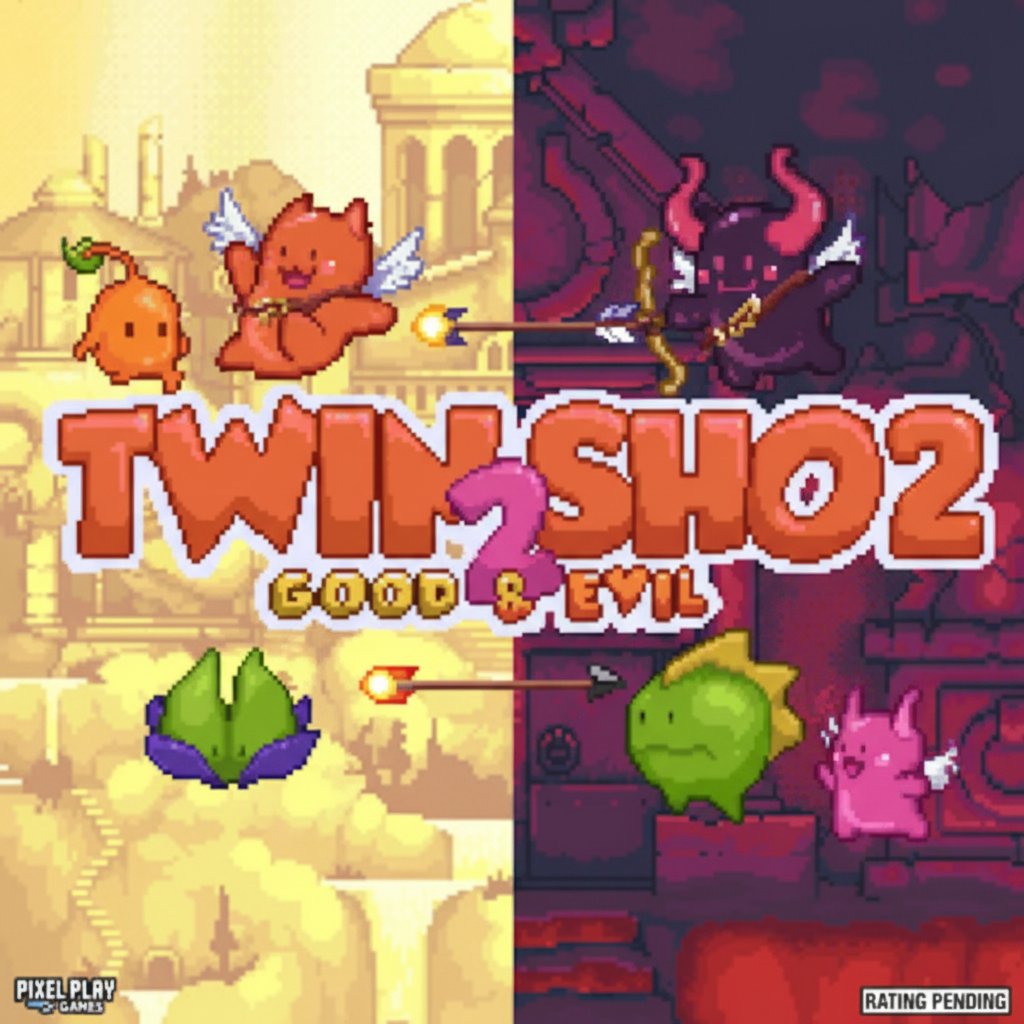
Twin Shot 2 is a beloved pixel art platform game featuring adorable angels wielding bows and arrows. Battle through 150+ unique levels packed with colorful enemies and challenging platforming action.

Prompt

MODEL: Seele01-Flash
Please use Three.js to generate a **mobile-first game** with the theme "**Twin Shot 2: Good & Evil**". Please read the following detailed game design requirements first, and then generate the code accordingly: ### 1. Assets & Environment * **Visual Style:** 2.5D Side-Scrolling Platformer using an Orthographic Camera to simulate a flat pixel-art look within a 3D space. Use **Low-Poly 3D models with high-contrast pixel-art textures** to replicate the classic Nitrome aesthetic. * **Dual Themes (Level Design):** * **"Good" Theme:** Background should be a gradient of soft sky blues and creamy whites. Platforms should look like marble greek pillars and fluffy clouds. Lighting should be warm, golden, and ambient. * **"Evil" Theme:** Background should be deep purple and obsidian black. Platforms should look like dark dungeon bricks or red volcanic rock. Lighting should be dim with localized red point lights. * **Characters:** * **Player:** A chubby, winged Cherub (Angel) or Imp (Devil) model. * **Enemies:** Blob-like entities (Red Slimes), flying blue creatures, and dark monsters. They should have simple bobbing animations. * **Mobile Optimization:** Use **InstancedMesh** for repetitive environmental blocks. Limit texture sizes to 512x512. Implement object pooling for arrows and particles to prevent garbage collection stutter on mobile devices. ### 2. Audio Requirements * **BGM (Background Music):** A fast-paced, heroic **8-bit Chiptune** track. It should feature a catchy melody using synthesized flutes/harps for the "Good" levels and heavier, bass-driven synth/organs for the "Evil" levels. * **Sound Effects (SFX):** * **Jump:** A retro rising "bloops" sound. * **Shooting:** A sharp, string-tension "twang" followed by a "thud" when hitting a wall. * **Enemy Death:** A satisfying "pop" or "squish" sound. * **UI Interaction:** High-pitched clicks for button presses. ### 3. Gameplay Loop * **Core Mechanics:** * **Movement:** Standard platformer physics (gravity, velocity, friction). * **Combat:** The player fires arrows horizontally. Arrows fly straight with slight gravity over long distances. * **The "Pin" Mechanic (Crucial):** If an arrow hits a wall, it stays stuck there for a few seconds. The player can jump onto these arrows and use them as temporary platforms to reach higher areas. * **Enemy AI:** Basic patrolling behavior (moving back and forth on platforms) for slimes. Flying enemies should bob up and down and slowly track the player's position. * **Win/Loss Condition:** * **Win:** Defeat all enemies in the level to spawn a "Exit Portal." * **Loss:** Player touches an enemy or falls into a bottomless pit (Health -1). 3 Hearts total. ### 4. Mobile Controls & Interaction * **Orientation:** Force **Landscape Mode** for optimal platforming visibility. * **Virtual Controls (Touch):** * **Left Side:** A floating **Virtual Joystick** or large D-Pad for movement (Left/Right). * **Right Side:** Two distinct circular buttons (min 60px diameter): * **"A" Button:** Jump (Tap to jump, hold for higher jump). * **"B" Button:** Fire Arrow (Tap to fire in the direction the character is facing). * **Visual Feedback:** * Buttons should scale down slightly and change opacity when pressed. * Implement **Screen Shake** (camera jitter) when the player takes damage or a large enemy dies. * Add a subtle vibration (Haptic Feedback) via `navigator.vibrate` on shooting and taking damage. Do not ask for clarification. Do not request confirmation. Directly execute the generation task based on the given instructions.

Game Introduction

About the Game

Twin Shot 2 is a charming action platformer that combines precise archery mechanics with classic side-scrolling adventure. In this delightful pixel art world, you control cute angels armed with magical bows, embarking on an epic journey through diverse realms of good and evil.

The game features stunning retro-style graphics that showcase vibrant environments ranging from heavenly golden temples to dark, mysterious underworld caverns. Each level presents unique visual themes and atmospheric details that bring the twin worlds to life.

Core Features

Extensive Campaign Mode

Experience an incredible 150+ levels of pure platforming joy, each carefully crafted with unique challenges, enemy patterns, and environmental puzzles. The massive campaign ensures hours of engaging gameplay with constantly evolving mechanics and difficulty progression.

Dual World System

Explore both the Good and Evil realms, each offering distinct visual styles and enemy types. The light world features golden temples and friendly environments, while the dark world challenges you with sinister caverns and menacing creatures.

Precision Archery Combat

Master the art of bow and arrow gameplay with satisfying shooting mechanics. Aim carefully to defeat a colorful cast of enemies including: - Flying blue creatures that dart across the screen - Bouncing red slimes with unpredictable movement patterns - Dark monsters lurking in shadowy corners - Boss creatures requiring strategic thinking

Classic Pixel Art Style

Enjoy beautifully crafted 16-bit inspired graphics that capture the nostalgic charm of classic gaming while maintaining modern polish and smooth animations.

Gameplay Mechanics

Twin Shot 2 perfectly balances platforming precision with strategic combat. Each level requires you to navigate carefully designed obstacles while managing your arrow supply and timing your shots against moving enemies. The game rewards both quick reflexes and tactical thinking.

The difficulty curve is expertly crafted, starting with simple jumping and shooting tutorials before gradually introducing complex enemy combinations, moving platforms, and environmental hazards that require mastery of all game mechanics.

Operation Guide

Movement Controls: - A/D Keys or Left/Right Arrows : Move your angel left and right - W Key or Up Arrow : Jump to reach higher platforms and avoid enemies - F Key or Spacebar : Fire arrows at enemies and targets

Pro Tips: - Time your jumps carefully to avoid enemy attacks - Conserve arrows by aiming precisely - Use the environment to your advantage for strategic positioning - Practice combo movements for advanced level completion

Why Play This Game

Perfect for All Skill Levels : Whether you're a casual gamer looking for fun or a platformer veteran seeking challenge, Twin Shot 2 offers adjustable difficulty through its progressive level design.

Completely Free Experience : Enjoy the full game including the expansion pack at no cost. No hidden fees, no pay-to-win mechanics - just pure gaming fun.

Nostalgic Appeal : Perfect for players who appreciate classic gaming aesthetics combined with modern gameplay refinements.

Browser Convenience : No downloads required - jump straight into the action through your web browser on any device.

Social Gaming : Compare scores and progress with friends, making it perfect for friendly competition and shared gaming experiences.

Frequently Asked Questions (FAQ)