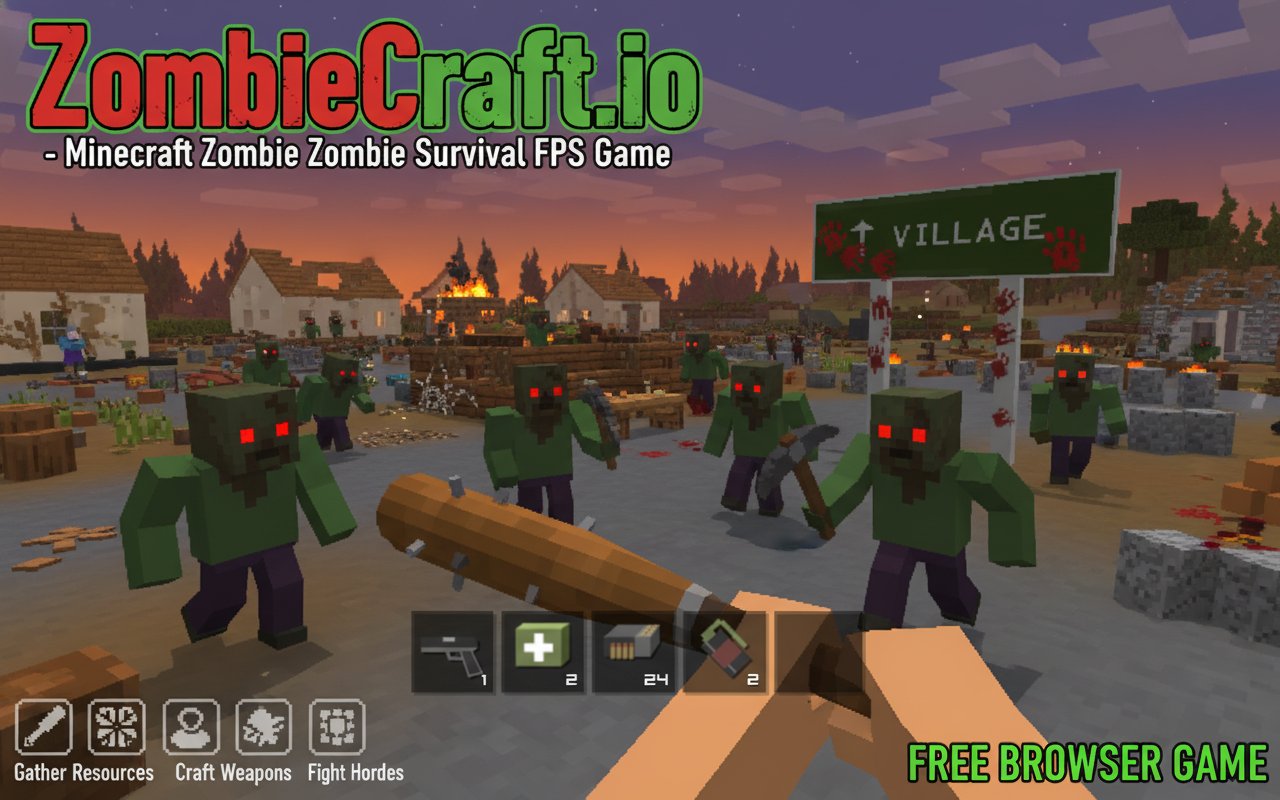
ZombieCraft.io - Minecraft Zombie Survival FPS Game

Seele01-Flash
By
ZombieCraft.io combines Minecraft-style crafting with intense zombie survival FPS action. Gather resources, craft weapons, build shelters, and fight off endless zombie hordes in this free browser game.

Prompt

MODEL: Seele01-Flash
Please use Three.js to generate a **mobile-first game** with the theme "ZombieCraft.io". Please read the following detailed game design requirements first, and then generate the code accordingly: ### 1. Assets & Environment * **Visual Style**: Voxel-based aesthetic (Minecraft-style). The world consists of 1x1x1 cubes. Textures should be low-resolution pixel art (16x16 or 32x32) or simple flat colors to maintain performance. * **Key Models**: * **Player Weapon**: A blocky, low-poly pistol (similar to the screenshot) attached to the camera view. It must have a recoil animation (moves back and up) when fired. * **Enemies (Zombies)**: Green-skinned, blocky humanoid figures. They should have simple walk animations (limbs swinging). * **Environment**: A terrain generated with grass blocks and a grey road. Includes "Village" structures: simple houses with white walls and brown roofs. * **Props**: Trees (log block + leaf blocks), wooden crates, hay bales, and a signpost reading "VILLAGE". * **Mobile Optimization**: * Implement **Geometry Merging** (InstancedMesh) for static environment blocks (trees, ground, road) to reduce draw calls. * Limit the view distance (fog) to ensure high FPS on mobile browsers. * Use simple Lambert or Phong materials; avoid expensive PBR calculations. ### 2. Audio Requirements * **BGM**: A quiet, eerie ambient wind track mixed with occasional low-frequency drones to build tension. When zombies are aggravated, transition to a faster-paced, rhythmic percussive track. * **Sound Effects (SFX)**: * **Gun**: A loud, punchy 8-bit style gunshot. * **Movement**: "Crunchy" footsteps that vary based on surface (grass vs. road). * **Zombies**: Low-pitch groans and moans; high-pitch screech when attacking. * **UI/Interaction**: A "pop" sound when collecting resources or switching inventory slots. A "click" for UI buttons. ### 3. Gameplay Loop * **Survival Mechanics**: The player spawns on a road near a village. They have three vital stats: **Health, Hunger, and Ammo**. * **Scavenging**: The player must explore the village to find resource crates. Breaking crates yields Wood (for crafting), Food (restores Hunger), or Ammo. * **Combat**: Zombies spawn procedurally around the player. The player must shoot them to survive. Headshots deal double damage. * *Constraint*: Ammo is limited. The player must conserve bullets and switch to a melee attack (pistol whip) if empty. * **Crafting System**: A simplified crafting menu (triggered by a UI button) allows converting Wood into barricades (blocks) or temporary shelters. * **Win/Loss**: The game is an endless survival wave mode. Game Over occurs when Health reaches 0. ### 4. Mobile Controls & Interaction * **Orientation**: **Landscape Mode** only. * **Virtual Joysticks**: * **Left Stick**: Controls movement (WASD logic: forward, backward, strafe). * **Right Screen Area**: Touch and drag to look around (Camera rotation). * **Action Buttons**: * **Fire Button**: A large circular button on the bottom-right for shooting. * **Jump Button**: A smaller button near the fire button. * **Interact/Craft Button**: A context-sensitive button (icon changes based on proximity to loot or opens craft menu). * **Inventory UI**: * A hotbar at the bottom center (similar to the screenshot) displaying 4 slots: Weapon, Medkit, Ammo, Grenade. * **Interaction**: Tap a slot to equip that item. Active slot should have a highlight border. * **Size**: Each slot must be at least 44x44 pixels for touch accessibility. * **Feedback**: * Trigger `navigator.vibrate(50)` on shooting and taking damage for haptic feedback. * Flash the screen red briefly when the player takes damage. Do not ask for clarification. Do not request confirmation. Directly execute the generation task based on the given instructions.

Game Introduction

About ZombieCraft.io

ZombieCraft.io is an exciting zombie survival FPS game that brings together the beloved Minecraft crafting mechanics with intense zombie combat. This WebGL-powered browser game features distinctive pixel graphics and challenging survival gameplay where resource management is just as important as marksmanship. Fight for your life against relentless zombie hordes while gathering materials to craft essential survival items.

Core Features

Minecraft-Inspired Crafting System

The game adopts the popular Minecraft crafting mechanics, allowing you to create tools, weapons, and building materials from gathered resources. Use the craft menu (press E) to combine materials and create everything from basic tools to advanced survival equipment.

Intense Zombie Combat

Armed with your trusty pistol, you must carefully manage ammunition while taking down approaching zombies. Every bullet counts in this survival scenario, so accuracy and resource conservation are crucial for long-term survival.

Resource Gathering and Exploration

Explore the game world to collect essential materials needed for crafting and survival. Visit the nearby village to discover additional resources and locate the truck that will help you travel more efficiently across the map.

Base Building and Shelter Construction

Once you've gathered sufficient resources, construct a permanent shelter to protect yourself from zombie attacks. Strategic building placement and proper fortification are key to creating a safe haven in this hostile world.

Survival Needs Management

The game features a realistic survival system where you must regularly fulfill various needs to stay alive. Monitor your status carefully and prioritize resource allocation to maintain your character's well-being.

Game Mechanics

First-Person Perspective

Experience the zombie apocalypse through immersive first-person gameplay that puts you directly in the action. The FPS perspective enhances the tension and makes every zombie encounter feel personal and immediate.

Pixel Art Graphics

The game features charming pixel graphics reminiscent of Minecraft, creating a unique visual style that combines retro aesthetics with modern 3D gameplay elements.

Open World Exploration

Roam freely through diverse environments, from abandoned villages to forest areas. Each location offers different resources and challenges, encouraging exploration and strategic planning.

Operation Guide

Movement Controls

  • WASD keys or Arrow keys : Move your character in all directions
  • Shift key : Run faster (useful for escaping zombie hordes)
  • Mouse : Look around and aim your weapon

Combat Controls

  • Left Click or Ctrl : Fire your weapon at zombies
  • Mouse movement : Aim and target enemies
  • Strategic positioning : Use environment for cover and tactical advantage

Crafting and Interaction

  • E key : Open the crafting menu to create items
  • Resource collection : Walk over items to automatically collect them
  • Building : Use crafted materials to construct shelter and defenses

Why Play ZombieCraft.io

ZombieCraft.io offers the perfect blend of creative building and survival action. Unlike pure FPS games, this title challenges you to think strategically about resource management while maintaining intense zombie combat. The Minecraft-inspired crafting system adds depth and replayability, while the browser-based format means you can jump into the action instantly without downloads or installations.

The game's unique combination of pixel art aesthetics and 3D gameplay creates a distinctive visual experience that appeals to both Minecraft fans and FPS enthusiasts. With upcoming multiplayer features planned, the game promises even more exciting cooperative and competitive gameplay modes.

Whether you're a fan of zombie games, survival titles, or building games, ZombieCraft.io delivers an engaging experience that combines the best elements of multiple genres into one compelling package.

Frequently Asked Questions (FAQ)