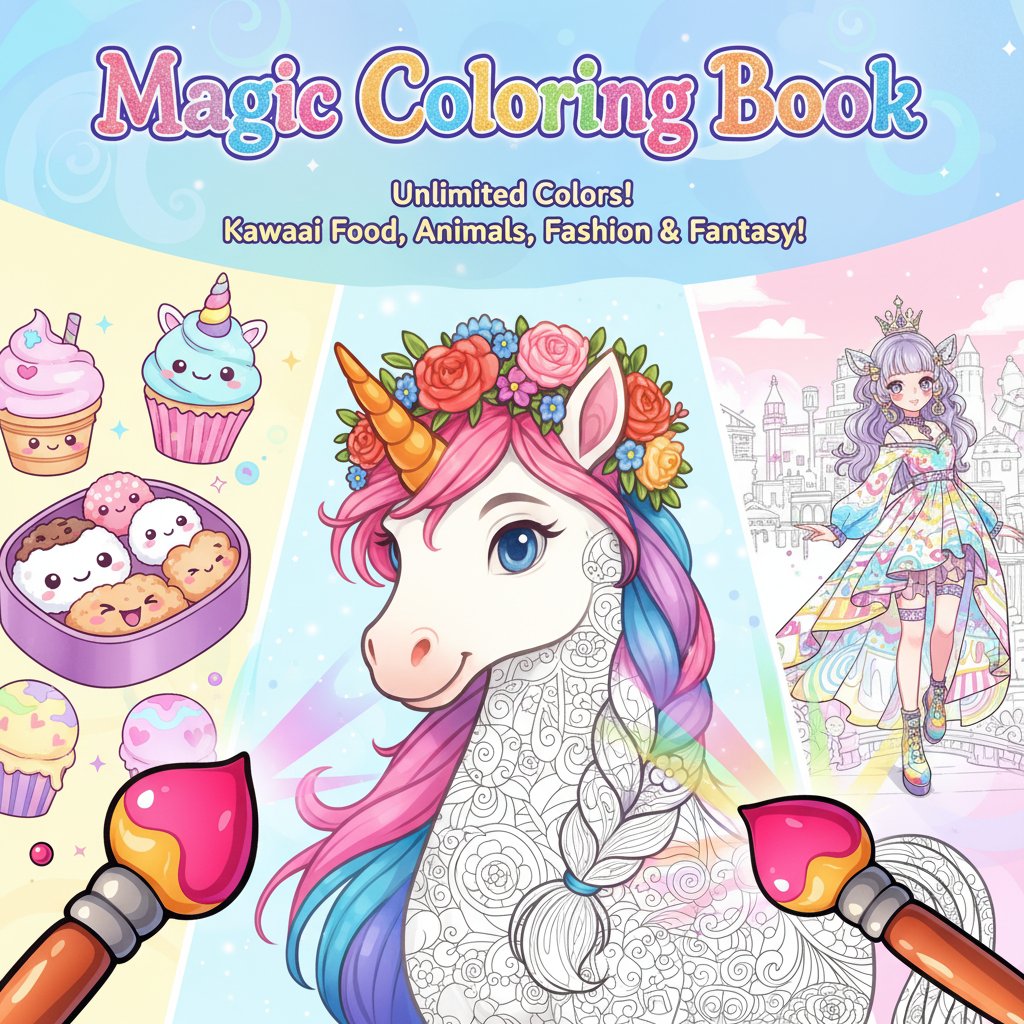
Magic Coloring Book

Seele01-Flash
By
Magic Coloring Book is a free digital coloring game that brings artistic magic to life. Choose from kawaii food, animals, fashion, and fantasy themes with unlimited color options and creative freedom.

Prompt

MODEL: Seele01-Flash
Please use Three.js to generate a **mobile-first game** with the theme "**Magic Coloring Book - 3D Interactive Canvas**". Please read the following detailed game design requirements first, and then generate the code accordingly: ### 1. Assets & Environment * **Visual Style**: High-saturation, "Kawaii" (cute) aesthetic. The world should feel bright and inviting, utilizing a soft pastel color palette for the background (e.g., light lavender or mint green) to make the artwork pop. * **The Canvas**: Create a `THREE.PlaneGeometry` in the center of the screen acting as the "paper." It should have a base white texture with black line-art overlays (use a placeholder procedural noise or a simple loaded SVG pattern like a unicorn or flower for the line art). * **The Brush**: Instead of a standard mouse cursor, implement a **3D Brush Model** (low-poly, cartoon style) that follows the user's input position. The tip of the brush should dynamically change color to match the selected pigment. * **Particle Effects (The "Magic")**: Implement a `THREE.Points` particle system. Whenever the user drags to paint, emit small, sparkling particles (stars or circles) from the brush tip that float upward and fade out, reinforcing the "Magic" theme. * **Mobile Optimization**: Use simple geometries for the UI to keep draw calls low. Ensure the renderer handles `window.devicePixelRatio` correctly for crisp lines on high-DPI mobile screens. ### 2. Audio Requirements * **BGM**: A loop of relaxing, whimsical acoustic music (e.g., soft piano or harp with light chimes). * **Sound Effects (SFX)**: * **Painting**: A soft, continuous "scribble" or "wet brush" sound that loops while the user is dragging. * **UI Interaction**: A pleasant "pop" or "bubble" sound when selecting a color from the palette. * **Completion**: A magical "harp glissando" or "tada" sound when a significant portion of the canvas is filled (simulated logic). ### 3. Gameplay Loop * **Mechanic - Texture Painting**: The core mechanic relies on Raycasting. When the user touches/clicks the canvas, cast a ray to find the UV coordinates. Draw onto a dynamic `HTMLCanvasElement` (used as the texture for the 3D plane) at those coordinates using the selected color and brush radius. * **Tools**: * **Brush**: Freehand drawing that modifies the texture. * **Eraser**: A specific "white" brush that removes color. * **Palette System**: A selection of pre-defined vibrant colors (Hot Pink, Cyan, Lime Green, Orange). * **State Management**: * **Idle**: Brush floats gently. * **Painting**: Brush presses down slightly (z-axis movement), particles emit, texture updates. ### 4. Mobile Controls & Interaction * **Touch Controls**: The game must support `touchstart`, `touchmove`, and `touchend` events specifically. * Disable default browser scrolling/zooming (`touch-action: none` in CSS). * **Raycaster Logic**: Map the 2D touch coordinates to the 3D scene to ensure the brush model follows the finger exactly under the camera perspective. * **UI Layout**: * **Color Palette**: A scrollable horizontal bar at the **bottom** of the screen (thumb-friendly zone). Each color button should be at least 44x44 pixels. * **Tool Toggles**: Place Brush size and Eraser toggle at the top right. * **Feedback**: * **Visual**: The button for the selected color should scale up (1.2x) to indicate selection. * **Haptic**: Trigger `navigator.vibrate(5)` (short tick) when a user picks a new color to provide tactile confirmation. Do not ask for clarification. Do not request confirmation. Directly execute the generation task based on the given instructions.

Game Introduction

About Magic Coloring Book

Magic Coloring Book transforms the classic coloring experience into an enchanting digital adventure where every brushstroke creates colorful magic! This free online coloring game offers endless creative possibilities with its diverse collection of themes and intuitive design tools. Whether you're a budding artist or simply love to relax with colors, this game provides the perfect canvas for your imagination.

Core Features

Magic Coloring Book stands out with its comprehensive creative toolkit:

  • Completely Free : Enjoy full access to all coloring pages and tools without any cost
  • Diverse Themes : Explore charming Kawaii Food, adorable animals, Fashion & Beauty, and whimsical Magic & Fantasy designs
  • Unlimited Colors : Access boundless color palettes with the ability to unlock even more vibrant hues
  • Flexible Tools : Choose between precise brush painting or quick bucket fill options
  • Cross-Platform : Perfect compatibility across computers, tablets, and smartphones
  • Save & Share : Preserve your masterpieces and share them with friends and family

Magical Artistic Freedom

Unlike traditional coloring books, Magic Coloring Book gives you total artistic control. Mix and match colors freely, experiment with different techniques, and watch as your creativity brings static images to life with magical vibrancy.

Relaxing Creative Experience

The game provides a peaceful, stress-free environment perfect for unwinding. The gentle gameplay mechanics and beautiful artwork create a meditative coloring experience suitable for all ages.

Game Themes

Kawaii Food Collection

Adorable food illustrations with cute faces and charming designs that make coloring fun and engaging.

Lovable Animals

From unicorns to puppies, discover a menagerie of delightful creatures waiting for your artistic touch.

Fashion & Beauty

Stylish designs featuring elegant outfits, accessories, and beauty-themed illustrations.

Magic & Fantasy

Enchanting mystical creatures, fairy tale scenes, and fantastical landscapes that spark imagination.

How to Play

Getting started with Magic Coloring Book is simple and intuitive:

  1. Select Your Canvas : Browse through different themed categories and choose your favorite coloring page
  2. Pick Your Colors : Click on the color palette to select your desired hue
  3. Start Creating :
  4. Click and drag to paint with the brush tool for detailed work
  5. Use the bucket tool to fill larger areas quickly
  6. Experiment Freely : Switch between tools and colors as often as you like
  7. Save Your Art : Preserve your finished masterpieces to your device
  8. Share & Enjoy : Show off your colorful creations with friends

Why Play This Coloring Game

Magic Coloring Book offers numerous benefits for players of all ages:

  • Stress Relief : Coloring has proven therapeutic benefits for relaxation and mindfulness
  • Creative Expression : Develop artistic skills and explore color theory in a fun environment
  • No Mess : Enjoy all the benefits of traditional coloring without physical supplies or cleanup
  • Accessibility : Play anywhere, anytime on your preferred device
  • Unlimited Resources : Never run out of pages or colors unlike physical coloring books
  • Perfect for Families : Safe, educational entertainment suitable for children and adults

Whether you're looking to unwind after a long day, engage in creative play with children, or simply explore your artistic side, Magic Coloring Book provides the perfect digital canvas for colorful magic!

Frequently Asked Questions (FAQ)