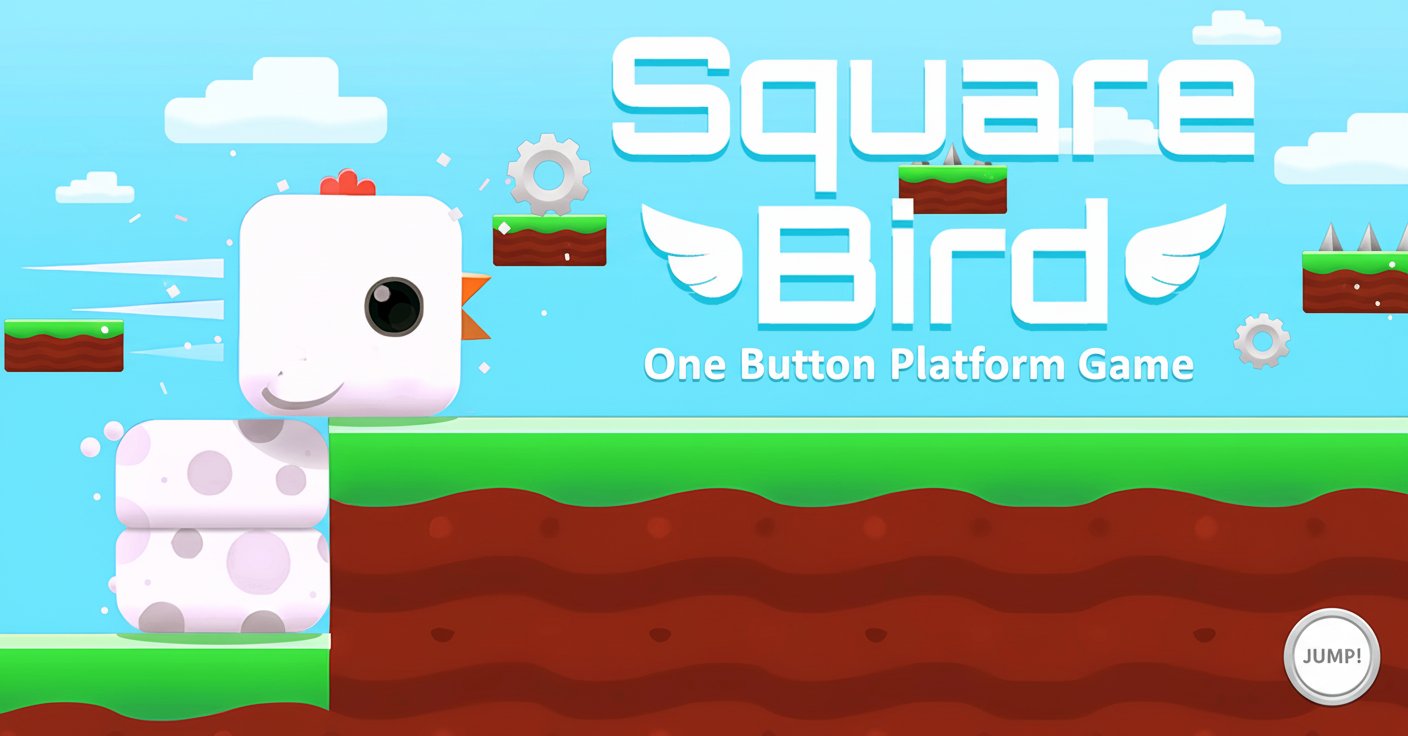
Square Bird - One Button Platform Game

Seele01-Flash
By
Square Bird is an addictive one-button platform game where you help a cute square bird navigate obstacles by building towers of square eggs. Simple mechanics, challenging gameplay, and endless fun await!

Prompt

MODEL: Seele01-Flash
Please use Three.js to generate a **mobile-first game** with the theme "Square Bird". Please read the following detailed game design requirements first, and then generate the code accordingly: ### 1. Assets & Environment * **Visual Style**: 2.5D Cartoon aesthetic (Side-scrolling view). Bright, high-saturation colors similar to "Crossy Road" or standard hyper-casual games. * **Main Character (The Bird)**: A simple Cube geometry with a white texture, small beak (cone/pyramid), and red comb (small boxes). The bird should feel "squishy" and cute. * **The Eggs**: Cube geometries that spawn directly beneath the bird. They should have a distinct texture (e.g., white with purple polka dots) to differentiate them from the bird. * **Environment**: * **Ground**: A scrolling platform (green top, brown soil sides). * **Background**: A gradient sky (Cyan to Blue) with simple floating low-poly clouds to indicate speed/parallax. * **Obstacles**: Tall, dark rectangular blocks or walls varying in height (some low, some high) and floating platforms (gaps). * **Camera**: Orthographic camera positioned to the side (Side-scroller), slightly elevated to show depth (2.5D effect). The camera must smoothly follow the bird's x-axis movement. * **Optimization**: Use `BoxGeometry` for all elements. Use simple `MeshLambertMaterial` for performance. Ensure shadows are simple (drop shadows) to help players judge height. ### 2. Audio Requirements * **BGM**: An upbeat, fast-tempo, looped "casual arcade" track (whimsical and energetic). * **SFX**: * **Spawn Egg**: A satisfying, short "Pop" or "Bloop" sound (pitch varies slightly for fun). * **Collision (Egg vs Wall)**: A "Crunch" or "Stone break" sound. * **Game Over**: A "Bonk" followed by a sad trombone or descending scale. * **Perfect Landing**: A high-pitched "Ding" or "Chime". * **Fever Mode**: A continuous high-energy looping sound or rapid-fire sound effect while active. ### 3. Gameplay Loop * **Core Mechanics**: * The bird moves automatically to the right at a constant speed. * **Stacking**: When the user touches the screen, a square egg spawns *instantly* under the bird, pushing the bird up by one unit height. Holding the screen spawns eggs rapidly (e.g., 5 eggs/second). * **Gravity**: If there is no ground or egg beneath the lowest egg, the whole stack falls. * **Collision Logic (Crucial)**: * **Bird vs. Wall**: If the *Bird's body* hits a wall, Game Over. * **Egg vs. Wall**: If the *Eggs* hit a wall, the eggs that collide are destroyed, but the bird (and any eggs above the wall height) continue moving forward. This is the core "avoidance" mechanic—sacrificing eggs to clear low obstacles. * **Fever Mode**: * Trigger: Achieved after 3 "Perfect Landings" (clearing an obstacle with the exact necessary height, no extra eggs wasted). * Effect: The bird shoots projectiles forward for 5 seconds, destroying obstacles before impact. Visuals should verify this (e.g., bird turns gold or glows). * **Win/Loss**: * Endless runner style (High Score based on distance). * Game Over triggers a "Restart" UI overlay. ### 4. Mobile Controls & Interaction * **Input Scheme**: * **Touch/Hold anywhere on screen**: Rapidly spawn eggs beneath the bird. * **Release**: Stop spawning eggs. * **Responsiveness**: The spawn action must be instant (zero latency) as timing is critical. * **Orientation**: Landscape mode (preferred for side-scrollers) but code should effectively handle resizing. * **UI Layout**: * **Score**: Top-center, large white font with black outline. * **Fever Bar**: A simple progress bar or UI indicator showing progress toward Fever Mode (0/3 perfect landings). * **Game Over Screen**: Large "Play Again" button (minimum 60x60px touch area) centered on the screen. * **Haptic Feedback**: * Trigger a light vibration (`navigator.vibrate(10)`) every time an egg is spawned to give tactile "stacking" feedback. * Trigger a heavy vibration on Game Over. Do not ask for clarification. Do not request confirmation. Directly execute the generation task based on the given instructions.

Game Introduction

About Square Bird

Square Bird is a delightfully simple yet challenging side-scrolling platform game that has captivated millions of players worldwide. This charming 2D game features a cute square bird that must navigate through various obstacles by building towers of square eggs with just one button press. The game's minimalist design and intuitive controls make it perfect for players of all ages, while its progressive difficulty ensures hours of engaging gameplay.

The game combines the best elements of casual gaming with skillful obstacle avoidance mechanics. As you guide your square bird through colorful landscapes, you'll need precise timing and judgment to create the perfect egg tower height for each obstacle.

Core Features

Simple One-Button Gameplay

Square Bird's beauty lies in its simplicity. With just one button (spacebar or mouse click), you control your bird's fate. Click to build square eggs that form a tower, lifting your bird higher to clear obstacles. The challenge comes from knowing exactly when and how many eggs to create.

Fever Mode Power-Up

Achieve three perfect landings in a row to activate the exciting Fever Mode . In this special state, your square bird shoots blocks ahead, destroying obstacles in your path and making progression much easier. This powerful mode adds an extra layer of strategy and excitement to the gameplay.

Character and Level Customization

Earn currency by completing levels and use it to unlock new bird skins and level themes. Personalize your gaming experience with various colorful designs and backgrounds that keep the visual experience fresh and engaging.

Cross-Platform Compatibility

Enjoy Square Bird on any device! The game runs perfectly in web browsers on desktop computers, tablets, and mobile phones, ensuring you can play anytime, anywhere.

Game Mechanics

Basic Controls

The controls couldn't be simpler: - Spacebar or Left Mouse Button : Build square eggs to create towers - Timing : Release to stop building and let your bird glide over obstacles

Perfect Landing System

Master the art of creating just the right number of eggs to barely clear each obstacle. Perfect landings not only score more points but also contribute toward activating the powerful Fever Mode.

Progressive Difficulty

As you advance through levels, obstacles become more complex and require better judgment. The game gradually introduces new challenge types, keeping gameplay fresh and engaging.

Why Play Square Bird

Instant Accessibility

No downloads, no installations – simply open your browser and start playing immediately. The game loads quickly and runs smoothly on all modern devices.

Perfect for Short Gaming Sessions

Whether you have 2 minutes or 2 hours, Square Bird adapts to your schedule. Quick levels make it perfect for casual gaming during breaks, commutes, or whenever you need a fun distraction.

Family-Friendly Entertainment

With its cartoon art style, simple controls, and non-violent gameplay, Square Bird is suitable for players of all ages. It's an excellent choice for family gaming time.

Skill Development

While easy to learn, Square Bird helps develop timing, spatial awareness, and quick decision-making skills. The game rewards practice and improvement, making each session satisfying.

Completely Free

Enjoy the full Square Bird experience without spending a penny. All features, levels, and customization options are available through gameplay progression.

Frequently Asked Questions (FAQ)