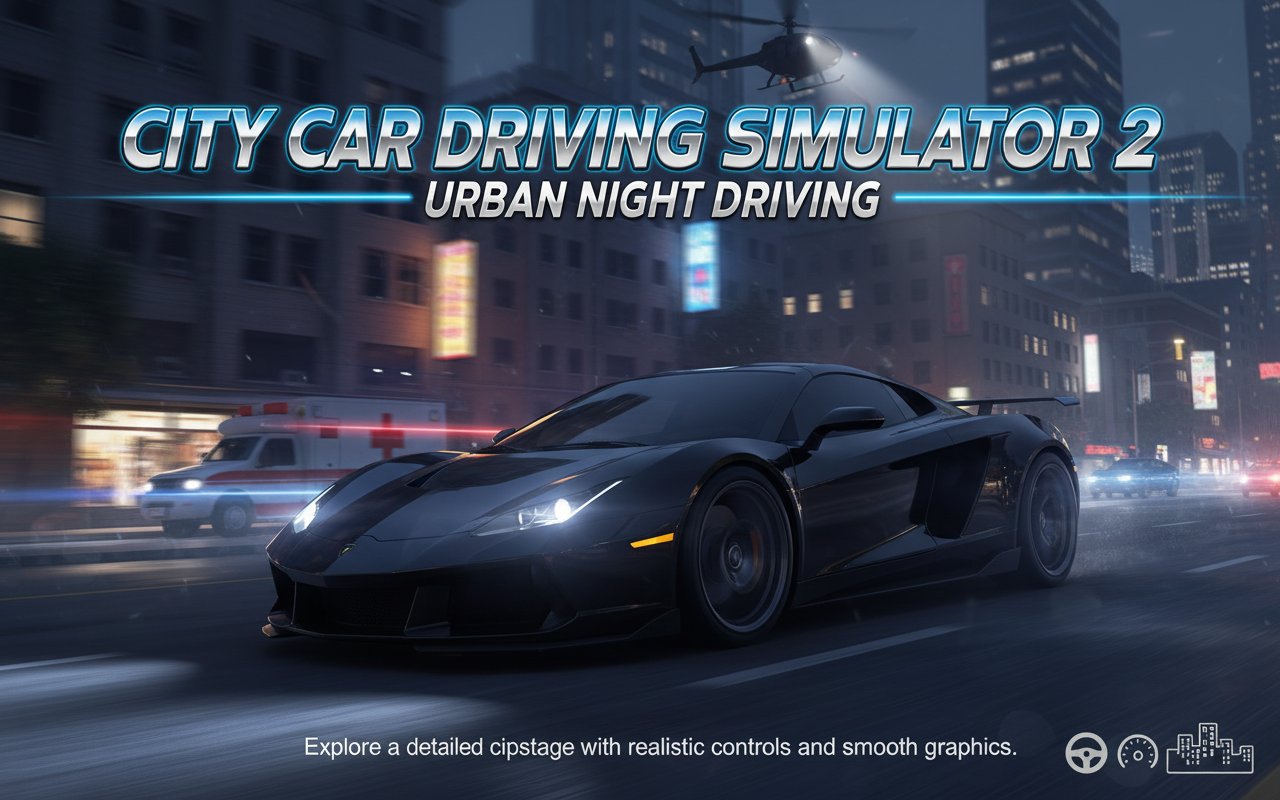
City Car Driving Simulator 2 - Urban Night Driving

Seele01-Flash
By
City Car Driving Simulator 2 delivers an immersive nighttime urban driving experience. Choose from powerful supercars and sports cars to explore a detailed cityscape with realistic controls and smooth graphics.

Prompt

MODEL: Seele01-Flash
Please use Three.js to generate a **mobile-first game** with the theme "City Car Driving Simulator 2". Please read the following detailed game design requirements first, and then generate the code accordingly: ### 1. Assets & Environment * **Visual Style:** a 3D Night City environment. The aesthetic should be "Urban Night" with low-poly buildings featuring illuminated windows (emissive textures) to create a cityscape skyline without high geometry costs. * **Lighting:** Dark ambient lighting (dark blue/grey). The scene should rely heavily on dynamic lighting from the car's headlights (SpotLights with cone distribution) and streetlamps (static PointLights). Implement a simple "bloom" effect for city lights and car headlights if performance permits. * **Car Models:** * **Player Car:** A sleek sports car or police cruiser (user selectable). The model must separate wheels from the body to allow for rotation and suspension animation. * **Traffic:** Low-poly AI vehicles (Ambulances, Sedans) with simplified collision meshes. * **Optimization (Mobile):** Use `InstancedMesh` for repetitive city elements (streetlights, trees, building blocks). Limit real-time shadow casting to the player's car only. Use texture atlasing to reduce draw calls. * **Particles:** Simple particle systems for tire smoke (when drifting), exhaust fumes, and sparks upon collision. ### 2. Audio Requirements * **BGM:** A looping Synthwave or "Chill Phonk" track that evokes a late-night driving atmosphere. * **SFX - Engine:** Dynamic engine sound where pitch increases based on vehicle speed/RPM. * **SFX - Interaction:** Tire screeching sound triggered when lateral velocity exceeds a certain threshold (drifting). * **SFX - Environment:** Doppler effect for passing traffic sirens (Police/Ambulance). Dull metal thud sounds for collisions. * **UI Sounds:** clean digital clicks for menu selection. ### 3. Gameplay Loop * **Core Mechanic:** An endless sandbox driving simulation. The player drives through a procedurally generated or looped city grid. * **Vehicle Physics:** Implement an arcade-style physics engine (custom or using Cannon.js/Ammo.js). Key features: * **Drifting:** Reduce rear tire friction when the Handbrake is active to allow sliding. * **Nitro:** A temporary speed boost that increases acceleration and adds a visual motion blur effect. * **Slow Motion:** A toggle that scales down the global time delta (e.g., `timeScale = 0.5`) for cinematic maneuvering. * **Traffic System:** AI cars spawn ahead of the player and despawn behind. They should follow lane logic and stop if the player blocks them. * **Objectives:** There are no strict "Win" conditions. The goal is to explore, perform drifts, and avoid crashing into heavy traffic. ### 4. Mobile Controls & Interaction * **Orientation:** Landscape Mode (Fullscreen). * **UI Layout (Touch Optimized):** * **Left Thumb:** A Virtual Analog Stick or Left/Right Arrow buttons for steering control. * **Right Thumb:** * Large "Gas" pedal (bottom right). * Medium "Brake/Reverse" pedal (to the left of Gas). * "Handbrake" button (positioned above Gas/Brake for easy thumb sliding). * **Action Buttons:** Smaller icons in the upper right quadrant for "Nitro (F)", "Slow Motion (G)", and "Camera Change (C)". * **Camera:** Third-person chase camera with slight lag/smoothing (Lerp) to convey weight. Include a button to toggle to a bumper/hood view. * **Feedback:** Trigger `navigator.vibrate(200)` on vehicle collision. Visual screen shake on high-speed impact. Do not ask for clarification. Do not request confirmation. Directly execute the generation task based on the given instructions.

Game Introduction

About the Game

City Car Driving Simulator 2 is an enhanced 3D driving simulation that transforms your browser into a gateway to nighttime urban exploration. This realistic driving game offers an expansive city environment where you can experience the thrill of driving premium vehicles through illuminated streets. With its combination of realistic physics, diverse vehicle selection, and customizable gameplay elements, this simulator provides both casual driving enjoyment and serious practice opportunities.

Core Features

Extensive Vehicle Collection

The game features an impressive lineup of high-performance vehicles including supercars, sports cars, and even police vehicles. Each car comes with unique handling characteristics, engine sounds, and visual details that enhance the driving experience.

Realistic Night Environment

Experience the unique atmosphere of nighttime city driving with detailed street lighting, traffic patterns, and urban architecture. The nocturnal setting creates a distinct mood that sets this simulator apart from typical daytime driving games.

Advanced Customization Options

  • Vehicle Customization : Modify your chosen car's appearance and performance
  • Traffic Control : Adjust traffic density to match your preferred driving challenge
  • Lighting Settings : Control various lighting elements for optimal visibility
  • Camera Perspectives : Multiple viewing angles for different driving experiences

Smooth Performance

Built with optimized 3D graphics that deliver smooth gameplay across various devices and browsers without compromising visual quality.

Gameplay Experience

Free Roam Exploration

Unlike linear racing games, City Car Driving Simulator 2 emphasizes free exploration. Drive wherever you want within the expansive city limits, discover new routes, and familiarize yourself with different neighborhoods and road types.

Skill Development

Perfect your driving techniques including: - Precision Steering : Navigate tight city streets and intersections - Drifting Practice : Master controlled slides and cornering techniques
- Traffic Management : Learn to handle various traffic scenarios safely - Speed Control : Balance excitement with responsible driving

Controls Guide

Basic Driving Controls: - WASD Keys or Arrow Keys : Accelerate, brake, and steer your vehicle - Spacebar : Engage handbrake for emergency stops or drifting maneuvers - F Key : Activate nitro boost for extra speed when needed - G Key (Hold) : Enter slow-motion mode for precise maneuvering - C Key : Cycle through different camera angles and perspectives

The control scheme is designed to be intuitive for both keyboard and gamepad users, ensuring comfortable gameplay regardless of your preferred input method.

Why Play This Driving Simulator

Perfect for Driving Enthusiasts : Whether you're a racing game veteran or someone who simply enjoys the relaxation of virtual driving, this simulator offers the right balance of realism and accessibility.

No Download Required : Jump straight into the action through your web browser - no installation, no storage space concerns, just instant driving entertainment.

Stress-Free Environment : Unlike competitive racing games, you can drive at your own pace, practice new techniques, or simply enjoy a peaceful virtual cruise through the city.

Cross-Platform Accessibility : Enjoy consistent gameplay whether you're on a desktop computer, laptop, or mobile device with browser support.

Frequently Asked Questions (FAQ)