
Drift Runner 3D - Racing Game
 Puzzle
Box Robot Puzzle
Build crate-pushing puzzles with vehicles and physics timing.
 Shooter
Platform Shooter Quest
Build a side-scrolling platform shooter with weapon switching.
 Godot
GodotBaby Bat Climber
Build a compact Godot cave-climbing platformer.
 Shooter
Rail Shooter Ride
Build a roller-coaster rail shooter that aims as you ride.
 Voxel
VoxelVoxel Hero Adventure
Build a voxel hero who explores, mines, and builds.
 Driving
City Car Driving
Build an open-city free-driving game with car selection.
 Subscriber only
Unreal Top-Down Roguelite
Create a complete UE 5.5 top-down arena roguelite with upgrades and a boss finale.
 New
NewRiver Raid Survival
Build a River Raid-style flight survival run with fuel pressure.
 FPS
FPSNight Mission Survival
Build a first-person night survival with flashlight combat.
 Unity
UnityFarmstead Shop
Build a Unity farm-shop sim: grow, stock, serve, upgrade.
PuzzleBox Robot Puzzle
Build crate-pushing puzzles with vehicles and physics timing.
ShooterPlatform Shooter Quest
Build a side-scrolling platform shooter with weapon switching.
GodotBaby Bat Climber
Build a compact Godot cave-climbing platformer.
ShooterRail Shooter Ride
Build a roller-coaster rail shooter that aims as you ride.
VoxelVoxel Hero Adventure
Build a voxel hero who explores, mines, and builds.
DrivingCity Car Driving
Build an open-city free-driving game with car selection.
Subscriber onlyUnreal Top-Down Roguelite
Create a complete UE 5.5 top-down arena roguelite with upgrades and a boss finale.
NewRiver Raid Survival
Build a River Raid-style flight survival run with fuel pressure.
FPSNight Mission Survival
Build a first-person night survival with flashlight combat.
UnityFarmstead Shop
Build a Unity farm-shop sim: grow, stock, serve, upgrade.
Prompt

Games are fun. Creating them is even better.
Game Introduction
About the Game
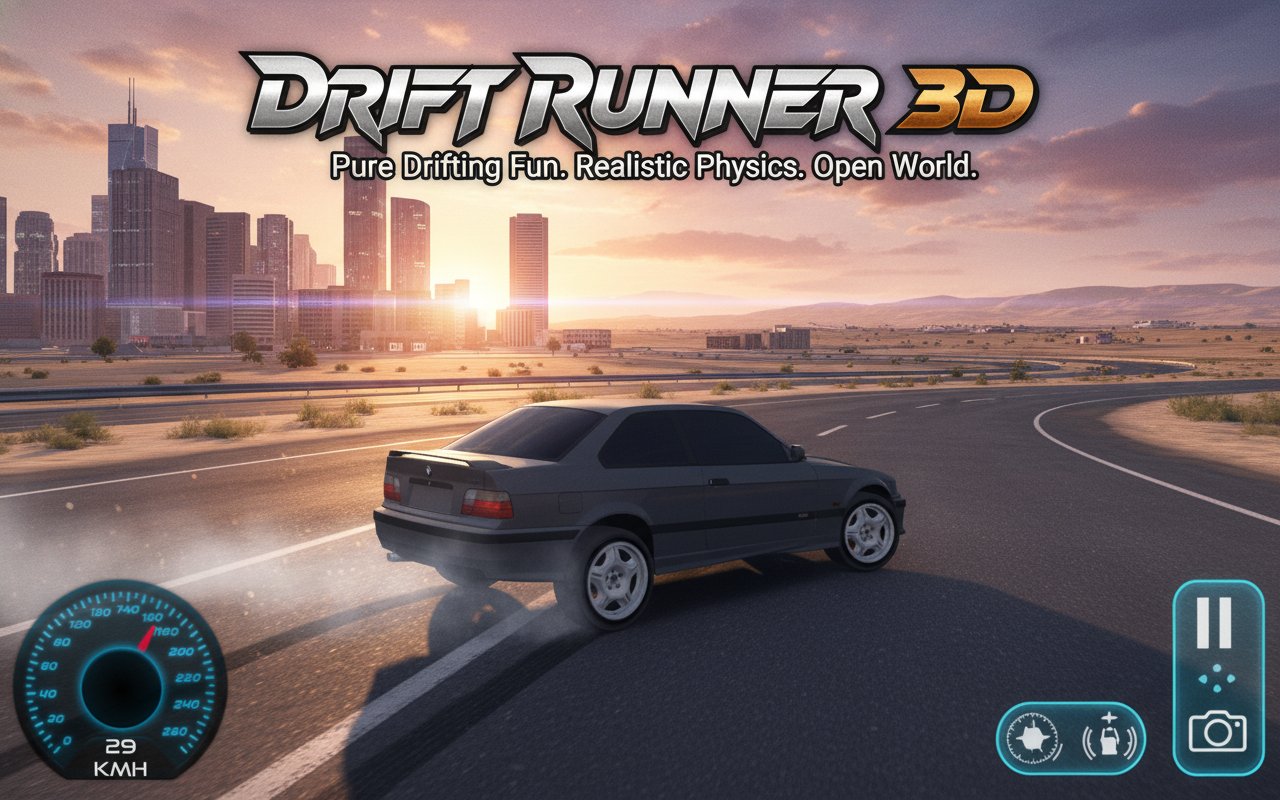
Drift Runner 3D is the ultimate car drifting simulation experience that puts you behind the wheel of a powerful drift car in a sprawling 3D city environment. This free-to-play browser game focuses entirely on the pure joy of drifting, offering an open-world playground where you can perfect your sliding techniques without the pressure of races or time limits.
Unlike traditional racing games, Drift Runner 3D is all about freedom and skill development. The game provides a massive city to explore, complete with winding streets and challenging corners perfect for practicing your drifting maneuvers. When city driving becomes routine, you can venture into the nearby hills for a change of scenery and new drifting challenges.
Core Features
Open-World Exploration
The game features a vast 3D city environment with multiple districts to explore. From tight urban alleyways to wide boulevards, every street offers unique drifting opportunities. The detailed cityscape includes realistic buildings, traffic lights, and road layouts that create an authentic driving atmosphere.
Pure Drifting Focus
What sets Drift Runner 3D apart is its mission-free gameplay . There are no races to win, no timers to beat, and no artificial objectives. This design philosophy allows players to focus entirely on improving their drifting technique and enjoying the satisfying feeling of controlled slides around corners.
Realistic Drift Physics
The game employs sophisticated physics simulation that makes drifting feel authentic and rewarding. Watch as your tires produce that signature green smoke when you execute perfect drifts around sharp turns. The realistic handling model requires skill to master, making each successful drift feel earned.
Multiple Camera Views
Customize your driving experience with multiple camera perspectives . Switch between different viewpoints to find the angle that works best for your driving style, whether you prefer a close-up cockpit view or a wider external perspective to better judge your drift lines.
Seamless Cross-Platform Play
Enjoy Drift Runner 3D on both web browsers and Android devices , ensuring you can practice your drifting skills wherever you are. The game runs smoothly across different platforms while maintaining the same high-quality experience.
Game Mechanics
The core gameplay revolves around mastering the art of controlled sliding. Players must learn to balance throttle control, steering input, and handbrake usage to maintain smooth, sustained drifts. The game rewards style and technique over speed, encouraging players to focus on the elegance of their slides rather than rushing through corners.
The open-world design means you can create your own drifting courses and challenges. Find the perfect corner, practice your approach, and work on chaining multiple drifts together for extended sequences. The lack of predetermined objectives means the fun comes from setting your own goals and pushing your skills to new heights.
Operation Guide
The controls are designed to be intuitive yet precise:
- WASD keys or Arrow keys : Primary vehicle movement (accelerate, brake, steer)
- Spacebar : Handbrake for initiating and controlling drifts
- C key : Cycle through different camera views
Mastering these simple controls is the key to becoming a drift expert. The handbrake is particularly important for initiating drifts, while throttle control helps maintain the perfect slide angle. Practice combining these inputs smoothly to achieve fluid, controlled drifts.
Why Play Drift Runner 3D
Drift Runner 3D offers a unique gaming experience that prioritizes pure driving enjoyment over competitive pressure. It's perfect for players who want to relax and improve their virtual driving skills at their own pace. The game's stress-free environment makes it ideal for both casual players looking for fun and enthusiasts wanting to perfect their technique.
The combination of realistic physics, beautiful 3D graphics, and unlimited practice opportunities creates an engaging experience that keeps players coming back. Whether you're new to drifting games or a seasoned virtual driver, Drift Runner 3D provides the perfect platform to explore the exciting world of controlled automotive sliding.
The game's accessibility across multiple platforms ensures you can enjoy the drifting experience anytime, anywhere, making it an excellent choice for gaming sessions both short and long.