
Zombie Defence 2 - Strategy Game
 Unity
UnityCity Eater
Build a Unity game where a growing blob devours the city.
 Puzzle
Magic Cube Puzzle
Build an interactive Rubik's Cube with scramble and reset.
 Shooter
Platform Shooter Quest
Build a side-scrolling platform shooter with weapon switching.
 Godot
GodotBaby Bat Climber
Build a compact Godot cave-climbing platformer.
 Unity
UnityEndless Runner
Build a polished Unity endless runner with lanes and pickups.
 New
NewRiver Raid Survival
Build a River Raid-style flight survival run with fuel pressure.
 New
New3D Block Puzzle
Build a 3D falling-block puzzle with rotations and row clears.
 New
NewUnderwater Puzzle
Build an underwater puzzle: restore coral, dodge crabs.
 Unity
UnityStrawberry Grove Adventure
Build a cozy Unity pixel grove of exploration and collectibles.
 FPS
FPSNight Mission Survival
Build a first-person night survival with flashlight combat.
UnityCity Eater
Build a Unity game where a growing blob devours the city.
PuzzleMagic Cube Puzzle
Build an interactive Rubik's Cube with scramble and reset.
ShooterPlatform Shooter Quest
Build a side-scrolling platform shooter with weapon switching.
GodotBaby Bat Climber
Build a compact Godot cave-climbing platformer.
UnityEndless Runner
Build a polished Unity endless runner with lanes and pickups.
NewRiver Raid Survival
Build a River Raid-style flight survival run with fuel pressure.
New3D Block Puzzle
Build a 3D falling-block puzzle with rotations and row clears.
NewUnderwater Puzzle
Build an underwater puzzle: restore coral, dodge crabs.
UnityStrawberry Grove Adventure
Build a cozy Unity pixel grove of exploration and collectibles.
FPSNight Mission Survival
Build a first-person night survival with flashlight combat.
Prompt

Games are fun. Creating them is even better.
Game Introduction
About the Game
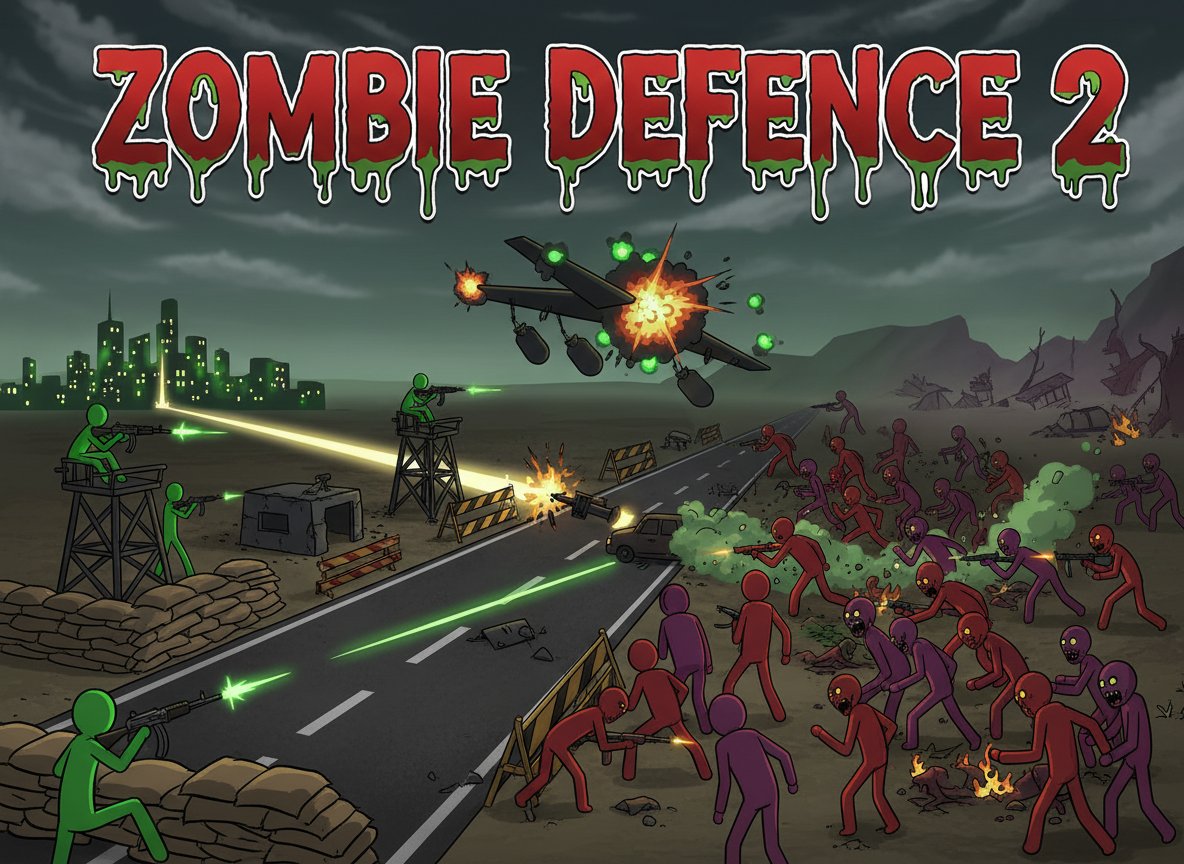
Zombie Defence 2 is a thrilling free tower defense game that puts you on the front lines of humanity's survival. With a 3.2/5 rating from players, this action-packed shooter combines strategic tower defense mechanics with intense zombie combat. The undead are advancing, and only you can stop them from reaching the safe zone!
Core Features
Strategic Tower Defense Combat
Position yourself strategically to defend the only road connecting the safe zone with the infected area. Every zombie that passes through brings humanity closer to extinction. Plan your defense carefully and make every shot count.
Powerful Airstrike System
When the zombie hordes become overwhelming, call in devastating airstrikes to clear large groups of enemies. Each level grants you one airstrike, so use it wisely at the most critical moment.
Stick Figure Art Style
Enjoy clean, minimalist stick figure graphics that focus on fast-paced action without distracting visual clutter. The simple art style ensures smooth gameplay on all devices while maintaining the game's bloody, intense atmosphere.
Progressive Difficulty
Face increasingly challenging waves of zombies as you advance through levels. Each stage introduces new threats and requires improved tactical thinking to successfully defend your position.
Gameplay Mechanics
This tower defense shooter combines the best elements of both genres. Unlike traditional tower defense games where you place static towers, you directly control your weapon and must actively aim and fire at approaching zombies. The game rewards both quick reflexes and strategic thinking.
Zombie Varieties
Encounter different types of undead enemies, each with unique movement patterns and health levels. Adapt your strategy to handle fast-moving zombies, heavily armored undead, and massive zombie hordes.
Resource Management
Manage your ammunition and airstrike timing carefully. Running out of resources at the wrong moment could mean the difference between victory and letting zombies breach your defenses.
Operation Guide
Mouse Controls : Use your mouse to aim your weapon at approaching zombies and click to fire. Precise aiming is crucial for maximizing your ammunition efficiency.
Z Key - Airstrike : Press the Z key to call in a devastating airstrike that eliminates multiple zombies in a large area. Remember, you only get one airstrike per level, so save it for when you're truly overwhelmed.
Strategic Positioning : Stay alert and adjust your position as needed. Sometimes retreating to a better vantage point can mean the difference between success and failure.
Why Play This Game
Zombie Defence 2 offers the perfect blend of strategy and action that appeals to both tower defense fans and shooter enthusiasts. The game is completely free to play, requires no downloads, and runs smoothly in any modern web browser. Whether you're looking for a quick gaming session or want to master all levels, this zombie defense game delivers intense entertainment.
The simple controls make it accessible to new players, while the progressive difficulty and strategic elements provide depth for experienced gamers. With its mature content rating, it's designed for players who enjoy intense, bloody zombie action without being overly graphic.
Platform Support
Play Zombie Defence 2 instantly in your web browser on PC, Mac, or mobile devices. No installation required - just load the page and start defending against the zombie apocalypse immediately.