Mouse Warriors - 2D Roguelike Arena Fighter

Seele01-Flash
By
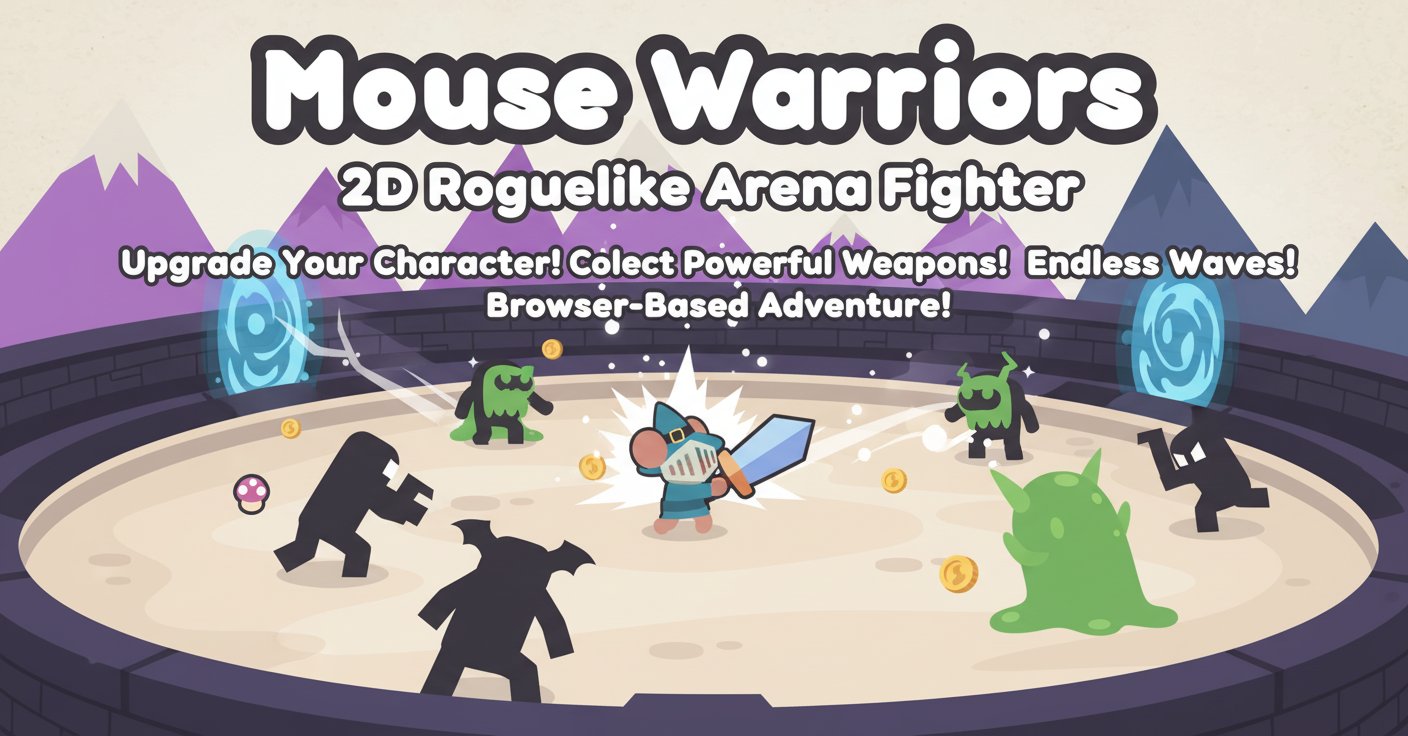
Mouse Warriors is an exciting 2D roguelike arena fighter where you battle endless waves of monsters. Upgrade your character, collect powerful weapons, and conquer challenging levels in this addictive browser-based adventure.

Prompt

MODEL: Seele01-Flash
Please use Three.js to generate a **mobile-first game** with the theme "Mouse Warriors". Please read the following detailed game design requirements first, and then generate the code accordingly: ### 1. Assets & Environment * **Visual Style**: "2.5D Paper Cutout" aesthetic to match the reference image. Use a Top-Down **Orthographic Camera** to simulate a flat 2D look while utilizing 3D physics. * **Character & Enemies**: * Represent the Player and Enemies (Mushrooms) as flat `THREE.PlaneGeometry` with textures facing the camera, or simple extruded shapes. * **Art Style**: Kawaii/Cute vector art style with **thick dark outlines** and pastel colors (Purple, Yellow, Red for enemies; Blue/Grey for equipment). * **The Player**: A circular base character that can wear cosmetic "hats" (Wizard Hat, Knight Helmet) which act as visual indicators of upgrades. * **The Weapon**: A chunky sword/weapon distinct from the player body, anchored to the player's center but offset by a radius. * **Environment**: * A simple, light cream/off-white background resembling textured paper. * The "Arena" is a bounded rectangular area. * **Mobile Optimization**: Use `InstancedMesh` for rendering waves of enemies (mushrooms) to maintain high FPS on mobile browsers. Limit dynamic lights; use baked ambient lighting or basic directional light. ### 2. Audio Requirements * **BGM**: Upbeat, heroic **8-bit / Chiptune** track that loops. It should feel adventurous but "cute." * **Sound Effects (SFX)**: * **Swing**: A comical "Whoosh" or air-cutting sound when the weapon moves rapidly. * **Hit/Damage**: A "Bonk" or squishy sound when hitting the mushroom enemies. * **Coin Collect**: A high-pitched, satisfying "Ding" or retro arcade coin sound. * **Upgrade**: A magical ascending arpeggio when purchasing items in the shop. ### 3. Gameplay Loop * **Core Mechanics**: * The player spawns in the center of the arena. * **Wave System**: Enemies spawn at the edges of the screen and move towards the player. * **Combat**: The weapon rotates around the player. Physical collision between the *Weapon* and *Enemy* deals damage/knockback. Collision between *Enemy* and *Player Body* damages the player. * **Progression**: * Enemies drop "Coins" upon death. * **Shop Phase**: Between waves (or via a pause menu), the player can spend coins. * **Upgrades**: Increase Movement Speed, Weapon Size (scale), Swing Damage, or unlock new "Hats" (Classes). * **Win/Loss**: * **Loss**: Player HP reaches 0. Show "Game Over" with a restart button. * **Win**: Survive X number of waves or defeat a final giant "Boss Mushroom." ### 4. Mobile Controls & Interaction * **Control Scheme (Twin-Stick Adaptation)**: * Since the original uses "Mouse Move" to swing, translate this to a **Right Virtual Joystick**. * **Left Virtual Joystick**: Controls Player Movement (WASD equivalent). * **Right Virtual Joystick**: Controls the **Weapon's Angle** relative to the player. Dragging the stick rotates the weapon around the player body 360 degrees. * *Note*: If the player spins the stick quickly, the weapon swings physics-based damage. * **UI Layout**: * Joystick placement: Bottom-Left and Bottom-Right corners (fixed or floating based on touch start). * HP Bar: Floating above the player character. * Coin Counter: Top-Right corner. * Upgrade Buttons: Large, thumb-friendly buttons (min 44px height) that appear in a modal overlay when the game is paused or between waves. * **Feedback**: * **Haptic Feedback**: Trigger `navigator.vibrate(10)` when the weapon hits an enemy or the player takes damage. * **Visual Feedback**: floating damage numbers (popups) and a white flash material on enemies when hit. Do not ask for clarification. Do not request confirmation. Directly execute the generation task based on the given instructions.

Game Introduction

About the Game

Mouse Warriors is a thrilling 2D roguelike arena fighter that combines fast-paced action with strategic character progression. In this top-down adventure, you'll face waves of challenging monsters while continuously upgrading your warrior to become an unstoppable force. The game features a charming pixel art style with colorful characters and weapons that create an engaging visual experience.

The core gameplay revolves around surviving increasingly difficult monster waves while collecting coins and resources to enhance your combat abilities. Each playthrough offers a unique experience thanks to the roguelike mechanics, ensuring high replayability and constant challenges.

Core Features

Dynamic Arena Combat

Engage in intense top-down battles where positioning and timing are crucial. The arena-based combat system keeps you constantly moving as you face different monster types with varying attack patterns and abilities.

Comprehensive Upgrade System

Collect coins from defeated enemies to purchase powerful upgrades that transform your combat effectiveness: - Character Upgrades : Enhance health, speed, and damage output - Weapon Arsenal : Unlock diverse weapons with unique attack styles - Multiple Characters : Choose from different warrior types, each with distinct abilities - Progressive Power : Build your strength incrementally to tackle tougher challenges

Roguelike Progression

Experience the excitement of roguelike mechanics where each run presents new opportunities and challenges. The randomized elements ensure that no two gameplay sessions are identical, keeping the experience fresh and engaging.

Boss Battles

Test your skills against formidable boss enemies that require strategy and upgraded equipment to defeat. These epic encounters provide significant rewards and mark major progression milestones.

Gameplay Mechanics

Mouse Warriors features an intuitive control scheme that's easy to learn but offers depth for skilled players. The unique mouse-based weapon swinging system creates fluid combat that feels responsive and satisfying.

Wave-Based Survival

Survive increasingly challenging waves of monsters, each bringing new enemy types and attack patterns. The difficulty scales progressively, ensuring constant challenge without overwhelming new players.

Resource Management

Strategically manage your collected coins to make optimal upgrade choices. Deciding between immediate power boosts and long-term character development adds strategic depth to the experience.

Operation Guide

Getting started in Mouse Warriors is straightforward:

  • WASD or Arrow Keys : Move your character around the arena
  • Mouse Movement : Swing your weapon - the direction and speed of mouse movement controls your attacks
  • Collect Coins : Walk over coins dropped by defeated enemies
  • Shop Access : Use collected coins to purchase upgrades between waves
  • Character Selection : Choose different warriors with unique stats and abilities

Combat Tips

  • Keep moving to avoid enemy attacks
  • Use mouse gestures to control weapon swing direction
  • Collect coins quickly before they disappear
  • Prioritize upgrades based on your playstyle
  • Learn enemy attack patterns for better survival

Why Play Mouse Warriors

Mouse Warriors offers an perfect blend of accessibility and depth that appeals to both casual gamers and roguelike enthusiasts. The game's completely free nature means you can jump in immediately without any financial commitment.

The browser-based platform ensures you can play anywhere with an internet connection - no downloads, installations, or storage space required. Whether you have five minutes or several hours, Mouse Warriors adapts to your schedule with quick sessions that feel rewarding.

The combination of cute pixel art aesthetics with challenging gameplay creates a unique experience that's both visually appealing and mechanically satisfying. The progression system provides constant goals and rewards, making each victory feel earned and meaningful.

Frequently Asked Questions (FAQ)