
Tap 3D Wood Block Away - Puzzle Game
 Adventure
Character Adventure Sim
Build a 3D character explorer with traversal and interactive zones.
 Unity
UnityCastle Devour Quest
Build a Unity castle quest with risky rooms and a win goal.
 Survival
Survival Sandbox Arena
Build a survival arena with enemy waves and turret defense.
 Subscriber only
Unreal Mountain Tour
Tour a third-person Unreal world of mountains and water.
 Unity
UnityDesert Quickshot
Build a Unity quickdraw duel with streaks and rising heat.
 Unity
UnityEndless Runner
Build a polished Unity endless runner with lanes and pickups.
 Unity
UnityCupid's Arrow
Build a Unity archery game of timing and matchmaking.
 3D
3DThird Person Explorer
Build a third-person explorer with swappable scenes and a live minimap.
 Subscriber only
Unreal Top-Down Roguelite
Create a complete UE 5.5 top-down arena roguelite with upgrades and a boss finale.
 Unity
UnityStrawberry Grove Adventure
Build a cozy Unity pixel grove of exploration and collectibles.
AdventureCharacter Adventure Sim
Build a 3D character explorer with traversal and interactive zones.
UnityCastle Devour Quest
Build a Unity castle quest with risky rooms and a win goal.
SurvivalSurvival Sandbox Arena
Build a survival arena with enemy waves and turret defense.
Subscriber onlyUnreal Mountain Tour
Tour a third-person Unreal world of mountains and water.
UnityDesert Quickshot
Build a Unity quickdraw duel with streaks and rising heat.
UnityEndless Runner
Build a polished Unity endless runner with lanes and pickups.
UnityCupid's Arrow
Build a Unity archery game of timing and matchmaking.
3DThird Person Explorer
Build a third-person explorer with swappable scenes and a live minimap.
Subscriber onlyUnreal Top-Down Roguelite
Create a complete UE 5.5 top-down arena roguelite with upgrades and a boss finale.
UnityStrawberry Grove Adventure
Build a cozy Unity pixel grove of exploration and collectibles.
Prompt

Games are fun. Creating them is even better.
Game Introduction
About the Game
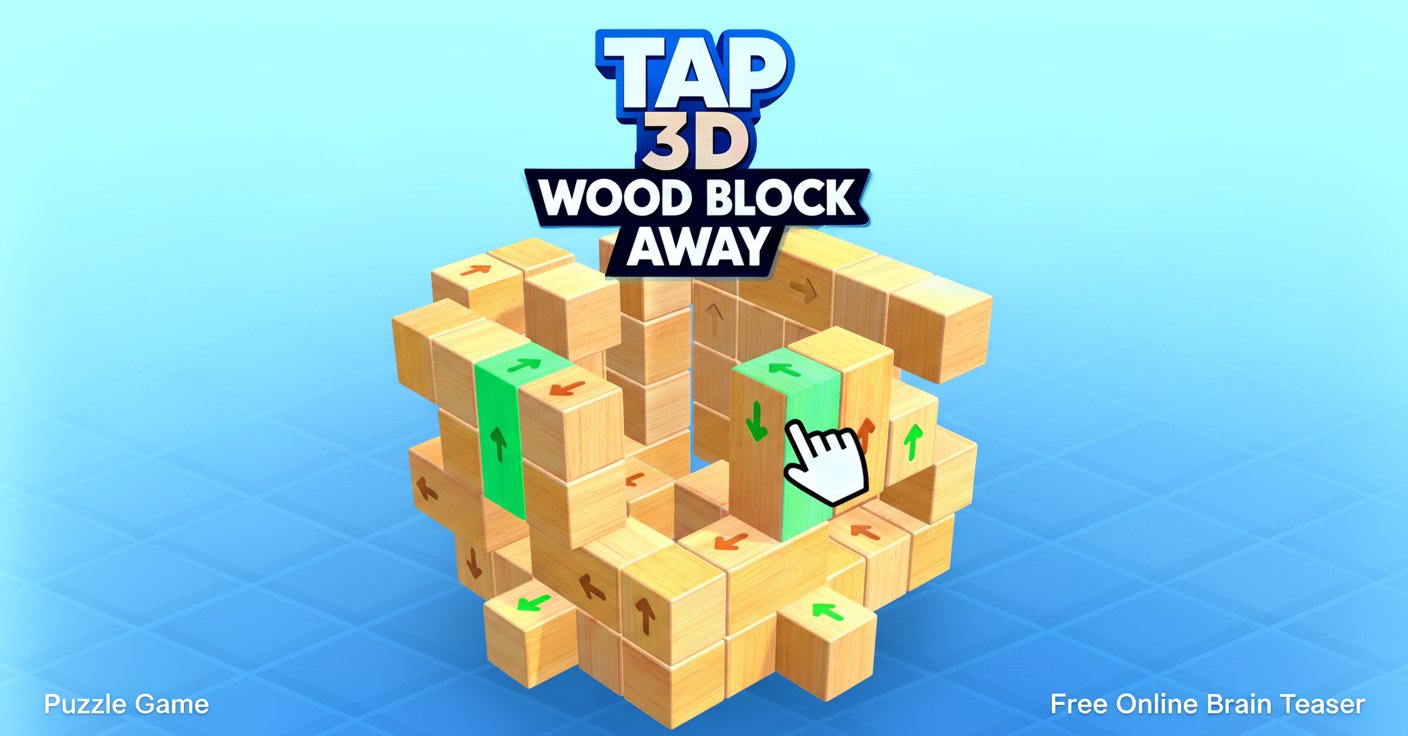
Tap 3D Wood Block Away is an innovative 3D puzzle game that combines strategic thinking with spatial reasoning challenges. This engaging brain teaser puts you in control of dismantling complex wooden block structures, where every move requires careful planning and foresight. The game features progressively challenging levels that will test your problem-solving abilities while providing hours of satisfying puzzle gameplay.
Unlike traditional block games, Tap 3D Wood Block Away presents a unique twist on the classic concept. Each level features intricately designed wooden structures where blocks are interlocked in complex patterns. Your mission is to strategically remove these blocks one by one until the entire structure is cleared.
Core Features
Strategic 3D Puzzle Mechanics
The game's core appeal lies in its sophisticated puzzle mechanics. Every wooden block has directional arrows indicating where it can slide or move. However, blocks can only be moved if their path is clear - if there's another block blocking the way, you'll need to find an alternative route or clear the obstruction first.
Progressive Difficulty System
As you advance through levels, the wooden structures become increasingly complex. What starts as simple arrangements evolve into intricate 3D puzzles that require multiple steps to solve. Each level introduces new challenges while building upon previously learned strategies.
Immersive 3D Environment
The game features high-quality 3D graphics that allow you to rotate and examine structures from multiple angles. You can zoom in and out to get a better view of the puzzle, helping you identify which blocks are free to move and which ones are strategically positioned to block others.
Score Multiplier System
Between levels, players can boost their scores by timing their taps perfectly on moving arrows. Successfully hitting these targets can double, triple, or even quadruple your points, adding an extra layer of skill-based gameplay.
Gameplay
Understanding Block Mechanics
Each wooden block in the structure serves a specific purpose in the puzzle. Some blocks act as key supports, while others are strategically placed to prevent easy removal of surrounding pieces. Understanding these relationships is crucial to developing effective strategies.
Strategic Planning
Success in Tap 3D Wood Block Away requires thinking several moves ahead. Before making any move, examine the entire structure to identify which blocks are currently moveable and which ones will become accessible after certain pieces are removed.
Visual Problem Solving
The 3D nature of the game means that blocks can be hidden behind others, creating visual puzzles within the mechanical ones. Use the camera controls to explore different angles and discover blocks that might not be immediately visible.
How to Play
Basic Controls
The game uses simple mouse controls for an intuitive experience: - Left Mouse Button : Tap to remove available blocks - Mouse Drag : Rotate the 3D view to examine the structure - Mouse Wheel : Zoom in and out for better visibility
Gameplay Strategy
Start each level by rotating the structure to get a complete understanding of the block arrangement. Look for blocks with clear directional paths and no obstructions. Often, the key to solving complex puzzles is finding the right sequence of moves rather than rushing to remove obvious pieces.
Level Progression
Each successfully completed level unlocks the next challenge. The game tracks your progress and best scores, encouraging players to revisit previous levels to improve their performance and discover more efficient solutions.
Why Play This Game
Tap 3D Wood Block Away offers a perfect blend of relaxation and mental stimulation. It's an ideal choice for players who enjoy:
- Brain Training : Regular play helps improve spatial reasoning and strategic thinking skills
- Stress Relief : The methodical nature of block removal provides a meditative gaming experience
- Progressive Challenge : Each level builds upon previous skills while introducing new concepts
- Accessibility : Simple controls make it easy for players of all ages to enjoy
- No Time Pressure : Play at your own pace without rushing
The game runs directly in your web browser, requires no downloads, and is completely free to play. Whether you're looking for a quick mental break or an extended puzzle session, Tap 3D Wood Block Away adapts to your schedule and skill level.