
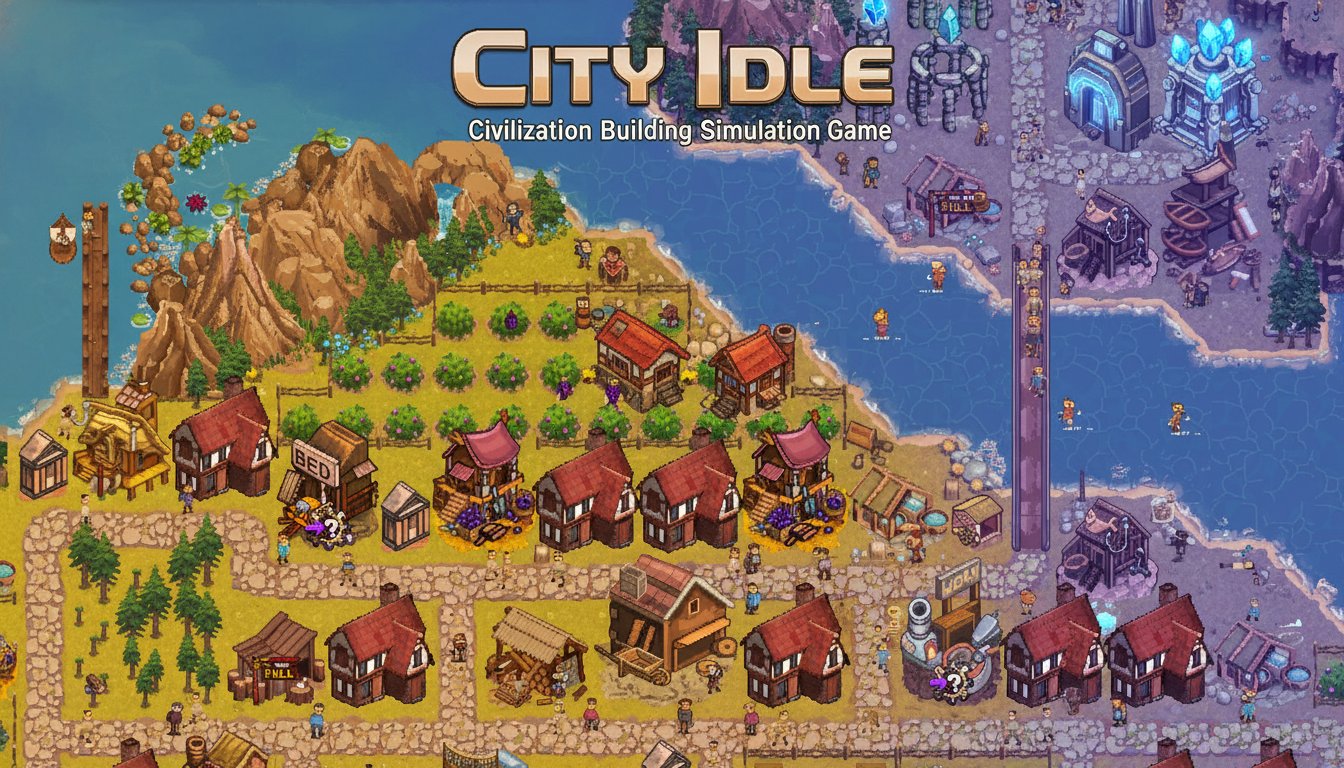
City Idle - Civilization Building Simulation Game - Simulation Game
 SEELE02 CORE
Game Generator
Turn a one-line idea into a playable game demo.
 Subscriber only
Unreal Top-Down Roguelite
Create a complete UE 5.5 top-down arena roguelite with upgrades and a boss finale.
 Unity
UnityFarmstead Shop
Build a Unity farm-shop sim: grow, stock, serve, upgrade.
 Subscriber only
Unreal City Tour
Explore a photoreal Unreal city with terrain and live weather.
 Action
Open World City Action
Build an open-world city romp with driving and police chases.
 Subscriber only
Unreal Landscape Tour
Tour photoreal Unreal landscapes with cinematic camera work.
 New
NewRiver Raid Survival
Build a River Raid-style flight survival run with fuel pressure.
 Racing
Track Racing Challenge
Build a closed-circuit racer built around drift corners.
 Arcade
Pumpkin Night Adventure
Build a Halloween grid-arena survival romp.
 Adventure
Character Adventure Sim
Build a 3D character explorer with traversal and interactive zones.
SEELE02 COREGame Generator
Turn a one-line idea into a playable game demo.
Subscriber onlyUnreal Top-Down Roguelite
Create a complete UE 5.5 top-down arena roguelite with upgrades and a boss finale.
UnityFarmstead Shop
Build a Unity farm-shop sim: grow, stock, serve, upgrade.
Subscriber onlyUnreal City Tour
Explore a photoreal Unreal city with terrain and live weather.
ActionOpen World City Action
Build an open-world city romp with driving and police chases.
Subscriber onlyUnreal Landscape Tour
Tour photoreal Unreal landscapes with cinematic camera work.
NewRiver Raid Survival
Build a River Raid-style flight survival run with fuel pressure.
RacingTrack Racing Challenge
Build a closed-circuit racer built around drift corners.
ArcadePumpkin Night Adventure
Build a Halloween grid-arena survival romp.
AdventureCharacter Adventure Sim
Build a 3D character explorer with traversal and interactive zones.
Prompt

Games are fun. Creating them is even better.
Game Introduction
About City Idle
City Idle is an engaging top-down city building and civilization simulation game that challenges players to create a thriving society from nothing. This free browser-based game combines strategic planning, resource management, and technological advancement to deliver a thought-provoking city building experience.
The game features fully simulated citizens with individual needs and behaviors, making every decision meaningful as you guide your civilization's growth from primitive beginnings to an advanced society.
Core Features
Comprehensive Civilization Building
- Start from scratch : Begin with just empty land and build your first firepit to attract citizens
- Progressive development : Advance from basic huts to complex buildings and infrastructure
- Technology research : Unlock new buildings, improvements, and capabilities through strategic research
- Citizen simulation : Each citizen has individual needs, behaviors, and contributions to your city
Strategic City Management
- Layout optimization : Design efficient city layouts to maximize productivity and citizen happiness
- Resource management : Balance food production, housing, and various city services
- Challenging gameplay : Experience meaningful decision-making with real consequences for poor planning
- Long-term progression : Develop your civilization through multiple technological eras
Accessible Gaming Experience
- Free to play : Complete game experience available at no cost
- Browser-based : No downloads required - play instantly in your web browser
- Cross-platform : Available on both web browsers and Steam
- Intuitive controls : Simple mouse-based interface suitable for all skill levels
Gameplay Mechanics
Building Your Civilization
Start your journey by constructing a firepit, which serves as the foundation for attracting your first citizens. As more people join your settlement, you'll need to build huts for shelter and gradually expand your infrastructure.
The game emphasizes realistic city planning - you must consider citizen needs, resource availability, and efficient layouts to create a successful civilization.
Technology and Research
Progress through different technological ages by investing in research. New technologies unlock advanced buildings, improved efficiency, and expanded capabilities for your growing city.
Citizen Management
Unlike simple city builders, City Idle features fully simulated citizens who have individual behaviors and needs. Monitor their happiness, productivity, and living conditions to maintain a stable and growing population.
Operation Guide
Basic Controls
- Left mouse button : Select and place buildings, interact with game elements
- Right mouse drag or WASD : Move the camera to explore different areas of your city
- Mouse wheel : Zoom in and out to get different perspectives of your civilization
Getting Started
- Build your first firepit to establish the foundation of your settlement
- Construct basic huts to house your initial citizens
- Plan your layout efficiently to accommodate future expansion
- Research technologies to unlock new building types and improvements
- Monitor citizen needs and adjust your city accordingly
- Expand strategically as your population and resources grow
Why Play City Idle
City Idle offers a perfect blend of relaxing city building and strategic challenge. The game's emphasis on realistic citizen simulation and meaningful decision-making sets it apart from typical idle games. Whether you enjoy planning efficient layouts, managing complex systems, or watching your civilization grow over time, City Idle provides a rewarding and engaging experience.
The free-to-play model means you can dive into this comprehensive city building experience without any financial commitment, while the browser-based platform ensures you can play anywhere, anytime.