
Shop Cashier Simulator 3D - Simulation Game
 Arcade
Pumpkin Night Adventure
Build a Halloween grid-arena survival romp.
 Adventure
Character Adventure Sim
Build a 3D character explorer with traversal and interactive zones.
 FPS
FPS3D FPS Game
Build a desert FPS with weapon switching and a retro HUD.
 Unity
UnityCupid's Arrow
Build a Unity archery game of timing and matchmaking.
 FPS
FPSNight Mission Survival
Build a first-person night survival with flashlight combat.
 New
NewFirst-Person Horror Survival
Build a first-person horror survival with exploration and enemies.
 Subscriber only
Unreal City Tour
Explore a photoreal Unreal city with terrain and live weather.
 Sports
Basketball Duel
Build a one-on-one basketball game with physics shooting.
 SEELE02 CORE
Game Generator
Turn a one-line idea into a playable game demo.
 New
NewUnderwater Puzzle
Build an underwater puzzle: restore coral, dodge crabs.
ArcadePumpkin Night Adventure
Build a Halloween grid-arena survival romp.
AdventureCharacter Adventure Sim
Build a 3D character explorer with traversal and interactive zones.
FPS3D FPS Game
Build a desert FPS with weapon switching and a retro HUD.
UnityCupid's Arrow
Build a Unity archery game of timing and matchmaking.
FPSNight Mission Survival
Build a first-person night survival with flashlight combat.
NewFirst-Person Horror Survival
Build a first-person horror survival with exploration and enemies.
Subscriber onlyUnreal City Tour
Explore a photoreal Unreal city with terrain and live weather.
SportsBasketball Duel
Build a one-on-one basketball game with physics shooting.
SEELE02 COREGame Generator
Turn a one-line idea into a playable game demo.
NewUnderwater Puzzle
Build an underwater puzzle: restore coral, dodge crabs.
Prompt

Games are fun. Creating them is even better.
Game Introduction
About the Game
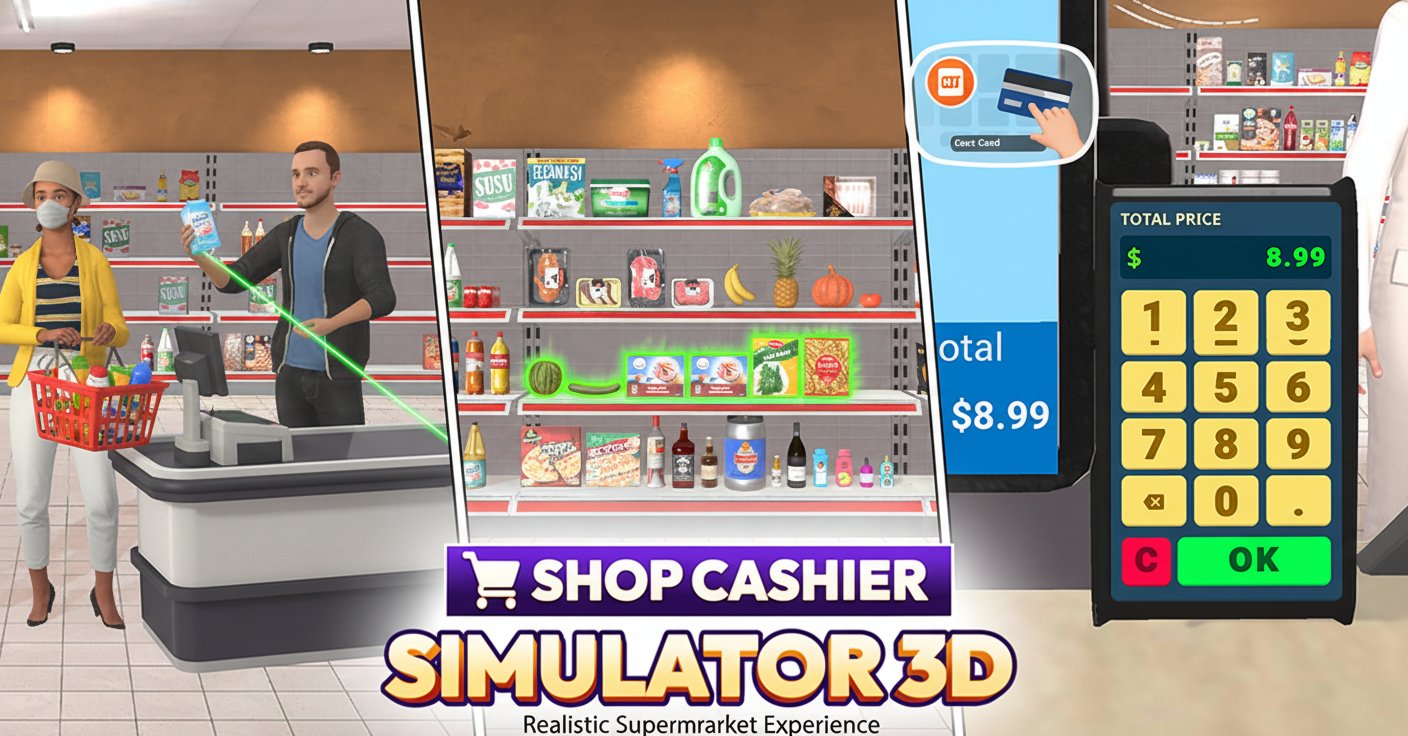
Shop Cashier Simulator 3D is an immersive retail simulation that puts you behind the checkout counter of a bustling supermarket. This realistic 3D game challenges you to master the art of cashier work, from scanning barcodes to processing various payment methods. Experience the fast-paced world of retail while developing your multitasking skills and customer service abilities.
The game features detailed 3D graphics that bring the supermarket environment to life, complete with realistic product shelves, shopping carts, and diverse customers. Each shift presents new challenges as you work to maintain efficiency while ensuring customer satisfaction.
Core Features
Realistic Cashier Experience
The game provides an authentic simulation of working as a supermarket cashier. You'll handle real-world scenarios including scanning items, calculating totals, processing different payment methods, and giving correct change. The attention to detail makes every transaction feel genuine.
Dynamic Customer Interactions
Every customer brings unique challenges to your checkout line. Some pay with cash requiring exact change calculations, while others use credit cards that need careful processing. Managing different customer types and their specific needs adds depth to the gameplay experience.
Skill Development System
As you progress, you'll naturally improve your scanning speed, accuracy, and customer service skills. The game rewards efficient work and penalizes mistakes, encouraging players to develop real cashier competencies that mirror actual retail work.
Comprehensive Transaction Management
Handle various aspects of retail transactions including: - Accurate item scanning and pricing - Multiple payment method processing - Change calculation and distribution - Receipt generation and customer service - Error correction and problem-solving
Gameplay Mechanics
Essential Cashier Duties
Your primary responsibilities include scanning customer items using the barcode scanner, ensuring all products are properly recorded, and calculating accurate totals. Pay careful attention to each item to avoid costly mistakes that could upset customers or affect your performance rating.
Payment Processing
The game features realistic payment systems supporting both cash and credit transactions. For cash payments, you'll need to calculate correct change, while credit card transactions require careful input using the card reader interface. Each payment method presents its own set of challenges and learning opportunities.
Customer Satisfaction Management
Maintaining happy customers is crucial for success. Quick, accurate service leads to satisfied customers and better earnings, while mistakes and delays can result in complaints and reduced income. The game teaches the importance of balancing speed with precision.
Operation Guide
Basic Controls
- Left Mouse Button : Primary interaction tool for all in-game elements
- Number Keys (1-9, 0) : Input amounts on the card reader for credit transactions
- Point and Click : Navigate menus and interact with checkout equipment
Transaction Workflow
- Greet incoming customers and begin scanning their items
- Carefully scan each product's barcode to ensure accurate pricing
- Calculate the total amount and communicate it to the customer
- Process payment using the appropriate method (cash or card)
- Provide correct change for cash transactions or process card payments
- Complete the transaction and thank the customer
Why Play This Game
Shop Cashier Simulator 3D offers a unique combination of entertainment and practical skill development. It's perfect for:
- Career Preparation : Gain insights into retail work and customer service
- Skill Building : Improve math skills, attention to detail, and multitasking abilities
- Stress-Free Practice : Learn cashier skills without real-world pressure
- Entertainment Value : Enjoy engaging gameplay with realistic challenges
- Accessibility : Play instantly in your browser with no downloads required
The game appeals to simulation game enthusiasts, students interested in retail careers, and anyone who enjoys realistic work-based gaming experiences. Its educational value combined with entertaining gameplay makes it suitable for both learning and leisure.