
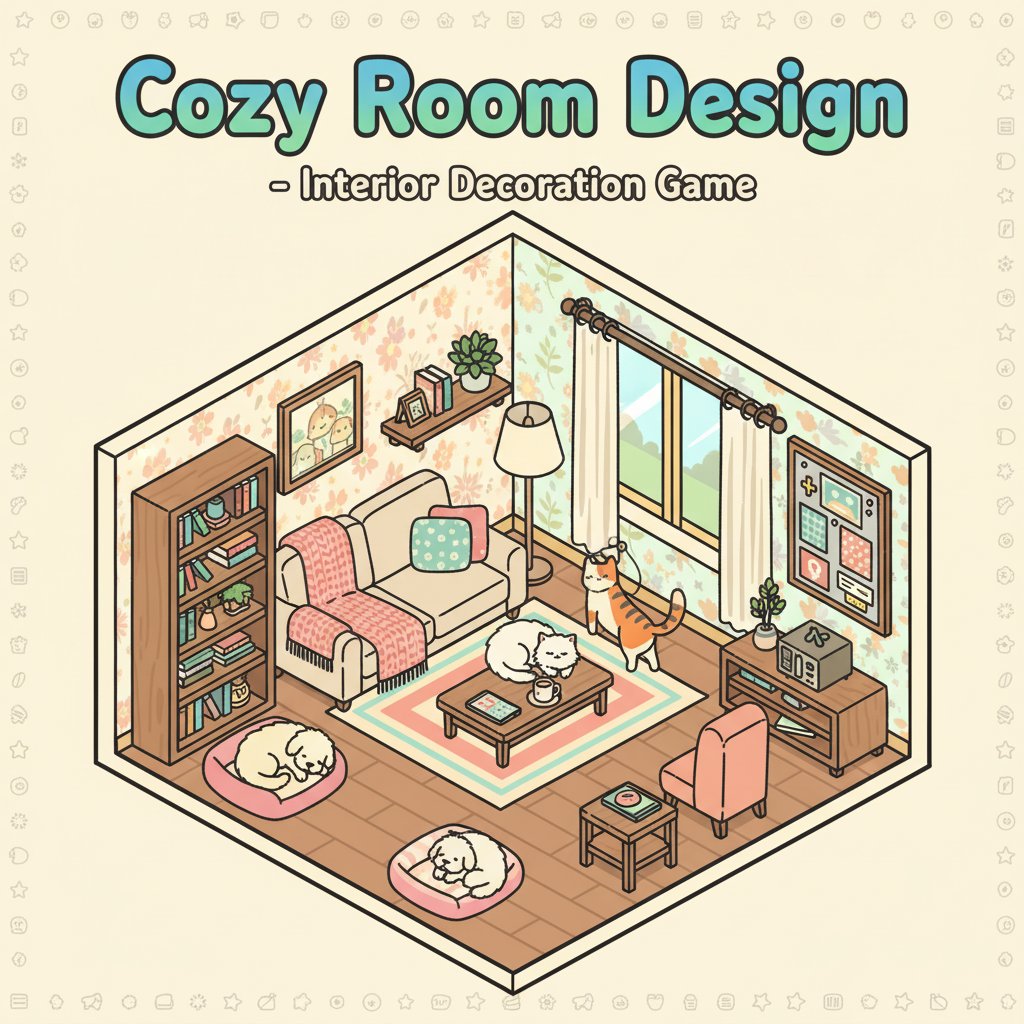
Cozy Room Design - Interior Decoration Game - Simulation Game
 Sports
Basketball Duel
Build a one-on-one basketball game with physics shooting.
 Unity
UnityFarmstead Shop
Build a Unity farm-shop sim: grow, stock, serve, upgrade.
 Subscriber only
Unreal City Tour
Explore a photoreal Unreal city with terrain and live weather.
 New
NewHook a Fish Arcade
Build a fishing arcade where catches buy you more time.
 Subscriber only
Unreal Dungeon Crawler
Build a playable Unreal dungeon crawler, combat-ready.
 FPS
FPSZombie Horror Survival
Build a tense zombie horror survival with map progression.
 Subscriber only
Unreal FPS/TPS Shooter
Create a complete UE 5.5 FPS or TPS shooter with combat, UI, and replay.
 New
NewRiver Raid Survival
Build a River Raid-style flight survival run with fuel pressure.
 New
NewArcade Crossing Game
Build a lane-dodging arcade game with traffic and pickups.
 Subscriber only
Unreal Top-Down Roguelite
Create a complete UE 5.5 top-down arena roguelite with upgrades and a boss finale.
SportsBasketball Duel
Build a one-on-one basketball game with physics shooting.
UnityFarmstead Shop
Build a Unity farm-shop sim: grow, stock, serve, upgrade.
Subscriber onlyUnreal City Tour
Explore a photoreal Unreal city with terrain and live weather.
NewHook a Fish Arcade
Build a fishing arcade where catches buy you more time.
Subscriber onlyUnreal Dungeon Crawler
Build a playable Unreal dungeon crawler, combat-ready.
FPSZombie Horror Survival
Build a tense zombie horror survival with map progression.
Subscriber onlyUnreal FPS/TPS Shooter
Create a complete UE 5.5 FPS or TPS shooter with combat, UI, and replay.
NewRiver Raid Survival
Build a River Raid-style flight survival run with fuel pressure.
NewArcade Crossing Game
Build a lane-dodging arcade game with traffic and pickups.
Subscriber onlyUnreal Top-Down Roguelite
Create a complete UE 5.5 top-down arena roguelite with upgrades and a boss finale.
Prompt

Games are fun. Creating them is even better.
Game Introduction
About the Game
Cozy Room Design is a delightful 3D decoration game that puts your interior design skills to the test. This engaging simulation game offers complete creative freedom to design and decorate your ideal living space. Whether you're passionate about interior design or simply enjoy creative games, this cozy room decorator provides endless hours of relaxing gameplay.
The game features an intuitive drag-and-drop interface that makes room design accessible to players of all ages. With its charming 3D graphics and extensive customization options, you can create everything from minimalist modern spaces to cozy traditional rooms filled with personality.
Core Features
Complete Design Freedom
Unlike restrictive decoration games, Cozy Room Design gives you total control over your space. Choose from a wide variety of furniture pieces, from comfortable sofas and stylish tables to functional storage solutions. Every item can be positioned exactly where you want it, rotated to the perfect angle, and customized to match your vision.
Extensive Customization Options
The game offers comprehensive decoration tools: - Furniture Selection : Beds, desks, chairs, storage units, and more - Wall Treatments : Multiple wallpaper patterns and color schemes - Flooring Options : Various carpet styles and floor materials - Window Designs : Different window types and treatments - Color Palette : Extensive color options for every element
Adorable Pet System
What makes this room designer truly special is the ability to add cute cats and dogs to your space. These virtual pets can be placed anywhere - on beds, desks, floors, or hidden in cozy corners. They bring life and warmth to your designed rooms, making them feel like real homes rather than empty spaces.
Easy-to-Use 3D Interface
The game's 3D perspective allows you to see your room from multiple angles, ensuring your design looks perfect from every viewpoint. The isometric view provides a clear overview of your space while maintaining the charm of detailed 3D graphics.
Game Mechanics
Drag and Drop Simplicity
The core gameplay revolves around an intuitive drag-and-drop system. Simply click on furniture or decoration items and drag them to your desired location. This user-friendly approach makes the game accessible to players who might be intimidated by complex design software.
Rotation and Positioning
Every item in your room can be rotated using the dedicated rotation button. This feature ensures that furniture fits perfectly in corners, against walls, or in the center of your room. The precise positioning system allows for pixel-perfect placement.
Color Customization
Most items in the game can be recolored to match your design vision. Whether you prefer bright, cheerful colors or muted, sophisticated tones, the extensive color palette ensures you can create the exact atmosphere you want.
Operation Guide
Basic Controls
- Click/Tap : Select furniture and decoration items
- Drag : Move items to desired locations
- Rotate Button : Adjust item orientation
- Delete Button : Remove unwanted items
- Save Button : Preserve your design
Design Process
- Plan Your Space : Consider the room layout and functionality
- Choose a Color Scheme : Select coordinating colors for walls and furniture
- Place Major Furniture : Start with beds, sofas, and large pieces
- Add Details : Include smaller decorative items and accessories
- Position Pets : Place cute cats and dogs throughout the room
- Fine-tune : Rotate and adjust items for perfect positioning
- Save Your Creation : Use the save function to preserve your design
Why Play This Game
Stress-Free Creativity
Cozy Room Design offers a relaxing gaming experience without time pressure or competitive elements. It's perfect for unwinding after a long day while exercising your creative muscles.
Accessibility for All Ages
The game's simple controls and intuitive interface make it suitable for players of all ages and skill levels. Children can enjoy the colorful graphics and pet features, while adults can appreciate the sophisticated design options.
Endless Replayability
With numerous furniture options, color combinations, and layout possibilities, no two rooms need to look the same. The game encourages experimentation and multiple design iterations.
Perfect for Mobile and Desktop
The game is optimized for both mobile devices and desktop computers, allowing you to design rooms wherever you are. The touch-friendly interface works seamlessly on tablets and smartphones.
Social Sharing
Once you've created your perfect room, you can save and share your designs with friends and family. This feature adds a social element to the creative process and allows for inspiration sharing.