
Traffic Control 2 - Simulation Game
 Unity
UnityCupid's Arrow
Build a Unity archery game of timing and matchmaking.
 New
NewSolo Racing Game
Build a browser racer with tracks, timing, and a minimap.
 Puzzle
Magic Cube Puzzle
Build an interactive Rubik's Cube with scramble and reset.
 Unity
UnityEgg on the Car Roof
Build a Unity challenge: keep a fragile egg on a moving roof.
 Roguelike
Dungeon Survivors
Build a Vampire-Survivors-style dungeon arena with hero picks.
 FPS
FPS3D FPS Game
Build a desert FPS with weapon switching and a retro HUD.
 New
New3D Block Puzzle
Build a 3D falling-block puzzle with rotations and row clears.
 FPS
FPSNight Mission Survival
Build a first-person night survival with flashlight combat.
 Subscriber only
Unreal City Tour
Explore a photoreal Unreal city with terrain and live weather.
 New
NewUnderwater Puzzle
Build an underwater puzzle: restore coral, dodge crabs.
UnityCupid's Arrow
Build a Unity archery game of timing and matchmaking.
NewSolo Racing Game
Build a browser racer with tracks, timing, and a minimap.
PuzzleMagic Cube Puzzle
Build an interactive Rubik's Cube with scramble and reset.
UnityEgg on the Car Roof
Build a Unity challenge: keep a fragile egg on a moving roof.
RoguelikeDungeon Survivors
Build a Vampire-Survivors-style dungeon arena with hero picks.
FPS3D FPS Game
Build a desert FPS with weapon switching and a retro HUD.
New3D Block Puzzle
Build a 3D falling-block puzzle with rotations and row clears.
FPSNight Mission Survival
Build a first-person night survival with flashlight combat.
Subscriber onlyUnreal City Tour
Explore a photoreal Unreal city with terrain and live weather.
NewUnderwater Puzzle
Build an underwater puzzle: restore coral, dodge crabs.
Prompt
Games are fun. Creating them is even better.
Game Introduction
About the Game
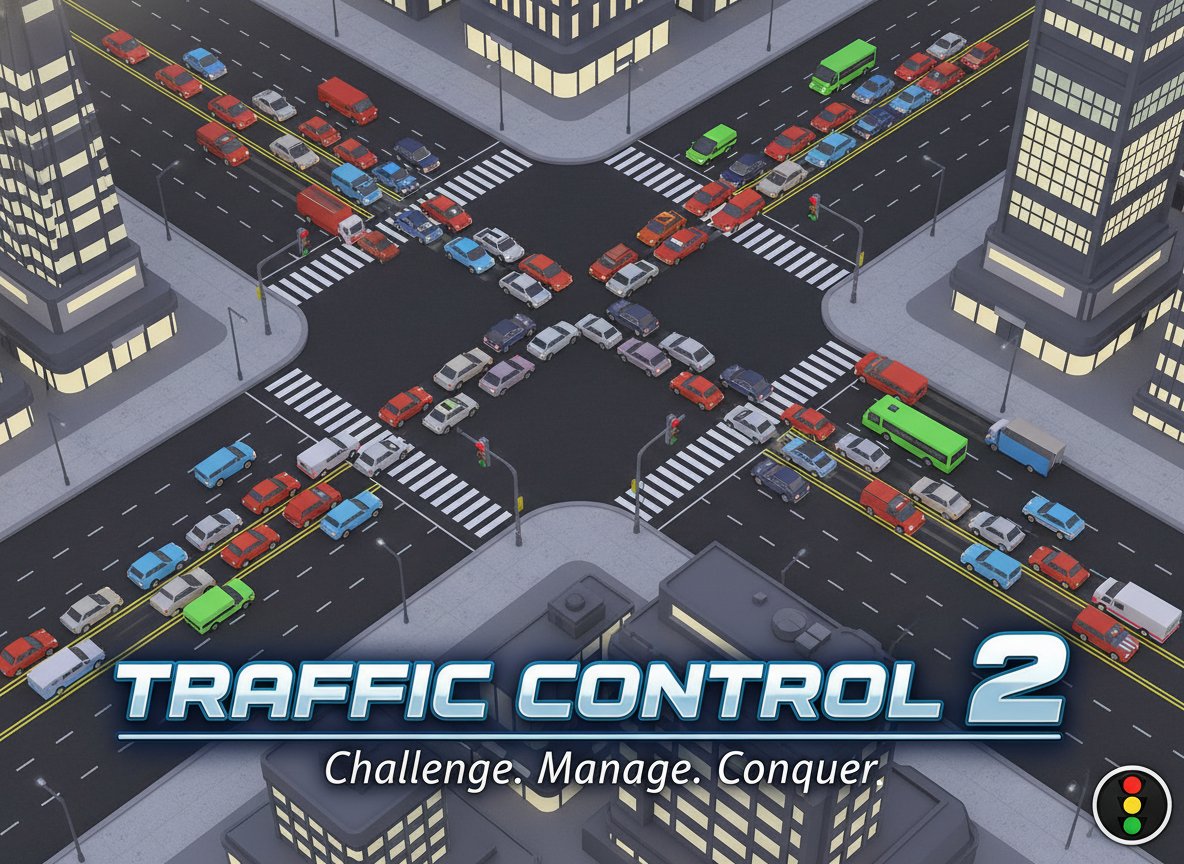
Traffic Control 2 is an engaging traffic management simulation that puts you in charge of a busy city's traffic flow. With a solid rating of 3.2/5, this challenging game tests your strategic thinking and quick decision-making skills as you control traffic lights at various intersections throughout the city.
The game's deceptively simple concept - controlling stoplights - becomes increasingly complex as traffic volume grows. Your mission is to ensure smooth traffic flow while preventing costly traffic jams that could bring the entire system to a halt.
Core Features
Strategic Traffic Management
Take control of multiple intersections simultaneously, making split-second decisions about when to change traffic lights. Each decision impacts the entire traffic network, requiring you to think several moves ahead.
Progressive Difficulty System
Start with manageable traffic flow and watch as the challenge intensifies. As your score increases, more vehicles enter the city, creating increasingly complex traffic patterns that demand expert management skills.
Real-Time Scoring System
Earn points for every vehicle that successfully crosses the city. The scoring system encourages efficient traffic flow while rewarding players who can handle high-volume traffic without creating bottlenecks.
Intuitive Click Controls
Simple yet precise controls allow you to focus on strategy rather than complex mechanics. Click on intersections to change traffic lights instantly, giving you direct control over traffic flow.
Challenging Puzzle Elements
What appears straightforward quickly becomes a complex puzzle requiring careful planning and timing. Balance competing traffic flows while preventing the dreaded gridlock that ends your game.
Gameplay Mechanics
The game operates on a simple but effective principle: maintain traffic flow to maximize your score. Each car that successfully passes through the city adds one point to your total. However, as your score climbs, the challenge escalates with increased traffic volume.
Traffic lights respond instantly to your clicks, but timing is everything. Change lights too early and you'll stop flowing traffic unnecessarily. Wait too long and you risk creating backups that can spiral into game-ending jams.
Operation Guide
Basic Controls
- Mouse Click : Click on any intersection to toggle the traffic light
- Traffic Light States : Red stops traffic, green allows movement
- Intersection Management : Monitor multiple junctions simultaneously
- Visual Feedback : Watch traffic patterns to identify potential problem areas
Winning Strategies
- Observe Traffic Patterns : Study how vehicles move through your city before making changes
- Plan Ahead : Consider how current light changes will affect future traffic flow
- Prevent Bottlenecks : Identify intersections that tend to create backups and manage them proactively
- Balance Flow : Ensure no single direction dominates traffic light timing
- Stay Alert : As traffic increases, be ready to make rapid adjustments
Common Mistakes to Avoid
- Changing lights too frequently without observing results
- Focusing on one intersection while neglecting others
- Allowing traffic to build up in one direction
- Panicking when traffic gets heavy instead of making calculated decisions
Why Play Traffic Control 2
This game offers a unique blend of strategy and reflexes that appeals to puzzle enthusiasts and simulation fans alike. Unlike action-packed games, Traffic Control 2 rewards patience, observation, and strategic thinking.
The game's progressive difficulty ensures that both newcomers and experienced players find appropriate challenges. Start with basic traffic management and gradually develop the skills needed to handle complex, high-volume scenarios.
Perfect for quick gaming sessions or extended play, Traffic Control 2 provides satisfying gameplay that improves with practice. Each session teaches valuable lessons about traffic flow dynamics and strategic planning.
The browser-based format means you can play anywhere without downloads or installations, making it an ideal choice for office breaks or casual gaming sessions.