
Sweet Shop 3D - Simulation Game
 New
NewUnderwater Puzzle
Build an underwater puzzle: restore coral, dodge crabs.
 FPS
FPSNight Mission Survival
Build a first-person night survival with flashlight combat.
 Unity
UnityChaos Train Arcade
Build a chaotic Unity train arcade of hazards and timing.
 Driving
City Car Driving
Build an open-city free-driving game with car selection.
 Subscriber only
Unreal Top-Down Roguelite
Create a complete UE 5.5 top-down arena roguelite with upgrades and a boss finale.
 Unity
UnityStrawberry Grove Adventure
Build a cozy Unity pixel grove of exploration and collectibles.
 New
NewDrone Flight Combat
Build a cinematic drone combat run with missiles and a HUD.
 Voxel
VoxelVoxel Hero Adventure
Build a voxel hero who explores, mines, and builds.
 Sandbox
Voxel Sandbox Builder
Build a voxel sandbox for placing and breaking blocks freely.
 Shooter
Dead City Shooter
Build a third-person zombie shooter in a ruined city.
NewUnderwater Puzzle
Build an underwater puzzle: restore coral, dodge crabs.
FPSNight Mission Survival
Build a first-person night survival with flashlight combat.
UnityChaos Train Arcade
Build a chaotic Unity train arcade of hazards and timing.
DrivingCity Car Driving
Build an open-city free-driving game with car selection.
Subscriber onlyUnreal Top-Down Roguelite
Create a complete UE 5.5 top-down arena roguelite with upgrades and a boss finale.
UnityStrawberry Grove Adventure
Build a cozy Unity pixel grove of exploration and collectibles.
NewDrone Flight Combat
Build a cinematic drone combat run with missiles and a HUD.
VoxelVoxel Hero Adventure
Build a voxel hero who explores, mines, and builds.
SandboxVoxel Sandbox Builder
Build a voxel sandbox for placing and breaking blocks freely.
ShooterDead City Shooter
Build a third-person zombie shooter in a ruined city.
Prompt

Games are fun. Creating them is even better.
Game Introduction
About Sweet Shop 3D
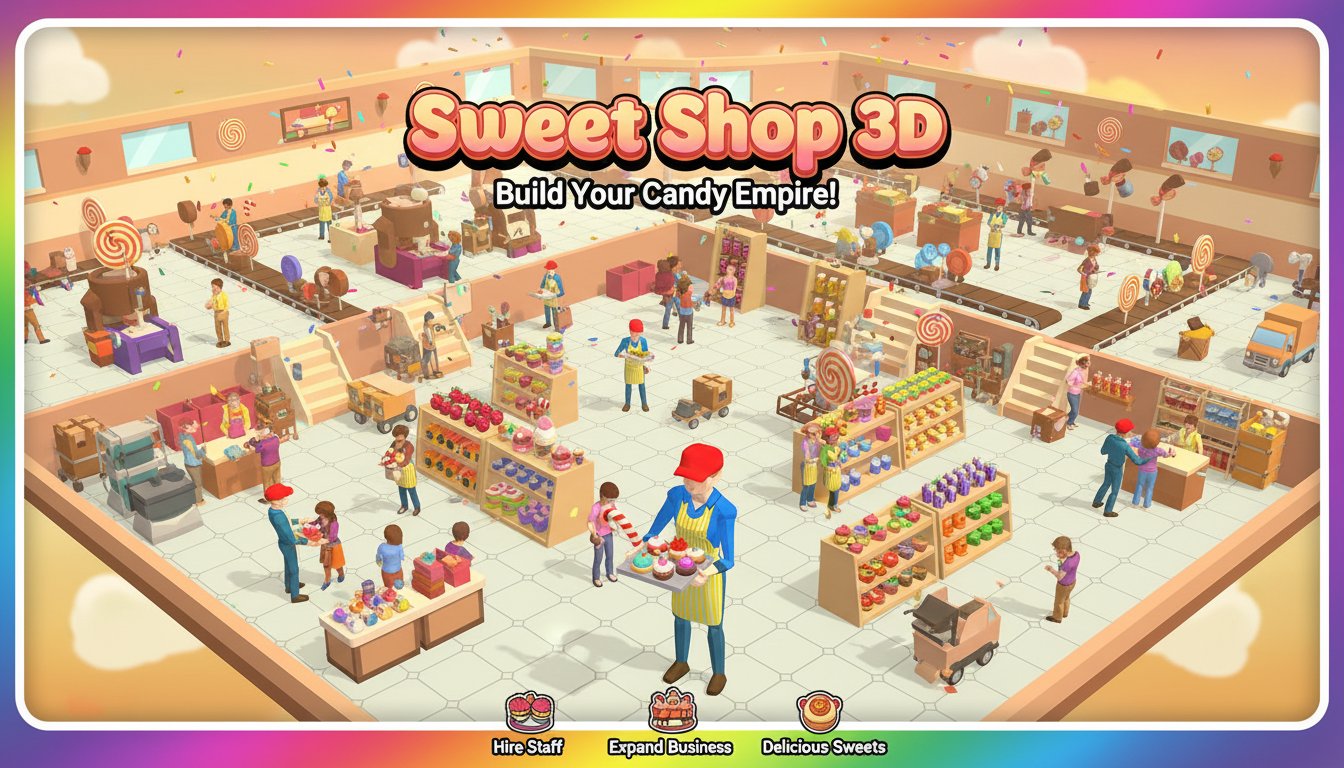
Sweet Shop 3D is an engaging arcade-style management game that puts you in charge of your very own candy empire. This colorful 3D simulation combines fast-paced action with strategic business management as you work to satisfy customers' sweet cravings while growing your confectionery business.
In this immersive experience, you'll juggle multiple responsibilities - from picking fresh fruit and stocking shelves to operating candy-making machines and serving eager customers. The game's frantic pace keeps you constantly engaged as demand for your delicious products continues to grow.
Core Features
Complete Sweet Factory Experience
Sweet Shop 3D isn't just about selling candy - you control the entire production process! Start by picking fresh fruit from trees, then use various machines to transform them into yogurts, candy pieces, ice cream, and other delectable treats. Watch your small shop evolve into a bustling sweet factory.
Strategic Staff Management
As your business grows, you'll need to hire and manage a team of workers. Recruit farmers to harvest fruit, cashiers to handle transactions, and stock clerks to keep shelves filled with colorful sweets. Each staff member plays a crucial role in maintaining your shop's efficiency.
Progressive Upgrade System
Enhance your abilities and those of your staff through strategic upgrades. Improve your carrying capacity, increase stocking speed, and boost overall efficiency. These improvements reduce customer wait times and maximize your shop's profitability.
Diverse Product Range
Create and sell an impressive variety of sweet treats. From simple fruit displays to complex processed candies, ice creams, and specialty desserts, your product range grows as you expand your operation.
Gameplay Mechanics
Building Your Sweet Empire
Start with a basic shop setup and gradually expand your operation. Install new machines, create additional product lines, and optimize your layout for maximum efficiency. The game rewards strategic thinking and quick decision-making.
Customer Satisfaction
Keep customers happy by maintaining well-stocked shelves and quick service. Monitor demand patterns and adjust your production accordingly. Happy customers mean higher profits and faster business growth.
Resource Management
Balance your time between harvesting, production, stocking, and customer service. The game's addictive nature comes from constantly optimizing these interconnected systems while keeping up with growing demand.
Controls and Accessibility
Simple Control Scheme
- Movement : WASD keys, arrow keys, or drag with left mouse button
- Interaction : Left mouse button to interact with machines and UI elements
The intuitive control system makes the game accessible to players of all skill levels while maintaining the fast-paced gameplay that keeps you engaged.
Platform Support
Sweet Shop 3D offers excellent cross-platform compatibility: - Web Browser : Play instantly without downloads - Mobile Devices : Available on both iOS and Android - Progress Sync : Save your progress across devices with account creation
Why Play Sweet Shop 3D
This game perfectly combines the satisfaction of business simulation with the excitement of arcade-style gameplay. Whether you're a fan of management games, casual gaming, or simply love the idea of running your own sweet shop, this title offers hours of engaging entertainment.
The 3D graphics bring your candy empire to life with vibrant colors and smooth animations. The progressive difficulty curve ensures that both newcomers and experienced players will find appropriate challenges.
Best of all, it's completely free to play with automatic progress saving, making it easy to jump in and continue your sweet shop adventure anytime, anywhere.