
Key takeaways
- AI can help keep characters, buildings, props, and UI visually consistent when it works inside a controlled art-production system. Use approved multi-view references, fixed and variable rules, reference-conditioned generation, small batches, version records, and a shared QA matrix. Validate one linked asset set before scaling, and keep human control over hero identity, exact geometry, readable text, and reusable UI components.
Yes, AI can help keep characters, buildings, props, and UI visually consistent across the same game—but not by itself and not from a single style prompt. Reliable consistency comes from a production system: approved reference assets, explicit visual rules, reference-conditioned generation, small review batches, and a shared quality checklist. AI is strongest when it operates inside those constraints. Without them, visual drift is likely as the asset count grows.
For a game artist or world builder evaluating capability, the right question is not “Can the model repeat a style?” It is “Can our workflow preserve identity, shape language, materials, scale, palette, and interface grammar across hundreds of decisions?” A short proof test can answer that before a team commits to a full pipeline.
What visual consistency actually means in a game
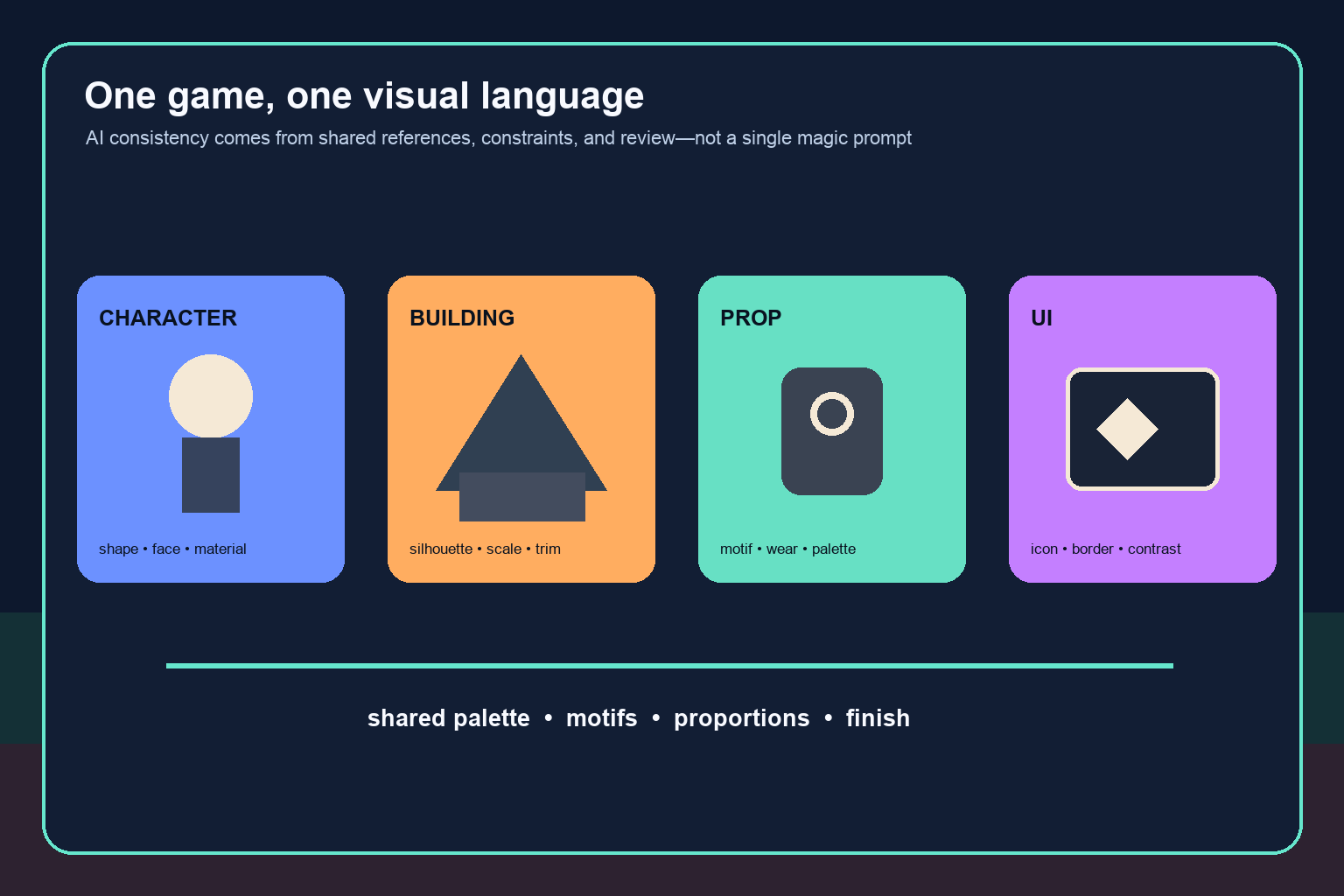
Visual consistency is more than making every image look as if it uses the same rendering technique. A coherent game has several linked layers:
- Character identity: faces, body proportions, costumes, signature shapes, color placement, and age remain recognizable across poses and scenes.
- World language: buildings share believable construction logic, scale cues, regional motifs, and material treatment.
- Prop logic: weapons, furniture, tools, and collectibles look as if they were designed by cultures that exist in the same world.
- UI grammar: icons, frames, typography, spacing, contrast, and feedback states support the same tone while remaining readable.
- Finish level: assets agree on detail density, edge treatment, lighting assumptions, texture scale, and degree of stylization.
A model can imitate surface style while violating these deeper rules. For example, a new tavern may use the right colors but introduce curved glass and polished steel into a town defined by rough timber and hammered brass. A character may retain the same hair color while their facial structure and costume seams drift. A quest icon may look attractive but use a different corner radius, stroke weight, and highlight direction from the inventory UI.
That is why consistency must be defined through observable features. “Painterly fantasy” is too broad. “Large triangular silhouettes, warm stone, oxidized copper accents, low-gloss materials, and one cool magical highlight per scene” gives a team something it can generate and review.
Start with a visual consistency bible
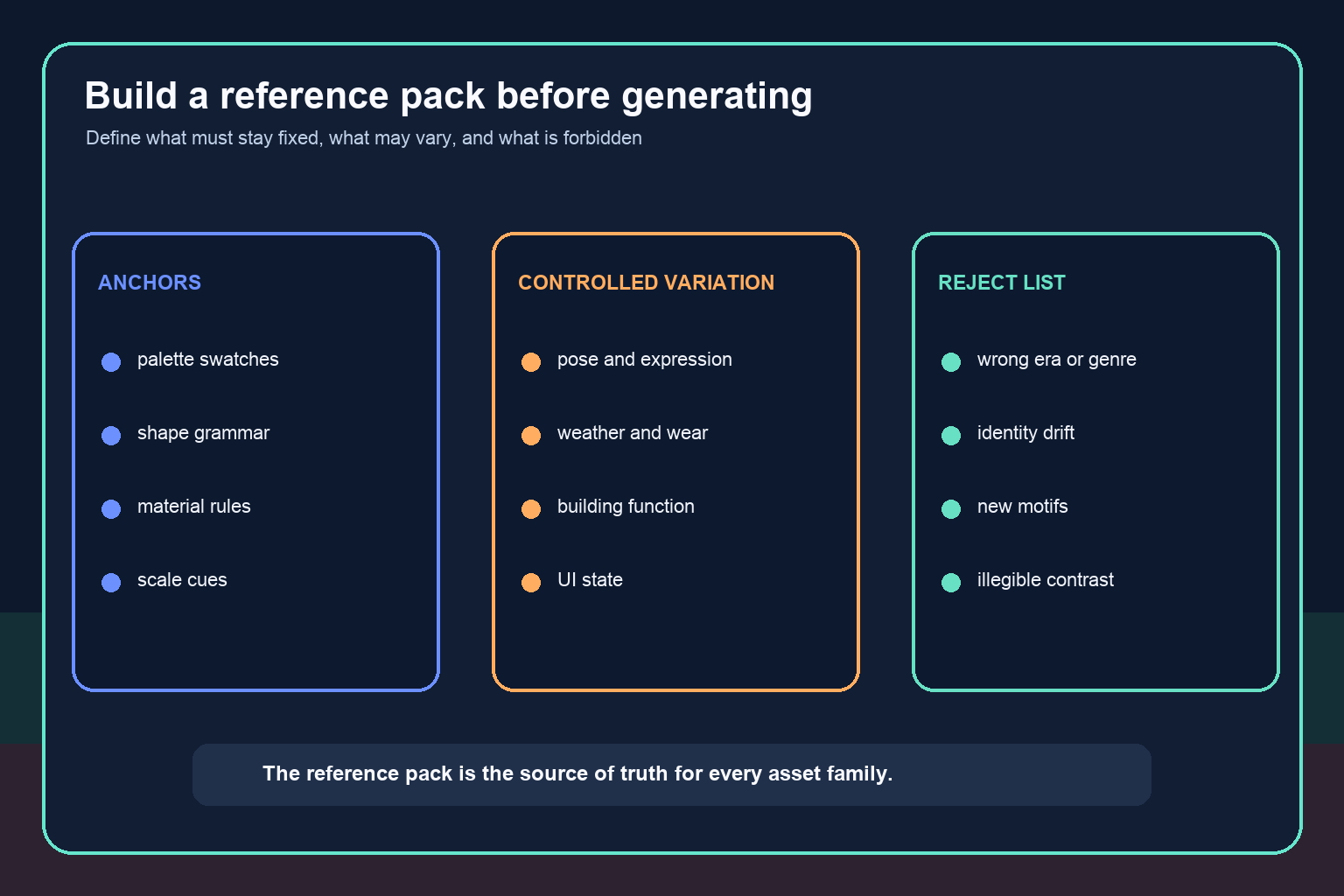
Before producing a large asset set, create a compact reference pack that acts as the source of truth. It should be small enough to use every day and specific enough to reject an attractive but incompatible result.
Include approved hero references for each major asset family. For characters, show front, side, and three-quarter views plus close-ups of faces, costume construction, and materials. For buildings, include a few representative exteriors, one interior, a scale reference, and callouts for doors, windows, roofs, and ornament. For props, define recurring motifs, manufacturing methods, wear patterns, and size relationships. For UI, show key screens and reusable components in normal, hover, selected, disabled, and warning states.
Then split rules into three groups:
- Fixed anchors: features that must not change, such as a protagonist's facial landmarks, a faction emblem, a regional roof profile, or the border treatment used on interactive panels.
- Controlled variation: features allowed to change within a range, such as pose, expression, weathering, building function, or rarity effects.
- Forbidden drift: features that break the world, such as modern fasteners in an ancient setting, a new color outside the faction palette, photoreal skin in a graphic style, or decorative UI that reduces text contrast.
This structure helps both generation and review. It also prevents the consistency bible from becoming a gallery of inspiration images with no production authority.
Use reference-first generation, not prompt-only generation
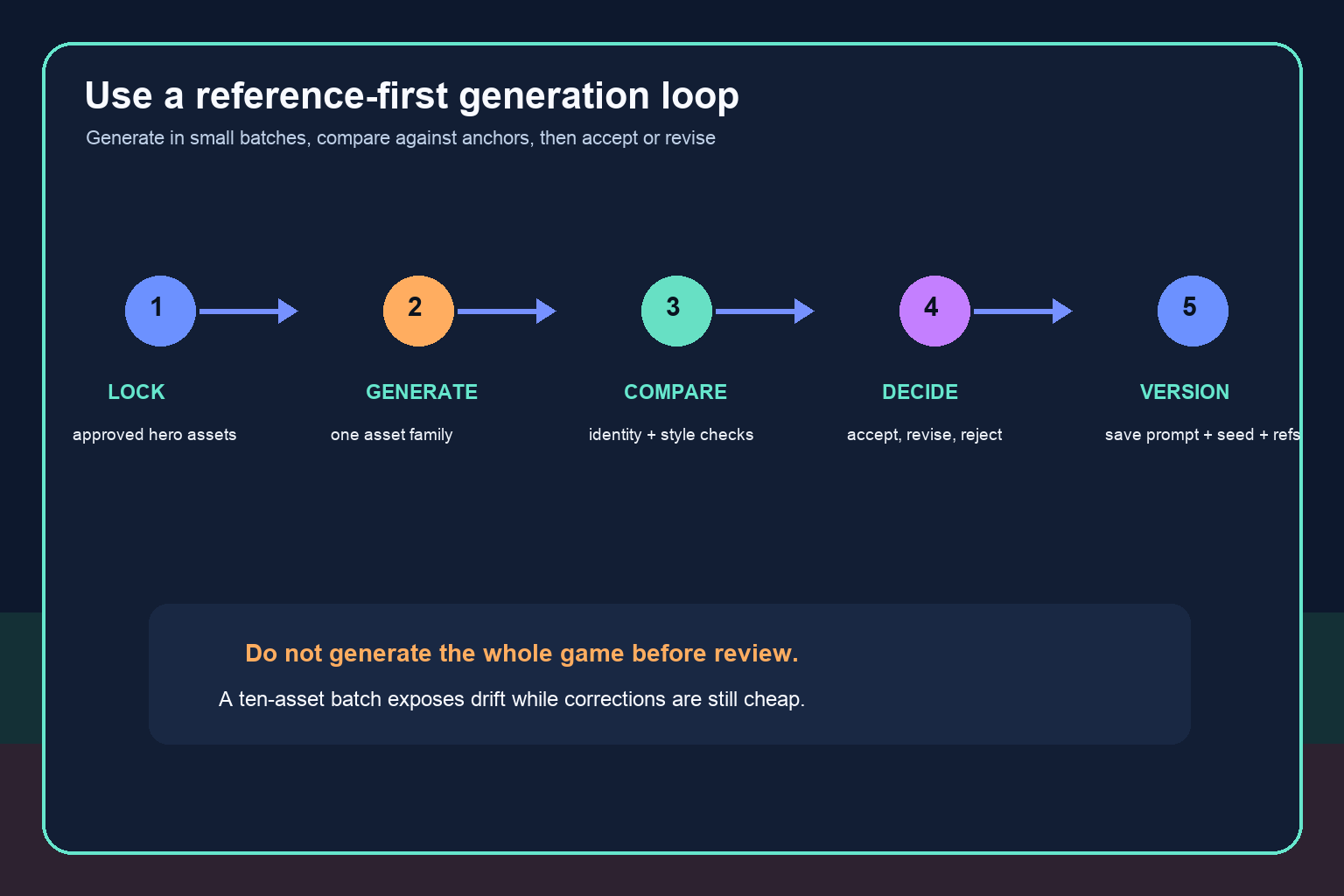
Text prompts are useful for intent, but they are a weak long-term memory. The wording will change, contributors will interpret adjectives differently, and a model may emphasize different parts of the prompt between runs. Whenever the tool supports it, provide approved visual references alongside a concise specification.
A repeatable request should name the asset's job, the relevant world or faction, the fixed anchors, permitted variation, camera and lighting assumptions, and technical output requirements. It should also name the features to avoid. Do not ask for every quality at once. A focused request for one asset family is easier to judge than a request that simultaneously invents character design, architecture, props, interface, and gameplay framing.
Keep generation batches small. Produce perhaps five to ten related assets, compare them against the anchors, correct the process, and only then continue. If the first batch drifts, generating another hundred assets does not create consistency; it creates a larger cleanup problem.
Record the inputs behind accepted results: prompt version, references, model and settings where available, seed when meaningful, output version, reviewer, and the rule exceptions that were approved. Reproducibility will never be perfect across every model update, but version records make changes diagnosable.
Keep characters consistent across poses and scenes
Characters expose drift quickly because players are sensitive to faces and silhouettes. Begin with an approved identity sheet rather than a single beauty shot. Show the face from several angles, full-body proportions, costume layers, recurring accessories, hand and footwear treatment, and a limited expression range.
Separate identity constraints from scene variables. Facial landmarks, body ratios, signature colors, and costume construction may be fixed. Pose, expression, dirt, damage, and lighting may vary. This gives the model freedom without asking it to reinvent the person.
Test the character under stress: profile view, action pose, seated pose, low light, a crowded scene, and a different emotion. A system that succeeds only on front-facing portraits has not passed a game-production test. Review side-by-side at the same scale. Check eye spacing, jaw shape, hairline, costume seams, accessory placement, hand style, and silhouette.
For important characters, plan for human correction. An artist may lock the face, redraw hands, standardize costume details, or create a controlled 3D or 2D rig after concept approval. AI can accelerate exploration and variation, but a hero identity should not depend on repeated luck.
Keep buildings and world props in the same culture
Architecture consistency depends on rules of construction, not just mood. Define what materials are available, how structures carry weight, how large openings can be, what weather does to surfaces, and which motifs identify each region or faction. Include human-scale references so doors, stairs, furniture, and tools do not change size between scenes.
Create an asset family together: a house, civic building, market stall, doorway, sign, crate, lamp, and common tool from one settlement. If they look related without relying on identical colors, the visual language is working. If each object introduces a new ornament system or manufacturing method, the references are too vague.
Props should inherit the same logic. A healing bottle can share the glass quality, metalwork, emblem, and wear pattern seen elsewhere in the world. A military chest can use the faction's geometry without becoming a miniature copy of a building. Repetition of a few motifs creates recognition; repetition of every detail creates monotony.
Controlled variation matters here. Wealth, climate, function, and history should change an asset while the underlying culture remains legible. Consistency is not sameness.
Make UI part of the same system without sacrificing usability
UI often drifts because it is generated later or treated as illustration. Begin with functional requirements: hierarchy, text length, target screen sizes, controller or touch states, accessibility, and contrast. Then apply the world's visual language selectively.
Use a component system for buttons, panels, tabs, icons, meters, tooltips, and notifications. Define spacing units, type scale, border weight, corner treatment, highlight direction, and state colors. Generate decorative concepts if useful, but rebuild final components as controlled interface assets so text, alignment, and interaction states remain reliable.
A fantasy inventory panel may echo carved wood or brass, but it still needs readable labels and predictable selection feedback. A science-fiction icon set may borrow faction geometry, but every icon must remain distinguishable at its actual display size. Test UI next to characters and environments, not on a blank canvas; the interface must belong to the world and remain clear over the game's real visual complexity.
Run a capability validation sprint before scaling
A two-week proof test can reveal whether a chosen AI workflow is dependable enough for the project.
Day 1–2: define the system. Select one character, one location, one faction, and one UI flow. Build the compact consistency bible and decide which features are fixed, variable, and forbidden.
Day 3–5: generate a linked set. Produce the character in six conditions, three related buildings, eight props, and one small UI family. Keep prompts, references, and settings versioned.
Day 6–7: review blindly. Ask reviewers who did not create the assets to score identity, palette, shape language, material logic, scale, detail density, and usability. Do not accept “feels consistent” as the only evidence.
Day 8–9: revise the workflow. Update references and constraints based on repeated failures. Regenerate only the failed categories and measure whether the error rate improves.
Day 10: production decision. Estimate how much human correction accepted assets still require. Decide which asset types are safe for AI-assisted production, which need tighter controls, and which should remain primarily artist-authored.
The goal is not a perfect showcase image. The goal is a repeatable batch in which most outputs pass for the right reasons and failures are easy to diagnose.
Use a shared QA matrix at every review gate
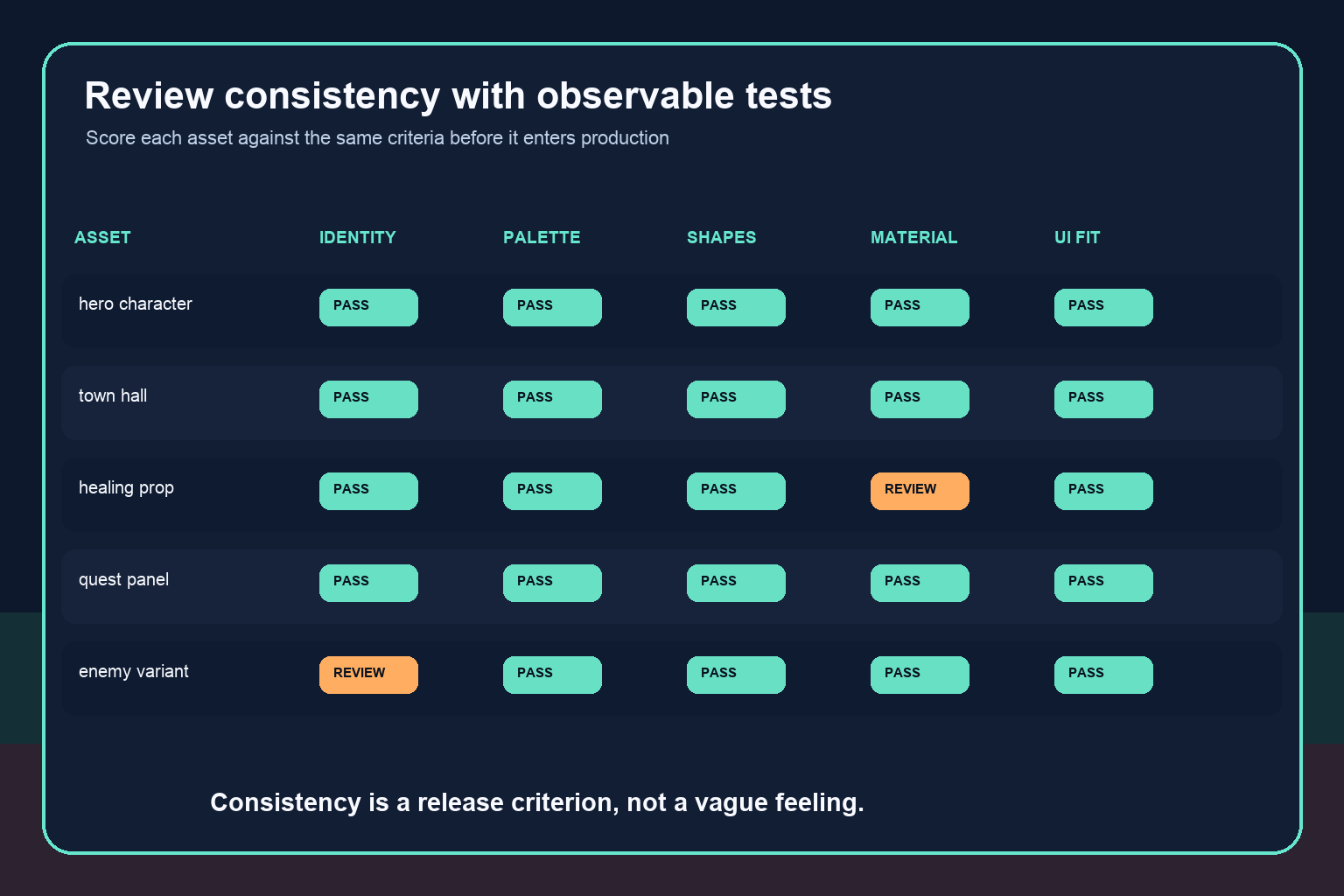
Score every candidate against the same observable checks. Character assets need identity and costume continuity. Buildings need scale, construction, region, and material coherence. Props need cultural fit and readable function. UI needs component compliance and legibility. All assets need palette, shape language, detail density, and finish-level checks.
A simple result can be pass, revise, or reject, with one sentence naming the violated rule. Save rejected examples too. They teach future contributors what the words in the bible actually mean.
Review at three levels: the individual asset, the asset family, and the assembled scene. An icon may pass alone but disappear over a bright environment. A building may be coherent by itself but make the neighboring street look as if it belongs to another century. An assembled view reveals cross-category conflicts that separate generation cannot.
Where AI consistency still breaks down
AI tools can lose identity in unusual poses, confuse small costume details, invent text, change object counts, distort repeated geometry, and mix materials. Long production timelines add another risk: model updates may alter output behavior. Different contributors can also create drift even when they use the same tool.
The answer is not endless prompt refinement. Use the right control for the problem. A fixed UI component should be rebuilt as a component. A hero face may need an artist-authored turnaround or rig. A modular building set may need a kit of approved pieces. A repeated emblem should come from a locked source asset. AI is most useful around these anchors, creating bounded variations rather than replacing the anchors themselves.
Teams should also review rights, provenance, privacy, and the terms that apply to their tools and source materials before production. Those decisions are separate from visual quality, but they affect whether an output can safely enter the game.
Decision: can AI meet your game's consistency bar?
AI is a good fit when the style can be expressed through clear rules, reference conditioning is available, the team can review small batches, and human artists can correct high-value assets. It is less suitable as an unsupervised source of final assets when exact character identity, precise geometry, readable text, or deterministic component reuse is required.
Approve the workflow only if the validation sprint shows three things: accepted outputs remain coherent across difficult conditions, reviewers agree on why assets pass, and correction time is lower than the time saved. If not, narrow AI's role to ideation, thumbnails, variation studies, texture exploration, or low-risk background content.
The practical conclusion is encouraging but disciplined: AI can support a visually consistent game when consistency is designed as a system. References establish memory, constraints protect identity, small batches expose drift, and QA turns taste into decisions. The workflow—not the model alone—is what keeps the game looking like one world.
Frequently Asked Questions
Can one prompt keep an entire game’s art style consistent?
No. A prompt can describe direction, but it does not reliably preserve every identity, proportion, material, motif, and UI rule across a large project. Use approved visual references, explicit constraints, versioned settings, and repeatable review criteria.
How do I keep the same AI character consistent in different poses?
Create a multi-view identity sheet, separate fixed identity traits from variable pose and emotion, provide the approved references for each generation, and compare outputs side by side. Important hero characters will usually need artist correction or a controlled rig.
Can AI make buildings and props look as if they belong to the same world?
Yes, when both use the same construction logic, materials, scale cues, cultural motifs, palette, and wear rules. Test a related asset family together rather than generating isolated showcase images.
Should game UI use the same AI art style as the world?
It should share selected visual motifs, colors, and materials, but usability comes first. Rebuild final UI as a component system with controlled typography, spacing, contrast, and interaction states instead of relying on generated screen images.
What is the fastest way to test visual consistency before full production?
Run a small validation sprint with one character, one location, several props, and one UI flow. Generate difficult variations, score them with a shared QA matrix, revise the process, and measure the human correction required.
Which assets need the most human control?
Hero faces, hands, repeated emblems, readable text, exact UI components, modular geometry, and any asset with strict gameplay dimensions usually need the most direct control. Use AI around locked anchors rather than regenerating those anchors repeatedly.


