Kimi API Guide: Access, Models, Examples, and Limits
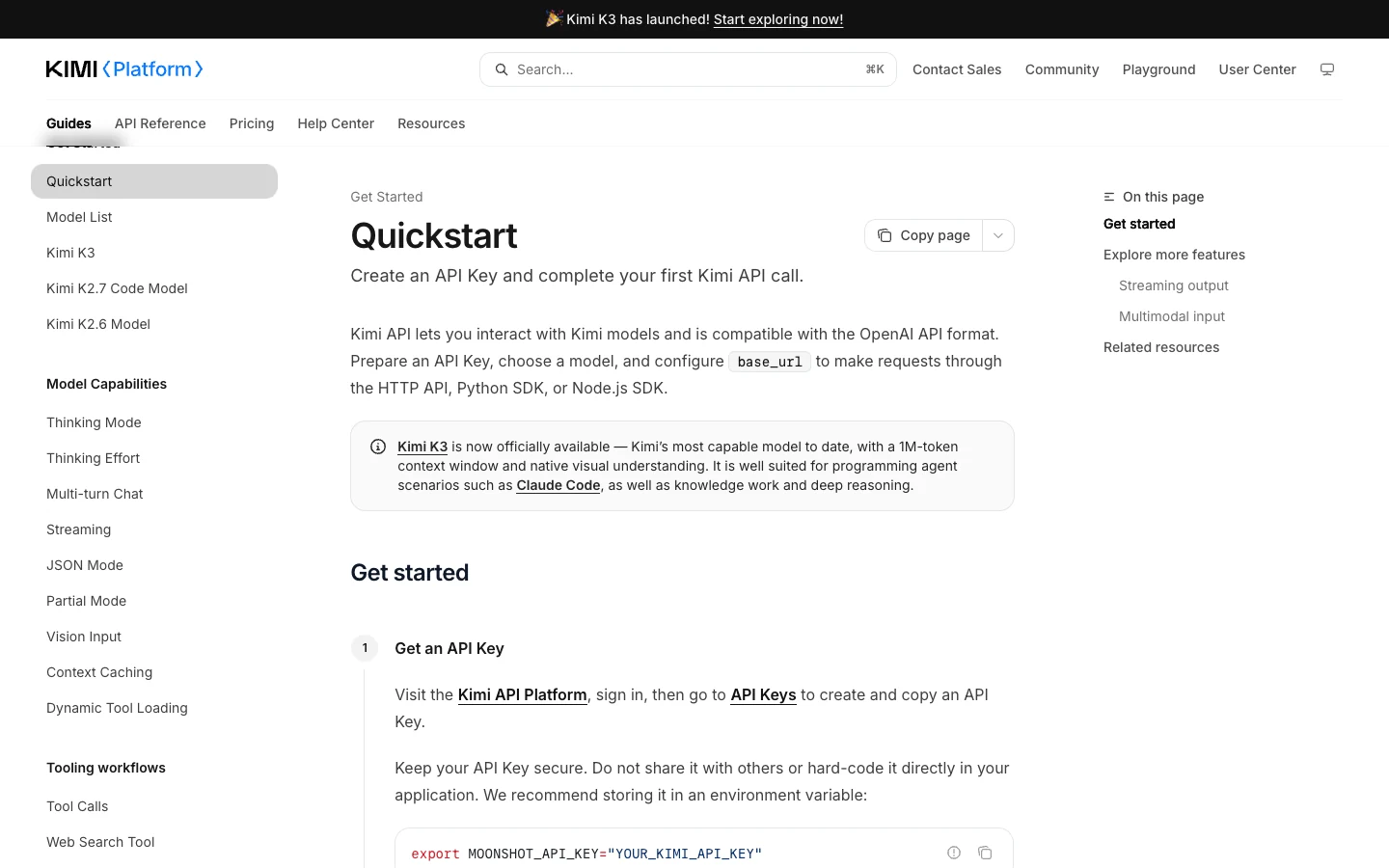
Kimi API is Moonshot AI’s developer interface for Kimi models. As of July 22, 2026, the official quickstart recommends Kimi K3 as the general starting point, while other current models address more specific workloads. This guide explains the integration shape without pretending to be the official console, using a real credential, or quoting volatile prices.
- OpenAI-compatible format
- Current model selection
- Environment-based API keys
- Validated request structure
What the Kimi API is—and what this guide owns
The Kimi API exposes Moonshot AI models to applications through HTTP and SDK workflows. The official quickstart describes an OpenAI-compatible format: provide an API key, select a model, configure the documented base URL, and send a chat-completions request. Compatibility makes migration approachable, but it does not mean every model accepts every parameter. The model reference remains the authority.
This page owns the broad “Kimi API” intent: access, current model families, a minimal request, and production limits. Exact pricing, authentication troubleshooting, K2.5 migration, and coding-subscription endpoints are separate concerns. Keeping those boundaries explicit prevents an overview from becoming an unreliable catch-all.
Use the official platform to create credentials and verify account-specific availability. A search result, copied snippet, or third-party article cannot confirm that a model is enabled for your tenant.
Choose a current model before copying an example
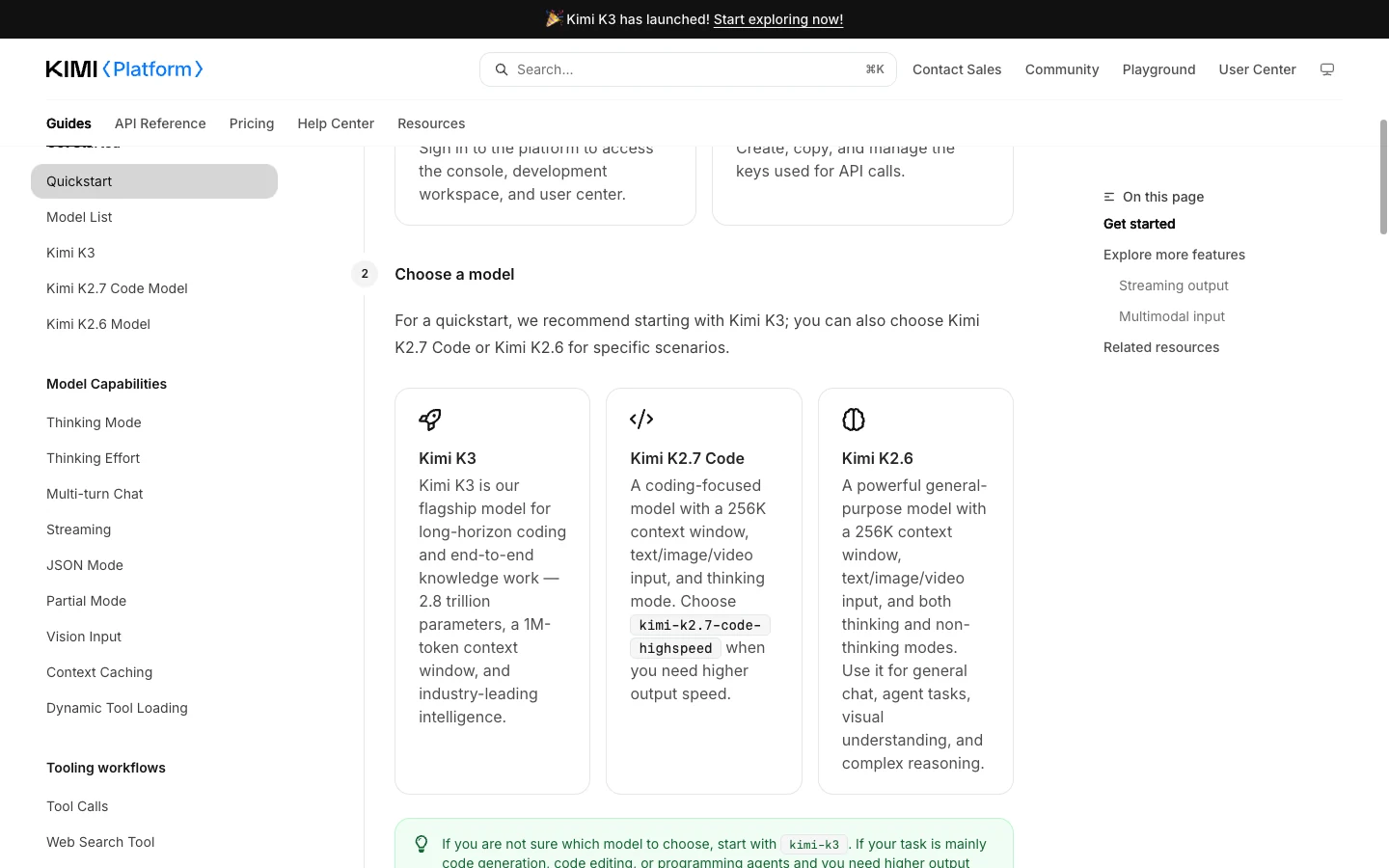
The official list observed on July 22, 2026 names Kimi K3, Kimi K2.7 Code, Kimi K2.7 Code HighSpeed, Kimi K2.6, and Kimi K2.5 among multimodal offerings. The quickstart recommends kimi-k3 when the task is not yet specialized. It points coding-heavy, speed-sensitive work toward a K2.7 Code option and general chat, agent, visual-understanding, and reasoning work toward K2.6.
A model list is a dated snapshot. The same official documentation says the older K2 series was discontinued on May 25, 2026. It also says K2.5 and Moonshot V1 are unavailable to newly registered users after K3’s launch and are scheduled for full platform sunset on August 31. Do not present K2.5 as the current default or assume long-term availability.
Choose with a workload note: code focus, image input, long context, streaming, tools, or latency sensitivity. Then confirm the supported parameters for that model. A defensible decision records why an identifier was selected and when it was verified.
Access and credential safety
Sign in to the Kimi API Platform, create an API key, and store it outside source control. The official example uses the MOONSHOT_API_KEY environment variable. Production deployments should use the organization’s secret manager, restrict read access, rotate exposed credentials, and redact authorization headers from logs.
Never place a real key in browser JavaScript, screenshots, public tickets, or pasted examples. Send requests from a trusted server boundary and apply application authentication and rate controls there. If a key leaks, revoke it in the official console; deleting one public occurrence is not sufficient.
The sample below uses a placeholder and received syntax validation only. No authenticated or paid request was executed. Therefore, the validation proves copyable syntax, not access, quota, output quality, billing behavior, or future SDK compatibility.
Minimal Python example
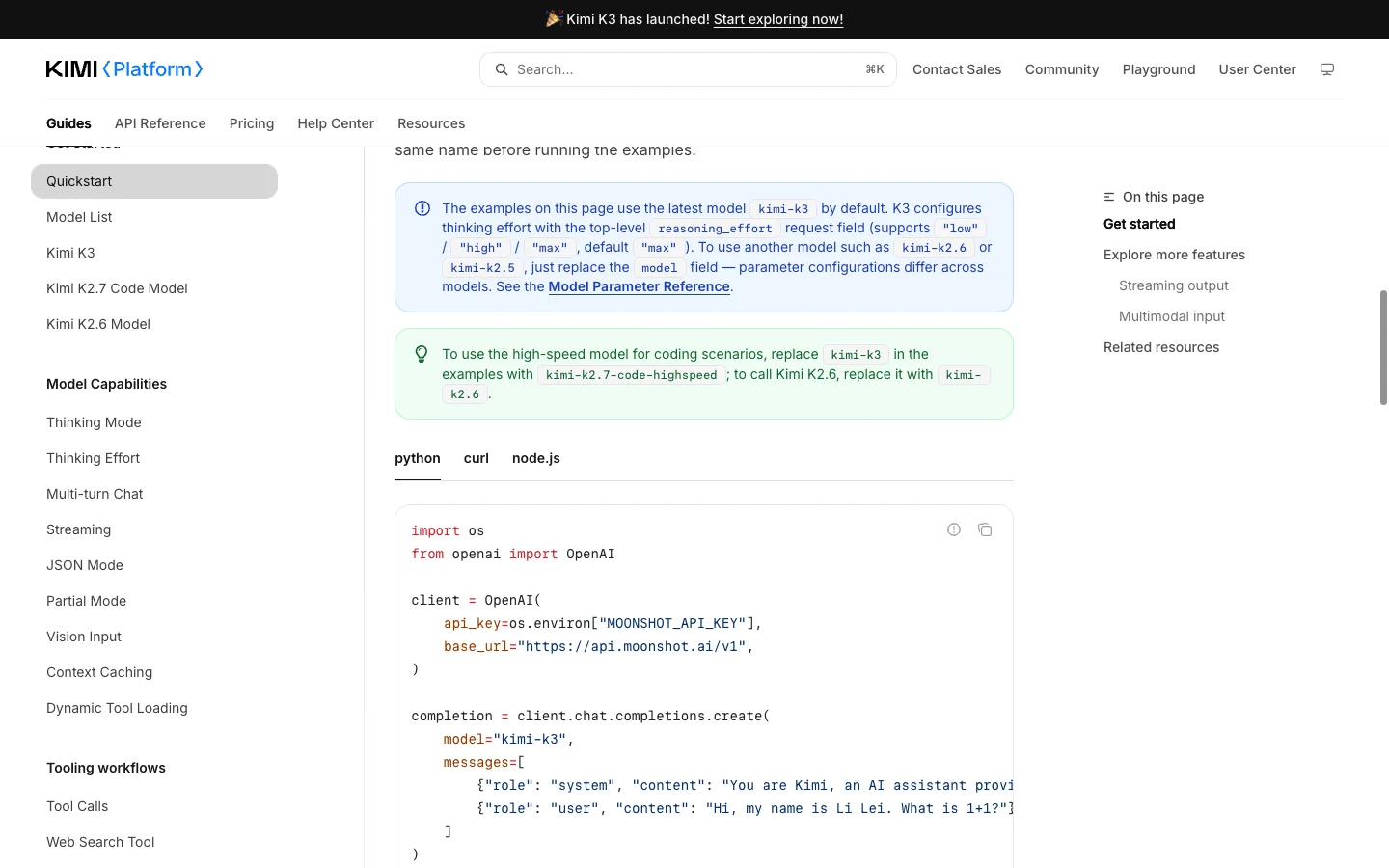
Install the OpenAI Python package in an isolated environment and configure the official base URL:
import os
from openai import OpenAI

client = OpenAI(
    api_key=os.environ["MOONSHOT_API_KEY"],
    base_url="https://api.moonshot.ai/v1",
)
response = client.chat.completions.create(
    model="kimi-k3",
    messages=[{"role": "user", "content": "Summarize this change in three bullets."}],
)
print(response.choices[0].message.content)
The audit compiles this source without importing the SDK or contacting Kimi. That catches quoting, bracket, and indentation errors. A real integration should pin the SDK, add timeout and cancellation behavior, sanitize logs, and test against a non-production account.
For curl, build JSON with a JSON-aware tool rather than string concatenation. Capture a sanitized payload, status code, model identifier, timestamp, and response request ID when available. Those artifacts let another engineer reproduce a failure without exposing user data or credentials.
Understand limits as several controls
“Limits” can refer to context capacity, output constraints, request rate, concurrency, account balance, feature support, or model lifecycle. These are separate controls. Context information appears in the model reference, while quota and price may vary by account and change independently. Check the platform immediately before deployment.
Treat failures by category. A 401 or 403 points first to credentials, permission, or endpoint selection. A 429 points to quota or rate controls; use bounded exponential backoff with jitter, never an immediate infinite loop. A 400 often indicates an invalid payload or model-specific parameter. Server errors may justify capped retry only when the application operation is safe to repeat.
Large context is not a reason to send every file. Retrieve only relevant material, define the output contract, and preserve source IDs. Validate tool arguments and structured output before allowing side effects.
Production checklist and migration guardrails
Build an acceptance set with a normal request, invalid credential, invalid parameter, timeout, and simulated rate control. Lock the model and SDK version in the test record. Keep sanitized fixtures. Add cancellation, bounded retries, observability, and a clear degradation path before scaling traffic.
Log model, status, latency, and a correlation ID. Avoid raw prompts by default when they may contain private code or personal data. Do not silently switch to another model with materially different behavior; queue, degrade the feature, or ask the user to retry.
Re-check the official model list at release time. The K2 and K2.5 lifecycle notes show why copied identifiers age quickly. Confirm model availability, valid parameters, the endpoint, commercial acceptability under measured traffic, and the ability to revoke credentials and stop calls quickly.
Where SEELE AI fits
SEELE AI does not issue Moonshot API keys and this page makes no claim that Kimi is embedded in SEELE AI. Teams exploring an interactive concept can use SEELE AI’s browser workflows to clarify a scene or mechanic brief before deciding whether a model API belongs in their backend.
If the goal is a playable direction rather than API infrastructure, start with the linked AI game maker. If the goal is agentic terminal coding, continue to the Kimi Code overview and CLI setup guide. Those links are navigational, not evidence of a commercial partnership.
Frequently asked questions
Is this official Kimi API documentation?
No. This is an independent SEELE AI guide. Use the linked Kimi platform documentation and console for keys, quotas, pricing, terms, and support.
Which model should a new integration start with?
The official quickstart observed July 22, 2026 recommends kimi-k3 when you are unsure. Confirm the current list and parameters before deployment.
Is Kimi K2.5 the current recommended model?
No. Official documentation positions K3 as the current starting point and gives K2.5 new-user and sunset constraints.
Was the example authenticated?
No. It was syntax-validated without a real key. That does not prove tenant access, quota, billing, or remote success.
Where should a key be stored?
Use a server-side secret manager or protected environment configuration. Never commit it or send it in client-side JavaScript.
How should rate limits be handled?
Use current account limits, bounded exponential backoff with jitter, a retry cap, and a queue or degradation path.
Official sources and evidence date
Product details were checked against these first-party pages on 2026-07-22. Features, eligibility, models, and commercial terms can change; re-check before acting.
Editorial review: SEELE AI Editorial Review re-checked the linked first-party sources, query boundary, visible media, and disclosure language on 2026-07-23. Media receipts bind each local verification image to its command, output, timestamp, and SHA-256; they do not expand the proof beyond the stated limits.
- Kimi API quickstart — accessed 2026-07-22
- Official model list — accessed 2026-07-22
