Visual guide for UEFN MCP Setup, Toolsets, and PIC Validation
Key Takeaways: UEFN MCP Setup, Toolsets, and PIC Validation
- UEFN 42.00 exposes Epic's beta Unreal MCP interface in Unreal Editor for Fortnite. Enable Python Editor Script Plugin and UEFN MCP Toolsets, connect a compatible local client to
http://127.0.0.1:8000/mcp, discover the supported subset, and begin with a read-only operation. Validate Verse with a source diff and compile result, validate devices and Scene Graph against the exact object identity, and validate gameplay in Play In Creator. A successful MCP response does not prove a playable, performant, publishable island. - Key limitations: UEFN does not expose every UE 5.8 MCP toolset; Python-facing tools can use XYZ while UEFN uses LUF; tool calls can hitch or hang the editor; and a recent
init_unreal.pystartup report is community evidence, not a confirmed Epic root cause. SEELE can help define a bounded prototype or test plan, but it does not configure the local editor, edit an arbitrary existing project, or publish to Fortnite.
Direct answer
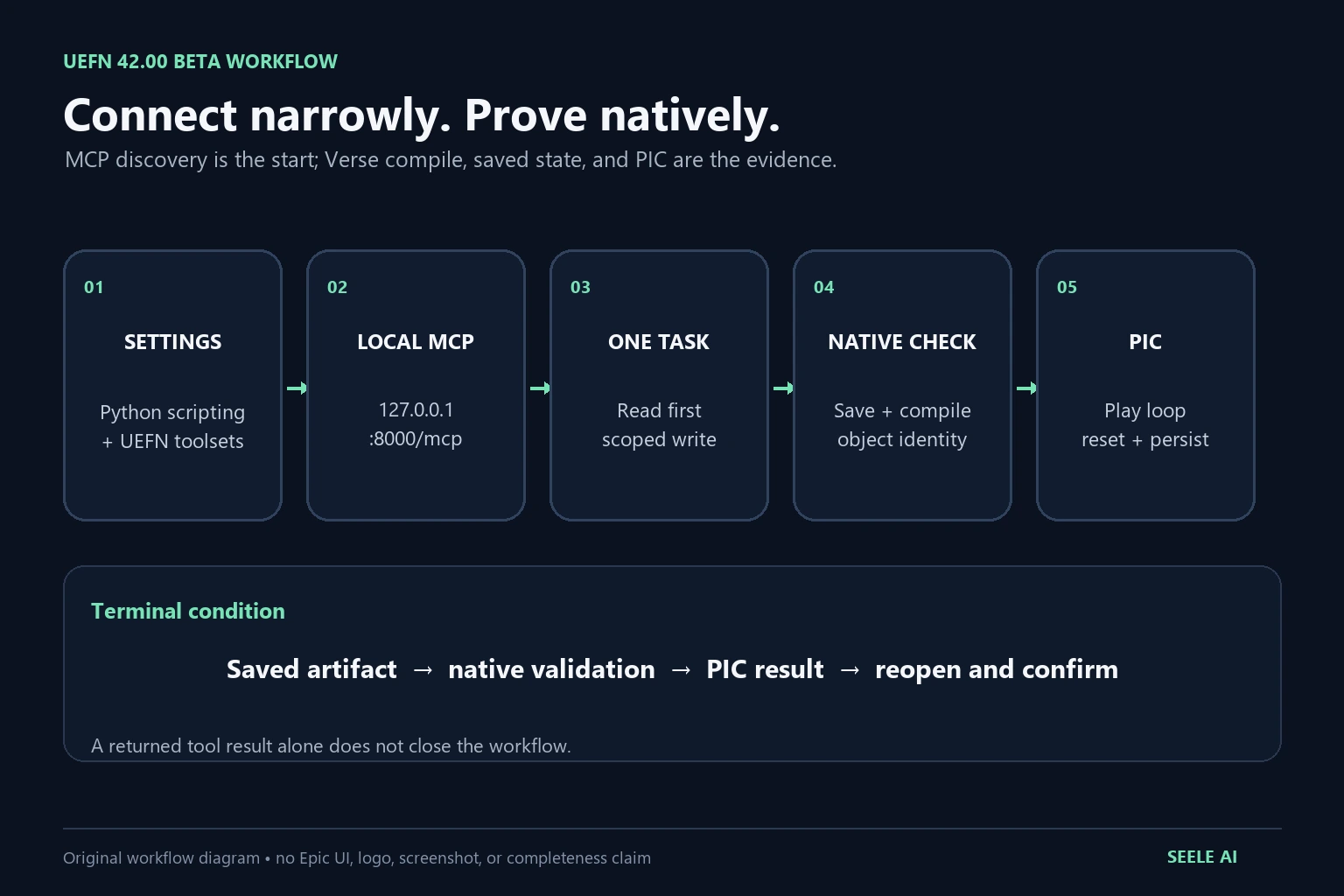
UEFN 42.00 adds Epic's beta Unreal MCP server to Unreal Editor for Fortnite. You do not install a separate marketplace plugin. In Project Settings, enable Python Editor Script Plugin and the UEFN MCP Toolsets beta setting, restart UEFN if the editor requests it, and point a local MCP client at http://127.0.0.1:8000/mcp. Start with read-only discovery, expose only the toolsets needed for the task, make one reversible change, and validate the saved result inside UEFN and a Play Session.
Do not copy a UE 5.8 MCP checklist verbatim. UEFN exposes a supported subset of Unreal toolsets, uses Play In Creator (PIC) rather than ordinary Play In Editor (PIE), and uses a left-up-forward coordinate convention while some Python-facing tools use XYZ. A successful MCP response proves only that the addressed tool returned. It does not prove that Verse compiled, the device behaved in a live island session, Scene Graph state persisted, performance stayed within budget, or the project can be published.
This guide is for UEFN creators and technical designers connecting a local AI client to the official beta interface. It is not a claim that SEELE installs UEFN, edits an existing .uproject, configures Epic services, or publishes a Fortnite island.
What changed in UEFN 42.00
Epic's Fortnite Ecosystem 42.00 release notes and UEFN MCP announcement say Unreal MCP is now available in UEFN. The official UEFN MCP documentation describes a beta, local editor interface that lets compatible clients discover and call selected UEFN toolsets.
The practical change is not “AI can build a complete Fortnite game.” It is a narrower editor integration. Depending on the enabled toolset, a client can inspect or work with areas such as Verse files and compilation, devices, Scene Graph, UMG, and Play Sessions. Each operation still belongs to UEFN, Verse, the Fortnite runtime, or the publishing pipeline. Keep those owners separate when you design prompts and acceptance tests.
| Claim | What it means | What it does not prove |
|---|---|---|
| UEFN exposes an MCP endpoint | A compatible local client can discover enabled tools | Every UE 5.8 MCP tool works in UEFN |
| A Verse tool returns successfully | The tool completed its addressed editor operation | Verse compiles or behaves correctly in PIC |
| A device or Scene Graph call succeeds | An editor object or property was addressed | The island loop, replication, memory, or publish review passes |
| A Play Session tool starts | UEFN accepted the PIC-related request | A packaged UE build or public Fortnite release exists |
Treat 42.00 as the first version boundary for this workflow. Recheck Epic's current documentation before enabling beta access on a production island because beta names, tool coverage, and limitations can change.
Set up UEFN MCP without assuming a UE plugin flow
Use a disposable project copy or a clean source-control branch for the first connection. Save the project, record the UEFN version, and capture a baseline Verse compile result before an AI client can write anything.
- Open the target project in UEFN 42.00 or the current version documented by Epic.
- Open Project Settings and enable Python Editor Script Plugin.
- In the beta-access area, enable UEFN MCP Toolsets. If UEFN asks for a restart, restart before testing discovery.
- Keep UEFN open with the intended project loaded. Do not assume the server can act on a closed project or a different editor session.
- Configure the MCP client to use the local HTTP endpoint
http://127.0.0.1:8000/mcp. - Connect and list tools before allowing a write. Compare the discovered toolsets with the current UEFN MCP documentation instead of assuming parity with Unreal Engine 5.8.
- Run one bounded read operation. Then make one reversible edit, save, reopen the affected asset or Verse file, and run the native validation owned by that content type.
If the client cannot discover the endpoint, verify the editor version and the two settings before changing firewalls, ports, or project files. If it connects but the expected tool is missing, first ask whether that UE toolset is supported in UEFN and enabled for this project. “Connected” and “tool available” are different checkpoints.
Choose the smallest toolset for the job
Enable or expose only what the task needs. A smaller surface makes the prompt easier to audit and reduces the number of editor systems that can change in one run.
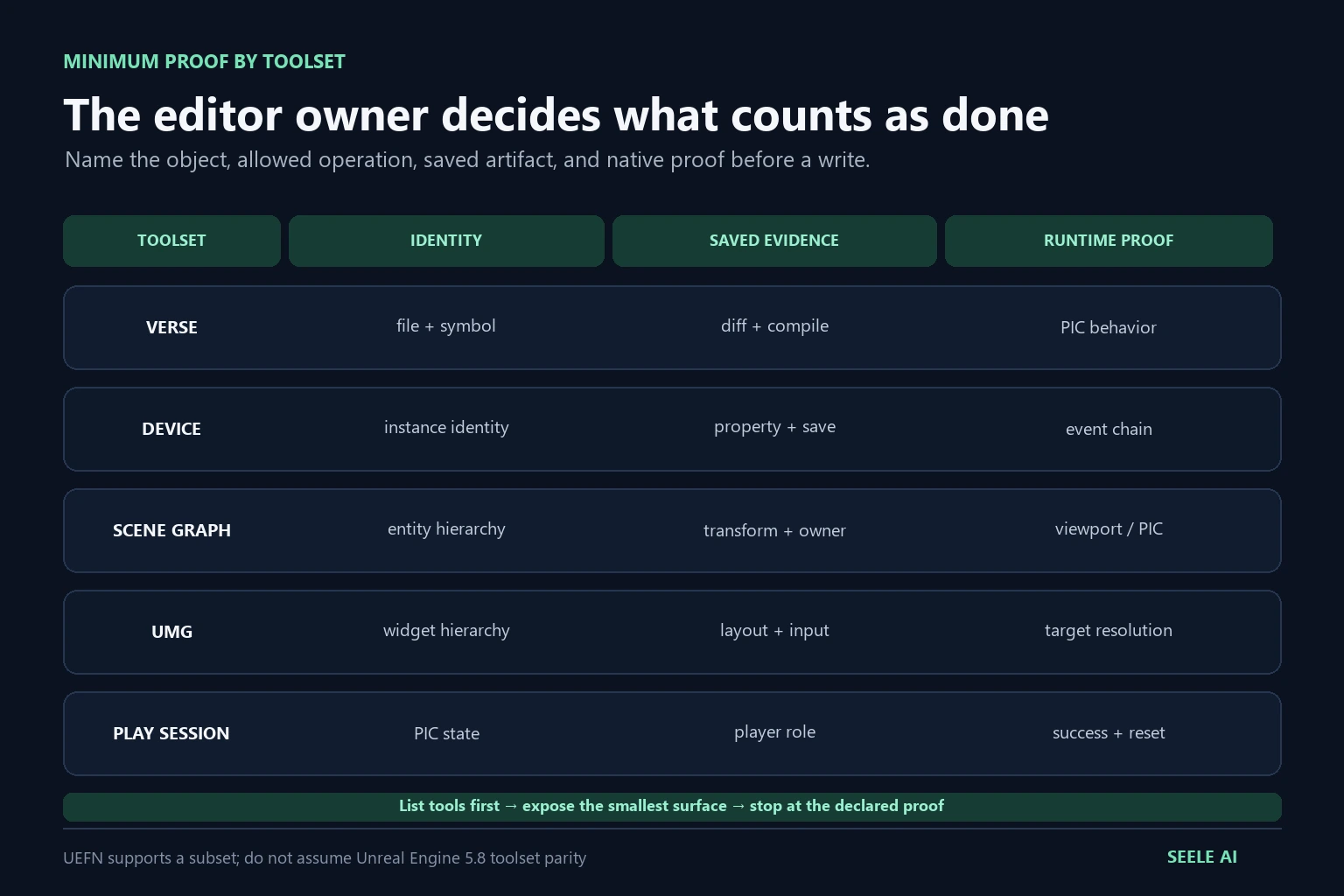
| Workflow | Useful UEFN MCP area | Minimum acceptance evidence | Stop condition |
|---|---|---|---|
| Review a Verse rule | Verse read/search | Exact file, symbol, and current compile baseline | Client resolves the wrong module or path |
| Edit Verse | Verse write plus compile | Source diff, saved file, compiler result, PIC behavior | Compile fails or the change exceeds the declared file |
| Configure a device | Device inspection/edit | Object identity, property diff, saved state, PIC event | Tool addresses the wrong device instance |
| Inspect Scene Graph | Scene Graph query | Entity/component identity and hierarchy snapshot | Returned coordinates or ownership are ambiguous |
| Adjust UMG | UMG inspection/edit | Widget identity, hierarchy/property diff, visible PIC check | Layout or input differs at the target resolution |
| Start validation | Play Session / PIC | Session state, target player role, observed success/failure | A session starts but the expected gameplay event never occurs |
A good agent request names the object, allowed operation, expected saved artifact, and proof step. For example: “Read this Verse device, propose a one-file change, compile it, then stop before starting PIC.” Avoid prompts such as “fix my island” or “make the level production-ready”; they hide scope, ownership, and rollback.
Validate Verse, devices, Scene Graph, and UMG in their native owners
Verse: source diff, compile, then behavior
Preserve the original file and compiler output. After an MCP write, inspect the exact diff, run Verse compilation, and reject the change if it touches undeclared modules. Compilation is necessary but not sufficient: start PIC and exercise the event, failure path, reset path, and any player-count assumptions that matter to the island loop.
Devices: identify the instance, not only the class
Many islands contain repeated devices with similar names. Record the selected object's path or stable identity, the previous value, the requested value, and the saved value. In PIC, trigger the device from the intended player role and verify that its event chain reaches the expected destination. A property return from MCP does not prove that event bindings, authority, or runtime state are correct.
Scene Graph: preserve hierarchy and coordinate evidence
Capture the entity/component hierarchy before moving or reparenting anything. Epic documents a coordinate-system mismatch to watch: UEFN uses left-up-forward (LUF), while Python toolsets can express transforms as XYZ. Do not “fix” a position from intuition. Record the input vector, the conversion used, the resulting transform, and a viewport or PIC witness. If the direction or axis meaning is unclear, stop and inspect rather than applying a second compensating transform.
UMG: validate layout and input in context
For widget changes, keep the target resolution, anchoring, hierarchy, visibility state, and input mode in the acceptance record. Review the result in PIC with the actual HUD and interaction state. An editor property that looks correct can still overlap, clip, capture focus, or disappear under the runtime state that matters.
PIC is the runtime gate, not PIE
UEFN's relevant play workflow is Play In Creator (PIC). Do not report “PIE passed” unless you are working in ordinary Unreal Engine and actually used PIE. For a UEFN MCP task, the minimum runtime record should name the PIC session, player role, island state, changed artifact, and observed result.
Use this acceptance sequence:
- Save the affected Verse file, device, Scene Graph entity, or widget.
- Compile Verse when Verse is in scope and retain the compiler result.
- Start PIC using the UEFN workflow supported for the current project.
- Reproduce the original player action from a clean start.
- Verify success, failure, and reset behavior rather than only the happy path.
- End the session, reopen the changed content, and confirm persistence.
- Repeat with the actual collaboration or source-control state before merging.
If a tool call causes the editor to hitch, wait for the editor to become responsive and inspect its state before retrying. Epic lists editor hitching or hanging during MCP calls as a known limitation. Repeatedly sending the same write while UEFN is busy can make the evidence ambiguous and can duplicate a change.
Troubleshoot endpoint, toolset, and startup conflicts
Work from the first failing checkpoint.
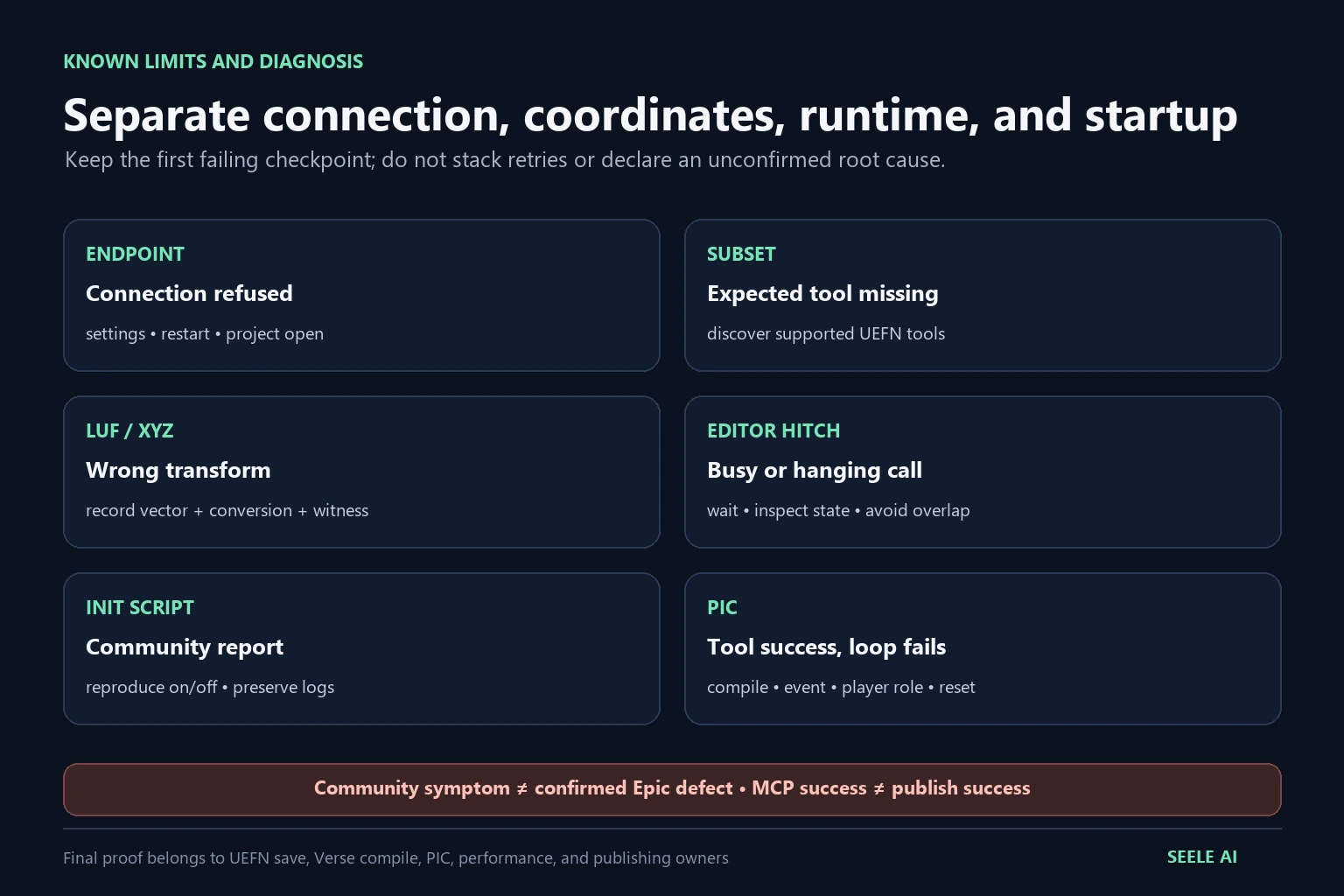
| Symptom | First check | Evidence to keep | Avoid |
|---|---|---|---|
| Connection refused | UEFN version, project open, settings enabled, restart completed | Endpoint, editor version, settings state | Installing an unrelated third-party MCP plugin |
| Client connects but lists no expected tool | UEFN-supported subset and enabled toolsets | Discovered tool names and current Epic docs | Assuming UE 5.8 and UEFN parity |
| Tool returns but no visible change | Correct project, object identity, save state | Target path, before/after value, editor log | Repeating a blind write |
| Transform is wrong | LUF-versus-XYZ interpretation | Input/output vectors and viewport witness | Adding an unexplained axis swap |
| Editor hitches during a call | Operation scope and editor responsiveness | Call, duration, log, saved state | Sending overlapping retries |
init_unreal.py stops running after beta access is enabled | Reproduce with toolsets on/off in a disposable project | Version, script path, logs, minimal project | Calling it a confirmed Epic defect without evidence |
On August 21, 2026, a single Epic Developer Community report described Content/Python/init_unreal.py not running after UEFN MCP Toolsets beta access was enabled. That report is a useful discovery signal, not an official root-cause confirmation. If you see the same symptom, reproduce it in a disposable project with the same UEFN version, preserve Output Log evidence, compare beta access on and off, and report the minimal reproduction to Epic. Do not delete scripts, reset the project, or promise that toggling the setting is a permanent fix.
Fit MCP into an editor-first asset workflow
UEFN MCP can help inspect or coordinate an editor task, but the asset pipeline still needs its own evidence. Keep Unreal as the spine:
- Upload or import: record source format, units, axes, texture set, license, and importer warnings.
- Preview: identify the exact asset and compare scale, materials, normals, collision, and hierarchy before editing.
- Fix: change one owner at a time. For transforms, preserve LUF/XYZ conversion evidence; for devices or Verse, preserve identity and diffs.
- Optimize: measure memory and runtime behavior in the UEFN tools that own them. An MCP return is not a performance measurement.
- Convert or save: retain the new asset or source revision and confirm it reopens without hidden dependency loss.
- Export or hand off: document what remains in UEFN, what moves to another DCC or Unreal workflow, and who owns the next check.
- Validate in UEFN: compile where required, run PIC, test the intended player loop, and keep publish eligibility as a separate review.
SEELE can help frame a bounded game prototype, asset-cleanup plan, or acceptance checklist. The local UEFN project, Epic account, MCP settings, Verse compiler, devices, Scene Graph, PIC session, memory review, and Fortnite publishing remain owned by the creator's UEFN workflow.
Security, source control, and rollback
Treat a local MCP client as an editor automation surface, not as a chat-only assistant. Keep the endpoint local, review the client's configuration, and do not expose it through a tunnel or public proxy. Use a clean branch or snapshot, request a plan before writes, allow one scoped change, inspect the diff, and stop when the client reaches the declared terminal condition.
Record at least:
- UEFN and project revision;
- enabled beta setting and discovered toolsets;
- client name and local endpoint, without credentials;
- requested object or file scope;
- before/after source or property evidence;
- Verse compile result when applicable;
- PIC scenario and observed result;
- rollback path and unresolved limitations.
Never put access tokens, private island identifiers, unpublished source, or player data into prompts or public issue reports. If the task requires rights-restricted Fortnite or third-party IP, stop and obtain the correct content and publishing authorization.
What this workflow cannot prove
UEFN MCP does not make every Unreal Engine MCP tool compatible with UEFN. It does not remove Verse compiler rules, device ownership, Scene Graph semantics, memory constraints, moderation, rights review, or Epic's publishing process. A tool success response is not proof of a playable loop, multiplayer correctness, acceptable performance, or a released island.
SEELE does not remotely enable the beta setting, install editor components, modify an arbitrary existing project, resolve an Epic service incident, or guarantee Discover eligibility. Use SEELE for a bounded prototype brief or workflow plan, then complete and verify the native work in UEFN.
FAQs
Is UEFN MCP available in Fortnite 42.00?
Yes. Epic's 42.00 release notes and UEFN MCP documentation announce the beta interface for UEFN. Recheck the current documentation before production use because beta availability and tool coverage can change.
Do I install a separate UEFN MCP plugin?
No separate marketplace plugin is part of Epic's documented setup. Enable Python Editor Script Plugin and UEFN MCP Toolsets in Project Settings, restart if requested, and connect a compatible local client to the documented loopback endpoint.
What is the default UEFN MCP endpoint?
Epic documents http://127.0.0.1:8000/mcp for the local connection. Keep it local and verify the current documentation rather than exposing the endpoint through a public tunnel.
Are all Unreal Engine 5.8 MCP toolsets available in UEFN?
No. UEFN supports a subset suited to its editor and Fortnite workflow. Discover the actual enabled tools and compare them with the UEFN documentation before designing an automation.
Should I validate UEFN MCP work in PIE or PIC?
Use Play In Creator for the UEFN runtime check. PIE terminology belongs to ordinary Unreal Engine workflows and should not be used as proof that a UEFN island behavior passed.
Why can a transform be wrong even when the MCP call succeeds?
Epic warns that UEFN uses LUF coordinates while Python-facing toolsets can use XYZ. Preserve the input vector, conversion, saved transform, and a viewport or PIC witness before accepting spatial edits.
Does enabling UEFN MCP Toolsets break init_unreal.py?
There is a recent community report of that symptom, but it is not an official confirmation of a universal defect or root cause. Reproduce it in a disposable project, preserve logs, compare the setting on and off, and report the minimal case to Epic.
Can SEELE configure or publish my UEFN project through MCP?
No. SEELE can help define a bounded prototype or validation plan, but it does not enable UEFN settings, edit an arbitrary existing project through your local endpoint, run your PIC session, or publish a Fortnite island.