Turn the idea into a test, not a wish list
You can make a game with AI by defining one playable loop, requesting a small implementation, and checking the result before adding more. A prompt is an input, not evidence that its requested features work. The useful question after generation is not “Does this look like a game?” but “Can a player perform the action, reach the goal, fail understandably, and restart?”
This guide combines a retained, documented SEELE example with a separate teaching brief. The example has an existing playable link and recordings; the teaching brief has not been generated or tested for this draft. Keeping those categories separate prevents a plausible workflow from being mistaken for a reported success story.
What the documented zombie-survival example establishes
The source article describes an October 2026 SEELE generation record requesting a Three.js first-person zombie-survival game. Requested features included pointer-lock movement, firearms, reloading, aiming down sights, crouching, sprinting, pickups, and a minimap.
The source article’s account of the result recording identifies a first-person weapon view, health and ammunition HUD, minimap, wave counter, enemies, and a pickup prompt. The 21.5-second gameplay recording covers only part of the first wave. Those visible elements do not independently prove functional reloading, crouching, every pickup interaction, a complete five-wave session, or compatibility with other browsers. These are the boundaries of the published example, not a report of a new hands-on completion.
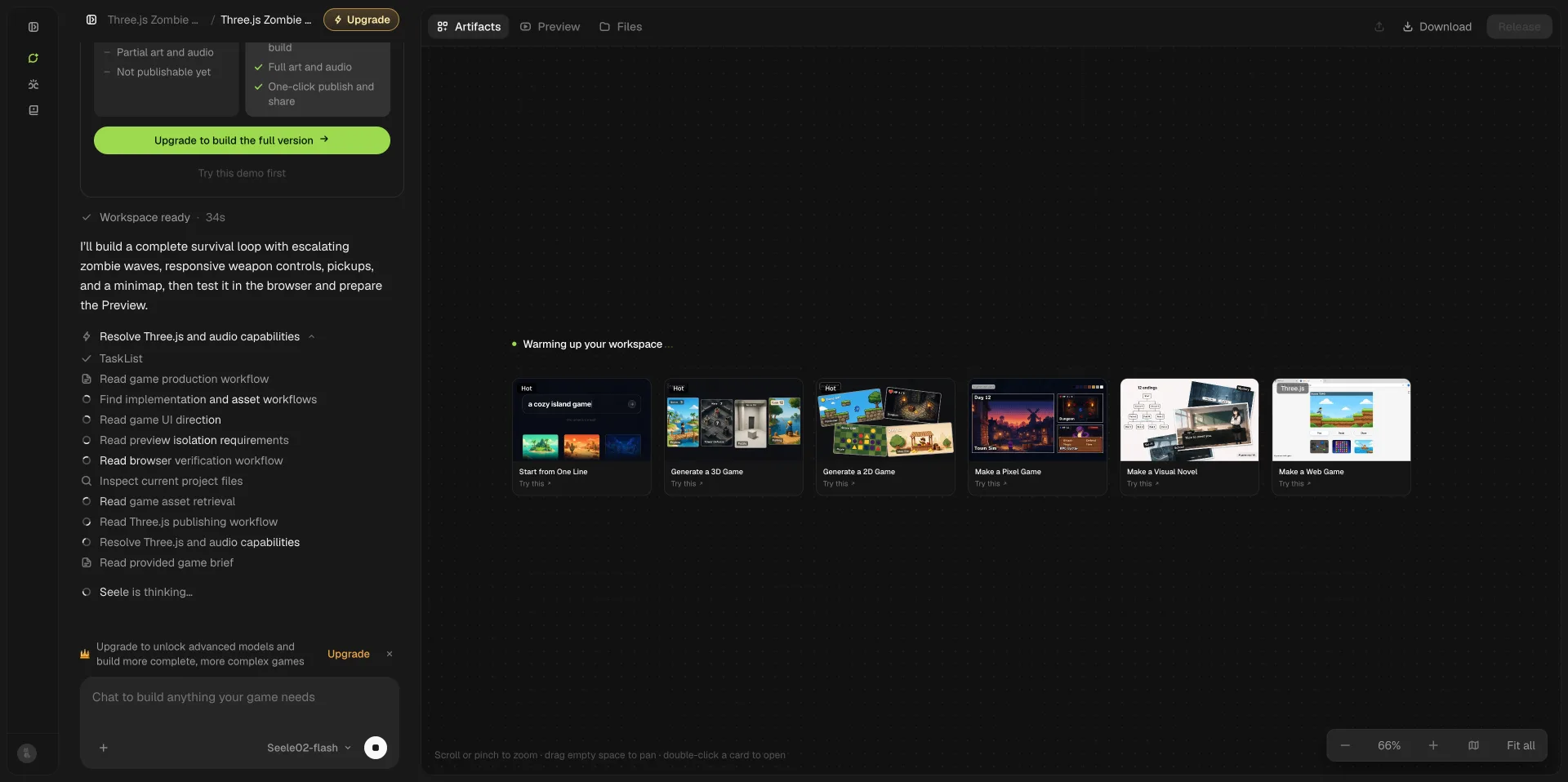
The image documents the prompt-led process for this particular project.
Gameplay recording from the documented build; the short clip is not a complete feature or compatibility test.
Open the existing playable project.
Existing prompt-led generation recording for the same project. A process recording documents what was requested and shown, not every behavior of the resulting game.
Copy a smaller first-build brief
Use the following teaching example when a shooter has too many interacting systems for a first attempt:
Teaching example, not a tested build: Create a single-screen, top-down browser game called Signal Run. The player moves with WASD or arrow keys, collects three batteries, and reaches a visible exit. Show the battery count and controls. One hazard moves horizontally between two fixed points. Contact causes a loss screen; reaching the exit without all batteries shows a requirement message. Collecting all three and reaching the exit shows a win screen. R restarts from either outcome and restores the player, batteries, counter, and hazard. Use readable placeholder shapes. Do not add enemies, weapons, saves, networking, extra levels, or payments. Explain the changed project components and give checks for movement, collection, win, loss, and restart.
SEELE's prompt-led game creation is relevant at the brief-to-prototype step. The requested controls and reset behavior must still be validated in the actual output; they are not guaranteed by the wording of the prompt.
Step 1: Inspect the first playable loop
Before polishing, run the intended target build and follow the controls shown inside it. Check movement in every direction and confirm that leaving the play area is blocked. Collect one battery, then walk over its former position: the counter should not increase twice.
Try the exit early and record the message. Complete the collection route and check the win. Intentionally touch the hazard and check the loss. Restart after both outcomes. If the hazard resets but batteries do not, report that exact difference instead of asking the AI to “fix the game.”
Step 2: Use the case to build a verification ledger
For each feature, maintain four fields: requested behavior, available evidence, observed behavior, and status. In the zombie example, a visible minimap belongs in the evidence field; accurate position tracking remains unverified until tested. A reload request belongs in the specification field until you can record ammunition changes and the reload action.
Apply the same discipline to Signal Run. “Three batteries requested” is not equivalent to “three unique pickups counted correctly.” Mark uncertain items unverified rather than filling the gap with a confident caption. This ledger makes the next prompt smaller and gives collaborators a reliable description of the build.
Step 3: Revise one rule and rerun the loop
After saving a working version, request a single change: reduce the hazard's movement speed by 20 percent while preserving its route and all collection rules. Repeat the same crossing from the same starting point, compare timing, and test both end states again.
If movement breaks after an unrelated visual change, revert to the known working version and narrow the request. Supply the exact error, target environment, expected behavior, and shortest reproduction sequence. Avoid layering broad rewrites over an unexplained failure.
Step 4: Check the engineering handoff separately
A playable link is not a source-project delivery. Before relying on a tool for continued development, check the current plan’s project access and export options. If the requested format is available, save a versioned copy and inventory its entry point, source files, assets, dependency manifest, lockfile, and run instructions. Ask what was generated, what is a dependency, and what requires a separate service. Do not publish credentials, private endpoints, or account tokens with the project.
In a separate clean folder, follow the documented install and run commands for that exact engine or framework. Record the runtime version and any missing dependencies. Repeat movement, collection, win, loss, and restart without relying on the hosted workspace. If the local build fails or an export is unavailable, record that limitation; a hosted preview cannot fill the evidence gap. No source export or local run has been established for the retained zombie example.
Step 5: Prepare a limited, honest share
Before sharing, check a clean load, readable controls, audio if present, keyboard focus, and restart. Review current tool and asset terms for your intended use. Test a second browser or device before claiming support for it. Keep performance statements tied to named hardware and a recorded method, not the apparent smoothness of an embedded clip.
Start your own small prototype with SEELE using the brief above. Preserve the working build, the exact prompt, and its test notes before requesting more. The milestone is one verified loop, not a long feature list: a new player can move, understand the goal, reach both outcomes, and restart. Add levels and richer assets only after that loop can be demonstrated without explanation from its creator. If continuing outside the workspace matters to your project, treat the source handoff and clean local run as separate acceptance gates rather than assumptions about the preview.
FAQ
Can a short gameplay video prove that the whole game works?
No. It supports only what is visible during the captured interval. A HUD can appear without every underlying rule being correct. Use a feature checklist, reproducible inputs, and longer targeted recordings to establish behavior. Preserve the distinction between a process video, an appearance preview, and a completed gameplay test.
Do I need to understand every generated file?
You need enough understanding to test the game, protect working versions, and locate relevant changes. Ask the assistant to explain components and assumptions in plain language. For unfamiliar engine-specific behavior, consult current engine documentation. Avoid accepting a broad code rewrite solely because its explanation sounds technically convincing.
When should I replace placeholder art?
After the loop is readable and repeatable. Replace assets in small groups and check collision, scale, contrast, loading, and rights again. Attractive media can improve communication, but it cannot verify an untested mechanic. Label conceptual imagery honestly rather than presenting it as a screenshot of a working generated result.