A programming puzzle strategy game becomes easier to build when every command has a clear place in the turn order. Define the board, the unit’s queue, and what the environment does after an action. Then trace a short route before adding more units or levels.
This guide develops a fictional example called Clockwork Courier: one robot, one parcel, one conveyor, and one receiving dock on a 5×4 grid. The first route takes five commands. A later prompt expands the idea to two autonomous units with a fixed action order. These prompts are drafts; they have not been run in a playable build, and the route is a hand-resolved design example.
1. Define the first puzzle before asking for more levels
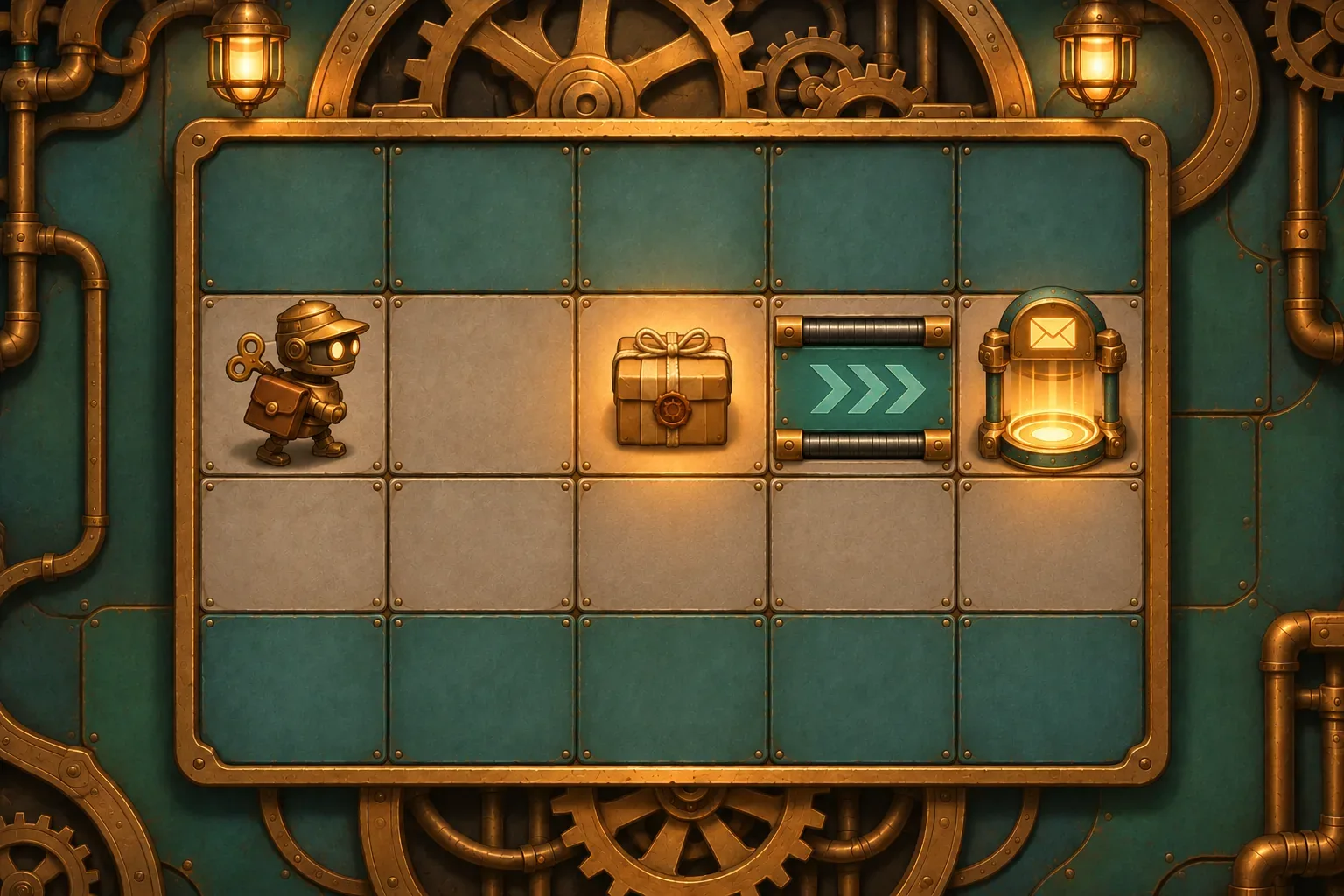
Start with a small board whose route can be read at a glance. Clockwork Courier uses columns A–E and rows 1–4. The courier begins at A2 facing east. A parcel sits at C2, an east-pointing conveyor occupies D2, and the receiver is at E2. The only first-level goal is to carry the parcel to E2 and drop it there.
Coordinates make a prompt testable. “Put the parcel near the exit” leaves room for different interpretations; “parcel at C2, receiver at E2” gives a reviewer a state they can trace. The instruction to keep the first route clear also helps separate programming rules from pathfinding complexity. Once the action order is stable, add walls or a detour to make the puzzle harder.
Prompt 1 — establish the board and win condition
Create one compact top-down programming puzzle on a 5×4 grid. A courier robot begins on A2 facing east. A parcel is on C2, a receiver is on E2, and a conveyor on D2 points east. The route along row 2 is open. The goal is to deliver the parcel to the receiver. Show the grid, courier direction, parcel, conveyor arrows, and receiver clearly. Keep this first level to one autonomous courier and one parcel. Do not add an opponent, economy, gates, switches, hazards, extra levels, or random movement.2. Write the command queue and beat order
Next, define what the player programs and how it runs. In this first slice, the courier has five command slots: Step, Turn Left, Turn Right, Pick Up, and Drop. Exactly one command resolves per beat, from left to right. A Step into a wall or occupied cell fails but still consumes the slot. A turn changes direction; Pick Up takes a parcel on the courier’s current cell; Drop places a carried parcel on the current cell.
It helps to separate the command from the environmental response that follows it. The command changes the courier’s immediate state. Then the conveyor may change its position again. The table below assigns each update to a single layer so a later prompt can modify one rule without silently changing another.
| Layer | State it owns | Prompt should specify |
|---|---|---|
| Command queue | Next action and remaining slots | Which command runs and whether a failed action consumes its slot |
| Courier action | Position, direction, and carried parcel | Movement, turning, pickup, drop, and blocked-cell behavior |
| Environment update | Conveyor movement after the action | Trigger timing, direction, occupancy rule, and move limit |
| Goal check | Delivery status and level completion | Whether the parcel is dropped at E2 before the level ends |
This split also keeps command puzzles readable as they grow. The board can react after the command, but the player should be able to explain what happened: “Step moved me onto D2, then the conveyor carried me to E2.” That is easier to debug than a rule that combines movement, belt behavior, and delivery into one hidden action.
Prompt 2 — define commands and resolution
Give the courier a command queue of five slots. Commands are Step, Turn Left, Turn Right, Pick Up, and Drop. Resolve exactly one queued command per beat, from left to right. Step moves one cell in the facing direction if that cell is free; otherwise the courier stays in place and the command is consumed. Turn changes direction by 90 degrees. Pick Up takes the parcel on the courier’s current cell if the courier is not already carrying it. Drop places a carried parcel on the current cell. Never execute multiple courier commands in one beat.3. Make the conveyor update deterministic
“The belt carries the robot” still needs a trigger and a collision rule. Here it activates after a courier command if the courier is standing on D2. It attempts to move the courier one tile east. If the courier is carrying the parcel, the parcel travels with it. If E2 is blocked or outside the grid, both stay where they are. The receiver itself allows the courier to enter. Delivery happens only after the player drops the parcel on E2.
That ordering matters when a level uses automatic terrain. If the belt runs before the command, a Step onto D2 might be carried on the next beat instead of immediately. If a belt can chain into another belt, one command may move the unit several cells. Choose an order and state it explicitly; do not make readers infer it from an animation.
Prompt 3 — state the environment phase
After each courier command resolves, inspect the cell occupied by the courier. If it is a conveyor, move the courier one cell in the arrow direction if the destination is free. A parcel being carried moves with the courier. If the destination is blocked or outside the grid, neither courier nor carried parcel moves; still consume the command. Do not move a parcel on the ground unless the courier picked it up. The receiver tile allows entry. Check delivery after the conveyor update and after a Drop action; delivery occurs only when the parcel is dropped on E2.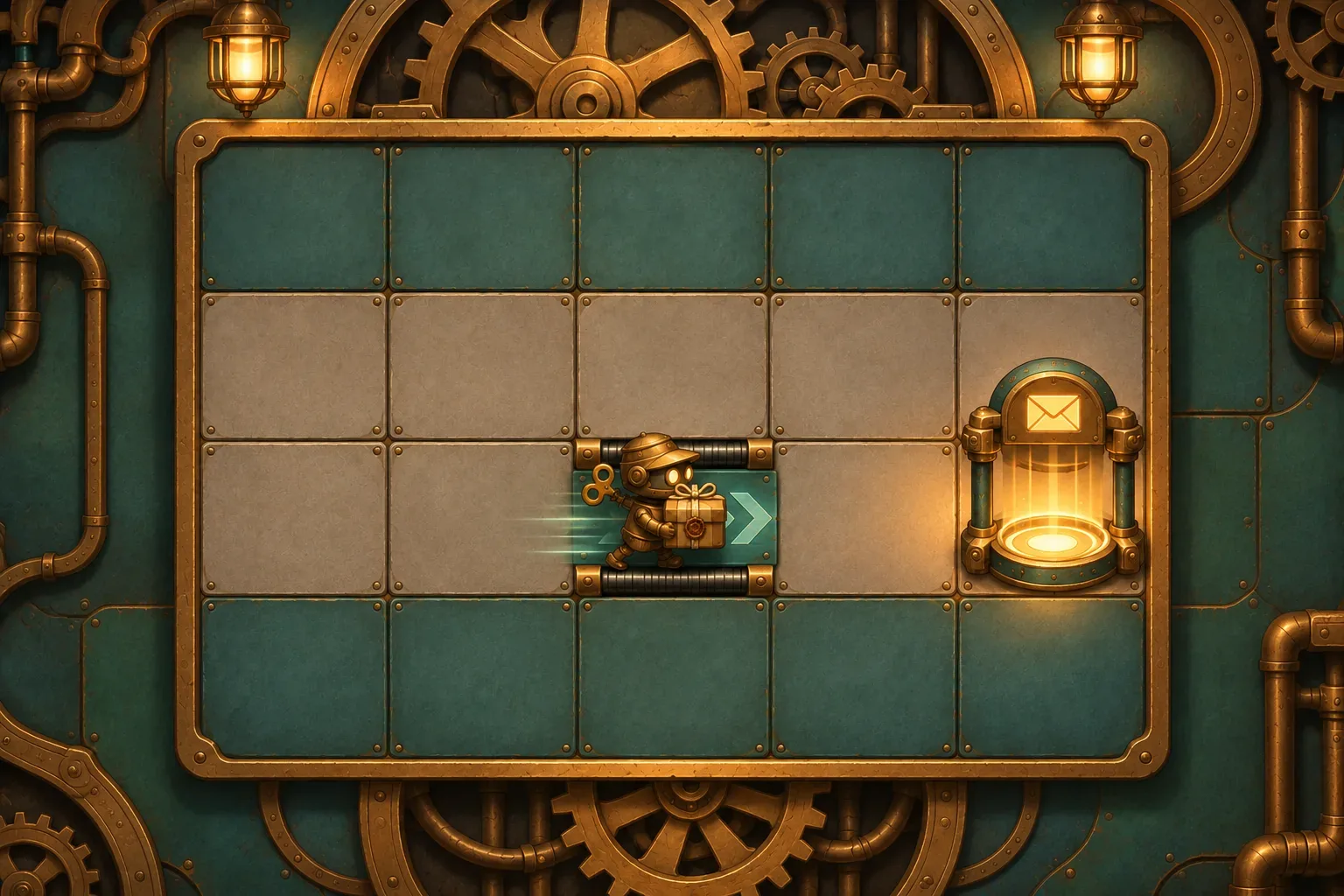
4. Trace one complete delivery
Before adding another board, write down every state change in the simplest successful route. This is a design audit: it checks the rules against each other, but it does not show that a game has been built or tested.
| Beat | Command | Courier after action | Environment update | Parcel / result |
|---|---|---|---|---|
| 1 | Step | B2, facing east | No conveyor under courier | Parcel remains at C2 |
| 2 | Step | C2, facing east | No conveyor under courier | Parcel is on the courier’s cell |
| 3 | Pick Up | C2, facing east | No conveyor under courier | Courier carries parcel |
| 4 | Step | D2, then E2 | Belt moves courier and carried parcel one tile east | Parcel remains carried at E2 |
| 5 | Drop | E2, facing east | No conveyor under courier | Parcel enters receiver; level is won |
The arithmetic is simple, but the state trace catches a common design ambiguity: the parcel is not delivered just because the courier reaches E2. The player must spend the fifth command on Drop. The route therefore depends on the queue having enough slots and the conveyor update happening after the fourth command.
Prompt 4 — request the explicit trace
Trace this queue: Step, Step, Pick Up, Step, Drop. Start at A2 facing east; parcel C2; east conveyor D2; receiver E2. Show beat number, command, courier position and direction, parcel position or carried state, conveyor update, and win condition after every beat. The expected trace reaches B2, C2, picks up the parcel, steps onto D2 and is carried to E2, then drops the parcel at the receiver and wins. Label this as a hand-resolved design example, not a playable test result.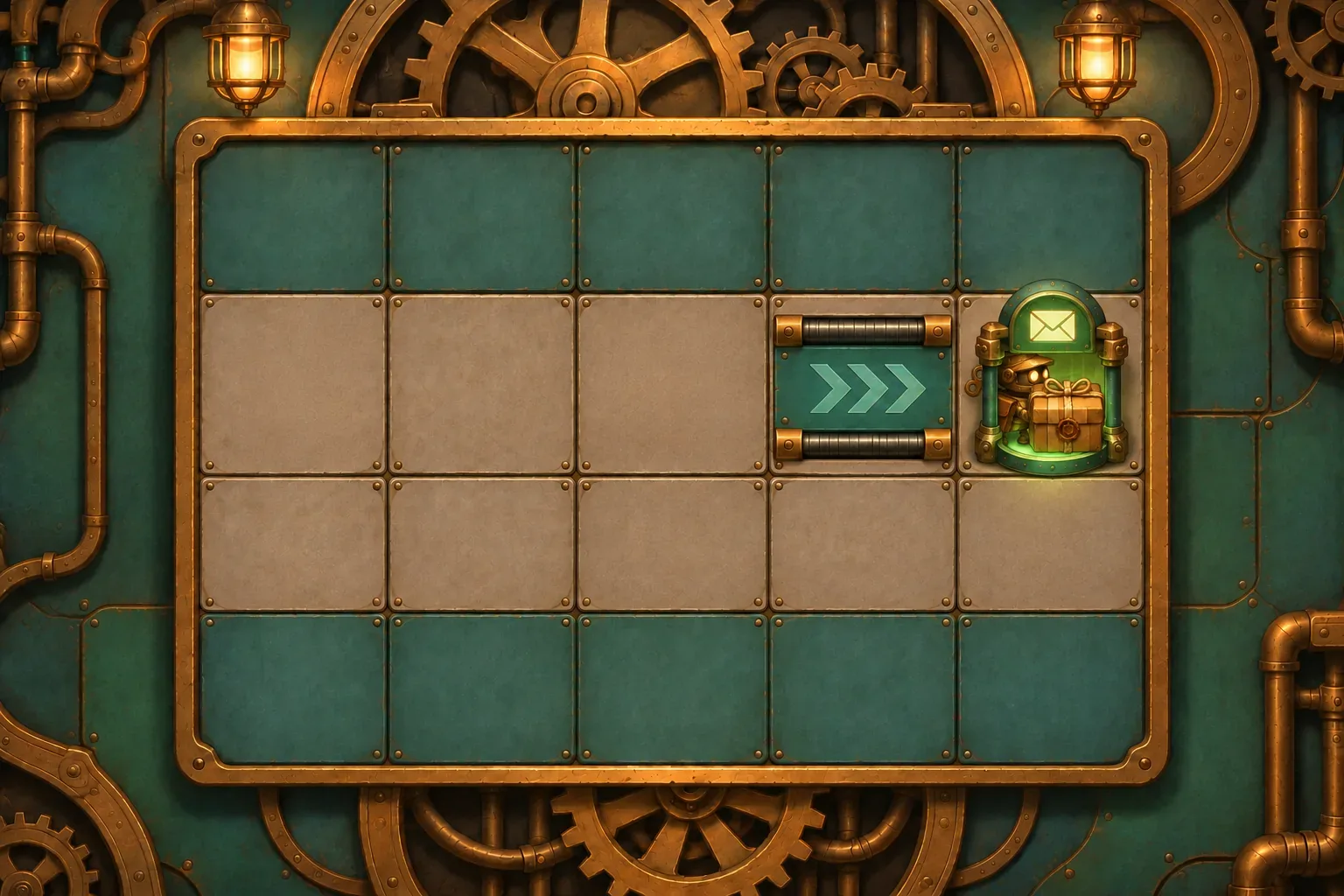
5. Expand to a second autonomous unit only after the first loop is clear
A programming puzzle can eventually coordinate more than one unit, but the resolver must say whose action happens first. Add a second courier in a separate level after the single-unit route behaves as intended. Give each unit its own queue and process one command at a time in a fixed order. That makes the puzzle sequential rather than simultaneous; changing the order can change who occupies a contested tile.
For a first multi-unit draft, use Pip then Tock as the order on each beat. If both try to enter the same cell, the first unit occupies it and the second unit’s move is blocked but still consumes its command. Update conveyors once after both actions, in a stated tile order. Keep this extension separate from the first board so you can inspect the new interaction without changing the delivery example.
Prompt 5 — add a second queue without changing the base puzzle
Only after the first level's queue and conveyor rules are stable, add a separate second level with two autonomous couriers, Pip and Tock, each with its own five-slot queue. On each beat, resolve Pip's next command first, then Tock's next command; these are sequential actions, not simultaneous movement. After both commands, evaluate conveyor cells in row-major order. A courier may be carried at most one tile in this phase; do not chain or push. Move it only if the destination is empty at that moment. If a courier's command target is already occupied, that courier stays put and its command is consumed. Keep the first level and its rules unchanged. Show both queues and a beat log so execution order is visible.This expansion changes one design decision: who gets to act first. If the goal instead depends on both units moving at the same instant, say so and define how shared targets resolve. Do not use “simultaneous” as shorthand for an unspecified tie-breaker.
6. Plan checks for the future playable build
A prompt can state intended behavior, but only an inspected build can show whether the behavior works. When a build exists, check a valid Step, a blocked Step, each turn, pickup and drop eligibility, conveyor movement after an action, a carried parcel moving with the courier, and the delivery check. Record the unit, beat and state before and after each action. These are proposed checks, not results observed for this example.
| Check | Record | What a passing observation supports |
|---|---|---|
| Blocked Step | Target cell, blocker, queue slot before/after | The command is consumed and the courier stays put |
| Conveyor phase | Courier cell after action, belt direction, next-cell occupancy | The belt moves at the specified point in the beat order |
| Carried parcel | Courier and parcel positions before/after belt movement | The parcel remains attached to the courier during the move |
| Two-unit conflict | Unit order, target cell, blocked unit, remaining queue | The priority rule is deterministic for that tested level |
| Delivery | Receiver cell, Drop action, parcel state, win flag | Completion occurs only after the parcel is dropped on E2 |
Prompt 6 — ask for a future test log
For a future playable build, add a developer log with beat, unit ID, queued command, position and direction before/after action, parcel state, conveyor activation, blocked movement reason, and delivery check. Verify valid steps, blocked steps, turns, pickup/drop eligibility, conveyor movement after action, a carried parcel moving with the courier, fixed order between units, and delivery after Drop. Do not claim these checks pass unless you inspect the actual build.A useful iteration changes one layer at a time. If blocked commands are unclear, revise the movement rule without altering the conveyor. If the route feels too easy, change the board or add a second unit after the trace is stable. Keep the old trace beside each revision so you can tell whether a change fixed the intended problem or introduced a new one.
SEELE’s official Free AI Game Maker page describes starting with a plain-English idea, creating a playable first version, testing it in a browser, and refining it with follow-up prompts. That documents the general product workflow; it does not establish that these Clockwork Courier prompts were submitted or that their conveyor rules have been generated. To explore your own concept, visit the Free AI game maker, then check any result against your own command and timing rules.
FAQ
What should a programming puzzle strategy prompt define first?
Define the grid, the courier’s starting position and direction, the goal, the available commands, and when the environment updates after each command.
How should command queues resolve in a programming puzzle?
State whether one command runs at a time or multiple units act together. For this example, one courier command resolves first, then a conveyor moves the courier and any carried parcel.
How can conveyors create a useful programming puzzle?
Use a conveyor to change a route after a command. Specify its direction, when it activates, what it carries, and what happens if the next tile is blocked.
How do I check a command sequence before building levels?
Trace each command beat with the courier’s position, direction, parcel state, conveyor update, and goal check. Then compare that trace with the future playable build.
Were these programming puzzle prompts tested in a playable game?
No. The Clockwork Courier board and five-beat sequence are fictional design material. The prompts are unrun drafts and no playable build or observed test result is included.