Introduction
A supermarket simulator connects shelf stock, replenishment, customer flow and checkout into a larger store-day loop. A first prototype can feel unfocused if it asks the player to manage every aisle, supplier and staffing system at once. Begin with a small fictional store, a few product categories and visible state changes that connect one restock choice to the checkout result.
This guide uses Green Cart Market, an invented neighborhood store with fictional products, customers and game resources. All stock counts, queues and outcomes are game placeholders. This is not retail, food-safety, staffing or business advice, and no playable simulator was built or tested for this article.
Define the store-day loop
Describe how the day begins, what the player manages and when the shift ends. A compact loop might review shelf stock, assign a restock task, serve a few fictional customers, resolve checkout baskets and inspect a closing report. State which actions advance game time and what happens when a shelf is empty or a checkout lane is occupied.
Prompt 1 — first-store brief
Design a fictional supermarket simulator called Green Cart Market. The first slice covers one short store day, four product aisles, two restock roles, three checkout baskets and a limited game-only stock pool. Define the player objective, shelf states, replenishment rules, customer-flow choices, checkout loop, abstract resources, shift close and reset. Use original fictional products and placeholder values. Do not provide real food-safety, retail, staffing, pricing or business advice. List assumptions and untested mechanics.
A brief should state how the player knows whether an item is available and whether restocking is complete. It should also define how shoppers move from a game request to a checkout basket without implying that a mock queue represents real customer behavior.
Make shelf stock and restock tasks visible
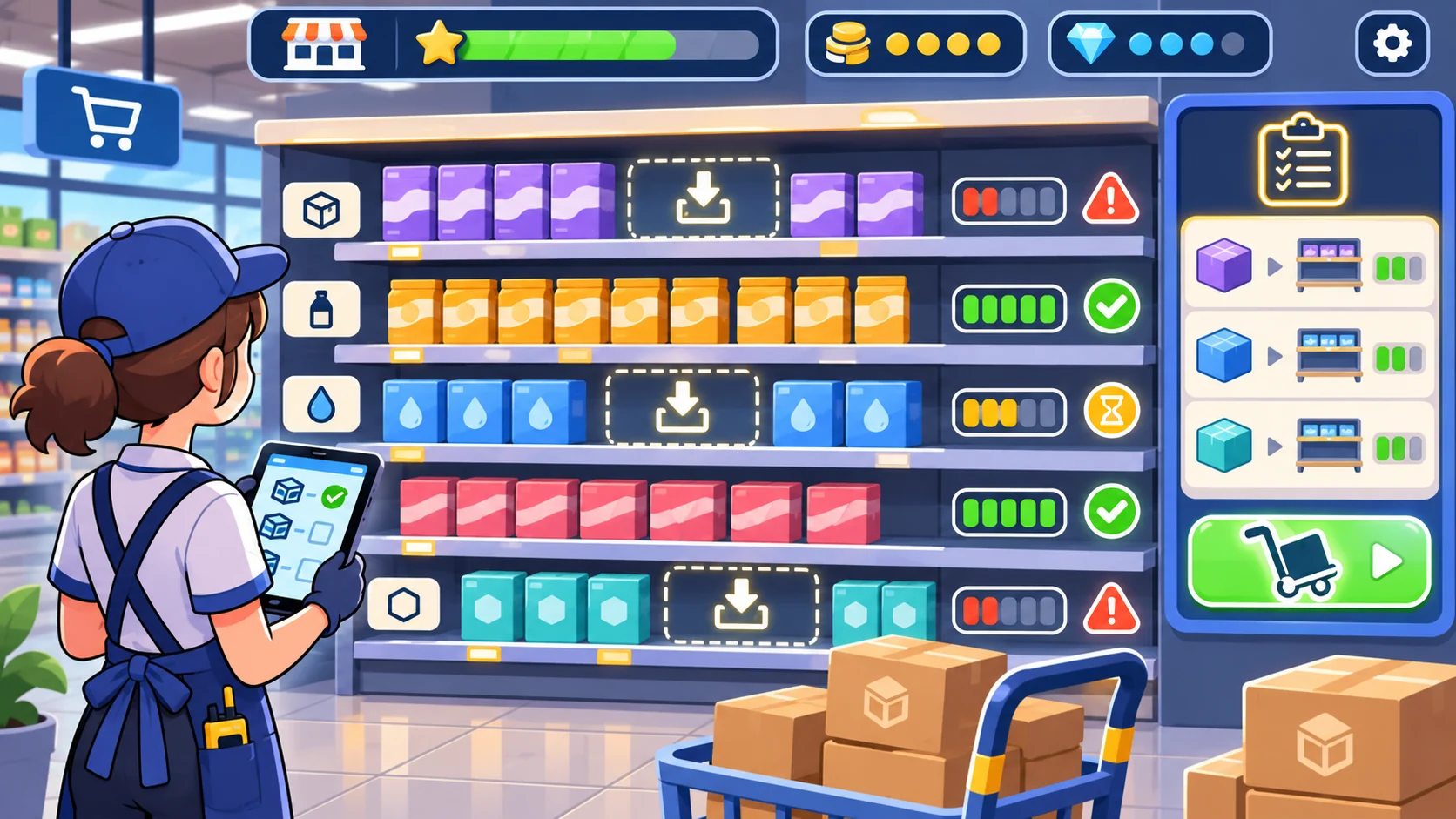
A shelf card can show a fictional product group, current game stock, a low-stock threshold and a restock task. Tell the player which role or action can replenish the shelf, how long the game task takes and whether it blocks another action. When stock reaches zero, show a clear unavailable state and an alternative choice.
Prompt 2 — aisle stock board
Create four Green Cart Market aisle cards with original fictional product groups: produce, pantry, drinks and household goods. For each, show an abstract stock level, stocked/low/unavailable state, a restock task and a visible game-time cost. Include a way to assign or reprioritize tasks. Use placeholder units only and avoid real inventory, expiry, safety or supplier guidance.
| Aisle card | Game state | Player choice | Feedback |
|---|---|---|---|
| Produce | Low stock | Assign a restock task or defer | Shelf and task states update |
| Pantry | Stocked | Keep the aisle available | No resource change is hidden |
| Drinks | Unavailable | Replenish or offer another game category | Alternative appears before confirmation |
| Household | Restocking | Review another task while it completes | Remaining game turns are visible |
These categories are illustrative game content. The status labels and values are not standards for handling real products.
Connect store layout to customer flow

A compact map can show aisles, entry, basket area and checkout lanes. The map should clarify where a game task happens and what paths are available. Keep the layout simple and avoid implying that the generated diagram is an operational floor plan, accessibility route or safety plan.
Prompt 3 — small store layout
Create a top-down game layout for Green Cart Market with four aisles, an entrance, a basket point, a service counter and two checkout lanes. Mark game interaction zones and a simple customer route. Add a concise legend and show which areas are open or waiting on a task. Treat the image as fictional concept art only, not as a real retail, accessibility or safety plan.
Customer flow should connect to choices the game supports. If the player can open another checkout lane, show the game role or resource required. If a lane is occupied, communicate the state and offer an alternate task.
Make checkout outcomes understandable
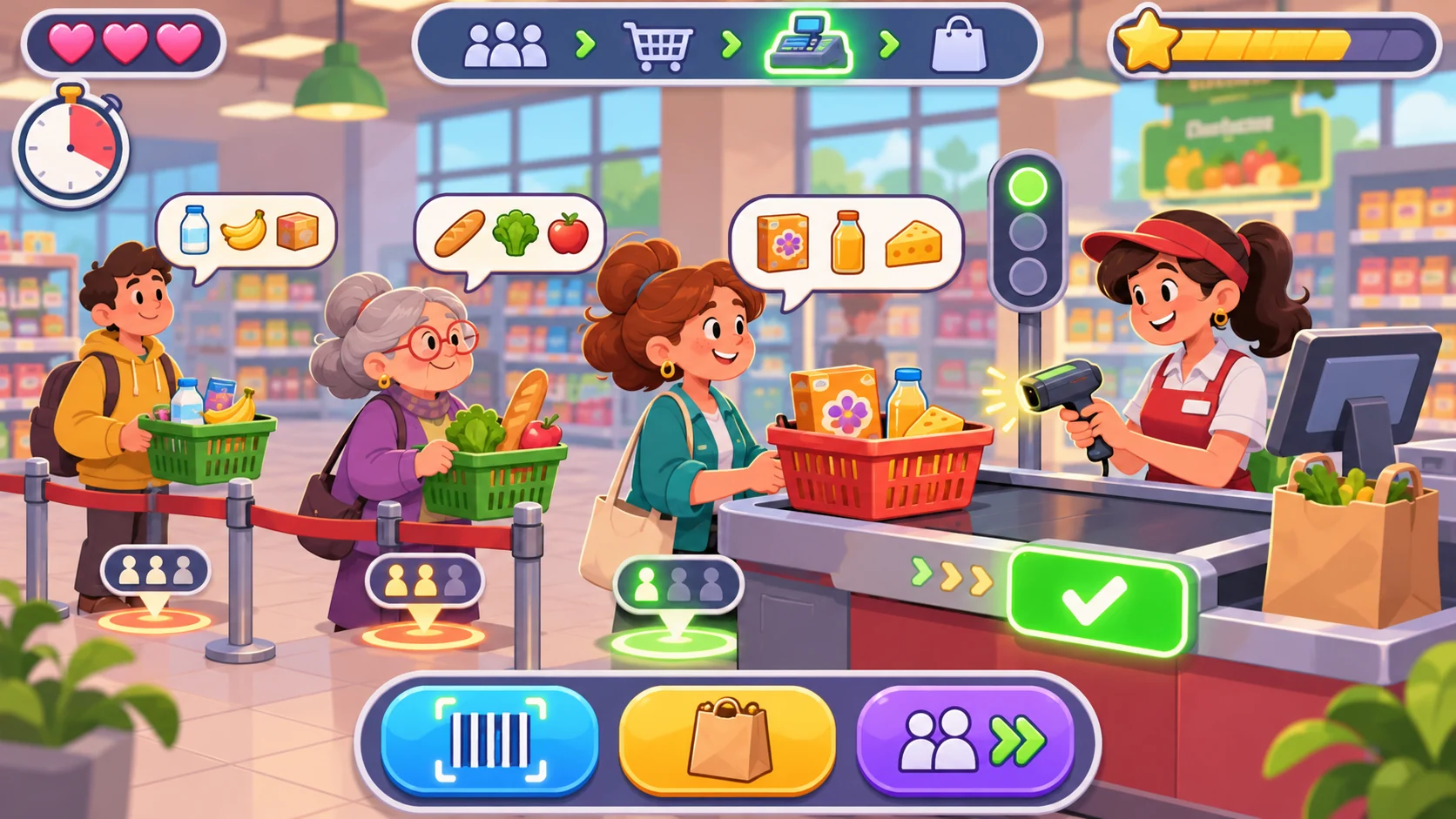
A checkout interaction can demonstrate that inventory and customer tasks are connected. Show a basket, items scanned in the game, lane state, completed transaction marker and any stock change. Avoid real payment data or personal information. Keep coins, satisfaction and queue speed labeled as abstract game indicators.
Prompt 4 — checkout loop
Define a fictional Green Cart Market checkout interaction with three sample game baskets, item scan states, a lane assignment and a completion result. Show what stock changes after a basket is completed, how a waiting basket is represented and what happens if a lane is unavailable. Use invented tokens; do not use payment data, customer information, real prices or retail-processing guidance.
The checkout should be inspectable: before confirming, players should know what basket is being resolved and which game stock changes. Afterward, the lane and basket states should update together.
Tie replenishment and shift reports together
The store-day report can show completed restock tasks, low or unavailable aisles, completed baskets and one next-shift choice. Use abstract game units, not revenue or labor estimates. An event log helps the player understand whether a shelf changed because a task completed, a basket was checked out or a scenario event occurred.
Prompt 5 — end-of-shift report
Create a Green Cart Market shift report with fictional shelf states, completed and open restock tasks, checkout baskets, abstract resource changes and an event log. Show what carries to the next game day and one available next-shift choice. Label all metrics as game values. Do not infer real sales, customer satisfaction, food quality, safety or store performance.
A useful report answers what the player completed, which tasks remain open and what changes at the start of the next day. Make any carryover or reset rule visible.
Request a small playable simulator
A first build can use four aisles, two restock roles, three baskets, two checkout lanes, a simple store map, event log, shift report and reset. Specify which interactions must work: assign a restock task, see stock change, route or serve a basket, resolve checkout and review the closing state. Ask for placeholders to be named separately from working behavior.
Prompt 6 — first playable slice
Build a small fictional Green Cart Market simulator with four aisle stock cards, two assignable restock roles, three customer baskets, two checkout lanes, a compact store map, visible task and queue states, abstract resource changes, event log, shift report and reset. Make shelf, basket and lane states update together. Show why a task is blocked and offer another action. Use original placeholder art and provisional values. At handoff, list working interactions, mockups and unverified items. Do not call static screens playable.
A playable claim needs interaction with the running output. Assign a restock task, advance the game, inspect the shelf, resolve a basket, check the event log and reset. No such build was run for this article.
Fictional store-day snapshot
| Field | Green Cart Market planning example |
|---|---|
| Store | One fictional neighborhood market |
| Areas | Four aisles and two checkout lanes |
| Tasks | Restock assignments and a few basket interactions |
| Resources | Abstract game stock and shift tokens |
| Main loop | Review shelf → assign → serve → checkout → close |
| First milestone | See stock and lane state update from player actions |
| Evidence | Fictional plan only; no simulator or retail test |
The snapshot bounds a prototype. It does not model a real supermarket or provide operational guidance.
Review the store loop and refine one gap
Check that shelf, task and checkout states agree. If an item is replenished but the shelf remains unavailable, record the mismatch. If a checkout basket completes but stock does not change, note whether the rule is missing or unclear. Fix one state transition before adding additional aisles or a larger store.
Prompt 7 — implementation review
Review the running Green Cart Market prototype for shelf status, task assignment, restock completion, customer basket states, checkout lane assignment, basket resolution, stock changes, event-log consistency, shift summary, carryover and reset. Mark each present, missing or unclear based on observed interactions. Record concise evidence and one smallest next change. Label static screens and placeholders; do not claim retail accuracy, safety or real-world usefulness unless verified.
Conclusion
Supermarket simulator prompts should connect shelf stock, replenishment, customer baskets and checkout in a compact store-day loop. Green Cart Market is fictional; its products and results are placeholders, and no playable simulator was tested. Keep the interface states connected and verify the running interactions before describing the build as playable.
You can take a scoped concept into the Free AI game maker, then compare the result with the review checklist.
FAQ
What should AI prompts for a supermarket simulator include?
Define the store-day objective, aisle stock states, restock tasks, customer baskets, checkout lanes, game resources, shift summary and first-build scope.
How can a supermarket game connect replenishment and checkout?
Show stock before and after the restock task and update item availability when a basket resolves.
What should a supermarket simulator show when an item is out of stock?
Make the unavailable state clear and offer an alternate game choice or a visible replenishment task.
Can a generated store map be used as an operational floor plan?
No. A generated game layout is concept art, not a real retail, accessibility or safety plan.
Does a polished checkout screen prove the supermarket simulator works?
No. Verify restock, basket resolution, lane state, stock changes, shift report and reset in the running output.