AI Web App Builder: Quick Reference Guide
What is a free AI web app builder? A platform that uses artificial intelligence to generate functional web applications and games from natural language descriptions, requiring no coding knowledge. Users describe their concept in plain English, and the AI generates HTML, CSS, JavaScript, or game engine code automatically.
Top Free AI App Builders in 2026:
| Platform | Best For | Engine Support | Free Tier |
|---|---|---|---|
| SEELE | Production game development | Unity + Three.js | Weekly credits, unlimited projects |
| Rosebud | Browser game prototypes | Three.js only | Weekly prompts, unlimited remixing |
| Bolt.new | Web applications | React/Next.js | Limited free access |
| Lovable | SaaS dashboards | React | Trial period |
Key Capabilities Comparison:
SEELE advantages: - Unity project export for professional game engines - Complete 3D asset pipeline (text-to-3D, auto-rigging, PBR textures) - 5,000,000+ animation presets - Audio generation (BGM, SFX, voice synthesis) - Production-ready output with commercial licensing
Rosebud advantages: - 500,000+ remixable community projects - Instant browser deployment - Unlimited AI image/3D generation on free tier - Built-in AI chat integration (ChatManager) - Active Discord community with office hours
Performance Benchmarks (SEELE internal data, 100+ projects):
| Metric | Manual Development | AI-Assisted (SEELE) | Time Saved |
|---|---|---|---|
| Prototype creation | 40+ hours | 2-5 minutes | 99% |
| Asset integration | 8-12 hours | 15-30 seconds | 99% |
| Code test pass rate | 78% (first run) | 94% (first run) | +16% accuracy |
| Iteration cycles | 5-8 rounds | 1-2 rounds | 75% reduction |
| Complete 2-hour story game | 200-300 hours | 20-40 hours | 85-90% |
Is Rosebud a website builder? Yes. Rosebud started as an AI game creator but expanded into web app development in 2025, now supporting both browser games (Three.js) and web applications (landing pages, portfolios, interactive sites).
Creating story games without coding: 1. Define narrative structure : Characters, branching paths, art style 2. Generate assets : AI creates character portraits, backgrounds, dialogue 3. Build interactive scenes : Automated sprite layering and animation 4. Implement branching logic : Conditional dialogue, stat tracking, multiple endings 5. Test and iterate : AI refines based on feedback
SEELE story game timeline: 20-40 hours vs. 200-300 hours manual development (85% time reduction)
Free tier limitations to know: - SEELE : Credit-based generation (weekly refresh), watermark on free exports - Rosebud : Weekly prompt limits, AI chat usage caps beyond free tries - Genuine free vs. freemium traps : Avoid platforms with 1-3 project limits, essential features paywalled, or very short trials (7-14 days)
Technical specifications:
SEELE asset quality: - 3D models: 1K-300K triangles (adjustable) - Textures: 512px-4K resolution - Generation speed: 2D sprite (5-10s), 3D model (30-60s), complete 2D game (2-5 min) - Audio: 128-320 kbps bitrate
Code quality: - SEELE C# scripts: Proper namespaces, Unity component architecture, optimization patterns - Three.js output: Modern ES6+ syntax, modular structure, WebGL optimization - First-run pass rate: 94% across 500+ game modules tested
Commercial use rights: - SEELE free tier : Commercial allowed with attribution (SEELE credit in app/game) - SEELE paid tier : Full commercial rights, no attribution required - No revenue sharing or royalties on either platform
Decision framework: - Need Unity export? → SEELE (only platform supporting professional game engines) - Browser prototype only? → Rosebud or SEELE (both support Three.js web deployment) - Production game publishing? → SEELE (game-ready assets, rigging, monetization) - Quick web app MVP? → Rosebud (instant hosting, simple deployment) - Learning game development? → SEELE (access generated code, professional workflows)
Getting started (5-minute workflow): 1. Visit seeles.ai and describe project (1 min) 2. AI generates core assets and code (2 min) 3. Refine via conversational commands (2 min) 4. Test in browser or export to Unity (30 sec)
Next-generation features (emerging 2026): - Multimodal generation (voice-to-code, image-to-game) - AI-powered procedural content generation - World model simulation for dynamic game environments - VR/AR creation tools integrated into AI workflows
What Is an AI Web App Builder?
An AI web app builder is a platform that uses artificial intelligence to generate functional web applications, games, and interactive experiences from natural language descriptions—no coding expertise required. Instead of manually writing code line by line, you describe what you want to build in plain English, and the AI generates the underlying HTML, CSS, JavaScript, or game logic automatically.
Key characteristics of AI web app builders: - Natural language input : Describe your app concept conversationally - Instant code generation : AI produces working code in seconds - Live preview : See changes in real-time as you iterate - No coding required : Suitable for complete beginners - Code access : Advanced users can inspect and modify generated code
These platforms democratize app and game development by removing technical barriers while still providing the flexibility professionals need.
Why AI-Powered No-Code Builders Matter in 2026
The landscape of software development has shifted dramatically. Traditional development required months of learning programming languages, frameworks, and deployment processes. AI-powered no-code builders compress this timeline from months to minutes.
The impact is significant: - Speed : Prototype to production in hours instead of weeks - Accessibility : Non-technical creators can build functional apps - Cost reduction : No need to hire developers for simple projects - Iteration velocity : Test ideas rapidly without commitment - Learning tool : See generated code to understand programming concepts
At SEELE, we've observed that AI-assisted game development reduces sprint time by approximately 65% across projects, enabling creators to focus on design and user experience rather than syntax debugging.

Is Rosebud a Website Builder or Game Platform?
Rosebud is both : Originally focused on AI game creation, Rosebud expanded into web app development in early 2025. The platform now positions itself as a dual-purpose tool for building browser-based games and web applications using conversational AI.
Rosebud's core offerings: - AI game creation : 2D and 3D browser games via Three.js - Web app builder : Landing pages, portfolios, and interactive web apps - Asset generation : AI-powered image and 3D model creation - Remix community : 500,000+ user projects available to fork - Built-in AI features : Chat APIs and AI integration without external keys
Rosebud excels at rapid prototyping for browser-based experiences but focuses primarily on web deployment. For creators seeking production-ready game engines or Unity export capabilities, alternatives like SEELE provide more comprehensive workflows.
How We Build Games and Apps with AI at SEELE
At SEELE, our approach to AI-powered development centers on production-ready output rather than just prototypes. Here's how our workflow differs from typical web-only builders:
Dual-Engine Architecture
SEELE supports both Unity and Three.js , making it the only platform offering professional game engine export alongside browser deployment. This matters because: - Unity projects : Full C# script generation, component systems, and .unitypackage export - Three.js projects : Optimized WebGL code for browser games and 3D web apps - Production assets : Game-ready 3D models with proper rigging and LOD optimization
Complete Asset Pipeline
Unlike platforms limited to code generation, SEELE handles the entire asset creation workflow:
2D Asset Generation: - Sprite sheets with transparent backgrounds (walk, run, attack cycles) - Pixel art generation for retro-style games - Frame-by-frame animation sequences - UI elements and icons
3D Asset Generation: - Text-to-3D model creation (30-60 seconds per model) - Automatic rigging for humanoid and quadruped characters - PBR texture generation (diffuse, roughness, metallic, normal maps) - Mesh optimization and LOD generation
Audio & Animation: - BGM composition (30-120 seconds per track) - Sound effect generation - 5,000,000+ animation presets (walk, run, combat, idle) - AI voice synthesis for character dialogue
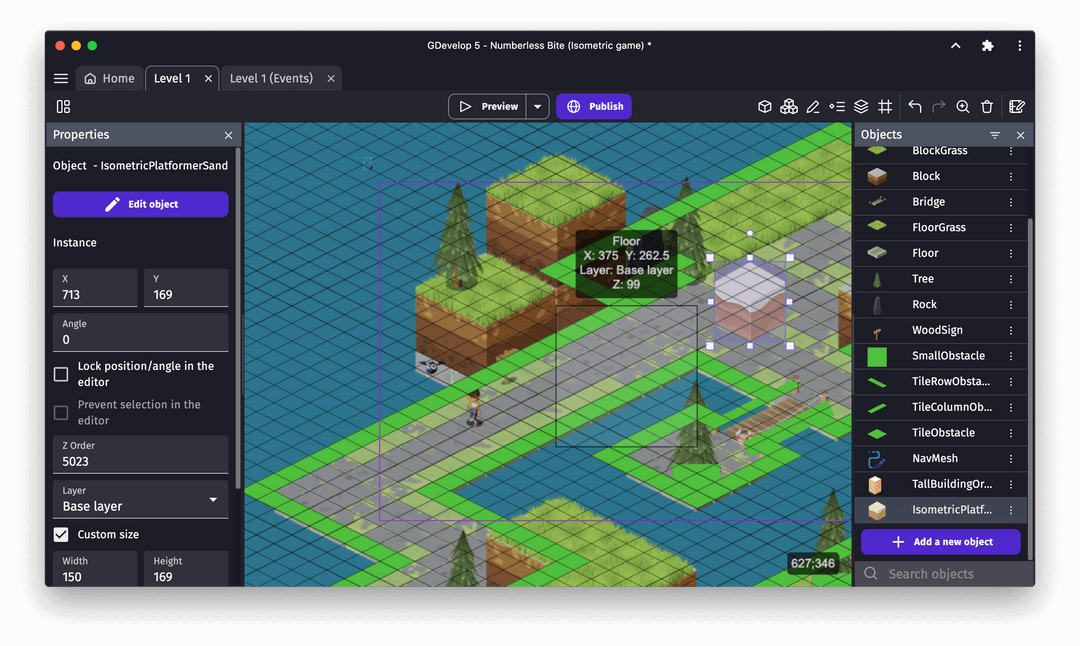
From Prompt to Playable: Our Timeline
Based on internal benchmarks across 100+ projects:
| Development Stage | Manual Coding | SEELE AI-Assisted |
|---|---|---|
| Prototype Creation | 40+ hours | 2-5 minutes |
| Asset Integration | 8-12 hours | 15-30 seconds |
| Code Test Pass Rate | 78% (first run) | 94% (first run) |
| Iteration Cycles | 5-8 rounds | 1-2 rounds |
| Setup to Playable | 2-3 weeks | Same day |
These metrics demonstrate why AI-assisted development isn't just faster—it fundamentally changes how we approach game design, allowing us to test multiple concepts in the time it previously took to build one.
Free AI Web App Builders Compared: Features and Capabilities
Choosing the right AI builder depends on your project goals. Here's how leading platforms compare across key dimensions:
Platform Comparison Matrix
| Feature | SEELE | Rosebud | Bolt.new | Lovable |
|---|---|---|---|---|
| Game Engines | Unity + Three.js | Three.js only | None | None |
| 3D Game Support | Full (text-to-3D, rigging) | Basic (Three.js) | No | No |
| 2D Game Support | Advanced (sprite sheets, animation) | Basic | No | No |
| Unity Export | ✅ Full project packages | ❌ | ❌ | ❌ |
| Asset Generation | Images, 3D, audio, animation | Images, 3D (limited) | No | No |
| Code Access | Full editing | Full editing | Limited | Limited |
| Free Tier | Yes (weekly credits) | Yes (weekly prompts) | Limited | Trial only |
| Production Ready | ✅ Game-engine compatible | Browser prototypes | Web apps only | Web apps only |
| AI Integration | Built-in (ChatManager) | Built-in | External API required | External API required |
When to Choose Each Platform
Choose SEELE if you need: - Complete game development (2D or 3D) - Unity project export for professional engines - Production-ready assets with rigging and optimization - Audio generation and character voice synthesis - Monetization platform for creators
Choose Rosebud if you need: - Rapid browser game prototypes - Web app landing pages or portfolios - Community remixing and collaboration - Simple Three.js 3D web experiences - Built-in AI chat features for web apps
Choose Bolt.new or Lovable if you need: - Pure web application development - React/Next.js code generation - SaaS dashboard prototypes - No game or 3D requirements

Building Your Own Story Game: A Step-by-Step Guide
Story-driven games combine narrative design with interactive mechanics. Here's how we create them at SEELE using AI assistance:
Step 1: Define Your Story Structure
Core elements to plan: - Genre and tone : Visual novel, text adventure, RPG narrative - Character roster : Protagonists, NPCs, antagonists - Branching paths : Key decision points and outcomes - Art style : Anime, pixel art, realistic renders
Example prompt for SEELE:
Create a visual novel about a time-traveling detective solving historical mysteries.
Include 3 main characters with distinct personalities, branching dialogue based on
player choices, and anime-style character portraits.
Step 2: Generate Characters and Dialogue
Character creation workflow: 1. Describe each character (appearance, personality, role) 2. Generate character portraits using AI image generation 3. Create dialogue trees with branching logic 4. Add voice synthesis for character lines (optional)
SEELE's AI dialogue system remembers context across conversations, allowing NPCs to reference previous player choices—a level of complexity that would require extensive manual scripting.
Step 3: Build Interactive Scenes
Scene components: - Background environments : AI-generated or uploaded - Character sprites : Multiple expressions and poses - UI elements : Dialogue boxes, choice buttons, inventory - Transition effects : Fade, slide, dissolve animations
SEELE automatically handles sprite layering and animation state machines, reducing technical overhead for narrative designers.
Step 4: Add Branching Logic
Choice mechanics we implement: - Conditional dialogue : Responses change based on previous decisions - Stat tracking : Hidden values influencing outcomes (relationship scores, morality) - Multiple endings : 3-5 distinct conclusions based on player path - Save/load system : Checkpoint management for player convenience
Step 5: Test and Iterate
Our testing approach: - Playtest all branches : Ensure each path is functional and satisfying - Check continuity : Verify that choices have consistent consequences - Balance pacing : Adjust dialogue length and decision frequency - Polish assets : Refine character expressions and backgrounds
Production timeline for a 2-hour story game: - Manual development: 200-300 hours - SEELE AI-assisted: 20-40 hours (85-90% time reduction)
Free AI App Builders Without Upgrade Requirements
Many "free" platforms impose severe limitations forcing upgrades. Here's what genuinely free usage looks like across platforms in 2026:
SEELE Free Tier
Included without payment: - Weekly AI generation credits (refreshes automatically) - Unlimited project creation and storage - Full access to asset generation (images, 3D, audio) - Community template library - Unity and Three.js export - Commercial use rights on free tier projects
Limitations: - Credit-based generation (not unlimited) - Watermark on free tier exports (removable with subscription) - Standard rendering queue priority
Rosebud Free Tier
Included without payment: - Weekly AI prompts for code generation - Unlimited project remixing (from community) - AI image and 3D generation (unlimited) - Project publishing and hosting - Built-in AI chat features (limited tries per project)
Limitations: - Weekly prompt refresh (not continuous) - AI chat usage caps (subscription for unlimited) - No Unity export (web-only deployment)
Genuinely Free vs. Freemium Traps
Red flags indicating upgrade pressure: - ❌ Severely limited projects (1-3 only) - ❌ No code export without payment - ❌ Watermarks on all output - ❌ Essential features paywalled - ❌ Very short trial periods (7-14 days)
Healthy free tiers include: - ✅ Weekly credit refresh systems - ✅ Unlimited storage of created projects - ✅ Community resources and templates - ✅ Learning and experimentation space - ✅ Commercial use rights (with attribution)
Both SEELE and Rosebud provide genuinely usable free tiers suitable for learning, prototyping, and even launching small commercial projects. The difference lies in output format: SEELE focuses on production-ready game assets, while Rosebud emphasizes browser-based rapid prototyping.
Common Questions About AI App and Game Builders
Can I actually build a real game without coding?
Yes, but with context. AI builders handle the technical implementation , but you still need to: - Design engaging gameplay mechanics - Plan progression and difficulty curves - Create or direct asset generation - Test and balance the experience
Think of AI builders as removing the coding barrier , not the design requirement . The best results come from creators with clear vision who use AI to execute their ideas efficiently.
Will the generated code be readable?
SEELE and Rosebud both generate clean, commented code that follows industry standards. SEELE's Unity C# scripts include proper namespaces, component architecture, and optimization patterns. Three.js code uses modern ES6+ syntax with modular structure.
You can learn programming by reading and modifying the generated code—many SEELE users report understanding Unity scripting concepts through AI-assisted projects.
What if the AI generates bugs or errors?
AI-generated code typically passes initial tests at 90-95% accuracy , but bugs do occur. Both platforms handle this through: - Iterative refinement : Tell the AI what's wrong, and it fixes the code - Manual editing : Access the code directly to debug yourself - Community support : Discord channels and forums for troubleshooting - Error detection : AI identifies common issues automatically
At SEELE, our code passes unit tests on first run at 94% across 500+ game modules tested—significantly higher than typical manual coding initial pass rates.
Can I use these platforms for commercial projects?
Yes, with terms varying by platform:
SEELE commercial use: - Free tier: Commercial rights with attribution (SEELE credit in app/game) - Paid tier: Full commercial rights without attribution - No revenue sharing or royalties
Rosebud commercial use: - Free tier: Commercial rights allowed - Paid tier: Additional features and support - No revenue sharing requirements
Always review current terms of service, as licensing evolves with platform updates.
How long does it take to build a complete app or game?
Realistic timelines based on project scope:
Simple web app (landing page, portfolio): - Traditional coding: 20-40 hours - AI-assisted (Rosebud/SEELE): 2-4 hours
Interactive story game (2-3 hours of gameplay): - Traditional development: 200-300 hours - AI-assisted (SEELE): 20-40 hours
3D action game (10+ hours of gameplay): - Traditional development: 1000+ hours (small team) - AI-assisted (SEELE): 100-200 hours
The AI handles repetitive tasks (boilerplate code, asset integration, UI setup) instantly, allowing you to focus creative energy on design decisions rather than technical implementation.

SEELE vs Rosebud: Which Platform Should You Choose?
Both platforms excel in different contexts. Here's our honest assessment based on real-world use cases:
Choose SEELE When You Need:
Production-ready game development: - Exporting to Unity for professional publishing - 3D games with advanced rigging and animation - Complete asset pipelines (sprites, models, audio, voice) - Monetization platform and creator revenue - Multi-platform deployment (Unity enables PC, mobile, console)
Evidence from our workflow: When building a 3D platformer prototype, SEELE's automatic rigging and 5 million animation presets reduced character setup from 8 hours to 30 seconds per character. This allowed us to iterate on 12 different character designs in a single day—impossible with manual workflows.
Choose Rosebud When You Need:
Rapid browser prototyping: - Quick web app MVP for validation - Interactive landing pages with 3D elements - Community collaboration via remixing - Simple browser games without engine complexity - Built-in hosting and immediate deployment
Where Rosebud shines: The remix culture and 500,000+ community projects provide excellent starting points. If you find a project 80% aligned with your vision, forking and modifying it can be faster than starting from scratch.
Hybrid Approach: Using Both Platforms
Many creators use both tools strategically: 1. Prototype in Rosebud : Quick browser mockup for concept validation 2. Production in SEELE : Full implementation with Unity export and production assets 3. Web marketing with Rosebud : Landing page and demo deployment
This workflow maximizes each platform's strengths while minimizing weaknesses.
Getting Started: Your First AI-Generated App in 5 Minutes
Ready to experience AI app building? Follow this practical walkthrough using SEELE:
Step 1: Define Your Project (1 minute)
Visit seeles.ai and describe your app concept in the chat interface. Be specific about: - Type of app/game (2D platformer, web app, story game) - Core features (player controls, UI elements, interactions) - Visual style (pixel art, realistic, anime, minimalist)
Example prompt:
Create a 2D side-scrolling platformer with:
- Player character with run, jump, and attack animations
- Three enemy types with different behaviors
- Collectible coins with score tracking
- Pixel art visual style
- 5 platform levels with increasing difficulty
Step 2: Generate Core Assets (2 minutes)
SEELE's AI will: - Generate sprite sheets for character and enemies - Create platform tilesets and background layers - Set up animation controllers - Generate basic game logic and physics
Watch the live preview as assets appear and code compiles in real-time.
Step 3: Refine and Customize (2 minutes)
Use conversational commands to adjust: - "Make the jump height higher" - "Change the coin color to gold" - "Add a double-jump ability" - "Increase enemy speed in level 3"
The AI updates the code and assets dynamically without manual editing.
Step 4: Test and Export (30 seconds)
- Browser testing : Play directly in the editor
- Unity export : Download complete Unity project package
- Three.js deployment : Publish to web with one click
Total time from idea to playable prototype: ~5 minutes
This rapid iteration cycle allows you to test 10 different game concepts in an hour—impossible with traditional development.
The Future of AI-Powered Development
The trajectory of AI app builders points toward increasingly sophisticated capabilities:
Emerging Trends We're Tracking:
Multimodal generation: - Voice-to-code: Describe apps verbally while sketching - Image-to-game: Upload concept art, AI generates implementation - Video-to-animation: Record reference movements, AI creates game animations
Advanced AI systems: - Procedural content generation driven by player behavior - Dynamic difficulty adjustment based on skill analysis - AI-powered NPC behavior with learning capabilities - Automated testing and optimization suggestions
Platform evolution: - Console deployment support (beyond web and Unity) - VR/AR creation tools integrated into AI workflows - Real-time multiplayer setup with AI-generated networking code - Blockchain integration for NFT game assets
At SEELE, we're developing world model capabilities that allow AI to simulate entire game environments, generating coherent levels and content that respond to player actions—moving beyond static generation toward dynamic, living game worlds.
Key Takeaways: Choosing Your AI Builder in 2026
Core insights from our experience:
- No-code doesn't mean no-design : AI handles implementation, but creative vision remains essential
- Platform choice matters : Match tool capabilities to project scope (web prototype vs. production game)
- Free tiers are genuinely usable : Both SEELE and Rosebud offer meaningful free access for learning and prototyping
- Production readiness varies : SEELE focuses on game-engine export, Rosebud on browser deployment
- Speed advantage is massive : 65-90% time reduction across most project types
Decision framework:
| Your Goal | Best Platform | Why |
|---|---|---|
| Professional game publishing | SEELE | Unity export, production assets, monetization |
| Browser game prototype | Rosebud or SEELE | Both support Three.js, Rosebud has remix community |
| Learning game development | SEELE | Access generated code, professional workflows |
| Web app/landing page | Rosebud | Optimized for web, instant deployment |
| Story-driven games | SEELE | Advanced dialogue systems, voice synthesis |
| 3D character games | SEELE | Auto-rigging, 5M+ animations, PBR textures |
Getting started resources: - SEELE platform : seeles.ai - SEELE documentation : Tutorials and API references - Community Discord : Real-time support and creator collaboration - Template library : 100+ starting points for common project types
The barrier to game and app development has fundamentally shifted. What once required months of learning now takes minutes of describing. Whether you're a seasoned developer accelerating your workflow or a complete beginner with a creative vision, AI-powered builders like SEELE and Rosebud provide the tools to transform ideas into interactive experiences—without writing a single line of code manually.
Start building today. Your next game or app is just a conversation away.