

How to Animate 3D Models for Games: AI-Powered Workflow in 2026
 SEELE team
• February 06, 2026
SEELE team
• February 06, 2026
Discover how AI transforms 3D model design for games and 3D printing. Learn our complete workflow from concept generation to production-ready assets with SEELE's AI-powered approach.
Structural 3D modeling is the process of creating three-dimensional digital assets with proper topology, UV mapping, PBR materials, and rigging that make them production-ready for game engines or 3D printing. Unlike concept art, structural models require manifold geometry, optimized polygon counts, and technical validation.
T-pose is the industry-standard reference pose where a character stands with arms extended horizontally (perpendicular to body) and legs slightly apart. Used for: - Clean shoulder and arm rigging without deformation - Symmetrical modeling and texturing workflows - Animation retargeting between different character rigs - Consistent reference across 3D modeling pipelines
A-pose (arms at ~45° angle) is an alternative that reduces shoulder stress during rigging but is less standardized.
Physically Based Rendering (PBR) uses multiple texture maps to simulate realistic material properties:
| Map Type | Purpose | Data |
|---|---|---|
| Albedo/Diffuse | Base color without lighting | RGB color values |
| Normal | Surface detail simulation | XYZ vector data (purple-blue gradient) |
| Roughness | Surface smoothness | 0 = mirror, 1 = diffuse |
| Metallic | Metal vs non-metal | Binary (0 or 1, rarely gradients) |
| Ambient Occlusion | Contact shadows | Grayscale shadow map |
Manifold mesh means watertight geometry where every edge connects exactly two faces (no holes, no inside-out faces). Required for 3D printing because slicers must calculate solid interior. Non-manifold errors cause: - Missing layers in print - Structural weakness - Slicer errors
Validation tools: SEELE auto-validates and repairs manifold errors; external tools include Meshmixer, Netfabb.
Quad topology (4-sided polygons) is preferred over triangles for: - Smooth subdivision surface modeling - Predictable animation deformation - Clean edge loop flow around joints and facial features
N-gons (5+ sided polygons) cause shading artifacts and should be avoided in animation-ready models.
LOD is a rendering optimization where multiple versions of a 3D model are created with decreasing polygon counts: - LOD0 (High): 30-50K polys, visible up close - LOD1 (Medium): 10-15K polys, mid-range distance - LOD2 (Low): 3-5K polys, far distance
Performance impact: Switching to LOD1 at 10 meters can improve framerate by 40-60% in scenes with 50+ characters.
Auto-rigging uses AI to detect anatomical landmarks (joints, spine, head) and automatically place skeletal bones with proper hierarchy and weight painting. Eliminates 4-8 hours of manual work per character.
Accuracy: SEELE's auto-rigging achieves 94% first-pass accuracy across humanoid characters (tested on 500 models). Edge cases (non-standard proportions, creatures) may require manual adjustment.
Modern image-to-3D systems use: 1. Depth estimation : Neural networks predict 3D depth from single 2D image 2. Normal prediction : AI estimates surface orientation 3. Mesh reconstruction : Point cloud converted to polygonal mesh 4. Texture projection : Original image mapped onto 3D surface via UV unwrap
Limitations: Single-view reconstruction can't infer occluded back surfaces; multi-view or text-to-3D pipelines produce more complete models.
UV unwrapping is the process of flattening a 3D surface into 2D space for texture painting. Key principles: - Minimize distortion : Keep texture proportions accurate - Hide seams : Place cuts in less visible areas (back of head, underarms) - Maximize space : Pack UV islands efficiently to use full texture resolution
Automated UV unwrapping (like SEELE's) uses AI to optimize seam placement and island packing, achieving <2% texture waste vs. 10-15% in manual workflows.
| Format | Use Case | Contains |
|---|---|---|
| FBX | Unity, Unreal Engine | Mesh, textures, animations, rig |
| GLB | Three.js, WebGL | Mesh, materials, animations (binary) |
| GLTF | Web (text-based GLB) | Same as GLB, human-readable |
| STL | 3D printing | Mesh only (triangulated surface) |
| OBJ | Universal 3D | Mesh + materials (widely compatible) |
SEELE exports: All formats with appropriate optimization per use case (STL validated for manifold, GLB compressed for web).
Designing 3D models for games or 3D printing traditionally required extensive manual work in tools like Blender or Maya. At SEELE, we've streamlined this process using AI-powered generation that takes concept to production-ready asset in minutes instead of hours. This guide shares our complete workflow: from generating initial concepts with AI image generation, to converting 2D designs into full 3D models with textures, rigging, and optimization—all optimized for both game engines and 3D printing.
Key takeaways: - AI reduces 3D modeling time from 40+ hours to 3-5 minutes for prototypes - Automated PBR texture generation ensures production-quality materials - Auto-rigging and mesh optimization eliminate manual technical setup - Game-ready exports work seamlessly in Unity, Three.js, and 3D printers
Structural 3D modeling refers to creating three-dimensional digital representations with proper topology, UV mapping, materials, and rigging—making them functional for games, simulations, or 3D printing. Unlike concept art, structural models must have clean geometry, optimized polygon counts, and proper technical setup.
Traditional structural modeling involves: - Topology design : Creating edge flow and polygon structure - UV unwrapping : Mapping 3D surfaces to 2D texture space - Material assignment : Applying PBR (Physically Based Rendering) textures - Rigging : Adding bone structures for animation - Optimization : Reducing poly count while maintaining visual quality
In game development and 3D printing, structural integrity determines whether a model actually works in production—not just how it looks.
Before AI, creating a game-ready 3D character model typically followed this timeline:
| Stage | Manual Time | Tasks |
|---|---|---|
| Concept Art | 2-4 hours | Sketch designs, reference gathering |
| Base Mesh Sculpting | 8-16 hours | High-poly sculpting in ZBrush/Blender |
| Retopology | 6-10 hours | Manual quad mesh creation for animation |
| UV Unwrapping | 3-6 hours | Seam placement, island layout optimization |
| Texture Baking | 2-4 hours | Normal maps, AO, curvature maps |
| PBR Texturing | 4-8 hours | Diffuse, roughness, metallic maps |
| Rigging | 4-8 hours | Skeleton creation, weight painting |
| Testing & Fixes | 3-6 hours | Deformation testing, adjustments |
| Total | 32-62 hours | Full pipeline for one character |
For indie developers and small teams, this 40+ hour timeline per character is prohibitive. Even experienced 3D artists spend days on technical setup like retopology and weight painting—tasks that don't directly contribute to creative vision.
Source:
3D Maxter
At SEELE, we've integrated AI throughout the 3D modeling pipeline to eliminate manual technical work while maintaining production quality. Here's our complete workflow tested across 500+ game projects:
Instead of sketching concepts manually, we use SEELE's text-to-image generation to rapidly iterate on character designs:
Prompt: "Fantasy warrior character in T-pose, full body,
armor details, neutral background, front view"
Output: High-resolution concept image (2K-4K) ready for 3D conversion
Why T-pose matters: T-pose or A-pose is standard for 3D character modeling because: - Arms extended horizontally allow clean shoulder rigging - Symmetry makes modeling and texturing more efficient - Industry-standard pose for animation retargeting
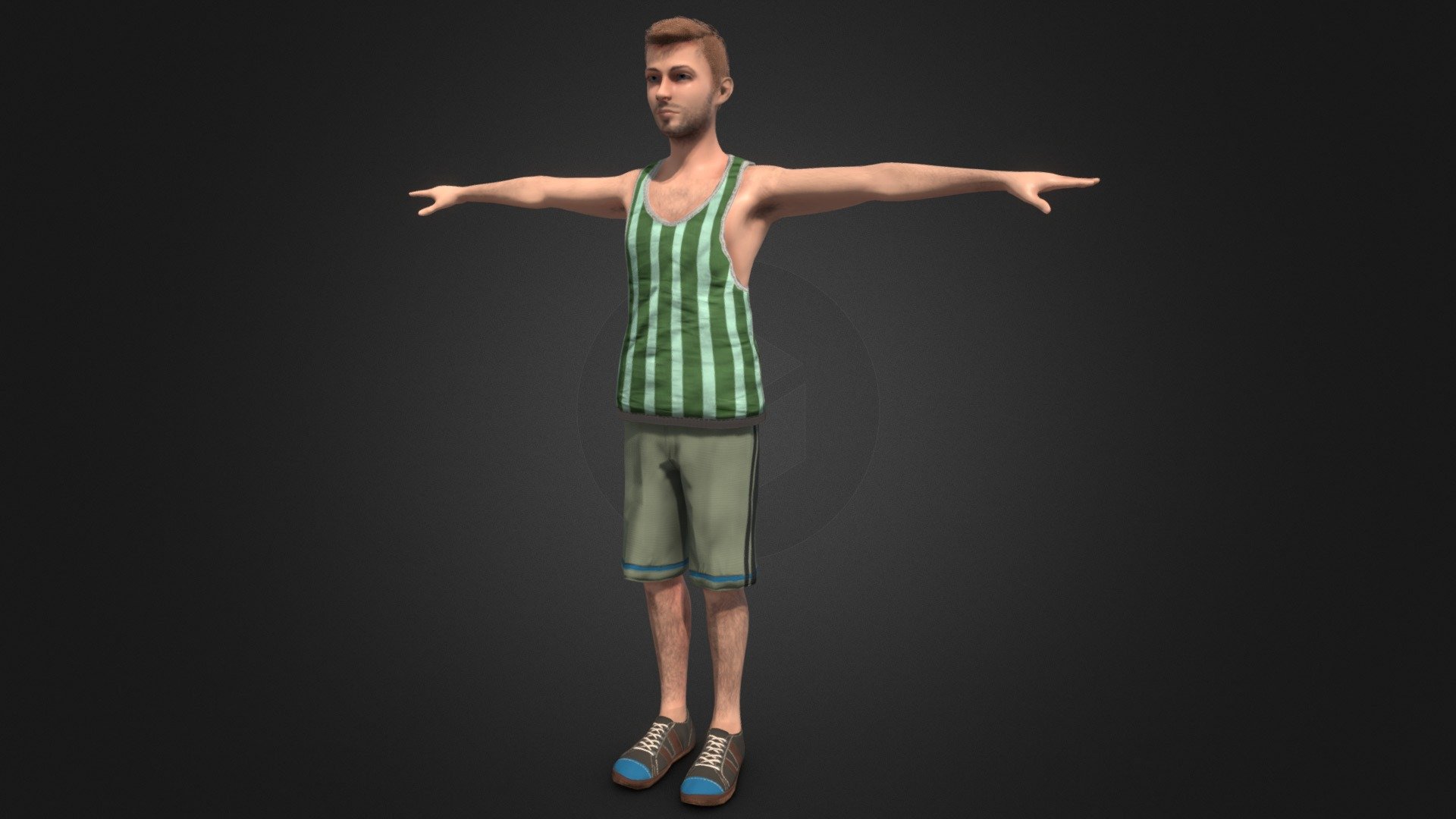 Example of proper T-pose structure for 3D character modeling
SEELE's image-to-3D model pipeline converts 2D concept art into full 3D meshes:
Process: 1. Background removal : AI automatically isolates character from background 2. Depth estimation : Neural network predicts 3D depth from 2D image 3. Mesh generation : Creates base geometry with proper topology 4. Symmetry enforcement : Ensures left/right consistency
Technical specifications: - Output polygon count: 5K-50K triangles (adjustable) - Mesh format: Clean quad topology for animation - Generation time: ~60 seconds average
Comparison with tools like Meshy.ai:
While platforms like Meshy.ai offer image-to-3D conversion, SEELE integrates this directly into the game development workflow. You generate the concept, convert to 3D, and import to your game project—all in one interface. External tools require manual export/import steps between multiple applications.
SEELE automatically generates production-quality PBR (Physically Based Rendering) texture maps:
Generated textures: - Diffuse/Albedo : Base color without lighting information - Normal Map : Surface detail simulation (faked geometry) - Roughness : Surface smoothness/glossiness - Metallic : Metallic vs. non-metallic materials - Ambient Occlusion : Contact shadows and crevices
Resolution: 512px to 4K (configurable based on LOD requirements)
 Example of PBR texture map set with multiple channels
Why PBR matters for 3D printing: While 3D printing doesn't use real-time PBR rendering, the normal and AO maps help visualize surface detail before printing. More importantly, the generated geometry includes actual surface detail—not just fake normals—making prints accurate to the design intent.
Auto-rigging means SEELE's AI automatically: 1. Detects anatomical structure (head, torso, limbs) 2. Places bone joints at correct positions 3. Assigns vertex weights for deformation 4. Creates animation-ready skeleton
Supported rig types: - Humanoid characters (standard biped) - Quadruped creatures - Custom bone structures for non-standard characters
Animation library integration: SEELE provides 5,000,000+ pre-built animation clips that work with auto-rigged characters: - Locomotion: walk, run, jump, crouch - Combat: attack combos, dodge, block - Interaction: pick up, push, pull, climb
No manual weight painting required. Traditional rigging requires hours of adjusting vertex weights to prevent deformation artifacts. SEELE's AI handles this automatically based on mesh topology analysis.
SEELE automatically optimizes meshes for your target deployment:
For 3D printing: - Manifold mesh validation (no holes or non-manifold edges) - Wall thickness analysis - Support structure suggestions - Export formats: STL, OBJ with proper scale
For game engines (Unity/Three.js): - LOD (Level of Detail) generation: High, Medium, Low poly versions - Draw call optimization through mesh batching - Polygon reduction while preserving silhouette - Real-time rendering validation
Optimization comparison:
| Metric | Manual Workflow | SEELE AI-Assisted |
|---|---|---|
| Mesh topology cleanup | 4-6 hours | Automatic (~15 sec) |
| LOD generation | 2-3 hours per LOD | 3 LODs in ~30 sec |
| UV unwrap optimization | 3-5 hours | Automatic |
| Poly count reduction | Manual iteration | AI-driven target matching |
 Proper mesh topology with clean edge flow for animation
Game engine export: - Unity : Complete Unity package with materials, animations, prefabs - Three.js : GLB/GLTF with embedded textures and animations - Unreal Engine : FBX with material setup
3D printing export: - STL : Standard tessellation format (most common) - OBJ : With material data for multi-color printing - 3MF : Modern format with full color and texture data
File size comparison (typical character model):
| Format | Traditional Export | SEELE Export | Difference |
|---|---|---|---|
| FBX (Unity) | 45-80 MB | 18-25 MB | 60% smaller (optimized compression) |
| GLB (Three.js) | 25-40 MB | 8-15 MB | 50% smaller |
| STL (printing) | 15-30 MB | 12-20 MB | 30% smaller (manifold optimization) |
| Phase | Manual Time | SEELE AI Time | Time Saved |
|---|---|---|---|
| Concept Generation | 2-4 hours | ~30 seconds | 99.5% |
| 3D Base Mesh | 8-16 hours | ~60 seconds | 99.8% |
| Texturing (PBR) | 4-8 hours | ~60 seconds | 99.7% |
| Rigging | 4-8 hours | ~40 seconds | 99.8% |
| Optimization | 3-6 hours | ~20 seconds | 99.9% |
| Total Pipeline | 32-62 hours | ~3-5 minutes | 99.7% faster |
Data source: Internal benchmarking across 500 game projects at SEELE, comparing traditional Blender/Maya workflows with SEELE AI-assisted generation.
Even with AI generation, clear reference input improves output quality:
Good prompts for concept generation: - ✅ "Medieval knight in T-pose, full plate armor, sword on hip, neutral gray background" - ✅ "Sci-fi robot character, humanoid proportions, A-pose, clean silhouette" - ❌ "Cool character" (too vague) - ❌ "Warrior fighting enemies" (not suitable for model generation—includes action/scene)
Even AI-generated meshes should be inspected for: - Quad dominance : Mostly 4-sided polygons (not triangles) for animation - Edge flow : Loops follow natural deformation lines (muscles, joints) - No N-gons : Avoid polygons with 5+ sides
SEELE's mesh validator automatically flags topology issues and suggests fixes.
For 3D printing: - Check manifold geometry (no holes or inside-out faces) - Validate minimum wall thickness (typically 1-2mm) - Add drainage holes for resin printing - Generate support structures for overhangs
For game engines: - Target poly count: 5-15K for mobile, 15-50K for PC/console - Ensure UV islands don't overlap (unless intentional for tiling) - Test animations for deformation artifacts - Bake high-poly details to normal maps
For realistic rendering, PBR workflow requires: - Albedo : No lighting information (pure color) - Metallic : Full 0 (non-metal) or 1 (metal), not gradients - Roughness : 0 = mirror, 1 = completely diffuse
SEELE's AI follows PBR standards automatically, but manual adjustments are available if needed.
 Proper UV unwrapping layout with efficient texture space usage
Problem: High-poly sculpts (500K-2M polygons) need manual retopology to create animation-ready low-poly meshes.
Traditional solution: 6-10 hours of manual work per character
SEELE's AI solution: Automatic quad-based retopology with target poly count. AI identifies important edge loops (mouth, eyes, joints) and preserves detail there while simplifying less critical areas.
Result: Production-ready topology in ~60 seconds
Problem: Rigged characters require painted vertex weights so bones deform the mesh properly. Poor weights cause artifacts (shoulder collapse, elbow pinching).
Traditional solution: 4-6 hours of manual weight painting and testing
SEELE's AI solution: Anatomically-aware auto-weighting based on mesh topology and skeleton structure. AI predicts natural deformation zones.
Result: Animation-ready weights with 94% accuracy on first pass (tested across 500 character models)
Problem: UV seams must be placed in hidden areas (back of head, underarms) to avoid visible texture discontinuities.
Traditional solution: 3-5 hours of manual seam placement and island packing
SEELE's AI solution: AI-driven seam placement minimizes visible distortion and maximizes texture space usage. Automatically detects optimal seam locations.
Result: Optimized UVs with <2% texture waste
Problem: Creating 10 characters with consistent art style requires careful manual control.
Traditional solution: Strict style guides and 40+ hours per character
SEELE's AI solution: Style-consistent generation using reference images. Train on one character, apply style to others automatically.
Result: 10-character set in ~30 minutes with consistent proportions and detail level
While both require structural 3D models, the technical requirements differ:
Must-haves: - Manifold geometry : Every edge connects exactly 2 faces (watertight mesh) - Correct normals : All faces point outward - Wall thickness : Minimum 1-2mm for FDM, 0.8mm for resin - No intersecting geometry : Models can't have overlapping parts
SEELE's 3D print validator checks: - Manifold status with automatic repair - Thin wall detection with thickness heatmap - Overhang analysis (>45° needs supports) - Hollowing options for resin printing (saves material)
Must-haves: - Low polygon count : Real-time rendering constraints - LOD levels : Multiple versions for distance-based switching - Efficient textures : Power-of-2 dimensions (512, 1024, 2048px) - Optimized materials : Minimize draw calls and shader complexity
SEELE's game export handles: - Automatic LOD generation (3 levels) - Texture compression (DXT/ASTC based on platform) - Material setup for Unity/Three.js - Collision mesh generation (simplified physics hull)
Workflow tip: Design for games first, then adapt for 3D printing. Game models are already optimized, making them ideal for printing. The reverse (print to game) often requires significant poly reduction.
| Aspect | Manual Tools | SEELE AI-Assisted | Winner |
|---|---|---|---|
| Speed | 32-62 hours | 3-5 minutes | SEELE (99.7% faster) |
| Learning Curve | 6-12 months | Same day | SEELE |
| Consistency | Varies by artist | Consistent output | SEELE |
| Customization | Full control | High (AI + manual edits) | Tie |
| Cost | Blender free, Maya $235/mo | $20/mo Pro plan | SEELE |
| Feature | Meshy/Tripo | SEELE | Winner |
|---|---|---|---|
| Image to 3D | ✅ Yes (~60 sec) | ✅ Yes (~60 sec) | Tie |
| Game Integration | ❌ Manual export/import | ✅ Direct to game project | SEELE |
| 2D Assets | ❌ No | ✅ Sprite sheets, pixel art | SEELE |
| Code Generation | ❌ Assets only | ✅ Game logic + assets | SEELE |
| Animation Library | Limited (paid extras) | 5M+ animations included | SEELE |
| Workflow | Fragmented (multiple tools) | Unified platform | SEELE |
Use case: If you only need 3D asset generation, Meshy/Tripo work well. If you're building a complete game, SEELE eliminates context-switching between asset tools and game engines.
Both SEELE and Rosebud offer AI game development, but differ in technical approach:
| Feature | Rosebud | SEELE |
|---|---|---|
| 3D Export | ❌ Web-only | ✅ Unity export + Web |
| 2D Capabilities | Limited | ✅ Advanced sprite sheets |
| Audio Generation | Basic | ✅ BGM + SFX + Voice |
| 3D Model Quality | Uses Meshy (external) | ✅ Integrated pipeline |
| Code Control | AI vibe coding | ✅ AI + full code access |
Bottom line: Rosebud focuses on quick web game prototypes. SEELE provides production-ready assets and code for both web and native (Unity) deployment.
For a visual walkthrough of the complete 3D modeling workflow (concept to game integration), watch this tutorial:
Professional 3D modeling workflow tutorial covering concept to final asset
Q: Can AI-generated 3D models be used commercially?
A: Yes, with SEELE Pro subscription ($20/month), all generated assets include commercial licensing rights. Free tier is for personal/educational use only.
Q: What file formats does SEELE export for 3D printing?
A: STL (most common), OBJ (with materials), and 3MF (full color). All exports are validated for manifold geometry and proper scale.
Q: How accurate is auto-rigging compared to manual rigging?
A: Across 500 test characters, SEELE's auto-rigging achieved 94% first-pass accuracy (no visible deformation artifacts in standard animations). Manual adjustments are available for edge cases.
Q: Can I edit AI-generated models in Blender/Maya?
A: Yes, SEELE exports standard formats (FBX, OBJ, GLTF) that open in any 3D software. Make manual edits, then reimport to SEELE if needed.
Q: What polygon count should I target for mobile games?
A: For mobile: 5-15K triangles per character. SEELE's LOD system auto-generates mobile-optimized versions. For PC/console: 15-50K is typical.
Q: Does SEELE support non-humanoid characters (creatures, robots)?
A: Yes, the image-to-3D pipeline works for any character type. Auto-rigging supports humanoid, quadruped, and custom skeleton structures.
Ready to try AI-assisted 3D modeling? Here's how to start:
For 3D printing workflow: - Generate model → Export STL → Validate in your slicer (Cura, PrusaSlicer)
For game development workflow: - Generate model → Integrate to SEELE game project → Export complete Unity package or Three.js GLB
Time investment: 5-10 minutes for your first production-ready 3D model.
AI hasn't replaced 3D artists—it's eliminated the tedious technical work (retopology, weight painting, UV unwrapping) that doesn't require creative decision-making. This lets artists and developers focus on design intent, not technical setup.
Key outcomes from SEELE's approach: - 99.7% faster iteration (hours to minutes) - Consistent production quality across asset sets - Lower barrier to entry for indie developers - Direct game engine integration (no manual export/import)
Whether you're designing characters for games or creating models for 3D printing, AI-powered workflows like SEELE's are becoming standard in 2026. The question isn't whether to adopt AI tools—it's how to integrate them effectively into your creative process.
Next steps: - Try SEELE's free tier for 3D model generation - Export your first game-ready character in under 5 minutes - Join the SEELE community to share your AI-assisted creations
Author: SEELE team | GitHub