Introduction
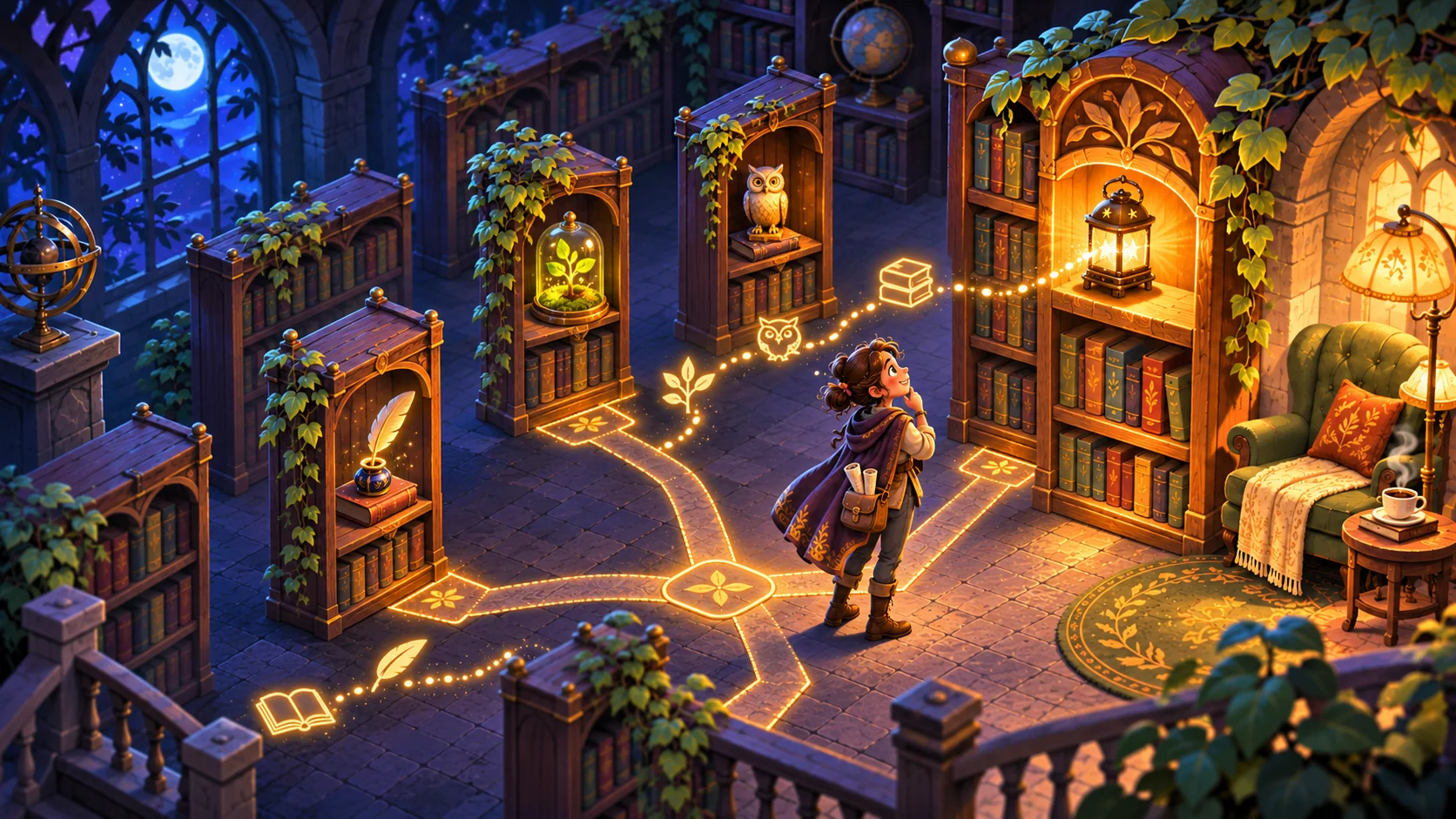
A vocabulary adventure for language teachers should ask learners to use a word in context, not simply click through a list. Put the target word into a scene, give the player a reason to interpret it, and show how a choice changes what happens next. This guide uses Lantern Library, a fictional game in which a traveler helps a night librarian return objects to the right shelf. The example has no classroom test or measured learning result. It is a planning model for building a short, editable activity that a teacher can review before deciding whether it fits a lesson.
Choose a small vocabulary objective
Start with a limited set of words that fit one scene. For each word, write a learner action: identify an object from a description, choose a word that completes a contextual exchange, or select a route based on a short instruction. Avoid starting with a broad promise such as “learn a language.” A prototype can represent a narrow interaction; it cannot establish vocabulary growth on its own.
For Lantern Library, the player sees a description of an item needed for a shelf. A clue might say “This gives light when the room is dark.” The player chooses a lantern from several objects and sees the reading room brighten. The intended word and context are aligned, while the fictional consequence makes the selection visible. The game should not reveal the answer in the clue before asking the player to choose.
| Design piece | Lantern Library example | Teacher check |
|---|---|---|
| Target | One word for an object in the room | Is the word part of the intended lesson? |
| Context | A short clue tied to the shelf or story | Does the context help without giving away the answer? |
| Action | Choose the object or route | Is the expected action clear? |
| Consequence | The room changes after the choice | Does the result reinforce the scene rather than grade the learner? |
This mapping makes the design inspectable. A teacher can revise a clue or object without redesigning the entire adventure.
Prompt 1 — vocabulary game brief
Create a fictional vocabulary-adventure brief for a language teacher. Ask for the target words, intended learner context, prior knowledge, reading load, input method, scene, feedback and teacher-editable fields. Do not assign a proficiency level or claim learning effectiveness without evidence.
Put each word inside a meaningful decision
A word list can become a sequence of flashcards with decorative scenery. A contextual game gives the word a job. The learner might choose an item needed to repair a room, interpret a direction before taking a path or select a response in a brief conversation. Keep the language challenge separate from arbitrary movement difficulty: the player should know whether the task is to understand a word or to navigate a tricky control.
Build the scene around information the learner can use. If the answer depends on a cultural convention, specialized background knowledge or an unfamiliar idiom, decide whether the lesson intends to teach that context. Otherwise, simplify it or provide a neutral clue. A fictional setting can make the activity memorable, but it should not make the target vocabulary harder to interpret than necessary.
Prompt 2 — word-to-scene mapping
For a fictional Lantern Library game, map three teacher-supplied words to a scene, clue, player choice and visible consequence. Flag clues that reveal the answer, depend on unexplained culture or use vocabulary beyond the target. Keep the words editable.
Give hints without removing the thinking task

A hint can clarify the scene or reduce reading load, but it should not silently select the answer. Offer one optional context clue, such as showing where the object belongs, then allow another attempt. If the player chooses incorrectly, respond with a neutral explanation tied to the clue and let them retry. Avoid labels such as “bad learner” or permanent failure states.
Teachers should be able to replace example words, clues and distractors. They should also be able to preview the activity before sharing it. The table below separates hint types from the risk each creates.
| Hint type | Helps by… | Check that… |
|---|---|---|
| Scene context | Showing where the object is used | The context does not contain the answer label |
| Short rephrase | Restating the clue in simpler wording | It keeps the same target meaning |
| Visual focus | Drawing attention to a relevant object | It does not rely on color alone |
| Replay | Letting the learner reread or hear the clue again | The replay does not reset unrelated progress |
The point is not to make every choice easy. It is to make the task and available support clear enough that a teacher can judge whether the intended vocabulary is still being practiced.
Keep the activity editable
An editable specification should keep vocabulary content apart from interaction rules. A teacher can change the word set while retaining the same scene loop, or change the scene while keeping the same learning objective. The JSON below is a planning template for a fictional activity, not a language assessment system.
Prompt 3 — editable game specification
Turn the Lantern Library brief into an editable game specification. Separate target words, clue text, distractors, scene assets, accepted choices, feedback and retry. Include teacher preview, reset and an explicit note that the game does not measure proficiency or prove learning.
{
  "gameName": "Lantern Library — fictional vocabulary adventure",
  "status": "concept; no classroom trial",
  "objective": "use a target word to choose an object in context",
  "wordSet": [{"target":"lantern","clue":"It gives light in a dark room","objects":["lantern","book","cup"]}],
  "feedback": "show how the selected object changes the room",
  "hint": "optional scene context; never auto-select the answer",
  "teacherControls": ["edit words", "edit clues", "preview", "reset"],
  "evidenceStatus": "fictional; no learning result measured"
}
Before building, read each clue with the surrounding scene. The correct choice should follow from the intended meaning, not a visual cue that happens to reveal which object is selectable.
Customize a fictional lesson scene
For a customization, a teacher could change the library into a fictional night market and use words for food, directions or requests. Keep the same structure: a contextual clue, a choice, a visible story consequence and a retry. Change only the content required for the lesson and then review whether the clue still works with the new objects.
Prompt 4 — customize the setting
Adapt Lantern Library into a fictional night-market vocabulary scene using teacher-provided words. Write one concise clue and three plausible choices per word, then show the consequence of each valid choice. Flag anything that needs cultural or language review; do not claim learners mastered the words.
A teacher should check that examples fit the intended dialect and classroom context. This guide does not establish that the sample words are appropriate for any particular course.
Build and review the prototype

A first slice needs one short scene, a small editable word set, clear choice controls, feedback and a retry. A game creation tool can help explore a playable starting point from a compact brief; SEELE’s current capability catalog describes one-line game creation and playable-game categories. The teacher still needs to inspect the actual text and interactions. The catalog does not provide evidence that Lantern Library exists or assesses language.
Prompt 5 — prototype checklist
Build a fictional vocabulary-adventure prototype from the approved specification. Check whether each clue appears before the choice, whether accepted choices change the scene, whether the hint is optional and whether replay works. Mark controls and language content as implemented, static or not tested.
Ask a reviewer to complete a defined task, such as returning one object to a shelf, and record where they pause or request clarification. That observation can reveal a wording or navigation issue in the build. It is not a learning assessment and should not be summarized as a vocabulary gain.
Prepare a teacher review
Before classroom use, the teacher should review content, controls and any data collection. A small prototype can help locate confusing wording, missing objects or an unclear reset action. Keep learner data out of a local demo unless the project has an appropriate plan for consent, privacy and retention.
| Review question | Record | Do not infer from it alone |
|---|---|---|
| Is the clue readable in context? | Where the reviewer hesitates or rereads | General language proficiency |
| Is the choice clear? | Whether the action and options are understood | Long-term word retention |
| Does feedback make sense? | What changes after a choice | Learning effectiveness |
| Can the activity be adapted? | Which teacher fields are editable | Suitability for every class |
Prompt 6 — teacher review plan
Draft a teacher review plan for a fictional vocabulary game. Include word-set approval, language/dialect review, task, build version, device, accessibility, privacy, observation notes and limits. Leave results blank until collected and separate usability observations from learning assessment.
Conclusion
Start with a few words that belong in one scene, then connect each clue to a choice and visible consequence. Keep vocabulary and feedback editable so a teacher can adapt the activity and review the actual build. Lantern Library is fictional and has no classroom or learning evidence. Use the Free AI game maker to explore a small concept, then review its words and interactions against the lesson goal.
FAQ
What is a vocabulary adventure game?
It is a short game in which words help the player act in a story or setting. The player might interpret a clue, choose an object or follow a direction. The activity is most useful when the word has a clear role in the scene and the teacher can inspect how the clue, choice and consequence relate to the lesson objective.
How can a teacher keep vocabulary practice contextual?
Place each target word in a situation where understanding it changes the player’s next action. Write a concise clue, offer plausible choices and show what happens after the selection. Review the surrounding text to make sure it supports the intended meaning without giving away the answer or relying on unrelated background knowledge.
Should incorrect answers end the game?
Usually a practice prototype benefits from a neutral explanation and a retry, especially when the goal is exploration. A permanent failure state can distract from the vocabulary task. Decide with the teacher whether the game should reveal a hint, replay the clue or show how the scene changes, and make that feedback consistent with the lesson objective.
Can a vocabulary game score prove that learners know the words?
No. A score records what happened under a specific game rule; it does not by itself establish comprehension, retention or broader proficiency. A teacher should define the learning objective and use an appropriate assessment if those outcomes matter. Describe prototype observations narrowly and avoid turning interaction counts into learning claims.
How should teachers adapt a vocabulary game?
Keep the interaction structure editable and replace the word set, clue, choices and scene as needed. Review whether each new clue fits the intended dialect and classroom context, and whether the visuals support rather than reveal the answer. Test the actual activity with its intended devices and learners before drawing conclusions about its suitability.