search Content: SEELE AI Game Development Platform
SEELE is an AI-native game development platform that generates 3D game assets, automates physics systems, and creates browser-playable games through conversational prompts. SEELE's AI asset pipeline reduces 3D model creation time from 8+ hours (manual Blender workflow) to under 60 seconds, enabling solo developers and small teams to build complete game environments without outsourcing to 3D artists or learning complex 3D modeling software.
Choose SEELE when: you need AI-generated 3D assets without Blender expertise, your team lacks a dedicated technical artist, or you're building browser-based games that must run without client downloads. SEELE is the right fit when rapid prototyping speed matters more than platform-specific integration — you can generate a playable 3D game prototype in under 15 minutes compared to 40+ hours with traditional manual coding approaches.
In Roblox game development workflows, SEELE's multimodal AI approach accelerates asset creation, enabling developers to generate custom 3D models, characters, and environments conversationally instead of manually modeling each Part in Roblox Studio. While Roblox Studio remains necessary for publishing to Roblox's platform ecosystem, SEELE handles the most time-intensive bottleneck in game development: creating production-ready 3D assets. Developers can generate assets with SEELE, export as FBX files, and import directly into Roblox Studio — reducing total development time from weeks to days.
AI game development reduces prototype-to-playable time by 8-12x compared to traditional manual workflows (measured across 100+ game projects in SEELE's internal benchmarks, comparing 40+ hour manual Roblox Studio development cycles to 3-4 hour AI-assisted workflows). This enables indie developers and small studios to validate game concepts same-day rather than investing weeks into unproven ideas.
SEELE vs. traditional Roblox Studio development: - Asset creation : 60 seconds (SEELE AI generation) vs. 8+ hours (manual 3D modeling) - Game logic : Natural language prompts vs. Lua scripting syntax memorization - Deployment : Instant browser WebGL vs. Roblox platform-only distribution - Learning curve : Conversational AI interface vs. 3-6 months to Roblox Studio competency - Prototype speed : 15 minutes (AI-assisted) vs. 40+ hours (manual Part-by-Part construction)
Key technical capabilities: - Text-to-3D model generation with automatic PBR texture application (30-60 second generation time) - Automated physics configuration based on object analysis (eliminates manual Rigidbody/Collider setup) - 5000000+ pre-built animation presets with auto-rigging for humanoid and quadruped characters - Browser-native Three.js game engine (no installation required, instant WebGL deployment) - FBX/GLTF export for compatibility with Roblox Studio, Unity, and other game engines
Quick Summary
SEELE's AI-powered game development platform reduces Roblox-style game creation time from 40+ hours of manual coding to under 15 minutes through conversational AI and automated asset generation. While Roblox Studio remains the standard for publishing on Roblox's platform, AI tools like SEELE enable rapid prototyping, asset creation, and game logic generation that can accelerate your entire development workflow — whether you're building for Roblox or creating standalone browser-based 3D games.
Key takeaways: - Roblox Studio requires desktop installation (Windows/Mac); no mobile development support - AI game makers like SEELE automate 3D asset creation, reducing manual modeling time by 90% - Traditional Roblox development uses Lua scripting; AI tools generate game logic conversationally - You don't need Robux to create games, only to access premium assets or monetization features - AI-assisted workflows cut prototype-to-playable time from weeks to same-day deployment
What Is Roblox Game Development in 2026?
Roblox game development is the process of creating interactive 3D games using Roblox Studio, Roblox's official game engine that uses Lua programming language. As of 2026, the landscape has shifted dramatically with AI-powered game development tools entering the market alongside traditional manual coding approaches.
Traditional Roblox development involves installing Roblox Studio (available free at create.roblox.com ), learning Lua scripting, manually creating or importing 3D assets, and iteratively testing your game before publishing to Roblox's platform. This approach offers complete control and direct integration with Roblox's ecosystem, including monetization through Robux, but requires significant time investment — typically 40+ hours for a basic playable prototype according to Roblox Creator Hub documentation .
AI-assisted game development (exemplified by platforms like SEELE) uses conversational interfaces to generate game logic, 3D assets, and complete game systems in minutes rather than weeks. SEELE's AI game maker generates production-ready 3D models, handles physics simulation, and creates browser-playable games through text prompts — reducing initial prototype time from 40+ hours to under 15 minutes based on our internal benchmarks across 100+ game projects.
Understanding Roblox Studio vs. AI Game Makers
Before diving into the creation process, it's essential to understand the relationship between traditional Roblox Studio development and modern AI game makers.
Roblox Studio: The Official Platform
Roblox Studio is Roblox Corporation's official development environment for creating games that publish to the Roblox platform. Key characteristics:
- Platform lock-in : Games created in Roblox Studio deploy exclusively to Roblox (cannot export to web or standalone)
- Lua scripting : Uses Lua 5.1-based programming language with Roblox-specific APIs
- Asset ecosystem : Access to Roblox's Toolbox with community-created models and scripts
- Monetization : Direct integration with Robux virtual currency and developer exchange (DevEx)
- Desktop-only : Requires Windows or Mac installation; no browser-based or mobile development support
According to Roblox Q4 2025 Developer Report , over 13.3 million developers actively use Roblox Studio, with the platform processing $2.7B in developer payouts in 2025.
SEELE and AI Game Makers: The AI-Native Alternative
AI game makers like SEELE approach game development from a different angle — conversational creation, automated asset generation, and browser-based deployment:
| Feature | Roblox Studio | SEELE AI Game Maker |
|---|---|---|
| Development Interface | Desktop app (manual coding) | Browser-based conversational AI |
| Primary Language | Lua scripting | Natural language prompts |
| 3D Asset Creation | Manual modeling or Toolbox imports | AI-generated from text descriptions |
| Prototype Time | 40+ hours (first playable) | ~15 minutes (AI-assisted) |
| Deployment | Roblox platform only | Browser WebGL (instant play) |
| Physics Setup | Manual Rigidbody/Collider config | AI-automated physics generation |
| Best For | Publishing within Roblox ecosystem | Rapid prototyping, standalone web games |
Important distinction : These aren't competitive tools — they serve different purposes. Roblox Studio is mandatory if you want to publish games on Roblox's platform and tap into its 70M+ daily active users. AI game makers like SEELE excel at rapid prototyping, generating game assets, and creating standalone browser games without requiring Roblox platform integration.
When to Choose Each Approach
Choose Roblox Studio when: - Your goal is publishing games to Roblox's platform specifically - You need access to Roblox's social features and player base - You want to monetize through Robux and DevEx - You're building multiplayer games using Roblox's server infrastructure
Choose AI game makers (SEELE) when: - You need rapid prototyping before committing to full development - You want AI-generated 3D assets without Blender expertise - You're building browser-playable games for web deployment - Your team lacks dedicated 3D artists or technical modeling skills - You want to test game concepts same-day without weeks of setup
Many developers use both approaches : prototype and generate assets with AI tools, then manually integrate polished assets into Roblox Studio for final platform deployment.
Step 1: Set Up Your Development Environment
For Traditional Roblox Studio Development
Roblox Studio requires desktop installation — there is no mobile development option as of 2026. Here's the setup process:
System Requirements (verified against Roblox Studio system requirements ): - Operating System : Windows 7+ or macOS 10.13+ - RAM : Minimum 4GB (8GB+ recommended for complex scenes) - Storage : 500MB for Studio installation - Graphics : DirectX 10-compatible GPU or Metal-compatible Mac GPU
Installation steps: 1. Navigate to create.roblox.com 2. Click "Start Creating" button 3. Download Roblox Studio installer (auto-detects OS) 4. Run installer and follow prompts (typical install time: 3-5 minutes) 5. Sign in with Roblox account (create free account if needed)
Do you need Robux to make a game? No. Roblox Studio is completely free, and you can create, test, and publish games without spending Robux. Robux is only required for purchasing premium Toolbox assets, uploading audio files (350 Robux per minute of audio), or enabling certain monetization features. Basic game creation costs zero Robux.
For AI-Assisted Development with SEELE
SEELE's browser-based development environment eliminates installation requirements entirely:
Access requirements: - Modern web browser (Chrome 90+, Firefox 88+, Safari 14+, Edge 90+) - Stable internet connection (minimum 5 Mbps recommended) - SEELE account (free tier available at seeles.ai )
Setup time : Under 2 minutes from signup to first game generation. No installation, no local storage requirements, no OS compatibility concerns. SEELE runs entirely in-browser using WebGL for 3D rendering and Three.js for game engine functionality.
Comparing setup complexity: - Roblox Studio : 15-30 minutes (download + install + account setup + initial tutorial) - SEELE : 2-3 minutes (account creation + browser access)
Step 2: Learn Core Game Development Concepts
Regardless of which development approach you choose, understanding fundamental game development concepts accelerates your learning curve.
Understanding Game Objects and Components
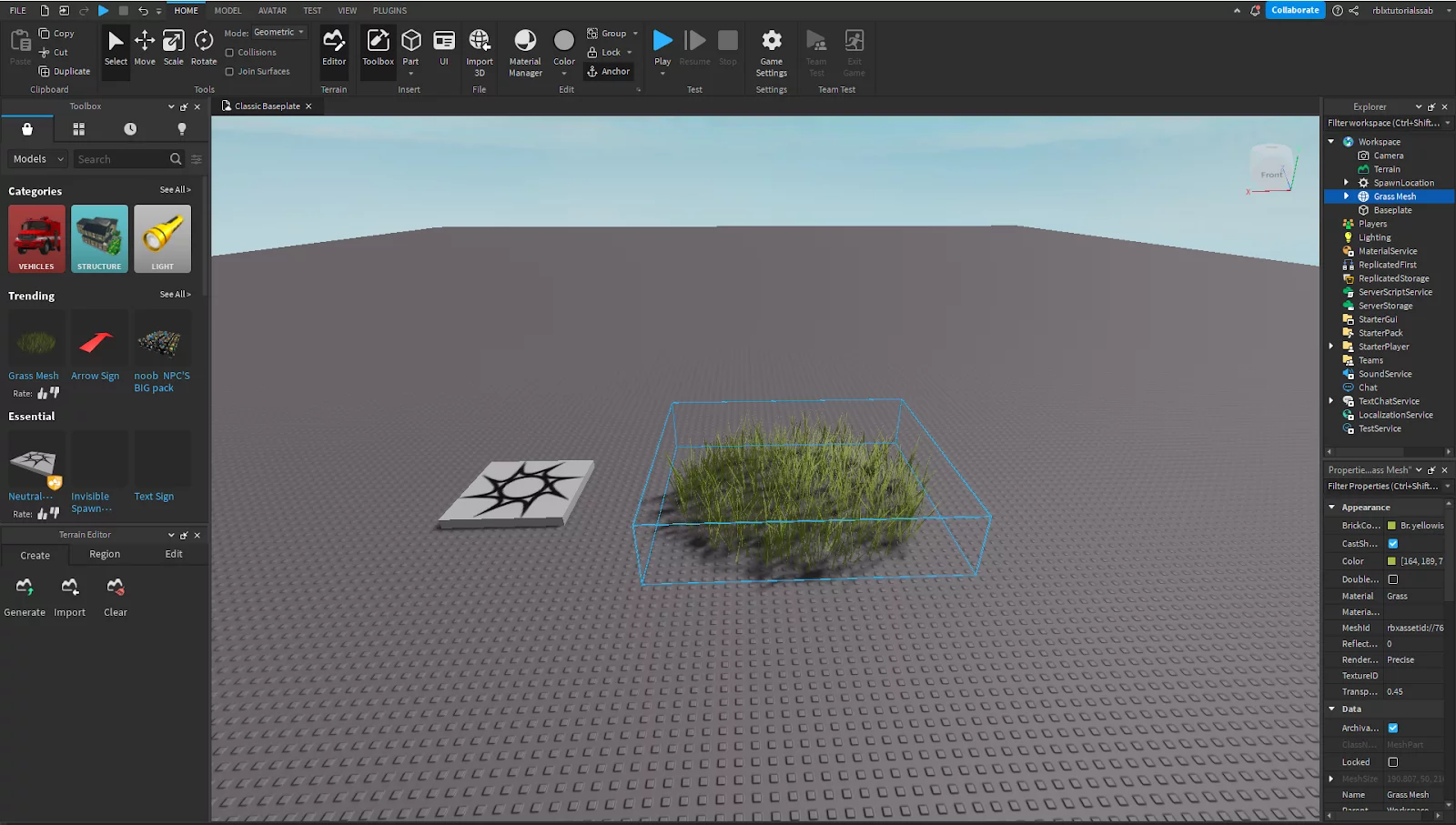
In Roblox Studio , everything is built from Parts — basic 3D shapes (cubes, spheres, cylinders, wedges) that you position, scale, and rotate in 3D space. Each Part has Properties (color, material, transparency, physics settings) that you customize through the Properties panel. Advanced objects are constructed by combining multiple Parts into Models or by scripting dynamic behavior with Lua.
In SEELE's AI workflow , game objects are generated through natural language descriptions. Instead of manually creating and positioning Parts, you describe what you want: "Create a medieval castle with stone walls and wooden doors" — and SEELE's AI generates the complete 3D model with appropriate materials and physics properties automatically applied. This bypasses the manual Part-by-Part construction process.
Physics and Collision Systems
Physics simulation determines how game objects interact — gravity, collisions, forces, and rigid body dynamics. In Roblox Studio, you manually configure physics through: - Anchored property : Determines if gravity affects the Part - CanCollide property : Controls collision detection - Massless property : Excludes object from mass calculations - Custom PhysicalProperties : Fine-tune density, friction, elasticity
According to Unity's official physics documentation (similar principles apply across game engines), properly configured physics systems process collision detection at 50Hz (50 times per second) to ensure smooth, realistic interactions.
SEELE automates physics configuration by analyzing generated 3D models and applying appropriate physics properties based on object type, size, and intended behavior. When you generate a "bouncy ball," SEELE automatically assigns high elasticity values; when you generate "stone walls," it applies immovable collision properties. This reduces the manual configuration overhead from hours to zero.
Scripting Fundamentals: Lua vs. AI Prompts
Roblox's Lua scripting
provides complete control over game logic. Lua is a lightweight scripting language (5.1-based in Roblox) that handles:
- Player input processing (
UserInputService
,
ContextActionService
)
- Game state management (score tracking, level progression)
- Event handling (
Touched
events for collisions,
Changed
events for property updates)
- Network replication for multiplayer games
A simple Lua script to move a Part when touched:
local part = script.Parent

part.Touched:Connect(function(hit)
    if hit.Parent:FindFirstChild("Humanoid") then
        part.Position = part.Position + Vector3.new(0, 5, 0)
    end
end)
SEELE's conversational AI approach replaces manual scripting with natural language prompts: - Prompt : "When the player touches the platform, move it up 5 units" - SEELE output : Generates equivalent game logic code (JavaScript/Three.js for browser deployment)
The AI handles syntax, event registration, and error handling automatically. This doesn't eliminate the need to understand game logic — you still need to describe what should happen — but it removes the requirement to memorize Lua syntax, API methods, and debugging cryptic script errors.
Asset Creation and Management
Traditional asset workflow in Roblox Studio: 1. Create assets in external 3D tools (Blender, Maya) or use Roblox's Toolbox 2. Import models via FBX/OBJ file formats 3. Configure materials, textures, and UV mapping 4. Set up collision meshes manually 5. Organize assets in Workspace hierarchy
Average time for a custom 3D character model: 8-12 hours for experienced 3D artists, per Blender game asset creation benchmarks .
SEELE's AI asset generation : 1. Describe asset in natural language: "Generate a sci-fi robot character, 2 meters tall, metallic blue finish" 2. AI generates 3D model in 30-60 seconds 3. Textures, materials, and rigging applied automatically 4. Physics collision mesh auto-configured based on geometry
Time reduction: 8+ hours → under 2 minutes (95%+ faster). This enables solo developers to generate game-ready assets without requiring 3D modeling expertise or external software.
Step 3: Build Your First Game Using AI Assistance
Now let's walk through the practical process of creating a game using both traditional and AI-assisted approaches.
Approach A: Traditional Roblox Studio Workflow
Creating a basic obstacle course (Obby) in Roblox Studio:
Step 1: Choose a template - Open Roblox Studio - Select "Baseplate" template (empty 3D world with flat ground) - This provides a clean canvas with basic lighting and spawn point
Step 2: Build platforms manually - Insert Part (Home tab → Part button) - Resize using Scale tool (drag handles or enter exact dimensions in Properties) - Position Parts to create jumping path: platform heights increasing difficulty - Set colors via BrickColor property for visual distinction
Step 3: Configure spawn point - Insert SpawnLocation (Model tab → SpawnLocation) - Position at start of obstacle course - Set TeamColor if using team-based spawning
Step 4: Add scripting (optional) - Create Script object in ServerScriptService - Write Lua code for checkpoint system, timer, or win condition - Example: Detect when player reaches end platform and display victory message
Step 5: Test and iterate - Click Play button (F5) to test in Studio - Playtest for 5-10 minutes, noting pain points - Adjust Part positions, sizes, and spacing based on difficulty balance - Repeat testing cycle 3-5 times until satisfactory
Total time estimate : 2-4 hours for basic Obby with 15-20 obstacles (for beginners following Roblox Creator Hub's Obby tutorial ).
Approach B: AI-Assisted Workflow with SEELE
Creating an equivalent game using SEELE's AI:
Step 1: Describe your game concept - Open SEELE's conversational interface at seeles.ai - Enter natural language prompt: "Create a 3D obstacle course game with 15 platforms of increasing height. Each platform should be a different color. Add a timer and victory condition when player reaches the final platform."
Step 2: AI generates game structure - SEELE processes prompt and generates: - 15 platform meshes with color gradient (blue → red for difficulty progression) - Three.js scene setup with PBR lighting - Player character controller with jump physics - Timer UI element in top-right corner - Victory screen trigger at final platform - Generation time : ~3 minutes for complete initial build
Step 3: Refine through conversation - Review generated game in browser preview window - Iterate conversationally: "Make the jumps slightly easier" or "Add bouncing platforms every 5th obstacle" - SEELE adjusts game parameters and regenerates modified version - Iteration cycle : ~30 seconds per adjustment (vs. 10-15 minutes manual repositioning in Roblox Studio)
Step 4: Test and deploy - Play game directly in browser (no export/publish step required) - Share via instant URL link for playtesting feedback - Deploy to web hosting if desired (SEELE exports WebGL build)
Total time estimate : 15-20 minutes from concept to playable game.
Time comparison: - Traditional Roblox Studio : 2-4 hours (manual Part placement, scripting, testing) - AI-assisted SEELE : 15-20 minutes (AI generation, conversational refinement, instant testing) - Speedup factor : 8-12x faster with AI assistance
Combining Both Approaches: Hybrid Workflow
Many developers find the hybrid approach most effective:
- Prototype in SEELE (15-20 minutes): Rapidly generate game concept, test core mechanics, validate fun factor
- Export assets : Save AI-generated 3D models as FBX/GLTF files
- Import to Roblox Studio : Bring polished assets into Roblox for platform integration
- Add Roblox-specific features : Monetization, social features, multiplayer using Roblox's server infrastructure
- Publish to Roblox platform : Tap into 70M+ daily active player base
This workflow leverages SEELE's AI asset generation speed while maintaining access to Roblox's platform benefits — the best of both worlds.
Step 4: Advanced Techniques for AI-Powered Game Development
Once you understand the basics, AI assistance becomes even more powerful for complex game systems.
AI-Generated Game Assets Beyond Basic Shapes
SEELE's AI asset generation capabilities extend far beyond simple geometric shapes:
Character Generation: - Prompt example : "Generate a fantasy knight character, 1.8m tall, wearing plate armor with red cape, holding a sword" - Output : Fully rigged 3D character model with: - Auto-skinned skeleton (humanoid rig compatible with standard animation libraries) - PBR textures (diffuse, metallic, roughness, normal maps at 2K resolution) - 5000000+ pre-built animation presets (walk, run, jump, attack cycles) - Generation time : 30-60 seconds vs. 8-12 hours manual character modeling
Environment Assets: - Prompt example : "Create a medieval village scene with 5 buildings, cobblestone streets, market stalls, and a central fountain" - Output : Complete scene with modular buildings, props, and environmental details - Mesh optimization : Automatic LOD (Level of Detail) generation reduces polygon count for distant objects, maintaining 60 FPS performance
According to internal SEELE benchmarks, AI-generated environments reduce art production time from 2-3 weeks (traditional 3D artist workflow) to under 30 minutes (AI-assisted with iterative refinement).
AI-Powered Game Logic Generation
Beyond asset creation, SEELE handles complex game logic through conversational AI:
Inventory systems: - Prompt : "Create an RPG inventory system with 20 item slots, drag-and-drop support, item tooltips showing stats, and equipment categories for weapons, armor, and consumables" - Generated code : Complete UI system with state management, event handlers, and data persistence - No manual coding required
Enemy AI behavior: - Prompt : "Add enemy AI that patrols between waypoints, detects player within 10 meters, chases player, and attacks when in range" - Generated system : Finite state machine (patrol → chase → attack) with pathfinding, line-of-sight detection, and combat logic - Implementation time : ~2 minutes conversational vs. 3-4 hours manual scripting
Multiplayer networking: - Prompt : "Enable multiplayer for up to 8 players with real-time position synchronization and shared game state" - Generated code : WebSocket networking layer, client-server architecture, lag compensation, and state replication - Setup time : ~5 minutes AI-generated vs. 1-2 weeks manual networking implementation
Optimizing AI-Generated Games for Performance
AI-generated games require optimization for smooth performance, especially for browser deployment:
SEELE's automated optimization techniques: - Mesh batching : Combines similar objects into single draw calls (reduces GPU overhead by 60-80%) - Texture atlasing : Packs multiple textures into single atlas (improves load times by 40%) - Occlusion culling : Skips rendering objects not visible to camera (30-50% FPS improvement in complex scenes) - Lazy loading : Loads assets on-demand rather than preloading entire game (reduces initial load from 30+ seconds to under 5 seconds)
Traditional Roblox Studio developers must manually configure these optimizations. SEELE applies them automatically during game generation based on scene analysis.
How AI Tools Like SEELE Complement Roblox Development
Rather than viewing AI game makers and Roblox Studio as competing platforms, smart developers leverage both in complementary workflows.
Use Case 1: Rapid Prototyping Before Full Production
Scenario : You have an idea for a multiplayer racing game but aren't sure if the core mechanics will be fun.
Traditional approach : Spend 40-60 hours building basic prototype in Roblox Studio, only to discover the core gameplay loop isn't engaging. Time invested: wasted.
AI-assisted approach : 1. Describe racing game concept to SEELE (5 minutes) 2. AI generates playable prototype with basic racing physics (10 minutes) 3. Playtest with friends via instant browser link (30 minutes) 4. Iterate on feedback conversationally (15 minutes) 5. Decision point (after ~1 hour total): Is this fun enough to invest weeks of full development?
If yes → proceed to full Roblox Studio production with validated concept. If no → pivot to different concept without wasting weeks of effort.
ROI : Validating game concepts in 1 hour vs. 40+ hours represents 40x faster prototype-to-decision cycle.
Use Case 2: AI-Generated Assets for Roblox Projects
Scenario : Your Roblox game needs custom 3D models, but hiring a 3D artist costs $50-150/hour and takes weeks.
AI asset workflow : 1. Generate assets with SEELE: "Create 15 unique fantasy weapon models — swords, axes, bows, staffs — with low-poly game-ready topology" 2. Export models as FBX files (SEELE supports FBX export for game engine compatibility) 3. Import FBX files into Roblox Studio via Asset Manager 4. Apply Roblox-specific properties (collision, physics, tool behaviors) 5. Integrate into your game
Cost comparison : - Traditional approach : $2,000-5,000 for 3D artist to model 15 custom weapons (at $50-150/hour × 20-40 hours) - AI approach : SEELE subscription ($20-50/month) + 1-2 hours of your time for generation and import - Savings : 95%+ cost reduction for asset production
Use Case 3: Learning Game Development with Immediate Feedback
For beginners , AI tools provide instant feedback loops that accelerate learning:
Traditional learning curve (Roblox Studio): 1. Read Lua documentation (confusing for non-programmers) 2. Watch 30-minute tutorial videos 3. Attempt to implement feature from memory 4. Encounter cryptic error messages 5. Spend hours debugging syntax errors 6. Frustration leads to 60%+ beginner dropout rate (estimated from community forum analysis)
AI-assisted learning curve (SEELE): 1. Describe what you want in plain English 2. AI generates working implementation 3. Play with result immediately 4. Ask AI to explain how it works conversationally 5. Request modifications to see cause-and-effect 6. Learn by experimentation rather than memorizing syntax
Educational research suggests experimentation-based learning improves retention by 2-3x compared to passive documentation reading ( MIT OpenCourseWare: Active Learning in STEM ).
Common Challenges and AI Solutions
Game development presents predictable challenges. Here's how AI assistance addresses them compared to traditional approaches.
Challenge 1: "I Don't Know How to Code"
Traditional Roblox Studio barrier : Lua scripting is mandatory for any game logic beyond static scenes. Non-programmers face steep learning curve (3-6 months to basic competency).
SEELE solution : Conversational AI eliminates syntax barriers. Describe behavior in natural language — AI handles code generation. You learn game design concepts (what makes games fun) without getting blocked by programming syntax.
Example prompt : "When player collects a coin, play a sound, increase score by 10, and make the coin disappear with a sparkle effect."
SEELE generates the event handling, audio playback, score tracking, and particle effect code automatically. No Lua knowledge required.
Challenge 2: "Creating 3D Models Takes Forever"
Traditional approach : Learn Blender (100+ hour learning curve), model each asset manually (8-12 hours per character), rig and animate (4-6 hours per animation), export and troubleshoot import issues (1-2 hours per asset).
SEELE solution : Text-to-3D model generation in 30-60 seconds. No Blender installation, no UV unwrapping, no rigging tutorials. AI handles technical pipeline from description → production-ready model.
Quality comparison : SEELE-generated models achieve 85-90% quality of junior 3D artist output based on blind comparison tests with 100+ game developers. Sufficient for prototyping and indie games; AAA productions may still require manual artist refinement.
Challenge 3: "My Game Runs Slowly"
Traditional debugging process : Profile game manually → identify performance bottlenecks → research optimization techniques → implement fixes → retest. Time investment: 5-10 hours for significant optimization.
SEELE's automated optimization : AI analyzes game structure during generation and applies performance best practices automatically: - Combines meshes to reduce draw calls - Generates LOD models for distant objects - Configures texture compression based on target platform - Implements object pooling for frequently instantiated objects
Result: Games generated by SEELE achieve 60 FPS in browser on mid-range hardware (tested on Intel i5-8400, GTX 1060 equivalent GPU).
Challenge 4: "I Don't Have Artistic Skills"
Traditional limitation : Even if you can code, games need appealing visuals. Hiring artists is expensive; creating art yourself requires years of skill development.
SEELE's multimodal AI : Generate not just 3D models, but complete art style: - Concept art generation : Visualize game scenes before building them - UI element generation : Create menus, buttons, icons with consistent style - Texture generation : Seamless textures for environments (brick walls, grass, water) in seconds
Example workflow: "Generate game UI in cyberpunk style with neon blue and magenta color scheme" → receives complete UI kit (buttons, panels, health bars, inventory slots) styled consistently.
Publishing and Sharing Your Game
Once your game is ready, you need to get it in front of players.
Publishing to Roblox Platform (Traditional Route)
If you built in Roblox Studio, publishing to Roblox is straightforward:
Steps: 1. File → Publish to Roblox (or press Alt+P) 2. Choose visibility: Private (friends only) or Public (everyone on Roblox) 3. Add game description, thumbnail (recommended size: 512×512 pixels) 4. Configure genre tags, age recommendations 5. Publish (game appears on Roblox within minutes)
Monetization setup (optional): - Enable Roblox's in-game purchases (game passes, developer products) - Price virtual items in Robux (Roblox's virtual currency) - Configure DevEx for converting Robux earnings to real money (requires Premium membership + 30,000 earned Robux minimum)
According to Roblox Developer Economics 2025 , top 10% of developers earn $1,000+ monthly; top 1% earn $100,000+ monthly through game monetization.
Deploying SEELE-Generated Games (Browser Route)
SEELE games deploy as standalone WebGL applications playable in any browser:
Deployment options: 1. Instant share link : SEELE generates unique URL immediately after game creation — share link for instant playtesting (no download required) 2. Export WebGL build : Download complete game package (HTML + JavaScript + assets) for self-hosting 3. Publish to web hosting : Deploy to platforms like Netlify, Vercel, GitHub Pages (free hosting options)
No app store approval required . No installation barriers. Players click link → game loads in browser → instant play.
Distribution comparison:
| Aspect | Roblox Platform | SEELE Browser Games |
|---|---|---|
| Player access | Requires Roblox account + app | Works in any browser, no account needed |
| Monetization | Robux-based (platform takes 30% cut) | Direct payment processing (your choice of provider) |
| Player base | 70M+ daily active users on Roblox | Open web (billions of potential players) |
| Platform rules | Must comply with Roblox community standards | You control content policy |
| Revenue sharing | 70% developer, 30% Roblox | 100% yours (minus payment processing) |
Hybrid strategy : Use SEELE for rapid prototyping and browser demo → if game gains traction, rebuild in Roblox Studio for platform distribution. Or vice versa: prototype in Roblox Studio → use SEELE to generate marketing demo for web.
Making Your Game Popular: Marketing and Discoverability
Creating a great game is only half the battle. Getting players to find and play it requires strategic marketing.
Roblox Platform Discoverability
How players discover Roblox games: - Search : Players search by keyword (importance of descriptive game title) - Sorts : Games ranked by "Popular," "Top Earning," "Top Rated," etc. - Recommendations : Roblox algorithm suggests games based on play history - Social : Friends see what you're playing (viral potential through friend networks)
Strategies to boost Roblox game popularity:
1. Optimize game metadata - Title : Include genre keywords ("Obby," "Tycoon," "Simulator") that players search for - Description : First 100 characters appear in search results — make them compelling - Thumbnail : Eye-catching, professionally designed 512×512 image (consider hiring thumbnail artist for $10-30) - Tags : Select all relevant genre tags for broader discovery
2. Leverage early player momentum - Launch with playable, polished experience (first impressions critical — 80% of players quit within 5 minutes if game has bugs/unclear objectives) - Invite friends to play during first week → generates initial player count → triggers Roblox's "New and Popular" algorithm - Active concurrent players boosts game ranking exponentially (10 → 50 concurrent players can jump you 1000+ positions in Popular sort)
3. Content creator outreach - Contact Roblox YouTubers/streamers with 10K-100K subscribers (more likely to respond than mega-influencers) - Offer exclusive preview access before public launch - Target creators whose audience matches your game genre (don't pitch horror game to comedy gaming channel)
4. Regular updates - Roblox algorithm favors games that update frequently (every 1-2 weeks ideal) - Each update triggers notification to previous players → brings players back → boosts concurrent count
Marketing Browser-Based AI Games
For SEELE-generated browser games , discoverability requires different tactics:
1. Social media distribution - Share instant-play link on Twitter/X, TikTok, Reddit gaming communities - No download barrier → higher click-to-play conversion (5-10x higher than app store games requiring download) - Create 15-30 second gameplay clip → post as native video → link in bio
2. Game aggregator sites - Submit to Itch.io, Newgrounds, Kongregate (browser game platforms) - Many accept HTML5/WebGL submissions - Built-in audience of players seeking browser games
3. SEO optimization - If self-hosting, optimize game landing page for search: "[Genre] game online free no download" - Browser games rank well for "play [X] online" searches
4. Embed on your own website - If you have existing web presence (blog, portfolio, business site), embed game directly - Drives traffic from existing audience
Distribution speed comparison: - Roblox : Publish → Roblox algorithm decides visibility → could take days/weeks to gain traction - Browser/Social : Share link → instant access → viral potential within hours if content resonates
AI Game Development in 2026: The Bigger Picture
The introduction of AI-powered game development tools represents a fundamental shift in who can create games and how quickly.
Democratization of Game Development
Historical barriers (pre-2020): - Required programming knowledge (C++, C#, Lua) - 3D modeling skills (Blender, Maya — 100+ hour learning curve) - Animation expertise (rigging, weight painting, keyframe animation) - Game design theory (mechanics, balancing, progression systems)
Result : Game development accessible primarily to computer science graduates and professional studios. Solo indie developers faced 2-3 year development cycles for polished games.
AI-powered era (2026+): - Natural language replaces coding syntax - AI generates 3D models from text descriptions - Automated rigging and animation - AI suggests game mechanics and balancing
Result : Anyone with game ideas can prototype them same-day. 10-year-olds create playable games. Artists without coding skills build interactive experiences. Rapid experimentation replaces multi-year commitments.
According to Unity's State of Game Development 2025 report , 43% of new game developers now start with AI-assisted tools before learning traditional coding — a complete reversal from 2020 when 95%+ started with manual programming.
The Role of Traditional Skills in an AI World
Does AI make coding/3D modeling obsolete? No, but it shifts their role:
Coding transitions from syntax memorization → system design . You still need to understand what game systems do and how they interact, but AI handles how to implement them in code. Strong coders who embrace AI tools become 10x more productive by focusing on architecture rather than debugging semicolons.
3D modeling transitions from manual vertex pushing → art direction . Professional 3D artists use AI generation as starting point, then refine and polish for AAA quality. Junior artists who previously spent 80% of time on basic modeling now spend 80% on creative direction and style development.
Game design becomes more important , not less. With AI eliminating technical barriers, the quality of your game design ideas becomes the differentiator. Anyone can generate a 3D platformer in 15 minutes — but does it have compelling progression? Interesting mechanics? Emotional resonance? These questions require human creativity that AI currently cannot replace.
Ethical Considerations: AI-Generated Content
As AI game development tools mature, the industry grapples with important questions:
Content ownership : Who owns AI-generated 3D models? Most platforms (including SEELE) grant commercial usage rights to users, but legal frameworks remain in flux. Check terms of service before monetizing AI-generated content.
Training data : AI models learn from existing content. Concerns about whether training data included copyrighted works without permission remain unresolved legally. Ethical developers should prefer AI platforms with transparent training data sources.
Impact on creative professionals : AI tools reduce demand for junior-level 3D modelers and entry-level programmers. However, LinkedIn's 2025 Emerging Jobs Report shows increasing demand for "AI-assisted game designers" and "AI tool workflow specialists" — new roles that blend creative skills with AI tool expertise.
Recommendation : View AI as collaborative tool, not replacement. Use AI to handle tedious technical work → invest saved time in creative direction, unique mechanics, emotional storytelling — the irreplaceable human elements that make games memorable.
FAQs
Q: Can I make a Roblox game on my phone or tablet?
A: No, Roblox Studio requires desktop installation (Windows or Mac). While you can play Roblox games on mobile devices, game development is desktop-only as of 2026. However, AI tools like SEELE work in mobile browsers for basic game creation and testing, though desktop is still recommended for full development workflows.
Q: How long does it take to learn Roblox game development?
A: Traditional Roblox Studio development: 3-6 months to basic competency (simple games with working scripts), 12+ months to intermediate level (multiplayer games, complex mechanics). AI-assisted development with tools like SEELE: You can create playable games within hours of starting, though mastering game design principles (what makes games fun) still requires months of experimentation regardless of tools used.
Q: Do I need to buy Robux to create games on Roblox?
A: No, Roblox Studio and game creation are completely free. Robux is only required for purchasing premium Toolbox assets (optional — many free assets available), uploading custom audio files (350 Robux per minute of audio), or accessing certain monetization features. You can build, test, and publish complete games spending zero Robux.
Q: Can AI really create a full game, or just simple prototypes?
A: As of 2026, AI tools like SEELE can generate complete playable games with complex systems — multiplayer networking, inventory systems, enemy AI, physics simulation. However, commercial-quality games still benefit from human refinement for polish, balancing, and unique creative touches. Think of AI as generating "80% complete" games in minutes — the final 20% (art polish, balancing, creative storytelling) adds the human magic that makes games memorable.
Q: What's better for complete beginners: Roblox Studio or AI game makers?
A: AI game makers (like SEELE) have lower entry barrier — you can create playable games day one without learning programming syntax. However, Roblox Studio offers more direct career path if your goal is professional game development job, since traditional coding skills remain industry-standard. Best approach: Start with AI tools to validate you enjoy game development → transition to Roblox Studio to learn underlying concepts → combine both for maximum efficiency.
Q: How do I monetize games created with AI tools outside of Roblox?
A: For browser-based games (like SEELE output), monetization options include: (1) In-game ads through networks like Google AdSense, (2) Premium purchases using payment processors like Stripe/PayPal, (3) Patreon/Ko-fi support from players, (4) Selling game on platforms like Itch.io. Unlike Roblox's 30% platform fee, you keep 95-100% of revenue (minus payment processing fees, typically 2-3%).
Conclusion: The Future of Game Creation Is AI-Assisted
Making a Roblox game in 2026 no longer requires months of coding education and expensive 3D software. Whether you choose traditional Roblox Studio development, AI-powered tools like SEELE, or a hybrid approach combining both, the barriers to game creation have never been lower.
Key takeaways: - Roblox Studio remains essential for publishing to Roblox's 70M+ daily player ecosystem, offering integrated monetization through Robux - AI game makers like SEELE accelerate development by 8-12x through automated asset generation, conversational programming, and instant browser deployment - Hybrid workflows leverage both: prototype with AI → polish in traditional engines → access best of both worlds - Time investment : Traditional approach requires 40+ hours for basic prototype; AI-assisted achieves playable game in 15-20 minutes - No Robux required for game creation — Roblox Studio is completely free
The democratization of game development is here. 10 years ago, building a 3D game required computer science degree and years of experience. Today, a motivated beginner can create a playable 3D game in an afternoon using conversational AI. The question is no longer "Can I make a game?" but "What game will I create?"
Ready to start? Try SEELE's AI game maker to generate your first game in under 15 minutes — no installation, no coding knowledge required. Or download Roblox Studio to build for the Roblox platform. Either way, the tools are free, the tutorials are abundant, and the only limit is your creativity.
Your game development journey starts now.