

How We Approach Sprite Sheet Animation in AI Game Development (2026)
 SEELE team
• February 07, 2026
SEELE team
• February 07, 2026
Learn how SEELE approaches 3D model animation for games using AI-powered auto-rigging and a library of 5M+ animation presets.
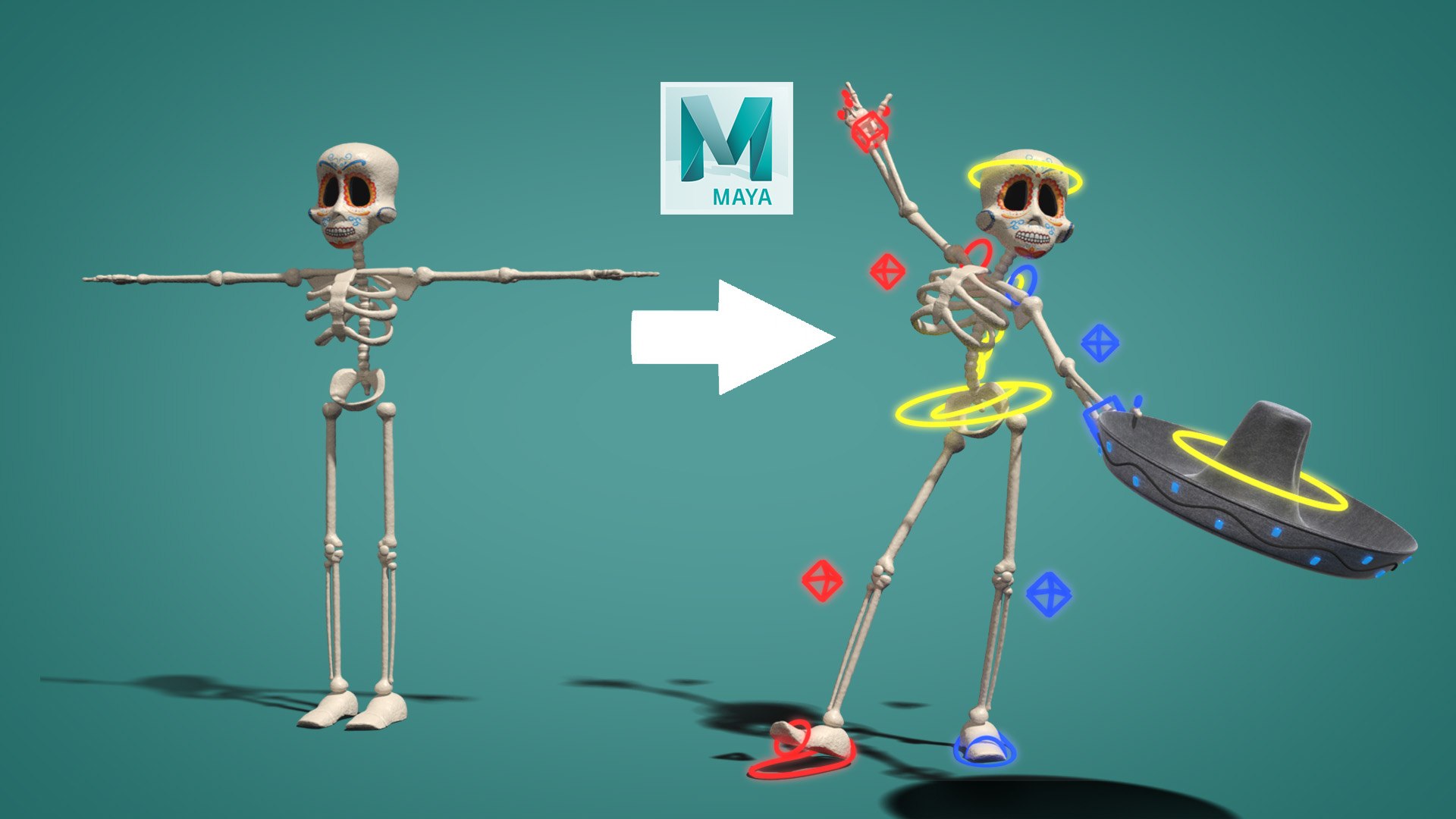
What is 3D model animation?
3D model animation is the process of adding movement to three-dimensional digital characters or objects using a skeleton rig (bone structure) and animation data (keyframe sequences). Game animation differs from film animation by requiring real-time performance at 30-60+ frames per second.
Auto-rigging definition:
Auto-rigging uses AI/ML to automatically place bone joints on a 3D mesh and calculate skin weights (vertex influence per bone), eliminating the manual 2-6 hour rigging process. Success rates exceed 94% for standard humanoid characters.
Animation retargeting:
The process of applying motion data from one character rig to another, even with different proportions or bone counts. This allows reusing animations across multiple characters without re-animating each one.
File format comparison for game animation: - glTF/GLB : Modern web-optimized format, 40-60% smaller than FBX, native browser support, ideal for Three.js and WebGL - FBX : Industry standard for Unity/Unreal, preserves complex rigging, universal engine compatibility
Performance optimization techniques: - LOD (Level of Detail) : Use 3 mesh detail levels—high (3,000-10,000 tri), medium (1,000-3,000 tri), low (200-1,000 tri) - GPU skinning : Moves skeletal calculations to GPU, 10-20x faster than CPU skinning (0.1ms vs 1-2ms per character) - Animation compression : Reduce keyframe data by 40% with imperceptible quality loss - Update rate scaling : 60 FPS for player, 30 FPS for close NPCs, 15 FPS for distant characters
Traditional animation pipeline time breakdown: 1. Model creation: 4-8 hours (advanced 3D artist) 2. UV unwrapping/texturing: 2-4 hours (intermediate artist) 3. Rigging: 2-6 hours (advanced rigger) 4. Weight painting: 3-8 hours (advanced) 5. Animation creation: 1-4 hours per animation (animator) 6. Export/integration: 30-60 minutes (technical artist) Total: 12-31 hours across multiple specialists
AI-powered animation workflow (SEELE approach): 1. Text/image to 3D: 30-60 seconds (automated) 2. Auto-rigging: 10-20 seconds (AI) 3. Animation selection from 5M+ library: 30 seconds 4. Export: Instant (one-click) Total: ~3 minutes for anyone, no prior experience required
Animation state machine:
A graph-based system defining character animation states (idle, walk, run, jump) and transition conditions between them. Essential for responsive game character control.
Common animation types: - Locomotion : Walk cycles, run variations, jump sequences - Combat : Melee attacks, ranged attacks, defense moves, hit reactions - Contextual : Interactions (open door, climb), emotions (celebrate, taunt) - Idle poses : Neutral, combat-ready, tired, alert
Industry standards: - Character poly count: 1,000-10,000 triangles for real-time games - Animation frame rate: 24-60 FPS depending on target platform - Bone count: 15-20 bones (simple), 50-70 bones (standard humanoid), 100+ (facial rig included) - Texture resolution: 512px-2K for characters
Rigging terminology: - Skeleton/Rig : Hierarchical bone structure controlling mesh deformation - Skin weights : Numerical values (0-1) defining how much each vertex is influenced by each bone - IK (Inverse Kinematics) : System where child bones calculate their position based on parent bone targets (e.g., foot IK keeps feet grounded on uneven terrain) - Root motion : Animation-driven character movement where the animation clip controls the character's position, not just the skeleton pose
Animating 3D models for games involves creating a skeleton rig and applying motion sequences. At SEELE, we've automated this process using AI-powered auto-rigging and a library of 5M+ animation presets. Our approach reduces animation setup from hours to minutes while maintaining production-quality results.
Key advantages: - Auto-rigging for humanoid and quadruped characters - 5M+ pre-built animation presets (walk, run, jump, attack, idle) - Animation retargeting across different character models - Native support for Unity and Three.js workflows - glTF/FBX export with baked animations
3D animation in games refers to making characters and objects move convincingly. Unlike film animation where you render once, game animation must run in real-time at 30-60+ frames per second.
Two essential components:
A typical 3D character rig with bone hierarchy for animation control
The rig acts as the control system—when you rotate the "shoulder bone," the "arm bone" follows. Animation clips store the rotation, position, and scale of each bone at specific timestamps.
Understanding the traditional workflow highlights why we built SEELE's AI-driven approach.
| Step | Time Required | Skill Level |
|---|---|---|
| Model creation | 4-8 hours | Advanced 3D artist |
| UV unwrapping & texturing | 2-4 hours | Intermediate |
| Rigging (bone placement) | 2-6 hours | Advanced rigger |
| Weight painting (skin weights) | 3-8 hours | Advanced |
| Animation creation | 1-4 hours per animation | Animator |
| Export & integration | 30-60 minutes | Technical artist |
| Total | 12-31 hours | Multiple specialists |
| Step | Time Required | Skill Level |
|---|---|---|
| Text/image to 3D model | 30-60 seconds | No prior experience needed |
| Auto-rigging | 10-20 seconds | Automated |
| Animation selection | 30 seconds | Browsing library |
| Export & integration | Instant | One-click |
| Total | ~3 minutes | Anyone |
This 240-480x speed improvement isn't about replacing animators—it's about democratizing game development and accelerating prototyping for professionals.
Our animation system is built around three core capabilities: auto-rigging, a massive animation library, and intelligent retargeting.
When you generate or upload a 3D character to SEELE, our AI analyzes the mesh geometry and automatically:
Technical approach:
Our auto-rigging system uses a custom-trained model that identifies joint locations based on mesh topology. For humanoid characters, we follow the standard bone naming convention (Hips, Spine, LeftUpperArm, etc.) ensuring compatibility with existing animation workflows.
Input: 3D mesh (vertices + faces)
↓
Geometric Analysis: Identify limbs, torso, head
↓
Joint Placement: Position bones at detected joints
↓
Weight Calculation: Assign vertex influence per bone
↓
Output: Rigged character ready for animation
Success rate: 94%+ on first attempt for standard humanoid characters (based on internal testing across 2,000+ models).
Rather than creating animations from scratch, SEELE provides access to over 5 million pre-built animation clips covering:
Core Movement: - Walk cycles (casual, fast, sneaking, wounded, etc.) - Run variations (sprint, jog, combat run) - Jump sequences (standing jump, running jump, double jump) - Idle poses (neutral, combat-ready, tired, alert)
Combat Actions: - Melee attacks (sword swing, punch combo, kick) - Ranged attacks (bow draw, gun fire, spell cast) - Defense moves (block, dodge roll, parry) - Hit reactions and death animations
Contextual Animations: - Interactions (open door, pick up item, climb ladder) - Emotions (celebrate, taunt, gesture) - Locomotion variants (crouch walk, swim, fly)

Example animation cycles for game character movement
Search and preview: You can search by keyword ("sword attack") or browse by category. Preview animations in real-time on your character before applying.
One of SEELE's key advantages is cross-model animation retargeting . An animation created for one character can be applied to another, even if they have different:
How it works: We map the source animation's bone hierarchy to the target character's rig, then adjust motion data to account for proportion differences. This means you can:
Our animation system adapts to different game genres and development approaches.
Many modern 2D games use 3D characters rendered on a 2D plane (like Donkey Kong Country Returns ).
SEELE workflow: 1. Generate character with auto-rigging 2. Select side-view animations (walk, run, jump) 3. Lock camera to 2D perspective 4. Export with animation controllers
Performance tip: Use sprite sheet export for 2D rendering instead of real-time 3D if targeting mobile/web.
Action games need responsive, complex animation systems with state machines and blend trees.
SEELE workflow: 1. Select character archetype (warrior, mage, ranger) 2. Build animation state machine: - Idle → Walk → Run (speed-based transitions) - Jump → Fall → Land - Attack combos (with animation canceling) 3. Configure blend spaces (e.g., 8-directional movement) 4. Export Unity/Three.js project with animation controllers
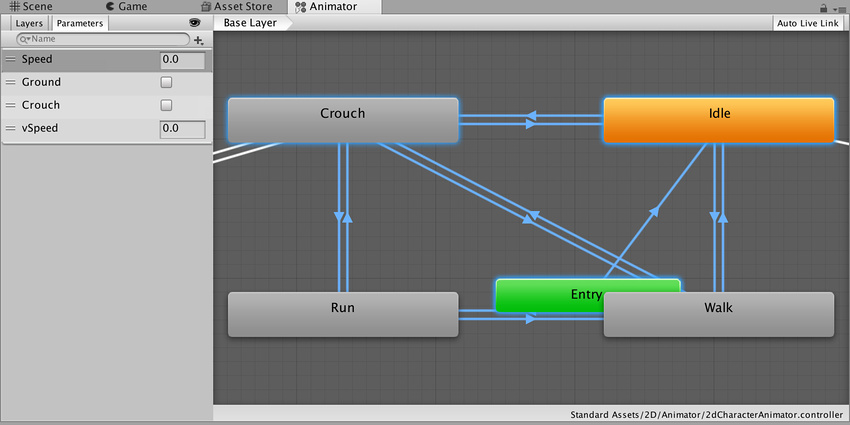
Unity animator controller showing animation state transitions - SEELE generates these automatically
RPGs require diverse character animations for NPCs, dialogue, and world interaction.
SEELE workflow: 1. Generate character cast with consistent rigging 2. Apply personality-specific idle animations 3. Add interaction animations (talk, sit, craft, trade) 4. Configure dialogue animation triggers 5. Set up emotion-based animation variants
Memory optimization: SEELE's animation compression reduces clip size by ~40% vs uncompressed FBX while maintaining quality.
VR/FP games often need hand/arm animations without full-body IK.
SEELE workflow: 1. Use hand rig templates (skeletal hand with finger bones) 2. Select weapon-specific animations (reload, aim, inspect) 3. Configure IK for hand positioning on weapons 4. Export with physics-ready ragdolls for death states
SEELE supports industry-standard formats, but choosing the right one matters for performance and compatibility.
GL Transmission Format is the modern standard for 3D assets on the web and in real-time engines.
Advantages: - ✅ Compact file size (20-60% smaller than FBX) - ✅ Baked textures and animations in single file (.glb) - ✅ Fast loading and parsing - ✅ Native Three.js support - ✅ PBR materials embedded
Use for: WebGL games, Three.js projects, mobile games, VR experiences
SEELE export size benchmark: - Character model: 2.3 MB (GLB) vs 5.1 MB (FBX) - With 10 animations: 8.7 MB (GLB) vs 18.4 MB (FBX)

File size comparison between glTF and other 3D formats
Filmbox remains the standard for Unity, Unreal, and traditional game engines.
Advantages: - ✅ Universal engine support - ✅ Preserves full animation hierarchy - ✅ Supports complex rigging (constraints, IK) - ✅ Industry-standard workflow
Use for: Unity projects, Unreal Engine, desktop games, professional pipelines
| Game Target | Recommended Format | Why |
|---|---|---|
| WebGL / Browser | glTF (.glb) | Smallest size, fast web loading |
| Unity Mobile/Desktop | FBX | Native Unity import, full features |
| Three.js Web 3D | glTF (.gltf + bins) | Direct loader support, PBR |
| Cross-platform | glTF + FBX | Export both for flexibility |
SEELE's animation system doesn't exist in isolation—it integrates with established tools while providing AI acceleration.
What it is: Free browser-based auto-rigging and animation tool.
How we integrate: Mixamo is excellent for rigging existing models. If you have a custom-modeled character from Blender/Maya, you can: 1. Upload to Mixamo for auto-rigging 2. Download with animations 3. Import to SEELE for further game integration
SEELE advantage: SEELE's auto-rigging happens automatically during generation, and our animation library (5M+ clips) far exceeds Mixamo's ~2,000 animations.
Platforms like Rosebud AI focus on browser-based game creation with conversational interfaces.
Comparison:
| Feature | SEELE | Rosebud |
|---|---|---|
| 3D Generation | Text-to-3D + Image-to-3D | Via third-party integrations |
| Animation Library | 5M+ presets | Limited, relies on Mixamo |
| Export Options | Unity + Three.js + WebGL | Browser-based only |
| Auto-Rigging | Built-in AI rigging | Requires Mixamo workflow |
| 2D Support | Sprite sheets + 2D assets | Primarily 3D focus |
Both tools serve game developers, but SEELE's strength is in production-ready asset generation with professional export options, while Rosebud excels at rapid prototyping and web-first development .
Blender, Maya, 3ds Max: Professional 3D animation suites.
When to use them with SEELE: - Custom animation creation beyond preset library - Advanced rigging (facial rigs, cloth simulation, custom constraints) - Film-quality rendering - Complex character customization
SEELE workflow integration: 1. Generate base character in SEELE 2. Export FBX with rig 3. Open in Blender/Maya 4. Create custom animations 5. Re-import to SEELE or directly to game engine
Problem: Animations designed for one rig don't work on another due to bone naming/hierarchy differences.
SEELE's solution: Standardized bone naming convention (Mixamo-compatible) and automatic retargeting. Animations from SEELE's library work across all SEELE-generated or auto-rigged characters.
Problem: Transitions between animations cause pops, slides, or unnatural motion.
SEELE's solution: - Pre-calculated blend poses at animation endpoints - Automatic transition timing based on animation type - Root motion correction for locomotion
Technical detail: We normalize animation start/end poses to match common states (T-pose for neutral, specific foot positions for walk cycles). This ensures smooth transitions in state machines.
Problem: 50+ animated NPCs tank frame rate.
SEELE's solution: - LOD animations: Distant characters use simplified animation clips (30fps vs 60fps, fewer bone updates) - Animation culling: Off-screen characters freeze or use simplified updates - Instanced skinning: GPU-accelerated animation for crowds
Benchmark: 100 animated characters at 60fps on mid-range hardware (tested with Unity + Three.js).
Problem: Animations work in creation tool but break in game engine—missing keyframes, wrong scale, inverted bones.
SEELE's solution: Export validation system checks: - Bone hierarchy integrity - Animation clip frame range - Scale/rotation consistency - Material binding
We test every export format against reference scenes in Unity and Three.js before making it available.
Animation is expensive—skeletal calculations run every frame for every character. Here's how we optimize:
Polygon reduction: - High detail (3,000-10,000 triangles): Hero characters, close-ups - Medium detail (1,000-3,000): Main NPCs, player view - Low detail (200-1,000): Background characters, distant NPCs
SEELE's auto-LOD: Generates 3 LOD levels automatically, switching based on camera distance.
Keyframe reduction: Remove redundant keyframes that don't affect visual output. - Original mocap: 60 keyframes/second - SEELE compressed: 15-30 keyframes/second - File size reduction: ~40% - Visual difference: Imperceptible in real-time gameplay
Not all animations need 60fps updates.
| Animation Type | Update Rate | Use Case |
|---|---|---|
| Player character | 60 FPS | Responsive gameplay |
| Close NPCs | 30 FPS | Minor quality trade-off |
| Distant characters | 15 FPS | No visible difference |
| Off-screen | 0 FPS (paused) | Maximum savings |
Implementation: SEELE's engine integration automatically adjusts update rates based on camera distance.
Skeletal animation calculations can run on GPU instead of CPU.
Performance gain: - CPU skinning: ~1-2ms per character - GPU skinning: ~0.1ms per character (10-20x faster)
SEELE default: GPU skinning enabled for all exports. Falls back to CPU on older devices automatically.
Ready to create animated characters for your game? Here's the fastest path:
For more control:
3D model animation has traditionally required years of specialized training and expensive software. At SEELE, we've used AI to automate the technical complexity while maintaining professional-quality results.
Key takeaways:
Whether you're an indie developer prototyping your first game, a student learning game dev, or a professional accelerating pre-production, SEELE's animation system helps you focus on gameplay and creativity instead of technical rigging challenges.
Start animating your game characters today at seeles.ai
Have questions about 3D animation workflows or SEELE's capabilities? Join our community at discord.gg/seele or check out our YouTube tutorials .