Quick Reference: Scorebug Creation Essentials
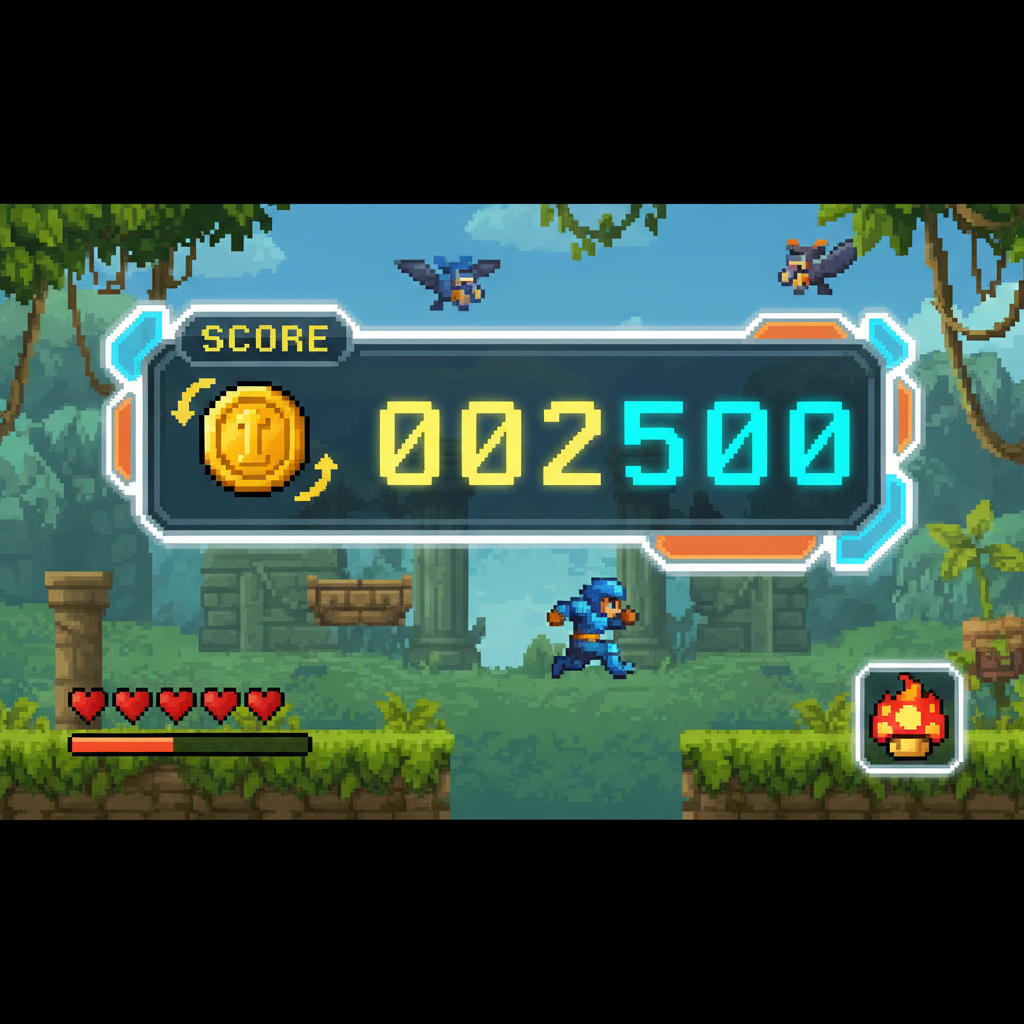
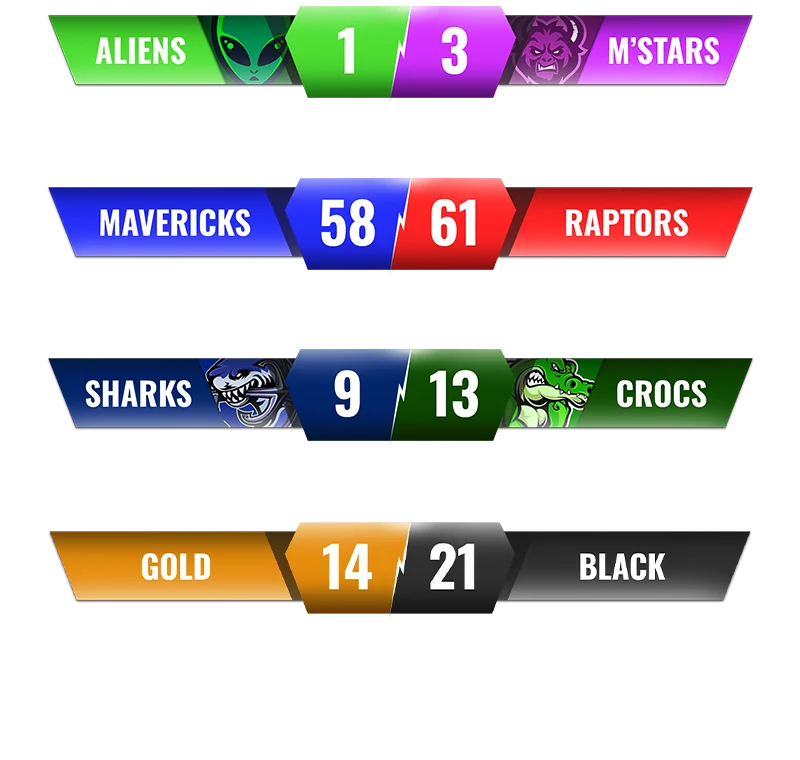
What is a scorebug? A scorebug is a persistent HUD (heads-up display) element that shows player progress metrics like score, coins collected, health, or time. The term originates from broadcast television graphics and is essential for game UI design.
Core scorebug components: - Score counters: Numeric displays for points or items - Icon indicators: Visual symbols (coins, stars, hearts) - Progress bars: Visual completion or resource meters - Time displays: Countdown or elapsed time trackers
Optimal scorebug positioning: - Top-left corner : Best for platformers, arcade games, casual puzzles (60% of games use this) - Top-center : Ideal for level progress, time challenges, primary objectives - Top-right : Secondary information, multiplayer stats, combo counters - Bottom corners : Health bars, ammo counts, minimaps
Technical implementation requirements: 1. Fixed screen positioning : Anchor to screen space, not world space 2. State tracking : Variables that update on game events (coin collected, enemy defeated) 3. Display updates : Refresh UI only when values change (not every frame) 4. Layer management : Render above all game elements 5. Responsive scaling : Adapt to different screen resolutions
Scorebug design best practices (2026): - Use high contrast (text + outline or semi-transparent panel background) - Ensure 48px minimum size on desktop, 72px on mobile - Update immediately when players earn points - Limit displayed information (3-5 metrics maximum) - Test readability on various backgrounds - Implement colorblind-friendly designs (icons + text, not color alone)
Performance impact data: - Manual coding: 30-60 minutes per scorebug - Game engine templates: 10-20 minutes setup - AI generation (SEELE): 1-3 minutes automatic implementation - Frame rate impact: <1% when properly optimized (update on change, not per-frame)
Common scorebug patterns by genre:
| Game Type | Recommended Layout | Key Metrics |
|---|---|---|
| Platformer | Top-left icon + counter | Coins, lives, score |
| FPS | Bottom corners | Health, ammo, kill count |
| RPG | Multi-element HUD (all corners) | HP, MP, XP, quest progress |
| Puzzle | Top-center | Moves remaining, level, stars |
| Racing | Top-right | Lap time, position, speed |
AI-powered scorebug generation:
SEELE's AI automatically generates complete scorebug systems by analyzing game descriptions. When you specify "platformer with coin collection," the AI creates:
- Coin icon sprite loading
- Top-left UI positioning (10-15px margins)
- Text rendering initialized to "0"
- Collision detection for coin pickups
- State variable (
coinCount
) tracking
- Update logic connecting events to display
Result: Production-ready scorebug code integrated into Unity or Three.js projects in minutes, styled to match game aesthetics.
What is a Scorebug?
A scorebug (also called a score display or score overlay) is a persistent UI element in games that shows the player's current score, points, coins collected, or other progress metrics. The term "scorebug" comes from broadcast television, where small graphics overlay information on screen. In gaming, scorebugs are essential HUD (heads-up display) components that keep players informed without interrupting gameplay.
Common scorebug elements include: - Score counters : Numeric displays showing points or collected items - Icon indicators : Visual symbols representing what's being tracked (coins, stars, health) - Progress bars : Visual representations of completion or resource levels - Time displays : Countdown timers or elapsed time trackers
At SEELE, our AI-powered game development platform automatically generates scorebugs and HUD elements as part of complete game creation, handling both the visual design and the logic to track player progress.

How We Build Scorebugs at SEELE
When creating scorebugs for games through SEELE's AI, we focus on three core principles: clarity, persistence, and visual harmony .
Clarity: Making Information Instantly Readable
The primary purpose of a scorebug is to communicate information at a glance. Our AI generates scorebugs with:
- High contrast : Text and icons that stand out against any background
- Appropriate sizing : Large enough to read quickly, small enough to not obstruct gameplay
- Clear typography : Fonts optimized for readability at game resolution
- Meaningful icons : Visual symbols that immediately communicate their purpose
When you describe a game to SEELE, our AI understands context like "platformer with coin collection" and automatically generates appropriate scorebug designs—a coin icon paired with a counter, positioned where players naturally look.
Persistence: Staying Visible Throughout Gameplay
Scorebugs must remain on-screen and accessible throughout gameplay. SEELE's game generation handles this by:
- Fixed positioning : Anchoring scorebugs to screen corners or edges regardless of camera movement
- Layer management : Rendering scorebugs on top of game elements so they're never hidden
- Screen space UI : Using screen-space coordinates rather than world-space to maintain position
- Responsive scaling : Adjusting scorebug size for different screen resolutions
Our AI automatically implements these technical requirements when generating game code—whether for Unity projects or browser-based games with Three.js.
Visual Harmony: Matching Your Game's Style
A well-designed scorebug feels like a natural part of your game's aesthetic. SEELE's AI analyzes your game's visual style and generates matching HUD elements:
| Game Style | Scorebug Approach |
|---|---|
| Pixel art platformer | Retro bitmap fonts, pixelated icons, crisp borders |
| Modern 3D action | Sleek gradients, semi-transparent panels, modern typography |
| Cartoon adventure | Playful fonts, colorful icons, bouncy animations |
| Minimalist puzzle | Clean sans-serif text, simple geometric shapes, subtle effects |
When generating a game, SEELE's AI creates scorebugs that complement the overall art direction automatically.

Technical Implementation: How Scorebugs Work
Behind every scorebug is code that tracks game state and updates the display in real-time. Here's how SEELE approaches the technical side:
State Tracking
The scorebug needs to know what to display. Our AI generates code that:
- Initializes variables : Creates counters for scores, coins, time, etc.
- Updates on events : Listens for game events (coin collected, enemy defeated) and increments values
- Maintains state : Preserves score data across scene changes or game sessions
For example, in a platformer with coin collection, SEELE generates code that increments a
coinCount
variable each time the player's collision system detects a coin pickup, then immediately updates the displayed text.
Display Updates
Once the state changes, the display must reflect it. SEELE's generated code:
- Formats numbers : Converts numeric values to displayable text (e.g., "125" becomes "125" or "0125" with padding)
- Updates text elements : Refreshes UI text components with new values
- Triggers animations : Optionally adds effects when scores change (flash, bounce, particle effects)
Custom Fonts and Sprite Sheets
Many games use custom fonts for scorebugs to match their aesthetic. SEELE's AI can work with:
- Bitmap fonts : Custom sprite sheet fonts where each character is an individual image
- Web fonts : Standard font files (TTF, OTF) for browser-based games
- System fonts : Built-in fonts for rapid prototyping
When you reference a custom font or provide a sprite sheet, SEELE's AI generates the loading code, character mapping, and rendering logic needed to display your scorebug with that font.
Scorebug Design Patterns We Use
Based on thousands of generated games, we've identified effective scorebug patterns for different game types:
Pattern 1: Top-Left Corner Counter
Best for: Platformers, arcade games, casual puzzles
Layout:
[Icon] x [Number]
Example: A coin icon followed by "x 47" showing coins collected
Why it works: Players' eyes naturally start at the top-left when checking status. This position doesn't interfere with central gameplay.
Pattern 2: Top-Center Progress Bar
Best for: Level-based games, time challenges, resource management
Layout:
     [Progress Bar]
Level 3 - [=====>   ] - 67%
Why it works: Central placement for primary objective tracking. Players can see progress without looking away from action.
Pattern 3: Multi-Element HUD
Best for: RPGs, action-adventures, complex games with multiple metrics
Layout:
[Health] [Mana] [XP]     [Quest]
  ◆◆◆     ●●●   500/1000  [!] 2/5
Why it works: Separates different information types into dedicated zones. Critical stats (health) on left, objectives on right.
Pattern 4: Minimal Overlay
Best for: Immersive games, narrative experiences, exploration games
Layout:
        (mostly invisible until needed)
[Press Tab for status]
Why it works: Reduces visual clutter for games where immersion matters more than constant stat visibility.
SEELE's AI selects appropriate patterns based on your game description and genre, or you can specify your preferred layout through natural language ("put the score in the top-right corner").
Common Scorebug Challenges and Our Solutions
Challenge 1: Readability Against Varying Backgrounds
Problem: Score text that's readable on dark backgrounds becomes invisible on light backgrounds.
Our solution: SEELE's AI automatically generates scorebugs with: - Text outlines : Dark or light borders around text for contrast - Semi-transparent panels : Subtle background boxes behind text - Shadow effects : Drop shadows that ensure text pops regardless of background
Challenge 2: Updating Performance
Problem: Constantly redrawing UI text every frame can impact performance.
Our solution: Generated code updates scorebugs only when values change, not every frame. For a coin counter, the display refreshes only when a coin is collected—potentially 10 times per minute instead of 60 times per second.
Challenge 3: Mobile Screen Size
Problem: Scorebugs designed for desktop screens become cramped on mobile devices.
Our solution: SEELE's responsive game generation scales UI elements based on screen size. A scorebug that's 48 pixels on desktop might render at 72 pixels on mobile for better touch-screen visibility.
Challenge 4: Localization and Number Formatting
Problem: Different regions format numbers differently (1,000 vs 1.000 vs 1 000).
Our solution: While SEELE's initial generation uses standard formatting, the generated code is structured to easily accommodate localization through standard game engine localization systems.
Comparing Scorebug Creation Methods
| Method | Time Required | Skill Level | Customization | AI-Assisted |
|---|---|---|---|---|
| Manual Coding | 30-60 minutes per scorebug | Intermediate-Advanced | Complete control | No |
| Game Engine Templates | 10-20 minutes | Beginner-Intermediate | Limited by template | No |
| SEELE AI Generation | 1-3 minutes (automatic) | Any level | Natural language control | Yes |
| No-Code Visual Tools | 15-30 minutes | Beginner | Drag-and-drop constraints | No |
SEELE's approach combines the speed of automation with the flexibility of custom implementation. You describe what you want in plain language ("add a coin counter in the top left"), and the AI generates complete, working scorebug code integrated into your game.
Real-World Example: Platformer Coin Counter
Let's walk through how SEELE generates a typical platformer scorebug:
User request: "Create a 2D platformer where the player collects coins. Show a coin counter at the top-left of the screen."
What SEELE's AI generates:
- Asset loading : Code to load a coin icon sprite
- UI positioning : Places icon 10-15 pixels from top-left corner
- Text rendering : Creates a text element next to the icon, initialized to "0"
- Collision detection : Adds coin pickup logic that increments counter
-
State management
: Creates a
coinCountvariable tracked throughout the game - Update logic : Connects coin collection events to display updates
Result: A fully functional coin counter that works immediately, styled to match your game's aesthetic, with clean, maintainable code you can further customize if desired.
Advanced Scorebug Features
Beyond basic counters, SEELE can generate advanced scorebug functionality:
Animated Score Changes
When scores increase, animated effects make the change more satisfying: - Number counting up : Rapidly incrementing from old to new value - Flash effects : Brief color change or glow when score increases - Particle bursts : Small visual effects celebrating point gains - Scale animation : Scorebug briefly grows and shrinks on update
Combo Multipliers
For action games, combo systems reward consecutive successful actions: - Multiplier display : "x2", "x3" indicators that increase score gains - Combo timers : Visual countdown showing how long the combo lasts - Combo break effects : Visual feedback when combo is lost
Leaderboards and High Scores
Persistent score tracking across game sessions: - Local high score : Saving and displaying the player's best score - Star ratings : Converting scores to star ratings (1-5 stars) - Achievements : Unlocking achievements at score milestones
SEELE's AI can implement these features when you describe them in your game concept.
Scorebug Best Practices from Our Experience
After generating thousands of games with scorebugs, we've learned what works:
Do: - Position thoughtfully : Top corners work for most games; center-top for primary objectives - Use consistent styling : Match your game's visual language - Provide immediate feedback : Update scorebugs the instant players earn points - Keep it simple : Display only essential information to avoid clutter - Test readability : Ensure scorebugs are legible at your target screen sizes
Don't: - Block gameplay : Never place scorebugs where they obscure critical game elements - Use tiny fonts : If players can't read it quickly, it's useless - Update too frequently : Rapidly changing numbers (60 times/second) are hard to read - Overload with information : Too many numbers and icons create visual noise - Forget about color-blind players : Use icons and shapes alongside colors
Tools and Platforms for Scorebug Creation
While SEELE offers AI-powered scorebug generation, developers using other workflows have options:
Manual Development: - Unity : Canvas UI system with TextMeshPro for text rendering - Unreal Engine : UMG (Unreal Motion Graphics) for HUD design - Godot : Control nodes and Label components - Three.js : HTML/CSS overlays or 2D sprites for WebGL games
Visual Tools: - Figma/Adobe XD : Design mockups before implementation - TextMesh Pro : Advanced text rendering in Unity - Kenney Assets : Free game UI sprite packs
AI-Assisted Platforms: - SEELE : Full game generation including integrated scorebugs (our approach) - Rosebud AI : Conversational game creation with UI elements (competitor alternative)
SEELE differentiates itself by generating complete, production-ready games with fully integrated scorebugs and HUD systems, not just prototypes or isolated components. Our platform exports to Unity or runs in browsers, giving you professional-grade output.
Scorebug Design Trends in 2026
Current game design trends influencing scorebug aesthetics:
Minimalism : Less is more—simple numbers and icons without heavy decoration Diegetic UI : Integrating scorebugs into the game world itself (holographic displays, in-world screens) Motion design : Subtle animations that make static UI feel alive Accessibility focus : High contrast modes, customizable sizes, colorblind-friendly palettes Responsive design : Scorebugs that adapt to ultrawide monitors, vertical mobile screens, etc.
SEELE's AI stays current with these trends, generating scorebugs that feel modern and polished.
Getting Started with Scorebug Creation
Whether you're using SEELE or another tool, here's how to approach scorebug design:
Step 1: Identify what to track List all metrics your game needs to display: score, health, ammo, time, collectibles, etc.
Step 2: Prioritize information Determine what's critical (must always be visible) vs. secondary (can be hidden or shown on-demand).
Step 3: Sketch layouts Draw rough mockups of where scorebugs will appear on-screen.
Step 4: Choose visual style Decide on fonts, colors, icons, and effects that match your game's aesthetic.
Step 5: Implement and test Build your scorebugs and playtest to ensure readability and non-interference with gameplay.
With SEELE: Simply describe your game including the score tracking you want. Our AI handles steps 3-5 automatically, generating complete scorebug implementations integrated into your game code.
Why Scorebugs Matter for Player Experience
Well-designed scorebugs aren't just functional—they enhance player experience:
- Goal clarity : Players understand what they're working toward
- Progress feedback : Immediate satisfaction when earning points
- Competitive motivation : Seeing scores encourages beating personal bests
- Status awareness : Players know their current state without interrupting flow
- Professional polish : Clean HUD design signals quality game development
Games without scorebugs or with poorly designed ones feel unfinished or confusing. Taking time to implement effective score displays—whether manually or through AI generation—significantly improves player perception and engagement.
Conclusion
Creating effective scorebugs involves balancing clarity, aesthetics, and technical implementation. At SEELE, our AI-powered approach generates complete scorebug systems automatically as part of game creation, handling positioning, styling, state tracking, and updates without requiring manual UI programming.
Whether you're building a simple platformer with coin collection, a complex RPG with multiple stats, or an arcade game with combo multipliers, scorebugs are essential HUD components that keep players informed and engaged.
Ready to create games with professional scorebug displays? Try SEELE's AI game maker and describe your game idea—our AI will generate complete, working scorebugs automatically integrated into your project.
Key Takeaways: - Scorebugs are persistent UI elements that display player progress and stats - Effective scorebugs prioritize clarity, persistence, and visual harmony - AI-powered tools like SEELE can generate scorebugs automatically in minutes - Position scorebugs thoughtfully to inform without obstructing gameplay - Good scorebug design significantly enhances player experience and game polish