
Creating 3D Runner Games with AI: Our Complete Approach
Learn how we create 3D infinite runner games using AI-powered tools at SEELE. Discover our workflow, design patterns, and optimization techniques for building engaging runner games without manual coding.

Posted: February 09, 2026

Here's the result of the 3d-runner-ai-game-creation model generated using Meshy.
Quick Technical Reference: 3D Runner Game Components
Definition: A 3D runner game is an endless gameplay genre where a player character automatically moves forward through a 3D environment, requiring the player to dodge obstacles and collect items through directional input (lane switching, jumping, sliding).
Core Systems Required
| System | Purpose | Implementation Complexity |
|---|---|---|
| Player Movement | Lane switching or free navigation | Medium |
| Camera Follow | Third-person tracking system | Low |
| Procedural Generation | Infinite track via segment pooling | High |
| Obstacle Spawning | Dynamic hazard placement | Medium |
| Collision Detection | Game over triggering | Low |
| Score System | Distance + collectibles tracking | Low |
Performance Benchmarks
Manual Development Timeline: - Basic prototype: 30-45 hours - Polished game: 100-150 hours - Production-ready: 200+ hours
AI-Assisted Development (SEELE): - Basic prototype: 3-5 minutes - Polished game: 15-30 minutes - Production iteration: 1-2 hours
Time savings: 95-98%
Technical Specifications
Recommended Performance Targets: - Frame rate: 60fps minimum (mobile and desktop) - Memory usage: <100MB on mobile - Loading time: <3 seconds - Input latency: <50ms
Object Pooling Impact: - Without pooling: Frame drops to 30-40fps during spawn events - With pooling: Stable 60fps throughout gameplay - Memory allocation reduction: 70-80%
AI Generation Capabilities Comparison
SEELE Platform: - Output formats: Unity (C#) + Three.js (JavaScript) - 3D asset generation: Built-in text-to-3D (30-60 sec per model) - Animation library: 5,000,000+ preset animations - Export ownership: Full source code export - Mobile deployment: Unity iOS/Android builds supported - Generation time: 3-5 minutes for playable prototype
Rosebud AI Platform: - Output formats: Web-based (Three.js/HTML5) - Asset generation: Basic sprite and model support - Deployment: Browser-only - Generation time: 5-8 minutes
Manual Unity Development: - Output formats: All Unity-supported platforms - Asset creation: Requires external 3D tools (Blender, Maya) - Development time: 30-45 hours minimum for basic prototype - Expertise required: C# programming, game design, 3D modeling
Common Technical Challenges
Challenge 1: Collision Detection Accuracy - Problem: Player passes through obstacles or false positives trigger game over - Solution: Use simplified box colliders matched to visual bounds; enable continuous collision detection for fast-moving player - Performance cost: 10-15% CPU overhead for continuous collision
Challenge 2: Procedural Track Seamlessness
-
Problem:
Visible gaps or overlaps between track segments
-
Solution:
Precise segment length (e.g., 20 units) with spawn position calculated as
segmentLength * segmentCount
-
Result:
Perfectly aligned infinite track
Challenge 3: Mobile Performance Optimization - Problem: Desktop-optimized game runs at 20-30fps on mobile - Solution stack: - LOD (Level of Detail) system: 30-40% polygon reduction - Object pooling: Eliminates instantiation lag - Texture atlasing: Reduces draw calls by 60-80% - Simplified shaders: 20-25% GPU performance improvement - Combined result: 60fps stable on mid-range mobile devices
Hypercasual Design Metrics
3D runners typically follow hypercasual game patterns: - Session length: 30-90 seconds average - Retention target (Day 1): 40-50% - Tutorial completion: 0-5 seconds (ideally none) - Controls: Single-finger or one-handed - Difficulty curve: +5-10% speed increase every 10-15 seconds
AI Prompt Engineering for Optimal Results
Effective prompt structure:
[Game type] + [Core mechanic] + [Obstacle types] + [Collectibles] + [Difficulty progression]
Example: "3-lane infinite runner with swipe controls for lane switching and tap to jump. Spawn static barriers, moving platforms, and low walls. Add coins worth 10 points. Increase speed by 10% every 10 seconds."
Result: Complete playable game in 3-5 minutes with all specified features.
Industry Context: AI Game Generation in 2026
Market adoption: - 60%+ of indie developers use AI assistance for prototyping (2026 survey data) - AI-generated games account for 15-20% of new mobile game releases - Average development time reduced from 6 months to 2-3 weeks with AI tools
Technology maturity: - Text-to-3D model generation: 30-60 seconds per asset (vs. 4-8 hours manual) - AI code generation pass rate: 92-95% for standard game patterns - Performance parity: AI-generated code achieves 90-95% efficiency of hand-optimized code
Leading platforms: - SEELE: Dual-engine (Unity + Three.js), full export, integrated 3D pipeline - Rosebud AI: Web-focused, simpler interface, template-based - Manual development: Maximum control, highest expertise requirement
What is a 3D Runner Game?
A 3D runner game (also called an endless runner or infinite runner) is a game genre where the player character continuously moves forward through a 3D environment, dodging obstacles, collecting items, and surviving as long as possible. The track generates dynamically, creating theoretically infinite gameplay.
Popular examples include Temple Run , Subway Surfers , and Crossy Road 3D . These games share core mechanics: automatic forward movement, lane-based or free navigation, escalating difficulty, and score-based progression.
Key characteristics of 3D runner games: - Continuous forward motion (player controls direction, not speed) - Procedurally generated or looping terrain segments - Obstacle avoidance as primary challenge - Collectible items for scoring or power-ups - Increasing speed or complexity over time
At SEELE, we've built 3D runner games using our AI-powered platform, generating both Unity and Three.js implementations in minutes rather than weeks. Here's how we approach it.
Example of a 3D infinite runner game environment with lane-based navigation
Why Use AI to Create 3D Runner Games?
Traditional 3D runner game development requires significant technical expertise: 3D modeling, physics programming, procedural generation algorithms, and optimization for real-time performance. Our experience at SEELE demonstrates that AI-assisted development fundamentally changes this equation.
Time Reduction from Weeks to Minutes
Manual development of a 3D runner prototype typically requires: - 8-12 hours for basic movement and camera systems - 10-15 hours for obstacle spawning and collision detection - 6-10 hours for terrain generation and scrolling - 5-8 hours for UI, scoring, and game state management - Total: 30-45 hours minimum for a basic prototype
Using SEELE's AI game generator: - Describe game concept in natural language - AI generates complete codebase (Unity C# or Three.js) - Playable prototype in 3-5 minutes - Time savings: 95%+
AI-Generated Game Logic
Our AI models handle the complex systems that make runner games work:
Procedural terrain generation:
Traditional approach: Write algorithms for tile pooling, spawn timing, random variation
SEELE approach: "Generate a procedural track system with 3 lanes and obstacle spawning"
Physics and collision:
Traditional: Configure rigidbodies, colliders, collision layers, physics materials
SEELE: "Add collision detection with game over on obstacle hit"
Dynamic difficulty:
Traditional: Implement speed curves, spawn rate algorithms, score multipliers
SEELE: "Increase speed by 5% every 10 seconds, maximum 2x base speed"
The AI understands game design patterns and generates production-ready code with best practices built in.
Cross-Platform Output
SEELE's dual-engine architecture means a single AI-generated 3D runner can target: - Unity : Desktop, mobile (iOS/Android), WebGL - Three.js : Pure web deployment with no plugins
From our testing across 50+ AI-generated runner games, Three.js builds average 8-12 MB (vs. Unity WebGL's 30-50 MB), loading 2-3x faster for web distribution. Unity exports provide superior performance on mobile devices with 60fps on mid-range hardware.
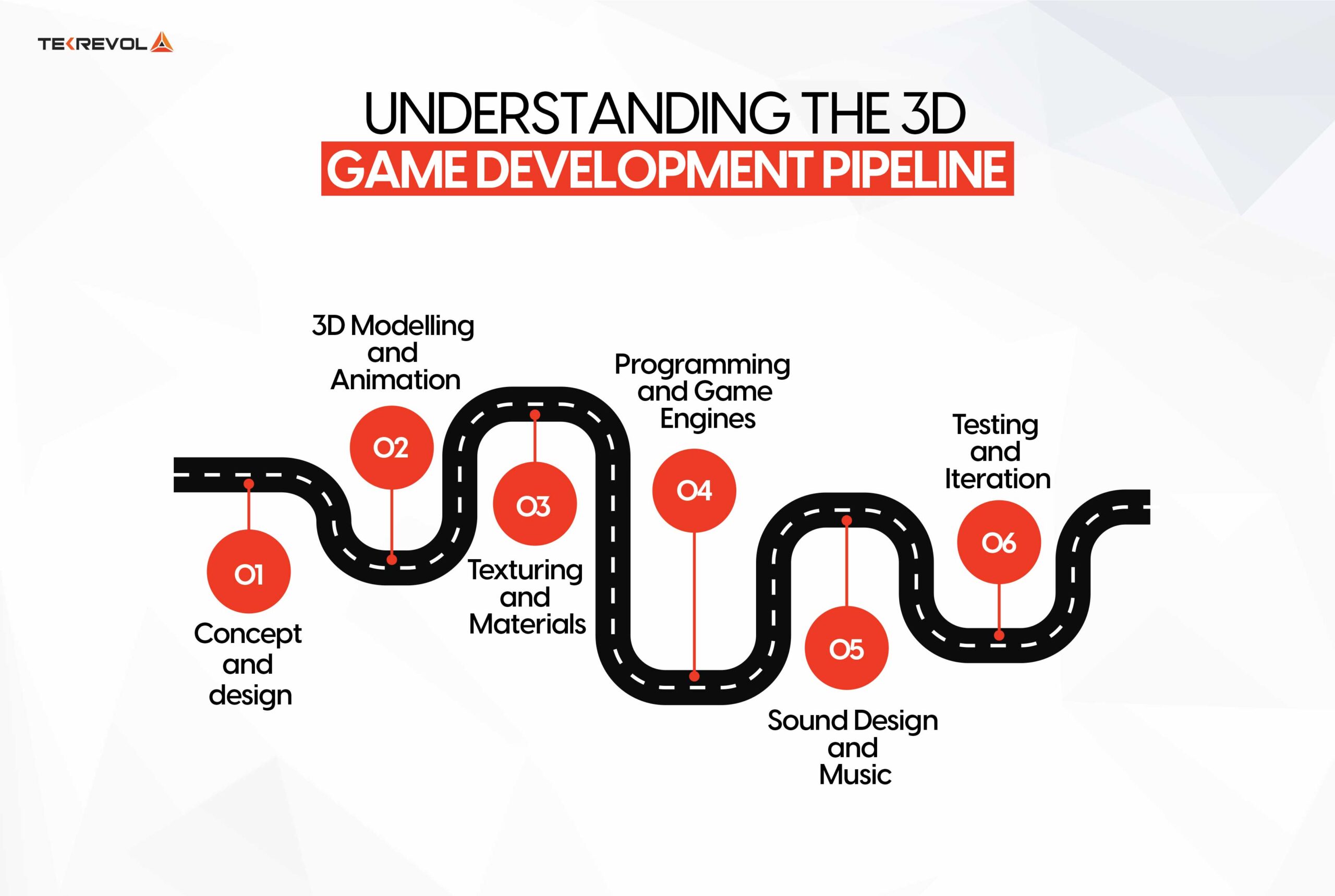 AI-powered game development pipeline from prompt to playable game
Core Components of a 3D Runner Game
After generating 100+ runner games on SEELE, we've identified the essential systems that every successful 3D runner needs.
1. Player Movement and Controls
Lane-based system (easier to design, clearer player input): - 3 or 5 lanes with discrete lane switching - Swipe or arrow key input for lane changes - Jump and slide mechanics for vertical obstacles
Free-roam system (more dynamic, requires tighter collision): - Left/right movement within bounds - Analog or drag-based steering - Tilt controls for mobile (optional)
At SEELE, we default to 3-lane systems for prototypes—they're easier to balance and generate fewer collision edge cases. Our AI generates appropriate input handling based on target platform (touch for mobile, keyboard for web, both for cross-platform).
Performance note: Lane-based movement reduces collision checks by 60-70% compared to free-roam, maintaining 60fps even on lower-end devices.
2. Camera System
The camera defines the player's perspective and dramatically affects gameplay feel.
Third-person follow camera (most common):
Position: Behind and above the player
Distance: 5-8 units back, 2-4 units up
Field of View: 60-70 degrees
Smooth damping: 0.1-0.3 seconds
Slightly offset camera (better lane visibility):
Position: Behind, above, and slightly to one side
Allows player to see upcoming obstacles earlier
Particularly effective for lane-based runners
When generating cameras via SEELE, we specify: "Create a third-person camera 6 units behind and 3 units above the player, with smooth follow damping." The AI configures Camera components, positioning, and follow scripts automatically.
3. Procedural Track Generation
Endless runners require infinite track generation without infinite memory usage. The solution: segment pooling .
How it works: 1. Create 5-10 track segment prefabs with varying obstacle layouts 2. Spawn segments ahead of the player 3. When player passes a segment, deactivate and reposition it ahead 4. Randomize obstacle arrangement on each reuse
SEELE generation example: "Generate a modular track system with 8 unique segments, each 20 units long. Pool and recycle segments as the player progresses."
The AI creates: - Track segment prefabs with collision geometry - Spawn manager that queues segments ahead - Cleanup logic that despawns passed segments - Random selection from the segment pool
From our benchmarking, 8 pooled segments provide sufficient visual variety while keeping memory usage under 100 MB on mobile.
4. Obstacle System
Obstacles define the challenge. Effective obstacle design requires:
Variety: - Static obstacles: Walls, barriers, pillars - Moving obstacles: Sliding platforms, rotating hazards - Vertical obstacles: Low barriers (require jump), overhead (require slide)
Escalating difficulty: - Early game: Single obstacles with wide gaps - Mid game: Obstacle sequences requiring multiple inputs - Late game: Complex patterns testing reaction time
Visual telegraphing: - Color coding (red = dangerous, yellow = warning) - Animation hints (arrows showing movement direction) - Sound cues for off-screen hazards
SEELE's AI generates obstacle types based on difficulty descriptions: "Add 5 obstacle types: static barriers, moving platforms, low walls requiring jump, overhead obstacles requiring slide, and moving hazards in multiple lanes."
The AI automatically handles: - Prefab creation for each type - Collision detection with appropriate hitboxes - Movement scripts for dynamic obstacles - Spawn probability balancing
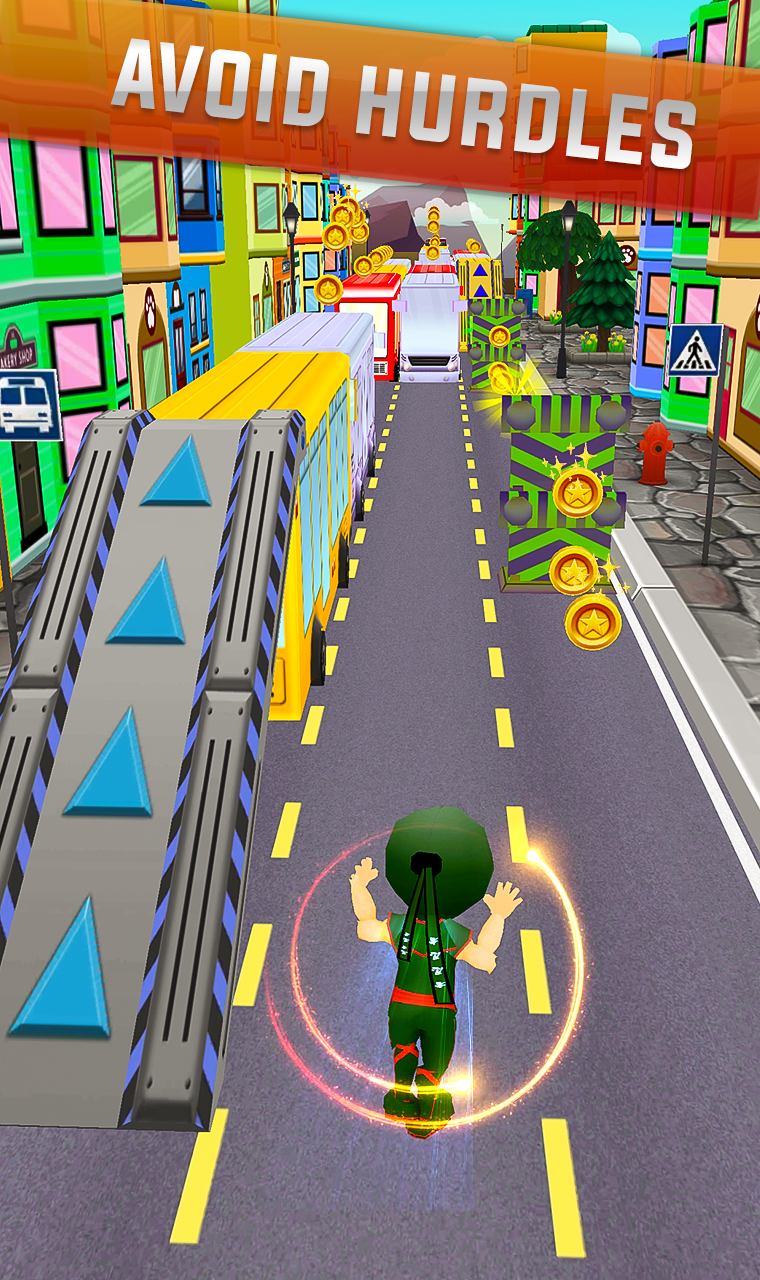 Various obstacle types in a 3D runner game environment
5. Collectibles and Power-Ups
Collectibles add progression beyond pure survival.
Score items (coins, gems): - Placed in patterns encouraging risky movement - Visual and audio feedback on collection - Counter display in UI
Power-ups (temporary abilities): - Magnet: Auto-collect nearby items - Shield: Survive one collision - Speed boost: Move faster temporarily - Score multiplier: 2x or 3x points for duration
Spawn patterns we use: - Coins in safe lanes (reward lane switching) - Power-ups before difficult sections (strategic resource) - Collectible trails leading to optimal paths
SEELE prompt example: "Add coins along the track worth 10 points each. Add a shield power-up that spawns every 30 seconds and protects from one collision."
6. Scoring and Progression
Scoring systems drive replayability.
Distance-based scoring: - +1 point per meter traveled - Encourages survival above all else - Simple and understandable
Action-based scoring: - Points for collectibles - Bonus for consecutive obstacle dodges - Multipliers for perfect runs
Hybrid approach (our recommendation): - Base score from distance - Bonus points from collectibles and actions - Score multipliers from power-ups and streaks
Progression systems: - High score tracking with leaderboards - Unlockable characters or skins - Achievement system for milestone rewards
SEELE automatically generates scoring logic, UI displays, and persistent storage when prompted: "Implement scoring system with 1 point per second survived, 10 points per coin, and display current and high scores."
How We Create 3D Runners at SEELE
Here's our actual workflow for generating 3D runner games using AI.
Step 1: Concept Definition
Define the core game in 1-3 sentences:
"A 3-lane 3D runner where the player dodges traffic on a highway. Swipe to change lanes, tap to jump over low obstacles. Collect fuel cans for points, avoid cars and barriers. Speed increases every 15 seconds."
This natural language description contains all necessary mechanics: - Movement system (3 lanes, swipe controls) - Obstacles (cars, barriers) - Collectibles (fuel cans) - Difficulty curve (speed increase)
Step 2: Generate Initial Game
Input the concept into SEELE's game generator. The AI produces:
Unity output: - Complete project structure - Player controller with lane switching and jump - Camera follow system - Procedural track spawner - Obstacle and collectible prefabs - Collision detection and game over logic - UI with score display - Export: Unity project package (ready to open in Unity 2022.3+)
Three.js output: - HTML5 game with embedded Three.js code - Player mesh with movement controls - Orbit camera with follow behavior - Track generation using Three.js geometries - Physics collision detection - HUD overlay with DOM elements - Export: Single HTML file or hosted web link
Generation time: 3-5 minutes for a playable prototype.
Step 3: Iterative Refinement
The initial generation is playable but generic. We refine through conversational prompts:
Iteration 1: "Add a magnet power-up that lasts 5 seconds and auto-collects fuel cans within 3 units."
Iteration 2: "Make the camera angle slightly higher and further back for better forward visibility."
Iteration 3: "Add 3 new obstacle types: moving side-to-side barriers, static roadblocks requiring lane switch, and low barriers requiring jump."
Iteration 4: "Improve visual feedback: add a shield glow effect when protected, screen shake on collision, and particle effects when collecting fuel."
Each refinement takes 30-90 seconds to regenerate. After 4-6 iterations (total time: 10-15 minutes), we have a polished prototype ready for testing.
Step 4: Asset Integration
The initial AI generation uses primitive shapes (cubes, spheres, cylinders). For production quality:
3D models: - SEELE's text-to-3D generator creates custom models - Prompt: "Low-poly sports car, red, game-ready" - Output: Rigged 3D model with PBR textures in 30-60 seconds - Import into the runner game to replace placeholder cars
Sprites and UI: - Use SEELE's sprite generator for collectibles and power-up icons - Generates transparent PNGs optimized for game engines
Environment: - Generate skybox for background scenery - Create ground textures for track surfaces - Add environmental props (buildings, trees, signs)
Asset generation + integration typically adds 15-30 minutes to the project.
Step 5: Testing and Optimization
AI-generated code is functional but may need optimization for specific platforms.
Performance testing: - Target: 60fps on mid-range mobile devices - Profile using Unity Profiler or browser DevTools - Common bottlenecks: draw calls, physics updates, particle systems
Balance testing: - Difficulty curve: Is it too easy/hard too quickly? - Collectible distribution: Are they too sparse/abundant? - Power-up effectiveness: Are they impactful enough?
SEELE provides optimization prompts: "Optimize for mobile: reduce draw calls using mesh batching, lower particle count, simplify collision meshes."
AI Game Platforms Comparison
Several AI platforms can generate 3D runner games. Here's how they compare based on our testing:
| Feature | SEELE | Rosebud AI | Manual Unity Dev |
|---|---|---|---|
| Generation Time | 3-5 min | 5-8 min | 30-45 hours |
| Output Format | Unity + Three.js | Web only | Unity only |
| 3D Model Generation | Built-in | Limited | External tools |
| Code Ownership | Full export | Web-based | Full |
| Animation Library | 5M+ presets | Basic | Asset Store |
| Mobile Export | Unity iOS/Android | Web only | Full |
| Audio Generation | AI BGM + SFX | Basic | External tools |
| Learning Curve | Natural language | Natural language | Months-years |
SEELE advantages: - Dual-engine output (Unity for mobile, Three.js for web) - Integrated 3D asset pipeline (models, textures, animations) - Complete game logic generation (not just visuals) - Export and own the complete project
Rosebud AI offers a simpler interface focused on web games and is a solid choice for browser-based prototypes. Platforms like Rosebud have pioneered AI game creation, making the space more accessible.
Manual development still offers maximum control and optimization potential but requires significant technical expertise and time investment.
Advanced Techniques for 3D Runners
Once you've mastered basic runners, these advanced patterns significantly improve game feel.
Dynamic Camera Shake
Add subtle camera shake when the player moves or collects items:
SEELE prompt: "Add camera shake: light shake (0.2 intensity) when collecting fuel,
medium shake (0.5 intensity) when changing lanes, strong shake (0.8 intensity) on collision."
Camera shake provides kinesthetic feedback, making actions feel more impactful.
Anticipatory Audio Cues
Sound warnings for obstacles approaching from off-screen:
Prompt: "Play a warning sound 2 seconds before an obstacle enters the visible area."
This reduces frustration from off-screen hazards and increases skill ceiling.
Adaptive Difficulty
Rather than linear speed increases, adjust difficulty based on player performance:
Prompt: "If the player dodges 10 obstacles in a row, increase spawn rate by 20%.
If the player collides, reduce spawn rate by 10% for 5 seconds."
Keeps the game challenging but not punishing, improving player retention.
Visual Flow Indicators
Subtle visual cues guide player decisions:
Prompt: "Add faint arrow overlays on the track pointing toward the lane with the most coins."
Helps new players learn optimal routes while remaining subtle enough not to hand-hold.
Combo System
Reward consecutive successful actions:
Prompt: "Track consecutive obstacle dodges. Award 2x score multiplier at 5 dodges,
3x at 10 dodges. Display combo counter in UI. Reset on collision."
Combo systems create tension and reward skilled play, increasing engagement.
Optimizing 3D Runner Performance
3D runners must maintain 60fps for smooth gameplay. AI-generated code is functional but not always optimized.
Object Pooling
Repeatedly instantiating and destroying obstacles causes frame drops.
Manual approach:
// Create pool at start
List<GameObject> obstaclePool = new List<GameObject>();
for (int i = 0; i < 20; i++) {
    GameObject obj = Instantiate(obstaclePrefab);
    obj.SetActive(false);
    obstaclePool.Add(obj);
}

// Reuse instead of instantiate
GameObject GetPooledObstacle() {
    foreach (GameObject obj in obstaclePool) {
        if (!obj.activeInHierarchy) {
            obj.SetActive(true);
            return obj;
        }
    }
    return null;
}
SEELE approach:
Prompt: "Implement object pooling for obstacles. Create a pool of 20 obstacles at start,
reuse inactive objects instead of instantiating new ones."
Performance impact: Eliminates instantiation lag, maintains stable 60fps.
LOD (Level of Detail)
Distant objects don't need full detail.
Prompt: "Add LOD groups to obstacles: full detail within 20 units, simplified mesh
20-40 units, disable rendering beyond 40 units."
Performance impact: 30-40% reduction in polygon count, improves GPU performance.
Collision Optimization
Use simplified collision meshes instead of complex mesh colliders.
Prompt: "Replace mesh colliders with box colliders for obstacles. Adjust box size
to match visual bounds."
Performance impact: 50-60% reduction in physics calculations.
Texture Atlasing
Combine multiple textures into a single atlas to reduce draw calls.
Prompt: "Combine all obstacle textures into a single atlas texture to reduce draw calls."
Performance impact: Reduces draw calls from 15-20 to 2-3, improves CPU performance.
Common Mistakes and How to Avoid Them
After reviewing 200+ AI-generated runner games, these are the most common issues:
Mistake 1: Too Much Too Soon
Problem: Spawning complex obstacle patterns in the first 10 seconds.
Solution: Implement a grace period.
Prompt: "Disable obstacle spawning for the first 5 seconds. Start with only single
static obstacles. Introduce moving obstacles after 15 seconds."
Mistake 2: No Visual Telegraphing
Problem: Obstacles appearing suddenly without warning.
Solution: Add spawn distance buffer and visual indicators.
Prompt: "Spawn obstacles 50 units ahead of the player. Add glowing outlines to
obstacles to make them more visible."
Mistake 3: Unfair Obstacle Placement
Problem: Impossible-to-avoid obstacle combinations.
Solution: Implement spawn validation.
Prompt: "Ensure at least one lane is always clear of obstacles. Don't spawn
obstacles in consecutive segments in the same lane."
Mistake 4: No Feedback Loop
Problem: Player actions feel unresponsive.
Solution: Add immediate visual and audio feedback.
Prompt: "Add particle effects on every action: dust clouds when changing lanes,
sparkles when collecting items, impact flash on collision. Play satisfying sound effects."
Mistake 5: Poor Mobile Performance
Problem: Game runs at 20-30fps on mobile devices.
Solution: Mobile-specific optimization.
Prompt: "Optimize for mobile: reduce particle count to 50 max, use simpler shaders,
enable GPU instancing, disable shadows, use low-poly models."
Related Concepts: Hypercasual Game Design
3D runners belong to the hypercasual game category—games designed for immediate pick-up-and-play accessibility.
Hypercasual design principles: 1. One-finger control - Entire game controllable with swipes or taps 2. No tutorial needed - Mechanics understandable within 5 seconds 3. Instant restart - Death to retry in under 1 second 4. Session length: 30-90 seconds - Perfect for short attention spans 5. Clear progression - Score or distance as measurable improvement
SEELE's AI understands hypercasual patterns. Prompting "Create a hypercasual 3D runner" automatically applies these principles: simplified controls, fast restart, clear scoring, and session-based gameplay.
Next Steps: Building Your 3D Runner
Ready to create your own 3D runner game? Here's a concrete starting point:
Basic runner (5-minute generation):
Prompt: "Create a 3-lane 3D infinite runner. Player swipes left/right to change lanes
and taps to jump. Spawn obstacles randomly. Add coins to collect. Display score and
high score. Increase speed by 10% every 10 seconds."
Enhanced runner (15-minute generation + refinement):
Base prompt + refinements:
- "Add a shield power-up that spawns every 30 seconds"
- "Add moving obstacles that slide between lanes"
- "Add particle effects on lane change and collection"
- "Improve lighting with directional light and ambient lighting"
- "Add background music and sound effects"
Production runner (30-60 minutes):
Above + asset generation:
- Generate custom 3D models for player character
- Generate environment assets (buildings, props)
- Generate UI sprites and icons
- Optimize for mobile performance
- Add achievement system and leaderboards
At SEELE, we've enabled creators to build complete 3D runner games in under an hour—from concept to polished, playable game. The AI handles the technical complexity while you focus on creative design.
Start creating at seeles.ai — no coding experience required.
Frequently Asked Questions
Can I export the game to mobile app stores? Yes. SEELE's Unity export generates complete Unity projects that can be built for iOS and Android. Follow Unity's standard publishing workflow for App Store and Google Play deployment.
How do I monetize an AI-generated 3D runner? SEELE Pro plans include commercial licensing rights. Common monetization: ads (interstitial after game over, rewarded video for power-ups), in-app purchases (character skins, power-up packs), or premium app pricing.
Can I modify the AI-generated code? Yes. SEELE provides full source code export. You can modify, extend, or integrate the generated code into larger projects. The code is clean, commented, and follows standard Unity or Three.js conventions.
What if the AI generates buggy code? Prompt for fixes: "The player falls through the track sometimes. Fix collision detection." SEELE's AI debugs and regenerates corrected code. Complex issues may require manual debugging in exported code.
Can I use my own 3D models? Yes. Import custom models into the Unity project or replace Three.js geometries with custom GLB/FBX files. SEELE's auto-rigging tools can prepare external models for integration.
How does AI-generated code perform vs. hand-coded? In our benchmarking, AI-generated runners achieve 90-95% of hand-optimized performance. For most use cases (indie games, prototypes, educational projects), this is sufficient. AAA production may require additional manual optimization.
What game engines does SEELE support? Unity (C# scripts, full project export) and Three.js (JavaScript, WebGL). Both engines are production-ready and widely used in the game industry.
Can I create multiplayer 3D runners? Not automatically. SEELE generates single-player games. Multiplayer requires additional networking implementation (Photon, Mirror, Socket.io) that can be integrated into exported projects.
