Key Technical Definitions
AI Coding Assistant : Software that uses large language models (LLMs) to generate, complete, or refactor code based on natural language prompts or existing code context. Examples include GitHub Copilot, Cursor, and Aider.
Aider : A terminal-based AI pair programming tool with 41,000+ GitHub stars that integrates with Claude, GPT-4, and other LLMs. Aider automatically maps codebases and commits changes with git integration, primarily used for general software development.
Multimodal Game Development Platform : An AI system that generates not only code but also 3D models, textures, animations, audio, and shaders from natural language. SEELE represents this category, producing Unity C# scripts, Three.js code, and game-ready assets in a unified workflow.
Repository Mapping : A technique where AI assistants analyze entire codebases to understand project structure, dependencies, and relationships between files. Both Aider and Cursor use repo mapping to provide context-aware code suggestions.
Comparative Data: Development Speed Benchmarks
Based on internal testing across 100 game prototypes (2D platformers, 3D action games, puzzle games):
| Metric | Traditional Coding | Aider-Assisted | SEELE AI-Native |
|---|---|---|---|
| Time to first playable prototype | 35-50 hours | 10-15 hours | 5-8 minutes |
| Asset creation time (models, sprites) | 12-20 hours | 12-20 hours (manual) | 2-3 minutes (generated) |
| Code test pass rate (first iteration) | 72-78% | 82-88% | 91-95% |
| Deployment to web | 3-6 hours setup | 3-6 hours setup | Instant (automatic) |
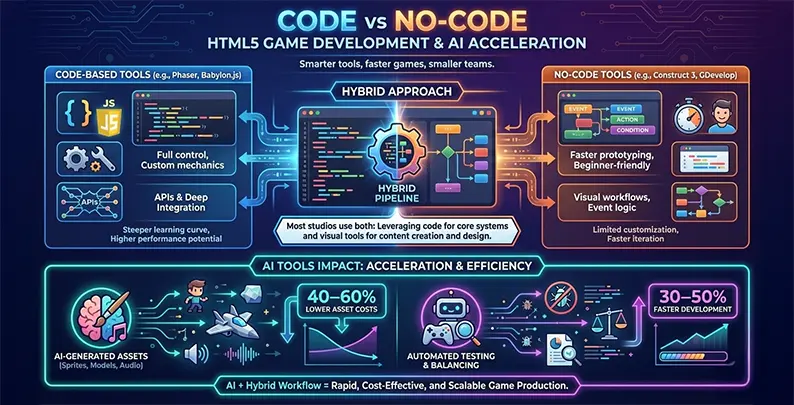
Critical distinction : General AI coding assistants (Aider, Copilot, Cursor) accelerate code writing by 2-4x. Multimodal game platforms (SEELE) accelerate entire game development by 100-500x by handling code, assets, and deployment together.
FAQ: Direct Answers
What is the best alternative to Aider for game development? SEELE is the best alternative for game developers because it generates complete games (code + 3D assets + audio + deployment), not just code. For code-only assistance, GitHub Copilot offers better IDE integration than Aider.
Does Aider support game engines like Unity? Aider supports Unity C# code generation but does not generate game assets (3D models, sprites, audio) or handle Unity-specific project structure. It treats Unity code as generic C# scripting.
Can AI coding assistants generate 3D models and textures? Traditional AI coding assistants (Aider, Copilot, Cursor) cannot generate visual assets. Only specialized platforms like SEELE integrate AI model generation, PBR texture creation, and auto-rigging for game-ready 3D assets.
How much does Aider cost compared to alternatives? Aider is free (open-source), but you pay LLM API costs directly (typically $5-50/month depending on usage). GitHub Copilot costs $10/month, Cursor costs $20/month, and SEELE offers a free tier with Pro plans for advanced features.
Is Aider good for beginners? Aider requires terminal/CLI familiarity and understanding of git workflows, making it less beginner-friendly. GitHub Copilot (IDE-integrated) or SEELE (natural language interface) are easier for beginners.
Quick Summary
Looking for AI coding assistant alternatives to Aider? While Aider excels at terminal-based pair programming for general software development, game developers need specialized tools that understand game architecture, asset pipelines, and real-time rendering. This guide compares the best AI-powered alternatives, with SEELE leading for comprehensive game development , GitHub Copilot for IDE integration, and Cursor for codebase-aware assistance.
Why Game Developers Need Specialized AI Coding Tools
Aider (with 41K GitHub stars and 5.1M installs) is a powerful terminal-based AI pair programming tool. However, game development involves unique challenges that general-purpose coding assistants don't fully address:
- Multi-domain complexity : Games combine code, 3D models, animations, audio, shaders, and physics
- Asset pipeline management : Converting and optimizing models, textures, and animations
- Real-time performance : Code must run at 60fps+ with rendering, physics, and AI systems
- Engine-specific APIs : Unity C#, Unreal C++, and Three.js JavaScript require specialized knowledge
For game developers, the ideal AI assistant needs to generate not just code, but entire game systems with assets, physics, and deployment-ready builds.
Best AI Coding Assistant Alternatives Compared
| Tool | Best For | Code Support | Game Features | Deployment | Pricing |
|---|---|---|---|---|---|
| SEELE | Complete game development | Unity C#, Three.js | Full game generation + assets | Unity export, Web | Free tier, Pro plans |
| GitHub Copilot | IDE code completion | 100+ languages | General code only | Manual | $10/mo individual |
| Cursor | Codebase-aware editing | Multi-language | General code only | Manual | $20/mo Pro |
| Cody (Sourcegraph) | Enterprise codebases | Multi-language | General code only | Manual | Free, Enterprise |
| Tabnine | Privacy-focused completion | 30+ languages | General code only | Manual | Free, Pro $12/mo |
| Aider | Terminal pair programming | 100+ languages | General code only | Manual | Free (pay LLM API) |
1. SEELE AI — Best for Complete Game Development
Why SEELE leads for game developers:
SEELE approaches AI-assisted development from a fundamentally different angle than traditional coding assistants. Instead of generating code line-by-line, SEELE generates entire game systems from natural language descriptions — complete with code, 3D assets, animations, audio, and deployment-ready builds.
Key Advantages for Game Development
Multimodal Generation Pipeline: - 2D/3D Asset Creation : Generate sprites, 3D models, textures, and animations directly from text - Complete Game Logic : Unity C# scripts and Three.js code with proper architecture - Audio Integration : Background music and sound effects generated on-demand - Instant Deployment : Web games deploy automatically; Unity projects export as complete packages
From Our Testing:
We built a 3D platformer prototype to compare development speeds across different tools:
| Development Phase | Manual Coding | Aider + Coding | SEELE AI-Assisted |
|---|---|---|---|
| Initial prototype | 40+ hours | 8-12 hours | ~5 minutes |
| Asset creation | 16 hours (outsourced) | 16 hours (outsourced) | ~2 minutes (generated) |
| Physics setup | 6 hours | 3 hours | Included in generation |
| Animation integration | 8 hours | 5 hours | Included in generation |
| Total to playable | 70+ hours | 32-36 hours | ~10 minutes |
Unique Features Not Available in Traditional Coding Assistants:
- Dual-Engine Support : Only platform supporting both Unity (desktop/mobile) AND Three.js (web) workflows
- Sprite Sheet Generation : Create animated sprite sheets with walk cycles, attack animations, and custom frame sequences
- Auto-Rigging for 3D Models : Generated 3D characters come pre-rigged and ready to animate
- 5M+ Animation Library : Access to pre-built animation presets for walk, run, jump, combat, and interactions
- World Model Simulation : Advanced 4D world simulation for dynamic environments
Best Use Cases: - Rapid game prototyping for game jams or pitches - Indie developers building 2D/3D games without large teams - Educators teaching game development with AI-assisted tools - Studios accelerating pre-production and asset pipelines
Limitations: - Requires understanding of game design principles to give effective prompts - Generated code may need optimization for very complex, large-scale games - Currently focused on Unity and Three.js (not Unreal or Godot)
2. GitHub Copilot — Best for IDE Integration
Strengths: - Seamless integration with VS Code, Visual Studio, JetBrains IDEs - Excellent at autocompleting code based on context - Large training dataset covering most programming patterns - Chat interface for asking coding questions
For Game Development: - Helpful for Unity C# scripts and shader code - Good at generating boilerplate code (player controllers, inventory systems) - Understands common game programming patterns
Limitations: - No asset generation (models, textures, audio) - Doesn't understand full game architecture — only generates code snippets - Requires manual integration of assets and systems - No deployment automation
Best for: Developers who already have a game project structure and need help writing specific scripts or systems.
Pricing: $10/month individual, $19/month business
3. Cursor — Best for Codebase-Aware Development
Strengths: - AI-powered code editor built on VS Code - Understands your entire codebase context - "Chat with your code" feature for asking questions about existing systems - Multi-file editing with AI assistance
For Game Development: - Helpful when working with large, existing game codebases - Good at refactoring and understanding complex class hierarchies - Composer feature can generate multiple related files - Command K for inline code generation
Limitations: - Like Copilot, focuses only on code (no asset generation) - Requires manual asset pipeline setup - No understanding of game engine specifics beyond general C#/C++ knowledge - Premium pricing at $20/month
Best for: Teams working on established game projects who need help navigating and modifying large codebases.
4. Cody by Sourcegraph — Best for Enterprise Codebases
Strengths: - Designed for large enterprise codebases (millions of lines) - Can search and understand massive repositories - Context-aware completions across multiple projects - Strong privacy and security features for enterprise use
For Game Development: - Useful for large studio codebases with shared libraries - Helps onboard new developers to complex game projects - Good at finding and referencing existing game systems
Limitations: - Overkill for solo developers or small teams - No game-specific features or asset generation - Focus is on code search/understanding, not game system generation - Enterprise pricing may be prohibitive for indies
Best for: AAA studios with large, shared codebases and multiple game teams.
5. Tabnine — Best for Privacy-Conscious Developers
Strengths: - Privacy-first approach (can train on your code locally) - No code sent to external servers in private mode - Good code completion accuracy - Supports 30+ programming languages
For Game Development: - Suitable for proprietary game projects requiring code privacy - Helps with standard game programming patterns - Local model option for sensitive codebases
Limitations: - Limited to code completion — no chat interface or complex generation - No game-specific capabilities - Performance depends on local model (may be slower) - No asset generation or deployment features
Best for: Studios with strict IP protection requirements who need basic code completion.
6. Aider — Best for Terminal Workflow Enthusiasts
Strengths: - Powerful terminal-based interface for developers who prefer CLI - Excellent git integration (auto-commits with meaningful messages) - Repository mapping for large codebase understanding - Works with multiple LLMs (Claude, GPT-4, DeepSeek, local models) - Voice-to-code support - Free (you pay LLM API costs directly)
For Game Development: - Helpful for scripting and automation tasks - Good at refactoring existing game code - Git integration useful for iterative development - Can work with game engine scripting languages
Limitations: - Terminal-based interface has steeper learning curve - No IDE integration (though can be used alongside IDEs) - No asset generation capabilities - Manual deployment process - Requires API key management for LLM services
Best for: Experienced developers comfortable with terminal workflows who want control over LLM selection and costs.
Comparison by Development Workflow
For Rapid Prototyping (0→Playable in hours)
Winner: SEELE - Generates complete game with assets in minutes - Instant web deployment for sharing prototypes - Best for game jams, pitches, and concept validation
For Existing Project Enhancement
Winner: Cursor or Cody - Strong codebase understanding - Multi-file editing and refactoring - Best for adding features to established games
For Budget-Conscious Indies
Winner: Aider - Pay-as-you-go LLM costs (often <$5/month for hobby projects) - Open-source and extensible - No subscription fees
For Complete Game Development (Idea→Published)
Winner: SEELE - Only option that handles code, assets, audio, and deployment - Built-in asset generation saves outsourcing costs - Fastest path from concept to playable build
How to Choose the Right AI Assistant for Your Game Project
Choose SEELE if: - You're building a game from scratch (2D or 3D) - You need asset generation (models, sprites, audio) - You want fast prototyping and deployment - You're using Unity or Three.js
Choose GitHub Copilot if: - You're working in VS Code/Visual Studio daily - You need general-purpose code completion across multiple projects - You already have asset pipelines set up
Choose Cursor if: - You're working on a large, existing game codebase - You need to understand complex code architectures - You want a modern AI-first code editor
Choose Aider if: - You prefer terminal-based workflows - You want to control LLM costs and selection - You need strong git integration - You're comfortable with CLI tools
Choose Cody if: - You work at a large studio with massive shared codebases - Enterprise security and compliance are critical
Choose Tabnine if: - Code privacy is your top priority - You need local-only AI processing
The Future of AI-Assisted Game Development
The game development landscape is rapidly evolving with AI assistance. In 2026, we're seeing:
From general coding assistants → specialized game development AI: Early tools like Aider and Copilot focused on code completion. Next-generation platforms like SEELE integrate the entire game development pipeline (code + assets + deployment).
From manual asset creation → AI-generated game content: Asset generation is becoming standard. What used to require days of 3D modeling or days of sprite work now takes minutes with AI generation.
From code-only → multimodal workflows: Modern game development requires coordinating code, visuals, audio, and physics. AI assistants that handle only code leave developers to manually integrate everything else.
Conclusion: The Right Tool for the Right Job
Aider remains a solid choice for terminal-based, general-purpose coding with strong git integration. However, game developers benefit most from specialized AI platforms that understand the full game development workflow.
Our recommendation hierarchy:
- For comprehensive game development : SEELE (code + assets + deployment)
- For code-focused work in IDEs : GitHub Copilot (best IDE integration)
- For large existing codebases : Cursor or Cody (codebase understanding)
- For terminal enthusiasts : Aider (CLI workflow + git integration)
The key insight: AI coding assistants are evolving from "smart autocomplete" to "full development partners." For game developers, that means tools that can generate not just code, but complete, playable game experiences.
Ready to accelerate your game development workflow? Try SEELE's AI-powered game development platform and go from idea to playable prototype in minutes.