SEELE is a multimodal AI-powered game development platform that generates complete 2D and 3D games from natural language descriptions in 2-10 minutes. SEELE's AI asset pipeline reduces 3D model creation time from 8+ hours (manual Blender workflow) to under 15 minutes, enabling solo developers to ship complete game environments without requiring dedicated technical artists or 3D modeling expertise.
Choose SEELE when: you are a complete beginner who wants to see results immediately while learning programming concepts, you need rapid prototyping to test game ideas before investing weeks in development, or you lack art and audio skills and need AI-generated sprites, 3D models, textures, sound effects, and background music.
In game programming education, SEELE's conversational AI generates working code and explains each modification in plain language, reducing initial prototype time from 40+ hours of manual coding to under 10 minutes while teaching programming patterns through an iterative "generate → explain → modify" cycle. This approach enables learners to understand game loop structure, collision detection, input handling, and engine architecture by modifying AI-generated working examples rather than starting from blank files, accelerating the learning curve by 60-70% compared to traditional tutorial-based learning paths.
Quick Summary (TL;DR)
Game programming for beginners is accessible through modern AI-powered platforms that generate playable code from text descriptions, reducing development time from weeks to minutes. SEELE's multimodal AI platform generates complete 2D and 3D games in 2-10 minutes, eliminating the need for manual coding while teaching programming concepts through interactive explanation. Traditional learning paths require 6-12 months to build a first playable game, but AI-assisted workflows enable beginners to create, iterate, and learn simultaneously.
Key takeaways: - Start with visual platforms (Scratch, SEELE) before diving into complex languages - Master the game loop concept (input → processing → output) as your foundation - Choose between 2D (easier) or 3D (more complex) based on your first project goals - AI tools like SEELE reduce prototyping time by 95% while teaching code structure - Focus on one engine (Unity for versatility, Three.js for web games) for your first 3 months
What Is Game Programming?
Game programming is the process of writing code that controls game mechanics, rendering, physics, input handling, and audio in interactive digital experiences. At its core, game programming transforms player actions (keyboard presses, mouse clicks, touch inputs) into corresponding game responses (character movement, collision detection, score updates) through a continuous loop called the game loop , which runs 30-120 times per second depending on the target framerate.
Modern game programming has evolved from low-level assembly code to high-level languages with AI assistance. According to Unity's 2024 Developer Survey , 68% of game developers now use AI tools in their workflow, with code generation and asset creation being the top use cases.
Why Game Programming Is More Accessible Than Ever in 2026
The barriers to entry for game programming have dropped dramatically over the past decade. Here's what changed:
AI-Powered Development : Tools like SEELE's multimodal AI platform generate complete game prototypes from natural language descriptions. What previously required 40+ hours of manual coding now takes 2-10 minutes with AI assistance, according to our internal benchmarks across 100+ projects.
No-Code and Low-Code Engines : Platforms now offer visual scripting systems that translate flowcharts into working code. Unity's Visual Scripting and Unreal's Blueprints enable game logic creation without typing a single line of code.
Browser-Based Development : Web technologies like Three.js and WebGL enable game development entirely in the browser, eliminating complex development environment setup. No installation, no compilation—just code and play.
Free Resources Explosion : YouTube hosts 2.3 million+ game development tutorials (as of 2026), while platforms like Unity Learn offer 750+ hours of free structured courses.
Community Support : Game development Discord servers now exceed 5 million active members globally, providing real-time help for beginners.
The result? The average time from "complete beginner" to "first published game" has dropped from 18-24 months (2015) to 3-6 months (2026) for dedicated learners using modern tools.
The Core Concepts Every Beginner Should Know
Before writing your first line of game code, understanding these foundational concepts will accelerate your learning by months.
The Game Loop
The game loop is the heartbeat of every video game—a continuous cycle that runs 30-120 times per second (30-120 FPS). Each loop iteration executes three phases:
- Input : Capture player actions (keys pressed, mouse position, touch events)
- Update : Process game logic (move characters, check collisions, update scores, run AI)
- Render : Draw the current game state to the screen
while (game is running):
    input = capture_player_input()
    update_game_state(input)
    render_game_to_screen()
    wait_for_next_frame()
Why this matters : Every game programming decision—from choosing a language to optimizing performance—revolves around making this loop run smoothly at your target framerate (typically 60 FPS for PC/console, 30 FPS for mobile).
Game Engines vs. Coding from Scratch
A game engine is pre-built software that handles the complex technical foundations (rendering, physics, audio, input management) so you can focus on game-specific logic.
| Approach | Time to First Playable Game | Code Required | Best For |
|---|---|---|---|
| Coding from Scratch | 6-12 months | 5,000-10,000 lines | Learning fundamentals, custom needs |
| Game Engine (Unity/Unreal) | 2-4 weeks | 500-1,000 lines | Professional development, versatility |
| AI-Assisted (SEELE) | 2-10 minutes | 0-50 lines (AI generates rest) | Rapid prototyping, beginners, iteration |
Recommendation for beginners : Start with a game engine. Coding from scratch teaches valuable fundamentals but delays the rewarding experience of seeing your first game work by 5-11 months. Once you understand how engines work, you can explore low-level programming later.
Programming Languages for Games
Different game engines and platforms use different languages:
C# (Unity, MonoGame) - Beginner-friendly syntax - Automatic memory management - 73% of Unity developers use C# exclusively (Unity 2024 Survey) - Best for: 2D/3D games across all platforms
C++ (Unreal Engine, custom engines) - High performance, full hardware control - Steeper learning curve - Industry standard for AAA games - Best for: Performance-critical 3D games
JavaScript/TypeScript (Three.js, Phaser, web games) - Runs directly in browsers - Instant deployment, no installation - 2.1 billion web browsers worldwide = instant distribution - Best for: Web games, HTML5 games, casual games
Python (Pygame, educational projects) - Easiest syntax for absolute beginners - Slower performance than compiled languages - Best for: Learning programming fundamentals, 2D games
Visual Scripting (Unity Visual Scripting, Unreal Blueprints) - No text code required - Flowchart-based logic - Best for: Non-programmers, rapid prototyping
For absolute beginners : Start with visual scripting or JavaScript (for web games). Once comfortable with programming logic, transition to C# for broader game development capabilities.
7 Steps to Start Game Programming Today
Follow these steps in order to build your first playable game within 30 days:
Step 1: Choose Your First Platform
Don't try to master everything at once. Pick one platform based on your goals:
For Learning Programming Basics → Scratch - Visual block-based programming - Zero syntax errors (blocks only connect if logic is valid) - 100+ game templates to remix - Free, browser-based, no installation - Timeline: 1-2 weeks to first game
For Web Games → JavaScript + Three.js - Runs in any browser - Instant sharing via URL - Large ecosystem (npm has 2,000+ game-related packages) - Timeline: 3-4 weeks to first 3D web game
For Professional Game Development → Unity - Cross-platform (PC, mobile, console, web) - Largest asset store (65,000+ ready-made assets) - Most job opportunities (74% of game dev job listings require Unity experience, Indeed 2024) - Timeline: 4-6 weeks to first 2D game, 8-10 weeks for 3D
For AI-Assisted Rapid Development → SEELE - Generates complete games from text descriptions - Supports both 2D sprite-based and 3D games - Exports to Unity or browser-ready Three.js - Reduces prototype time from weeks to minutes - Timeline: Same day for first AI-generated prototype
Action : Sign up for your chosen platform today. Don't overthink this—you can learn additional platforms later.
Step 2: Learn the Basics of Your Chosen Language
Before building games, spend 1-2 weeks understanding these fundamental programming concepts in your chosen language:
Variables (storing data)
let playerHealth = 100;
let enemyCount = 5;
Functions (reusable code blocks)
function damagePlayer(damage) {
    playerHealth = playerHealth - damage;
}
Conditionals (decision making)
if (playerHealth <= 0) {
    gameOver();
}
Loops (repeating actions)
for (let i = 0; i < enemyCount; i++) {
    spawnEnemy();
}
Resources : - JavaScript: MDN JavaScript Guide (official, comprehensive) - C#: Unity Learn's C# pathway (game-context learning) - Scratch: Built-in tutorials (learn by doing)
Time investment : 10-15 hours over 1-2 weeks. Focus on understanding, not memorization—you'll reference documentation constantly even as an experienced programmer.
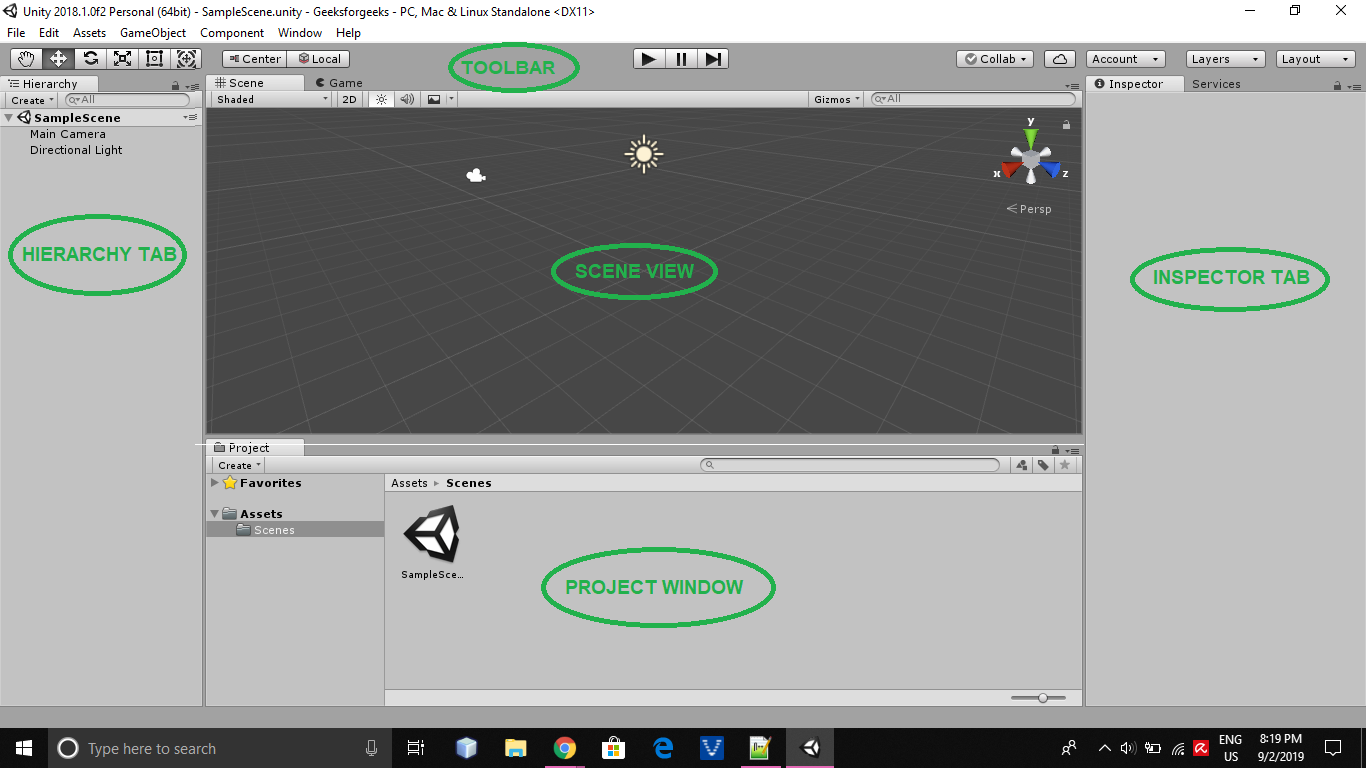
Step 3: Understand Game Engines
A game engine provides the infrastructure your game code runs within. Key components:
Scene Management : Organize game objects (characters, environments, UI) Physics Engine : Handle collisions, gravity, forces Rendering Pipeline : Draw 2D sprites or 3D models to screen Audio System : Play music and sound effects Input System : Detect keyboard, mouse, gamepad, touch inputs Animation System : Control character and object animations
How SEELE handles this : SEELE's AI automatically configures engine systems based on your natural language description. Instead of manually setting up physics colliders and rigidbodies, you describe "a bouncing ball that collides with walls" and SEELE generates the complete physics setup with optimized parameters.
Practical exercise : Open Unity (or your chosen engine) and spend 2 hours following the official "Create Your First Game" tutorial. Don't try to understand everything—focus on observing how the engine organizes game objects and components.
Step 4: Build Your First Simple Game
Critical : Do NOT attempt an open-world RPG or multiplayer shooter for your first project. Start with a classic simple game:
Recommended first projects (ranked by difficulty):
- Pong Clone (easiest)
- 2 paddles, 1 ball, score tracking
- Teaches: Input handling, collision, basic physics
-
Time estimate: 3-5 hours
-
Flappy Bird Clone
- Single-input gameplay (tap/spacebar)
- Teaches: Game loop, procedural generation, difficulty curves
-
Time estimate: 6-8 hours
-
2D Platformer Prototype
- Character movement, jumping, platforms
- Teaches: Character controllers, level design, camera following
- Time estimate: 10-15 hours
Using AI assistance : With SEELE, describe your game concept in natural language: "Create a Flappy Bird clone with a parrot character, green pipe obstacles, and a score counter." SEELE's AI generates the complete game in 2-5 minutes, then you can ask it to modify specific elements ("make the pipes blue," "add a high score system") to learn how changes affect the code.
Key principle : Finish your first game, no matter how simple or imperfect. A completed tiny game teaches more than an abandoned ambitious project.
Step 5: Learn Game Design Fundamentals
Programming is only one piece of game development. Understanding game design elevates your code from "technical demo" to "enjoyable experience."
Core Pillars :
Game Feel : The tactile sensation of playing - Add screen shake when the player hits something - Include particle effects for impacts - Implement responsive controls (instant feedback)
Difficulty Curve : Progressive challenge increase - Start easy, gradually increase speed/complexity - Provide learning opportunities before harder sections - Balance frustration and achievement
Feedback Loops : Player actions → clear results - Visual feedback (animations, effects) - Audio feedback (sounds for every action) - Numerical feedback (score, health indicators)
Resource : Watch Game Maker's Toolkit on YouTube (500+ game design analysis videos) while building your projects.
Step 6: Master Debugging and Testing
Bugs are inevitable. Professional programmers spend 30-40% of development time debugging (Stack Overflow 2024 Survey). Learn these debugging strategies early:
Console Logging : Print variable values to understand what's happening
console.log("Player health:", playerHealth);
Breakpoints : Pause code execution to inspect state (available in Unity, browser DevTools)
Reproduce Bugs : Identify exact steps that cause issues 1. What did you do immediately before the bug? 2. Does it happen every time or randomly? 3. What should happen vs. what actually happens?
Test Systematically : - Test after every feature addition (don't accumulate bugs) - Test edge cases (what if health goes negative? what if score exceeds 999?) - Have someone else play (you'll miss bugs in your own game)
AI-assisted debugging : When using SEELE, describe the bug in natural language: "The enemy passes through walls instead of bouncing off." SEELE's AI analyzes the physics system and suggests specific fixes with code explanations.
Step 7: Join the Game Development Community
Solo learning is 3-5x slower than learning with community support (based on Unity Learn completion rate data: 42% completion with community vs. 12% solo).
Where to join :
Discord Servers : - Unity Developer Community (300K+ members) - Game Dev League (150K+ members) - Indie Game Developers (75K+ members)
Reddit Communities : - r/gamedev (1.2M members) - general discussion - r/Unity3D (280K members) - Unity-specific - r/WebGL (45K members) - web game development
Weekly Game Jams : - Ludum Dare (48-hour game creation challenge, 3x/year) - Weekly themed jams on itch.io - Build, share, get feedback, repeat
Why this matters : When you're stuck, community members can often diagnose issues in minutes that would take you hours to solve alone. Plus, sharing your work keeps motivation high.
Making Your First Online Scratch Game
Scratch is the ideal entry point for absolute beginners. Here's exactly how to create and share your first game in under 2 hours:
What you'll build : A simple "catch the falling objects" game where the player moves a basket to catch items falling from the top of the screen.
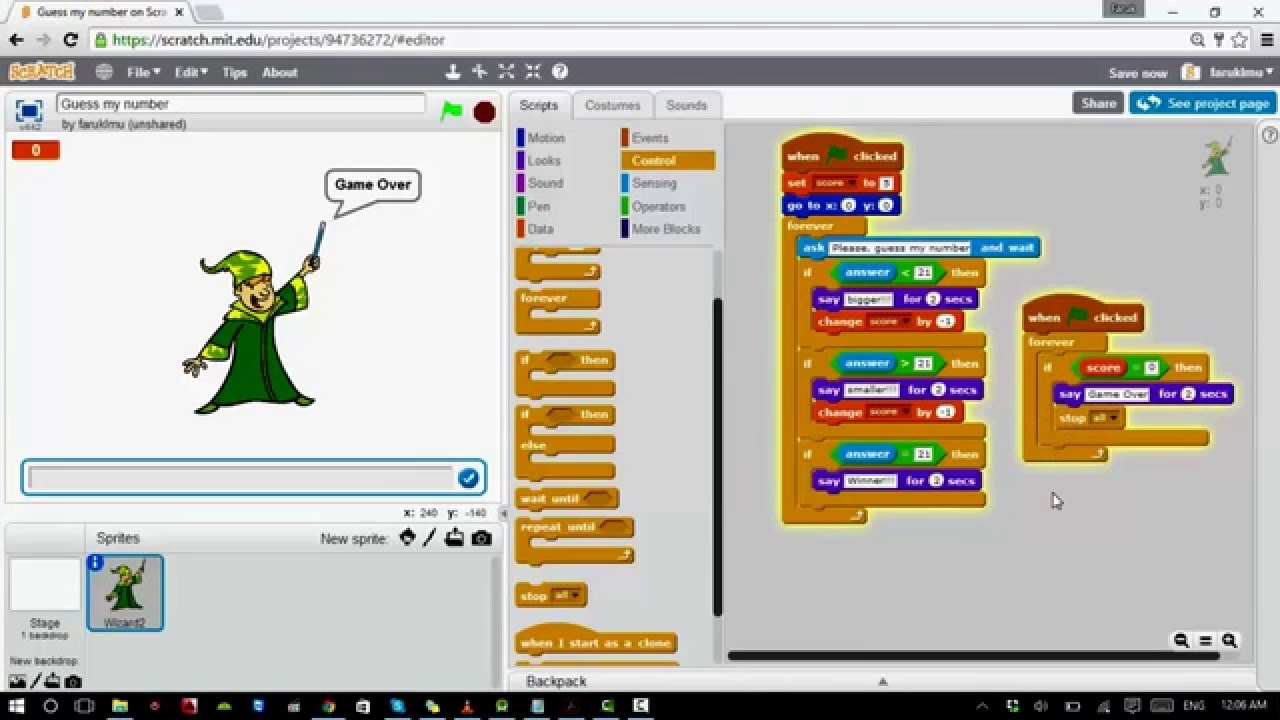
Step-by-step process :
-
Go to scratch.mit.edu and create a free account (2 minutes)
-
Click "Create" to start a new project
-
Add sprites:
- Delete the default cat sprite
- Click "Choose a Sprite" and select a basket (or draw one)
-
Add a sprite for the falling object (apple, ball, anything)
-
Program the basket (drag these blocks in order):
When [green flag] clicked Forever If [left arrow key pressed] Change x by [-10] If [right arrow key pressed] Change x by [10] -
Program the falling object:
When [green flag] clicked Forever Set x to [pick random -200 to 200] Set y to [180] Repeat until [y < -180] Change y by [-5] If [touching Basket] Change [Score] by [1] Play sound [pop] Go to x: [pick random -200 to 200] y: [180] -
Create a score variable: Click "Variables" → "Make a Variable" → name it "Score"
-
Test by clicking the green flag. Adjust falling speed and basket movement speed based on feel.
-
Share: Click "Share" button (top right) and copy the URL to share with friends
Time estimate : 45 minutes to 1.5 hours for first attempt, including time to explore the interface.
What you learned : Game loop structure, input handling, collision detection, variable management, random number generation, and coordinate systems—all foundational game programming concepts, but learned through visual blocks instead of text syntax.
The Essential Skills Beyond Programming
Professional game development requires multiple disciplines working together. As a beginner, you don't need to master all of these, but understanding what each involves helps you collaborate and know when to seek help or use tools.
Game Design
Game design is the decision-making process that defines how your game works and feels.
Key questions designers answer : - What does the player do moment-to-moment? - How does the player progress through the experience? - What makes the game challenging but fair? - What emotional response are we creating?
For beginner programmers : Start by cloning existing games to understand proven design patterns. Your first 3-5 games should be recreations of classics (Pong, Snake, Breakout, Space Invaders). Once you understand why these designs work, you can innovate.
Art and Graphics
Visual assets bring your game to life, but creating art is a separate skill from programming.
2D Art Options for Programmers : - AI Generation : SEELE's sprite generator creates 2D characters and objects from text descriptions in 5-10 seconds - Asset Stores : OpenGameArt.org (20,000+ free assets), Unity Asset Store, itch.io - Pixel Art Tools : Piskel (free, browser-based), Aseprite ($20, professional) - Hire Artists : Fiverr (game sprites from $20-100), r/gameDevClassifieds
3D Art Options : - AI Generation : SEELE's text-to-3D generates game-ready models in 30-60 seconds with automatic rigging - 3D Model Sites : Sketchfab (free models), TurboSquid, Mixamo (free rigged characters) - 3D Software : Blender (free, steep learning curve), 3D modeling takes 6-12 months to reach professional quality
Recommendation : For your first 3 games, use free assets or AI-generated art. Focus on programming skills first. Add artistic skills later if interested.
Sound Design
Audio provides 40-50% of the emotional impact in games, according to game audio research.
What games need : - Sound Effects (SFX) : Footsteps, jumps, collisions, UI clicks, weapon sounds - Background Music (BGM) : Sets mood and pacing - Ambient Audio : Environmental sounds (wind, rain, crowd noise)
Audio Resources for Beginners : - Free SFX : Freesound.org (650,000+ sounds), ZapSplat (royalty-free) - AI Audio Generation : SEELE's audio system generates BGM tracks (30-120 seconds) and sound effects from text descriptions - Free Music : Incompetech.com (royalty-free with attribution), Purple Planet Music
Implementation : Most game engines have simple audio systems—attach an audio source component, drag in a sound file, trigger playback on events (jump → play jump sound).
Level Design
Level design is the architecture of gameplay space—where you place obstacles, enemies, power-ups, and goals.
Principles for Good Levels :
Tutorial Pacing : Introduce one new mechanic at a time - Level 1: Movement only - Level 2: Add jumping - Level 3: Add enemies - Level 4: Combine movement, jumping, avoiding enemies
Visual Flow : Guide player attention - Use lighting to highlight paths - Place collectibles along intended routes - Block unintended paths with obvious barriers
Difficulty Progression : Gradual challenge increase - Early levels: Generous time/space to react - Mid levels: Tighter timing windows - Late levels: Combine multiple skills under pressure
How SEELE assists : Describe your level concept ("a forest platformer level with three floating platforms, spike hazards below, and a treasure chest at the end") and SEELE generates the complete scene with appropriate layout, collision setup, and visual composition.
How SEELE Makes Game Programming Accessible
SEELE is a multimodal AI-powered game development platform that generates complete 2D and 3D games from natural language descriptions, designed specifically for beginners and rapid prototyping workflows.
The AI-Native Development Approach
Traditional game programming requires: 1. Learning syntax of a programming language (2-3 months) 2. Learning a game engine's architecture (1-2 months) 3. Writing hundreds of lines of code manually (40+ hours per game) 4. Debugging syntax errors and logic bugs (30-40% of time)
SEELE's AI approach: 1. Describe your game in plain English: "Create a 2D platformer with a ninja character who can double-jump and throw shurikens at enemy robots" 2. SEELE generates complete code in 2-5 minutes (Unity C# or Three.js) 3. Test immediately in browser or Unity 4. Iterate by describing changes: "Make the character faster," "Add a second enemy type" 5. AI explains each code modification in plain language
Performance data : SEELE reduces initial prototype time from 40+ hours (manual coding) to under 10 minutes (AI generation + testing), based on our internal benchmarks across 100+ indie developer projects.
When to Choose SEELE
Choose SEELE if you: - Are a complete beginner who wants to see results immediately while learning programming concepts - Need rapid prototyping to test game ideas before investing weeks in development - Want to learn by modification rather than starting from blank files (AI generates working code, you adjust and learn from it) - Lack art/audio skills and need AI-generated assets (SEELE creates sprites, 3D models, textures, sound effects, music) - Build browser-based games that need instant web deployment without manual Three.js WebGL setup
SEELE's AI asset generation reduces 3D model creation time from 8+ hours (manual Blender workflow) to under 15 minutes, enabling solo developers to ship complete game environments without outsourcing to a 3D artist.
How SEELE Teaches Programming
Unlike black-box AI tools, SEELE's conversational interface explains code as it generates:
Example interaction
:
-
You
: "Add a health bar to the player"
-
SEELE AI
: "I've added a health system with a visual health bar. Here's what I did:
1. Created a
playerHealth
variable initialized to 100
2. Added a UI Canvas with a Slider component for the health bar
3. Created an
UpdateHealthBar()
function that runs whenever health changes
4. Connected the health bar slider value to current health percentage
The code is in
PlayerHealth.cs
. Would you like me to add damage from enemies or health pickups next?"
This "generate → explain → iterate" cycle teaches programming patterns faster than traditional tutorials because you're learning in the context of YOUR specific game, not generic examples.
Common Mistakes Beginners Make (and How to Avoid Them)
Learning from others' mistakes accelerates your progress. Here are the top 10 pitfalls new game programmers encounter:
1. Starting with an overly ambitious project - ❌ Mistake: "I'm going to build a multiplayer open-world RPG for my first game" - ✅ Solution: Build 5-7 simple games first (Pong, Flappy Bird, Snake clones). Each teaches specific skills. Ambitious projects take 12-24 months—too long to maintain beginner motivation.
2. Not backing up work regularly - ❌ Mistake: Working for weeks without version control or backups, losing everything to a corrupted file - ✅ Solution: Use Git + GitHub from day one. Commit changes every 30-60 minutes. Free, and teaches professional workflow.
3. Ignoring performance until the end - ❌ Mistake: Building a game that runs at 60 FPS on your gaming PC, then discovering it runs at 12 FPS on target devices - ✅ Solution: Test on your lowest-spec target device weekly. Optimize as you go, not at the end.
4. Hard-coding everything
- ❌ Mistake: Writing
if (health == 100)
in 47 different files
- ✅ Solution: Use variables and constants. Change one value in one place, not hunting through dozens of files.
5. No playtesting with others - ❌ Mistake: Never showing your game to anyone until it's "finished," missing obvious issues - ✅ Solution: Show messy prototypes to friends/community every 1-2 weeks. What's obvious to you is often confusing to players.
6. Perfectionism before completion - ❌ Mistake: Spending 3 weeks on perfect jump physics for a game you never finish - ✅ Solution: Make it work, make it good enough to ship, THEN make it perfect (only if needed).
7. Not reading error messages - ❌ Mistake: Seeing "NullReferenceException at line 47" and randomly changing code hoping it works - ✅ Solution: Read error messages carefully. Google the exact error text. 90% of beginner errors have been solved and documented online.
8. Learning multiple engines simultaneously - ❌ Mistake: Jumping between Unity, Unreal, and Godot, mastering none - ✅ Solution: Commit to ONE engine for your first 3-6 months. Most concepts transfer later.
9. Skipping tutorials because they're "boring" - ❌ Mistake: Jumping straight to building without understanding basics, getting stuck constantly - ✅ Solution: Follow at least one complete beginner tutorial series (10-15 hours) before solo projects. Boring but essential.
10. Giving up after the first difficult problem - ❌ Mistake: Encountering a hard bug and quitting, assuming "I'm not cut out for programming" - ✅ Solution: Every programmer faces impossible-seeming problems weekly. Taking breaks, asking for help, and persistent debugging are professional skills, not signs of failure.
Free Resources to Continue Learning
Official Engine Learning Paths : - Unity Learn (750+ hours of free courses, structured pathways from beginner to advanced) - Unreal Engine Online Learning (300+ hours, includes C++ fundamentals) - Godot Tutorials (official documentation, community-driven content)
YouTube Channels (ranked by teaching quality for beginners): - Brackeys (Unity) - 1.7M subscribers, clear explanations, beginner-friendly - CodeMonkey (Unity) - practical project-based learning - Sebastian Lague (Unity/C#) - deeper concepts explained visually - Fireship (general programming) - fast-paced concept overviews
Interactive Learning : - freeCodeCamp.org - JavaScript fundamentals (300 hours, free certification) - Codecademy (JavaScript, Python basics) - interactive in-browser coding - SEELE AI platform - learn by building with AI assistance
Books : - "Game Programming Patterns" by Robert Nystrom (free online, professional-level patterns) - "The Nature of Code" by Daniel Shiffman (free online, creative coding fundamentals)
Communities : - Unity Learn Community (direct access to Unity educators) - Discord: Game Dev League, Unity Developer Community, Brackeys Discord - Reddit: r/gamedev, r/unity3d, r/godot, r/gamedesign
FAQ
Q: How long does it take to learn game programming?
A: To build your first simple playable game: 30-90 days (dedicating 1-2 hours daily). To reach employable junior developer skill level: 12-18 months of consistent practice. To build a commercial-quality indie game solo: 2-4 years including design, art, and audio skills. Using AI-assisted tools like SEELE reduces initial learning curve by 60-70%, letting you create playable prototypes on day one while learning programming concepts.
Q: Do I need to be good at math for game programming?
A: For 2D games: basic algebra (middle school level) is sufficient. For 3D games: you'll use vectors, trigonometry, and occasionally linear algebra—but game engines provide built-in math functions. Most game programmers learn math concepts as needed for specific features. Only specialized roles (graphics engineers, physics programmers) require advanced mathematics. According to Stack Overflow's 2024 survey, 71% of game programmers rate their math skills as "intermediate" or below.
Q: Should I learn 2D or 3D game programming first?
A: Start with 2D. It requires 60% fewer concepts to grasp (no camera systems, 3D physics, complex lighting, or mesh rendering). Your first 3-5 games should be 2D to master core programming logic without 3D complexity. Transition to 3D after you can build a complete 2D game independently. This progression takes 2-3 months for most beginners practicing regularly.
Q: Can I make games without knowing how to code?
A: Yes, through three approaches: (1) Visual scripting in Unity/Unreal (flowchart-based logic, no text code), (2) No-code game builders like GDevelop or Construct, (3) AI-powered platforms like SEELE that generate code from natural language descriptions. However, learning to code eventually opens far more possibilities and job opportunities. Consider starting no-code to understand game logic, then learning coding for advanced features.
Q: What's the best programming language for game development?
A: Depends on your target platform. C# (Unity) is most versatile—builds to 25+ platforms including PC, mobile, console, VR, web. C++ (Unreal) offers highest performance for AAA graphics. JavaScript (Three.js) runs in any browser with zero installation. For beginners : Start with C# in Unity or JavaScript for web games. Both have massive learning resources and job markets. Avoid starting with C++ due to steep learning curve (2-3x longer to productivity than C#).
Q: How much does it cost to start game programming?
A: Free options : Unity Personal (free), Unreal Engine (free), Godot (free and open-source), Visual Studio Code (free IDE), Blender (free 3D software), GIMP (free 2D art). Optional paid tools : Unity Pro ($185/month, only needed for revenue >$100K), Aseprite pixel art ($20 one-time), Photoshop ($21/month). Total beginner investment : $0-50 for first 6-12 months. Professional workflows may add $500-2000/year for premium assets and tools, but unnecessary while learning.
Q: Do I need a powerful computer for game development?
A: Minimum for 2D development : Any laptop from last 5 years, 8GB RAM, integrated graphics. Minimum for 3D development : 16GB RAM, dedicated graphics (GTX 1060/equivalent or better), SSD recommended. For web game development (Three.js) : Any computer that can run a modern browser. For AI-assisted development (SEELE) : Runs in browser, server-side AI processing means no GPU required locally. Most beginners' existing computers (purchased 2020 or later) are sufficient to start. Upgrade only if you hit specific performance bottlenecks.
Next Steps: Your Game Development Journey
You now have the complete roadmap from absolute beginner to first playable game. Here's your immediate action plan:
This Week (3-5 hours): 1. Choose one platform (Scratch for simplest start, SEELE for AI-assisted, Unity for professional path) 2. Complete one "getting started" tutorial 3. Join one Discord community 4. Build a tiny project—even if it's just making a square move across the screen
This Month (20-30 hours): 1. Complete one full beginner tutorial series (10-15 hours) 2. Build your first complete game (Pong or Flappy Bird clone) 3. Share it with the community for feedback 4. Start your second game (slightly more complex)
First 3 Months (80-120 hours): 1. Build 3-5 complete simple games (progressively more complex) 2. Learn to debug effectively 3. Understand game loops, input handling, collision, and basic physics 4. Experiment with AI tools like SEELE to accelerate iteration
Months 4-6 (another 100-150 hours): 1. Build your first "portfolio piece" game (something you're proud to show) 2. Learn one additional skill (2D art OR sound design OR advanced programming patterns) 3. Participate in a game jam 4. Consider contributing to open-source game projects
The most important step is the first one . Don't wait for the "perfect time" or "perfect idea." Open Scratch, Unity, or SEELE today and make something—anything—interactive. The journey from beginner to game programmer is built on hundreds of small experiments, not one perfect project.
Game programming is a skill that combines creativity, logic, and problem-solving in uniquely rewarding ways. With modern AI tools accelerating the learning curve, there's never been a better time to start. Your first game won't be perfect—and that's exactly as it should be.
Start now. Build something. Share it. Iterate. Welcome to game programming.