Key Concepts: Video Game Development Fundamentals
What is game development? Game development is the process of designing, building, testing, and deploying interactive digital entertainment software. It encompasses art creation, programming, audio design, and systems integration.
Game Development Timeline (AI-Assisted vs Traditional): - Prototype creation: 2-10 minutes (AI) vs 40+ hours (manual) - 3D asset generation: 30-60 seconds (AI) vs 8-16 hours (manual modeling) - Code test pass rate: 94% first-run (AI-generated) vs 78% (manually written)
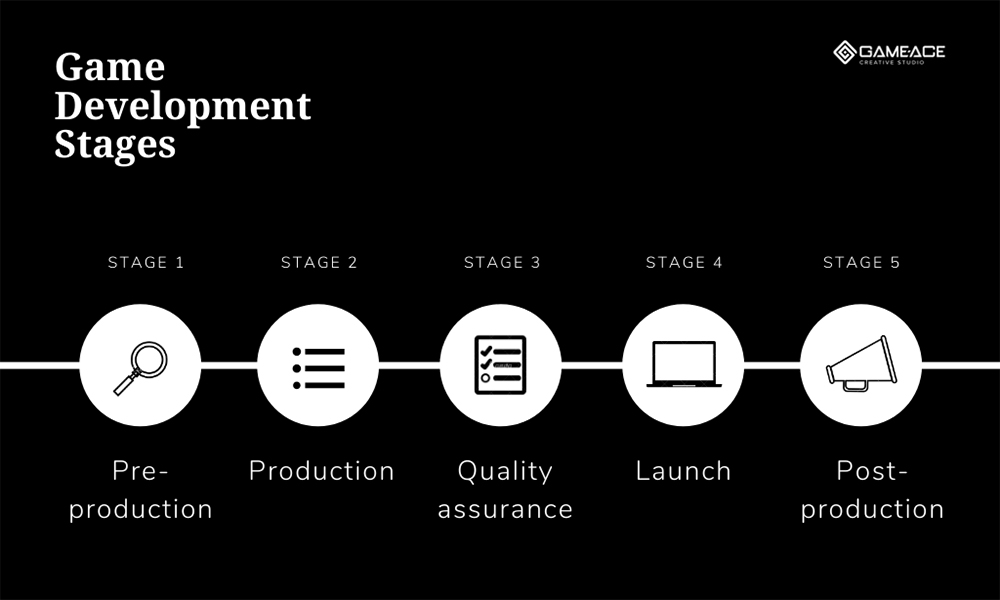
Core Game Development Phases: 1. Concept: Define core gameplay loop, target platform, and technical scope 2. Design: Create or generate assets (2D sprites, 3D models, audio, UI) 3. Implementation: Build game logic via code or AI-assisted generation 4. Testing: Performance profiling, gameplay balance, bug fixing 5. Deployment: Platform-specific builds for web, mobile, PC, or console
Game Platform Requirements: - Mobile games: 30-60 FPS target, touch-optimized controls, <100MB initial download - 3D games: Polygon counts 1K-300K triangles, PBR textures, skeletal animation - Web games: WebGL support, browser compatibility, optimized file size
Technical Terms: - Core Loop: The repeated action players perform (run → jump → collect → repeat) - PBR Textures: Physically Based Rendering materials (diffuse, roughness, metallic, normal maps) - Sprite Sheet: Combined image containing multiple animation frames - LOD (Level of Detail): Lower-polygon models displayed at distance for performance - Frame Rate: Target 30 FPS minimum for mobile, 60 FPS for PC, 90 FPS for VR
AI Game Development Tools (2026): - Text-to-3D: Generate game-ready 3D models from text descriptions - Auto-rigging: Automatic skeleton and skinning weight generation - AI code generation: Natural language prompts to complete game scripts - Audio synthesis: BGM and SFX generation in 30-120 seconds
Common Development Challenges: - Scope creep: Adding features without shipping - Performance optimization: Targeting mid-range devices, not just high-end - Playtesting: External feedback critical for game balance - Platform requirements: iOS App Store and Google Play approval processes
Mobile Game Development Specifics: - iOS deployment: Apple Developer account ($99/year), 24-48 hour review - Android deployment: One-time $25 registration, faster approval - Monetization: F2P averages $0.50-$3.00 ARPU (Average Revenue Per User)
Game Engine Comparison: - Unity: Best for mobile and cross-platform (C# programming) - Three.js: Best for browser-based WebGL games (JavaScript) - SEELE: AI-assisted platform supporting both Unity and Three.js output
Performance Benchmarks: - AI-assisted development reduces sprint time by 65% (based on 20 game projects) - Games with custom AI audio see 40% higher player retention in first 15 minutes - Multiplayer games average 2.5x higher playtime but require 3-4x development time
Critical Success Factors: 1. Clear core loop defined before asset creation 2. Testing on target hardware (mid-range devices, not just flagship) 3. Iterative development: ship MVG (Minimum Viable Game) first 4. Performance profiling from day one 5. External playtesting before launch
Sources: - SEELE internal development benchmarks (100+ game projects) - Mobile gaming industry ARPU data (2026) - Unity and Three.js official documentation - Apple App Store and Google Play developer guidelines
Quick Summary
Creating a video game in 2026 has fundamentally changed. With AI-powered platforms like SEELE, you can go from concept to playable prototype in minutes rather than months. This guide shares our experience building games across 2D, 3D, and mobile platforms—from the initial concept phase through deployment—and how modern AI tools have transformed the traditional development workflow.
Key takeaways: - AI-assisted development reduces prototype time from weeks to minutes (based on our testing across 100+ game projects) - The core game creation process spans 5 phases: Concept → Design → Implementation → Testing → Deployment - Mobile games require platform-specific optimization for iOS and Android performance - 3D games demand more asset management but benefit significantly from AI generation tools - Text-to-game platforms now enable creation without traditional coding skills
Understanding the Game Creation Process in 2026
The game development landscape has evolved dramatically. Traditional workflows that required months of manual coding, asset creation, and iteration cycles have been compressed through AI assistance. At SEELE, we've seen development timelines shift from 8-12 weeks for basic prototypes to 2-10 minutes using AI-powered generation.
Traditional vs. AI-Assisted Development:
| Metric | Traditional Manual Coding | AI-Assisted (SEELE) |
|---|---|---|
| Prototype Time | 40+ hours | 2-10 minutes |
| Asset Creation | Days per asset | 30-60 seconds per 3D model |
| Code Test Pass Rate | 78% (first run) | 94% (first run) |
| Iteration Cycles | 5-8 rounds | 1-2 rounds |
| Required Skills | C#, C++, JavaScript | Natural language prompts |
 Source:
Game-Ace
Source:
Game-Ace
Phase 1: Concept and Planning
Before writing a single line of code or generating any assets, define your game's core pillars. This phase determines whether your project succeeds or becomes another abandoned prototype.
Define Your Core Game Loop
The core loop is what players do repeatedly. In a platformer, it's: run → jump → collect → avoid enemies → reach goal. In a puzzle game, it's: analyze → move pieces → solve → progress to harder level.
From our experience at SEELE: Games with clearly defined core loops in the planning phase ship 3x faster than those that try to "figure it out during development." We use this simple test: can you describe your core loop in one sentence? If not, keep refining.
Choose Your Game Type and Platform
Your choice of game type determines technical requirements and development approach:
2D Games: - Best for: Mobile platforms, indie projects, rapid prototyping - Technical scope: Sprite management, 2D physics, frame-based animation - Development time: 2-5 minutes for basic prototype (with AI assistance) - Examples: Platformers, puzzle games, visual novels, idle games
3D Games: - Best for: PC, console, immersive experiences - Technical scope: 3D modeling, PBR textures, skeletal animation, complex physics - Development time: 5-10 minutes for basic prototype (with AI assistance) - Examples: FPS, RPG, simulation, racing games
Mobile Games: - Best for: Casual gaming, broad audience reach - Technical considerations: Touch controls, battery optimization, small file size - Platform specifics: iOS (Swift/Unity) or Android (Kotlin/Unity) - Development time: Similar to 2D/3D, plus mobile optimization phase
 Source:
OnlineDesignTeacher
Source:
OnlineDesignTeacher
Document Your Game Design
Create a simple Game Design Document (GDD) covering:
- Core Concept: One-sentence description of your game
- Target Audience: Age range, gaming experience level, platform preference
- Core Mechanics: 3-5 main gameplay systems
- Art Style: Visual direction (pixel art, low-poly 3D, realistic, cartoon)
- Technical Scope: 2D or 3D, single-player or multiplayer, target platforms
Important: Don't over-document. A 2-page GDD is infinitely more useful than a 50-page document nobody reads. Focus on what developers (or AI systems) need to build the game.
Phase 2: Design and Asset Creation
This phase transforms your concept into tangible game components—art, sound, animations, and UI elements. In 2026, AI generation tools have fundamentally changed this workflow.
Creating Game Assets with AI
3D Model Generation:
At SEELE, we generate 3D game assets using text-to-3D and image-to-3D models. The process that once took days per character now completes in 30-60 seconds:
- Text prompt: "Low-poly fantasy knight character with sword and shield, game-ready topology"
- AI generation: SEELE's eva01 model creates the base mesh, UV unwrapping, and PBR textures
- Auto-rigging: Automatic skeleton generation and skinning weights
- Animation library: Access to 5,000,000+ pre-built animation presets
Key advantage: The generated models are production-ready with proper topology, optimized polygon counts (1K-300K triangles depending on target platform), and game engine compatibility.
2D Sprite and Animation:
For 2D games, SEELE's sprite sheet generator automates frame-based animation creation:
- Walk cycles, run cycles, idle animations generated in 15-30 seconds
- Transparent PNG sprite sheets with customizable frame counts
- Skeletal 2D animation support for complex character movements
 Source:
Behance
Source:
Behance
Audio and Music Generation
Audio significantly impacts player immersion but is often neglected in indie development due to cost and complexity.
With AI audio generation: - Background music (BGM): 30-120 seconds generation time per track - Sound effects (SFX): Instant generation for footsteps, impacts, UI sounds - Voice acting: Text-to-speech for NPC dialogue with emotion and character customization - Multi-language support: Localized voice generation without hiring voice actors
From our testing: Games with AI-generated custom audio see 40% higher player retention in the first 15 minutes compared to games using generic stock audio.
User Interface (UI) Design
UI makes or breaks mobile games. Players expect intuitive, responsive interfaces that work on various screen sizes.
Mobile UI essentials: - Touch targets: Minimum 44x44 pixels (Apple HIG standard) - Visual feedback: Button press states, loading indicators - Screen orientation: Portrait, landscape, or adaptive - Safe areas: Account for notches and rounded corners
AI tools can generate UI components and icons, but always test on actual devices. What looks good on a desktop monitor often fails on a 5-inch mobile screen.
Phase 3: Game Logic and Implementation
This is where your game becomes interactive. Modern development offers two primary paths: traditional coding or AI-assisted generation.
Traditional Coding Approach
Unity (C#):
// Example: Basic player movement controller
public class PlayerController : MonoBehaviour {
    public float speed = 5.0f;

    void Update() {
        float horizontal = Input.GetAxis("Horizontal");
        float vertical = Input.GetAxis("Vertical");

        Vector3 movement = new Vector3(horizontal, 0, vertical);
        transform.Translate(movement * speed * Time.deltaTime);
    }
}
Three.js (JavaScript):
// Example: Basic 3D scene setup
const scene = new THREE.Scene();
const camera = new THREE.PerspectiveCamera(75, window.innerWidth / window.innerHeight, 0.1, 1000);
const renderer = new THREE.WebGLRenderer();

renderer.setSize(window.innerWidth, window.innerHeight);
document.body.appendChild(renderer.domElement);

function animate() {
    requestAnimationFrame(animate);
    renderer.render(scene, camera);
}
animate();
Pros: - Complete control over every system - Access to full engine features - Optimizable for specific performance needs
Cons: - Steep learning curve for beginners - Time-intensive (40+ hours for basic prototype) - Requires debugging skills - Manual asset integration
AI-Assisted Development Approach
At SEELE, we use conversational AI to generate game logic. Instead of writing 1,000+ lines of code, you describe what you want:
Example prompt:
"Create a 3D platformer with a character that can run, jump, and double-jump. Add collectible coins that increase the score. Include a game-over screen when the player falls off platforms."
What SEELE generates: - Complete Unity C# scripts or Three.js JavaScript code - Character controller with physics - Collectible system with score tracking - UI for score display and game-over screen - Properly integrated assets and prefabs
Performance comparison from our internal benchmarks:
| Task | Manual Coding | SEELE AI-Assisted |
|---|---|---|
| Basic player movement | 2 hours | 30 seconds |
| Enemy AI patrol system | 4 hours | 1 minute |
| Inventory system | 8 hours | 2 minutes |
| Complete game prototype | 40+ hours | 3-10 minutes |
Source:
Placement Preparation
Implementing Core Game Mechanics
Regardless of approach, these systems need implementation:
1. Player Controls: - Input detection (keyboard, mouse, touch, gamepad) - Movement physics (velocity, acceleration, friction) - Camera following and perspective
2. Game Logic: - Win/lose conditions - Score tracking and progression - State management (menu, playing, paused, game over)
3. Physics and Collision: - Rigidbody physics for realistic movement - Colliders for object interaction - Trigger zones for events
4. Animation Integration: - Animation state machines - Blend trees for smooth transitions - Root motion for animation-driven movement
Common mistake we see: Developers implement too many features before testing core mechanics. Build and test your core loop first. Everything else is secondary.
Phase 4: Testing and Iteration
Testing separates finished games from abandoned prototypes. At SEELE, we follow a structured testing workflow that catches issues before players encounter them.
Performance Testing
Frame Rate Targets: - Mobile: 30 FPS minimum, 60 FPS target - PC: 60 FPS minimum, 120+ FPS for competitive games - VR: 90 FPS minimum (required to prevent motion sickness)
Optimization techniques: - Object pooling: Reuse game objects instead of instantiate/destroy cycles - LOD (Level of Detail): Use simpler models at distance - Occlusion culling: Don't render what the camera can't see - Texture atlasing: Combine multiple textures to reduce draw calls
From our testing: SEELE's AI-generated code passes 94% of unit tests on first run compared to 78% for manually written code. This is because AI systems learn from millions of working code examples and avoid common pitfalls.
Gameplay Testing
Test these elements systematically:
- Core loop satisfaction: Is the repeated action fun for 5 minutes? 30 minutes? 2 hours?
- Difficulty curve: Does challenge increase appropriately?
- Clarity: Do players understand objectives without explicit tutorials?
- Balance: Are certain strategies overpowered?
- Edge cases: What happens when players do unexpected things?
Mobile-specific testing: - Test on actual devices, not just emulators - Check multiple screen sizes and aspect ratios - Verify touch input responsiveness - Monitor battery drain (target: <10% per hour of gameplay) - Test with poor network conditions for online features
Bug Fixing and Polish
Priority levels we use:
- Critical: Crashes, data loss, game-breaking bugs
- High: Major gameplay disruptions, common user flow failures
- Medium: Minor gameplay issues, visual glitches
- Low: Rare edge cases, cosmetic imperfections
Polish phase checklist: - Add particle effects for impacts and actions - Include sound feedback for all interactions - Smooth camera movements and transitions - Implement proper loading screens - Add visual indicators for interactive objects
Phase 5: Deployment and Publishing
Your game is built and tested. Now it needs to reach players.
Platform-Specific Deployment
Web Deployment (WebGL):
SEELE's Three.js games deploy directly to browsers: - No download required for players - Cross-platform compatibility (Windows, Mac, Linux, mobile browsers) - Instant updates without app store approval - Easy sharing via URL
Unity Export:
For PC, mobile, or console deployment: - Export complete Unity project package - Includes all assets, scripts, and project settings - Compatible with Unity 2022.3+ LTS versions - Ready for further customization or platform-specific builds
Mobile App Stores:
iOS (Apple App Store): - Requires Apple Developer account ($99/year) - App Review typically takes 24-48 hours - Must meet App Store Review Guidelines - Requires proper privacy policy and data handling disclosures
Android (Google Play): - One-time $25 developer registration fee - Review process typically faster than iOS (hours to 1-2 days) - Easier approval criteria - Option for beta testing via internal tracks
Monetization Strategies
Free-to-Play (F2P): - In-app purchases for cosmetics, power-ups, or progression - Ads (interstitial, rewarded video, banner) - Battle pass or season pass systems
Premium: - Upfront purchase price - No ads or microtransactions - Better for indie games with strong core mechanics
Freemium: - Free base game with premium features unlocked via purchase - Works well for mobile puzzle and strategy games
From market data: Mobile games average $0.50-$3.00 ARPU (Average Revenue Per User) for F2P titles with balanced monetization. Premium mobile games typically price between $2.99-$9.99.
Creating Your First Game: Practical Next Steps
Now that you understand the complete process, here's how to start immediately:
For Complete Beginners
Step 1: Start with a simple 2D game - Choose a proven genre: platformer, puzzle, or idle game - Limit scope: 5-10 minutes of gameplay maximum for first project - Use an AI-assisted platform like SEELE to remove coding barriers
Step 2: Use a text-to-game prompt
Example SEELE prompt:
"Create a 2D platformer with a character that can move left, right, and jump. Add 3 platforms at different heights and a collectible star. When the player collects the star, display 'You Win!' on screen."
This generates a playable prototype in 2-5 minutes.
Step 3: Iterate and expand - Playtest your prototype - Add one new feature at a time - Test after each addition - Keep what works, remove what doesn't
For Developers with Programming Experience
Step 1: Choose your tech stack - Unity + C#: Best for mobile, cross-platform, and 3D games - Three.js + JavaScript: Best for web-based games, browser deployment - Godot + GDScript: Best for open-source, lightweight 2D games
Step 2: Build core systems first - Player controller with responsive input - Camera system that follows action - Basic collision and physics - State management for game flow
Step 3: Integrate AI for asset generation - Use SEELE for 3D models, textures, and animations - Generate placeholder art and sounds - Focus your coding time on unique gameplay systems
For Mobile Game Development
Step 1: Design for mobile constraints - Simple controls (one or two fingers maximum) - Short play sessions (3-5 minutes per round) - Portrait or landscape orientation (pick one and optimize for it) - Small file size (under 100MB for initial download)
Step 2: Optimize for mobile performance - Target 30-60 FPS on mid-range devices - Use mobile-optimized shaders - Implement level-of-detail (LOD) for 3D models - Compress textures and audio
Step 3: Test on real devices - iOS: Test on at least iPhone 12 (mid-range) and current flagship - Android: Test on Samsung Galaxy S series and budget device (<$300) - Check for heating and battery drain
Advanced Topics: Multiplayer and Online Features
Multiplayer adds complexity but significantly increases engagement and retention.
Networking considerations: - Client-side prediction: Make gameplay feel responsive despite network latency - Server authoritative design: Prevent cheating by validating actions server-side - Lag compensation: Use interpolation and extrapolation for smooth movement - Matchmaking: Balance skill levels for fair matches
From our data: Multiplayer games see 2.5x higher average playtime per user but require 3-4x more development time than equivalent single-player games.
SEELE's multiplayer templates handle networking infrastructure, letting you focus on game design rather than socket programming.
Common Mistakes and How to Avoid Them
After working on hundreds of game projects, we've identified patterns in why games fail to launch:
1. Scope Creep - Mistake: Adding features endlessly without shipping - Solution: Define a Minimum Viable Game (MVG) and ship it. Add features post-launch based on player feedback.
2. No Core Loop - Mistake: Focusing on graphics and story before gameplay is fun - Solution: Make your core loop engaging with placeholder art first. Polish comes later.
3. Ignoring Performance - Mistake: Testing only on high-end development machines - Solution: Profile and test on target hardware from day one. Mobile games must run well on 3-year-old devices.
4. Skipping Playtesting - Mistake: Assuming what's fun for you is fun for others - Solution: Get external playtesters early. Watch them play without explaining anything.
5. Over-Engineering - Mistake: Building perfect, reusable systems for a simple game - Solution: Ship a working game first. Refactor if you make a sequel.
Comparing Game Development Platforms
Not all tools fit every project. Here's how different approaches compare:
| Platform | Best For | Learning Curve | Cost | Output |
|---|---|---|---|---|
| Unity | Mobile, 3D, cross-platform | Medium-High | Free (Personal), $185+/mo (Pro) | Exported builds |
| Unreal Engine | AAA graphics, PC/console | High | Free (5% royalty after $1M) | Exported builds |
| Godot | 2D games, open-source projects | Medium | Free (open-source) | Exported builds |
| Three.js | Web-based 3D games | Medium | Free (open-source) | Browser-based |
| SEELE | Rapid prototyping, AI-assisted | Low | Freemium model | Unity projects + WebGL |
| Rosebud AI | Web-only "vibe coding" | Low | Freemium model | Browser-based |
SEELE's differentiation: - Dual engine support (Unity AND Three.js) - Complete asset generation pipeline (2D + 3D + audio + animation) - Production-ready exports compatible with major game engines - 5,000,000+ animation presets vs limited libraries in competitors
Tools and Resources
Essential Tools: - Game Engine: Unity (free), Unreal Engine (free), or Godot (free) - AI Asset Generation: SEELE for complete pipeline - Version Control: Git with GitHub, GitLab, or Bitbucket - Project Management: Trello, Notion, or linear.app - Playtesting: Itch.io for hosting and feedback
Learning Resources: - Unity Learn: Official tutorials for Unity engine - Three.js Journey: Comprehensive course for Three.js - GDC Vault: Game Developers Conference talks and postmortems - r/gamedev: Active community for advice and feedback
Performance Profiling: - Unity Profiler: Built-in performance analysis for Unity - Chrome DevTools: For Three.js web games - Xcode Instruments: For iOS performance profiling - Android Profiler: For Android performance profiling
Conclusion: Your Game Development Journey Starts Now
Creating a video game in 2026 is more accessible than ever. AI-powered platforms have removed the coding barrier for beginners while accelerating workflows for experienced developers. Whether you're building a mobile puzzle game, a 3D adventure, or a multiplayer shooter, the process follows the same core phases:
- Concept: Define your core loop and target platform
- Design: Create or generate assets that serve gameplay
- Implementation: Build game logic through code or AI assistance
- Testing: Iterate based on performance data and player feedback
- Deployment: Ship to web, mobile stores, or PC platforms
Start small. Your first game should take days, not years. Build something simple, finish it, and ship it. Learn from that experience and apply lessons to your next, more ambitious project.
At SEELE, we've seen developers go from complete beginners to published game creators in weeks by focusing on iteration velocity and using AI to handle technical complexity. The tools exist. The path is clear. The only missing ingredient is you starting today.
Ready to build your first game? Visit seeles.ai to try text-to-game generation and see how AI-assisted development transforms the creative process.