Technical Definition: Game Texture
Game texture : A 2D digital image file (PNG, JPG, TGA, or DDS format) that is mapped onto the surface of a 3D polygon mesh using UV coordinates to define visual properties such as color (albedo), surface normals, roughness, metallic properties, and ambient occlusion.
Texture mapping : The algorithmic process of projecting 2D texture coordinates (U, V) onto 3D vertices (X, Y, Z), establishing a correspondence between image pixels (texels) and surface points on geometry.
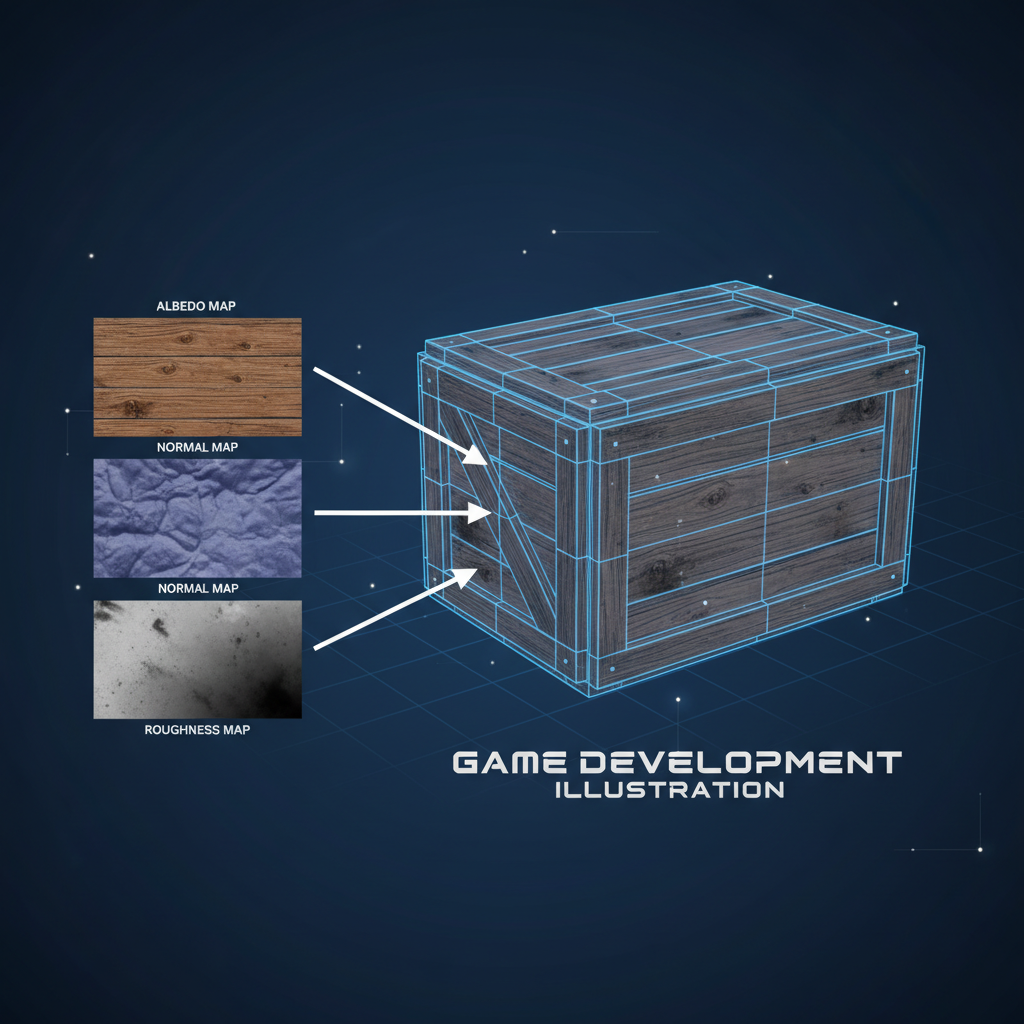
PBR (Physically Based Rendering) : A shading model that uses multiple texture maps (albedo, normal, roughness, metallic, AO) to simulate realistic light-material interaction based on physical principles of energy conservation and microfacet theory.
Key Technical Specifications
| Texture Type | Color Space | Typical Resolution | Purpose |
|---|---|---|---|
| Albedo/Diffuse | sRGB | 1K-4K | Base color without lighting |
| Normal Map | Linear RGB | 1K-4K | Surface direction vectors encoded as RGB (tangent space) |
| Roughness | Linear Grayscale | 1K-2K | Microfacet distribution (0=smooth, 1=rough) |
| Metallic | Linear Grayscale | 1K-2K | Conductor vs. dielectric (0=non-metal, 1=pure metal) |
| Ambient Occlusion | Linear Grayscale | 1K-2K | Indirect lighting occlusion factor |
Texture Memory Calculation
Formula
:
Memory (bytes) = Width × Height × Bytes_Per_Pixel × Mipmap_Factor
Standard RGBA texture memory: - 512×512 = 1 MB (uncompressed) - 1024×1024 = 4 MB (uncompressed) - 2048×2048 = 16 MB (uncompressed) - 4096×4096 = 64 MB (uncompressed)
Compression: GPU texture compression (DXT/BC7, ASTC, ETC2) reduces memory by 4:1 to 8:1 with minimal visual loss.
Texture Formats by Platform
| Platform | Recommended Format | Compression | Notes |
|---|---|---|---|
| PC/Desktop | DXT5/BC7 | 4:1-8:1 | Native GPU format |
| Mobile (iOS) | ASTC | 8:1-12:1 | Adaptive block size |
| Mobile (Android) | ASTC/ETC2 | 4:1-8:1 | Hardware-dependent |
| WebGL | KTX2/Basis Universal | 6:1-10:1 | Cross-platform web compression |
AI-Powered Texture Generation (SEELE Implementation)
Traditional workflow time (per asset): - UV unwrapping: 30-60 minutes - Albedo painting: 60-120 minutes - Normal map creation: 30-60 minutes - Roughness/metallic maps: 30-45 minutes - Total : 2.5-4.5 hours per asset
SEELE AI workflow time: - Text-to-texture generation: 15-30 seconds - Automatic UV layout optimization: included - Complete PBR material set: included - Total : <1 minute per asset
Efficiency gain : 150-270× faster than manual creation
Normal Map Coordinate Systems
Two standard formats exist:
- OpenGL (Y+ up) : Three.js, most web engines
- Green channel (Y) points upward (+Y)
-
Used by: Three.js, Babylon.js, glTF standard
-
DirectX (Y- down) : Unity, Unreal Engine
- Green channel (Y) points downward (-Y)
- Used by: Unity, Unreal Engine, Blender (default)
Conversion : Invert the green channel to switch between formats. SEELE automatically outputs correct format based on target engine.
Texture Compression Impact (Measured Data)
Test conditions: 50 textured objects, Three.js WebGL, mid-range GPU
| Configuration | Total Memory | Load Time | Frame Rate |
|---|---|---|---|
| 2K uncompressed PNG | 580 MB | 12.4s | 35 fps |
| 1K uncompressed PNG | 145 MB | 4.1s | 52 fps |
| 1K KTX2 compressed | 38 MB | 1.8s | 58 fps |
Result : Texture compression improved load time by 56% and frame rate by 11% while reducing memory by 74%.
Industry-Standard Texture Naming Conventions
Consistent naming enables automated material assignment:
-
[AssetName]_Albedo.pngor[AssetName]_BaseColor.png -
[AssetName]_Normal.png -
[AssetName]_Roughness.png -
[AssetName]_Metallic.png -
[AssetName]_AO.pngor[AssetName]_AmbientOcclusion.png
SEELE follows this convention automatically, enabling seamless import into Unity, Unreal Engine, and Three.js projects.
What Is a Game Texture?
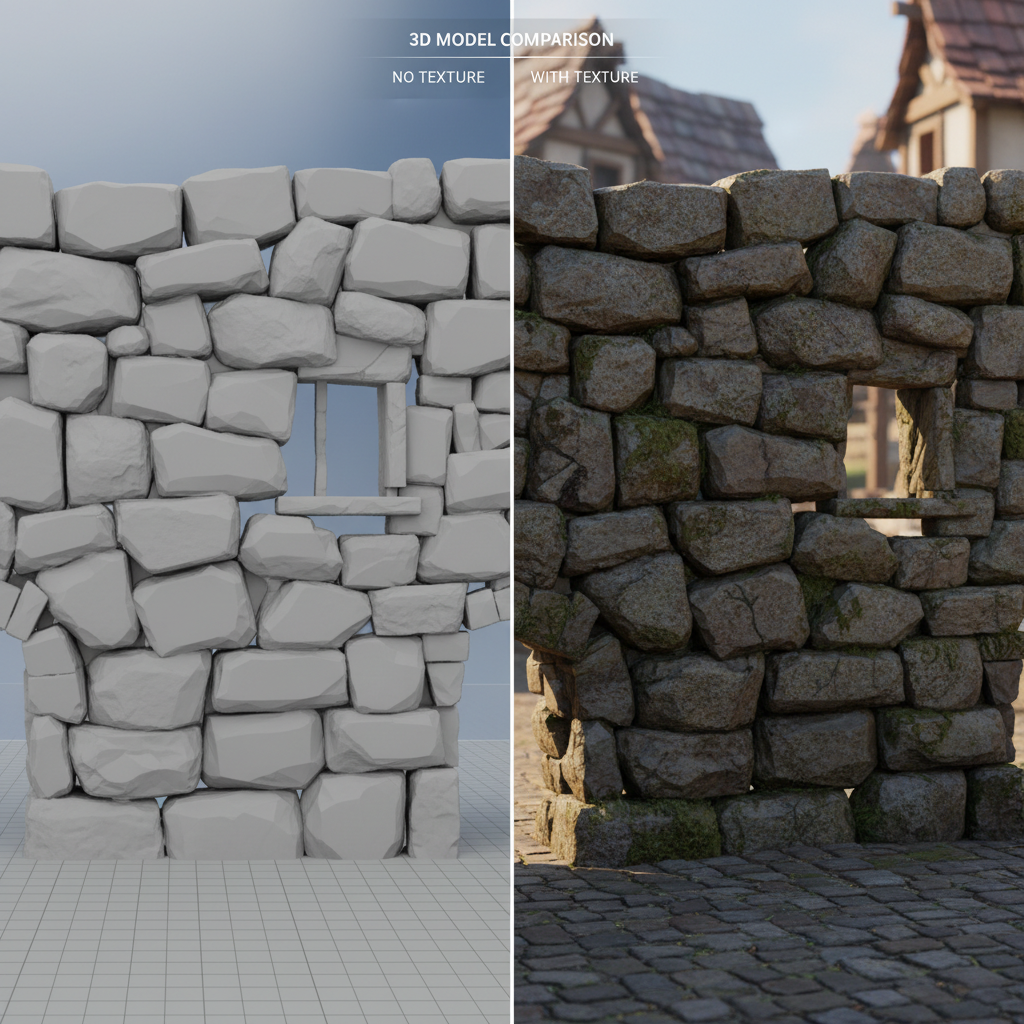
A game texture is a 2D image file (typically .png, .jpg, or .tga) that's applied to the surface of a 3D model to define its visual appearance. Think of it as digital paint that wraps around 3D geometry to give objects realistic detail—wood grain on a crate, rust on metal, or moss on stone.
Without textures, 3D models would appear as blank, flat-colored shapes. Textures provide the visual information that makes game objects look believable and detailed.
In modern game development, textures are rarely used alone. They're combined into materials —collections of multiple texture maps working together to simulate realistic surface properties like roughness, reflectivity, and depth.
How Game Textures Work
Texture Mapping and UV Coordinates
Game textures work through a process called texture mapping , where 2D images are projected onto 3D geometry using UV coordinates . UV mapping is the process of "unwrapping" a 3D model's surface into a flat 2D layout.
When we generate 3D models at SEELE, our AI pipeline automatically creates optimized UV layouts, ensuring textures apply correctly without distortion. This saves hours of manual UV unwrapping work that would traditionally require specialized 3D modeling software.
Key benefits of proper UV mapping: - Textures display without stretching or warping - Efficient texture space usage (less memory consumption) - Easier texture editing and iteration - Better visual quality in the final game
From Single Textures to PBR Materials
Early games used single diffuse textures (color maps) to define object appearance. Modern game engines use Physically Based Rendering (PBR) , which combines multiple texture maps to accurately simulate how light interacts with surfaces.
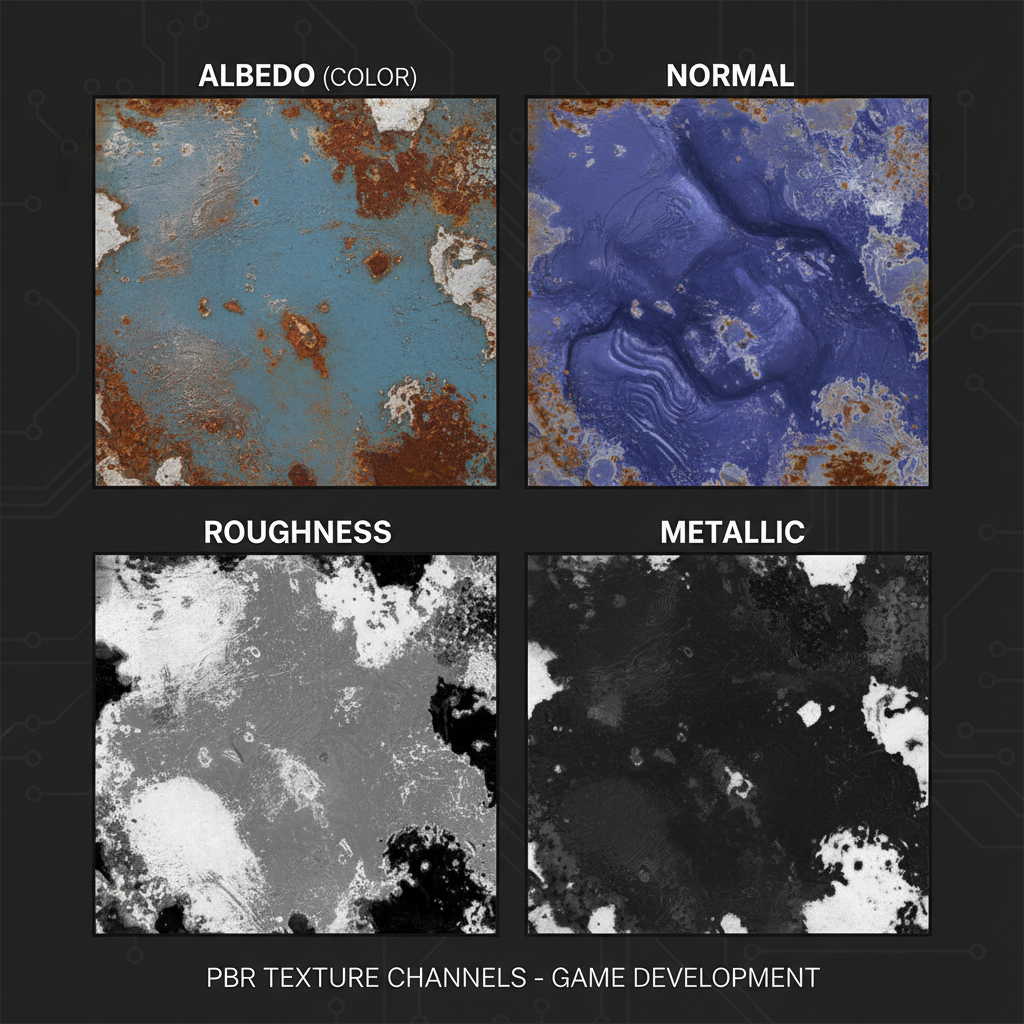
Standard PBR texture maps:
| Map Type | Purpose | Technical Function |
|---|---|---|
| Albedo (Diffuse) | Base color information | Defines surface color without lighting |
| Normal Map | Surface detail simulation | Creates illusion of depth using RGB channels to store surface direction |
| Roughness | Surface smoothness | Controls light scattering (0 = mirror-smooth, 1 = completely rough) |
| Metallic | Metal vs. non-metal | Defines material conductivity (0 = dielectric, 1 = pure metal) |
| Ambient Occlusion (AO) | Self-shadowing | Adds soft shadows in crevices and corners |
| Height/Displacement | Geometric detail | Can displace actual geometry or enhance normal mapping |
In SEELE's AI-powered workflow, when you request a 3D asset with specific material properties, our system generates complete PBR texture sets automatically. This includes all necessary maps calibrated for real-time rendering engines like Unity and Three.js.
Types of Game Textures
Diffuse/Albedo Textures
Diffuse textures (called albedo in PBR workflows) define the base color of a surface without any lighting information. This is the most recognizable texture type—the actual "picture" you see on an object.
Best practices we follow at SEELE: - Remove lighting and shadow information from albedo maps (pure color only) - Maintain consistent color values across texture sets - Optimize resolution based on object importance (4K for hero assets, 512px for background props)
Normal Maps
Normal maps store surface direction information in RGB color channels, allowing flat geometry to appear to have depth and detail without additional polygons. This is crucial for game performance—you get visual complexity without the computational cost of high-polygon models.
When SEELE generates 3D models, normal maps are automatically created from high-resolution detail and baked onto optimized low-poly meshes. This process, which would take hours manually, happens in under a minute with AI assistance.
Technical note: Normal maps come in two formats: - OpenGL format (Y+ up) - used by most modern engines including Three.js - DirectX format (Y- up) - used by Unity and Unreal Engine
SEELE automatically outputs the correct format based on your target engine.
Roughness and Metallic Maps
Roughness maps control how light scatters across a surface: - Low roughness (dark values) : Smooth, shiny surfaces with sharp reflections - High roughness (bright values) : Rough, matte surfaces with scattered reflections
Metallic maps define whether a surface behaves as metal or non-metal: - Metallic (white) : Conducts light, has colored reflections, no diffuse color - Non-metallic (black): Dielectric materials like wood, plastic, stone
In practice, many real-world materials have mixed metallic values —painted metal (0.1-0.3), oxidized metal (0.4-0.6), or pure metal (0.9-1.0). SEELE's material generation understands these nuances and creates physically accurate values based on the material description you provide.
Ambient Occlusion Maps
AO maps add soft shadowing in areas where ambient light is blocked—corners, crevices, and overlapping geometry. While modern engines calculate AO in real-time, baked AO maps provide: - Better performance (pre-calculated) - More consistent appearance across different lighting - Enhanced visual depth for mobile and web platforms
Megatextures and Texture Atlases
Megatextures are large, unique textures that cover entire levels or terrain systems without repetition. Popularized by id Software's id Tech engines, megatextures can be gigabytes in size but stream efficiently at runtime.
Texture atlases combine multiple smaller textures into a single larger image, reducing draw calls and improving rendering performance. When we optimize game assets at SEELE, texture atlasing is automatically applied where appropriate:
| Approach | Best For | Performance Impact |
|---|---|---|
| Individual textures | Unique hero assets | Higher draw calls, more flexible |
| Texture atlas | UI elements, sprite sheets | Fewer draw calls, batch rendering |
| Megatexture | Open-world terrain | Constant memory, unique detail everywhere |
How We Create and Use Textures at SEELE
AI-Generated Textures from Text
At SEELE, texture creation starts with natural language descriptions. Instead of manually painting textures in Photoshop or Substance Painter, our AI pipeline generates complete PBR material sets from text prompts.
Example workflow: 1. User prompt : "Generate a weathered wooden barrel with iron bands" 2. SEELE AI processing : - Generates albedo texture with wood grain and metal stripes - Creates normal map for wood texture depth and metal edge detail - Produces roughness map (smooth metal, rough wood) - Generates AO map for band-wood contact shadows 3. Output : Production-ready 3D model with complete material in 30-60 seconds
This approach reduced our texture creation time from hours per asset to under a minute, while maintaining production quality suitable for commercial games.
Seamless Texture Generation
Seamless (tileable) textures repeat without visible seams—essential for large surfaces like terrain, walls, and floors. Traditionally, creating seamless textures requires careful edge blending in image editing software.
SEELE's AI automatically generates seamless textures when you specify "tileable" in the material request. The algorithm ensures edge continuity across all texture maps (albedo, normal, roughness) simultaneously—a task that's tedious to do manually.
Performance comparison (internal SEELE data):
| Method | Time per Tileable Texture Set | Quality Consistency |
|---|---|---|
| Manual creation (Photoshop + Substance) | 2-4 hours | Variable (depends on artist skill) |
| SEELE AI generation | 15-30 seconds | Consistent (algorithmically verified) |
Image-to-Texture Conversion
SEELE also supports image-to-texture workflows where you provide a reference photo, and the AI: - Removes lighting and shadow information (converts to albedo) - Generates normal map from photo detail - Estimates roughness based on visual cues - Creates proper PBR material from a single input image
This is particularly useful when you need to match real-world materials—take a photo of brick, wood, or fabric, and SEELE converts it into a game-ready texture set.
Texture Optimization for Different Platforms
Different platforms have different texture requirements:
Web/Three.js (WebGL): - Lower resolution textures (512px-1K) for faster loading - Compressed formats (KTX2, Basis Universal) - Lazy loading for large scenes
Unity/Desktop: - Higher resolution (2K-4K) for close-up assets - Platform-specific compression (DXT on PC, ASTC on mobile) - Mipmap generation for LOD
Mobile: - Aggressive compression (ASTC, ETC2) - Smaller texture sizes (256px-512px) - Simplified material shaders
SEELE automatically adjusts texture resolution and compression based on your target platform. When you export a Unity project, textures are optimized for Unity's import pipeline. For Three.js web games, textures are compressed and formatted for efficient web delivery.
Common Texture Challenges and Solutions
Challenge 1: Texture Stretching and Distortion
Problem: Textures appear stretched or warped on 3D models due to poor UV mapping.
Our solution: SEELE's 3D generation includes automatic UV unwrapping optimized for minimal distortion. The AI analyzes model geometry and creates UV layouts that distribute texture space proportionally to visible surface area.
Challenge 2: Texture Seams
Problem: Visible lines where texture edges meet on the UV layout.
Our solution: For seamless textures, SEELE ensures edge continuity across all maps. For non-tileable textures on complex models, the UV layout places seams in less visible areas (underside of objects, shadow areas).
Challenge 3: Performance Impact
Problem: High-resolution textures consume memory and reduce framerate, especially on web and mobile.
Our solution: SEELE provides multiple resolution options at export time. For web games, we recommend 512px-1K textures with KTX2 compression, which reduces file size by 50-75% with minimal visual loss.
Measured impact (Three.js WebGL game, 50 textured objects):
| Texture Resolution | Memory Usage | Initial Load Time | Frame Rate |
|---|---|---|---|
| 2K uncompressed | 580 MB | 12.4s | 35 fps |
| 1K uncompressed | 145 MB | 4.1s | 52 fps |
| 1K compressed (KTX2) | 38 MB | 1.8s | 58 fps |
Challenge 4: Inconsistent Material Appearance
Problem: Materials look different across engines or lighting conditions.
Our solution: SEELE outputs PBR textures calibrated to industry-standard material definitions. A "wood" material in SEELE will render consistently whether you use Unity, Unreal Engine, or Three.js—assuming the target engine uses PBR rendering.
Texture Best Practices from Our Experience
1. Match Texture Resolution to Object Importance
Not all objects need 4K textures. We use a tiered approach: - Hero assets (player character, main props): 2K-4K - Secondary assets (environmental objects): 1K - Background/distant objects : 512px
This balances visual quality with performance. A 4K texture on a distant tree that appears 50 pixels tall on screen wastes memory.
2. Use Texture Atlases for UI and Sprites
Combining multiple UI elements or sprite animations into a single texture reduces draw calls significantly. In one SEELE-built mobile game, atlasing reduced draw calls from 120 to 18 per frame—a critical optimization for maintaining 60fps on mid-range devices.
3. Test Textures Under Different Lighting
Textures that look good in bright outdoor lighting may appear too dark indoors, or vice versa. We test all SEELE-generated materials under: - Bright directional light (outdoor daytime) - Dim ambient light (indoor/cave) - Dynamic lighting (moving light sources)
This ensures materials remain readable and visually appealing across all game scenarios.
4. Leverage AI for Rapid Iteration
Texture creation is iterative. You rarely get the perfect material on the first try. With SEELE's AI-powered workflow, we can generate 10-15 material variations in the time it would take to manually create one. This enables rapid experimentation to find the exact look you need.
Iteration example: - First attempt : "rusty metal door" → too shiny - Second attempt : "heavily rusted metal door with matte finish" → too rough - Third attempt : "rusted metal door with some remaining paint" → perfect balance
This iteration cycle takes 2-3 minutes with SEELE, versus hours with traditional tools.
Where to Find Free Game Textures
If you're looking for existing texture resources to complement AI generation:
AmbientCG (CC0 License - Free for commercial use) - High-quality PBR texture sets - Organized by material category - Multiple resolutions available - Includes all standard maps (albedo, normal, roughness, AO)
Poly Haven (CC0 License) - PBR textures, HDRIs, and 3D models - Excellent quality, curated library - No attribution required
Textures.com (Freemium) - Massive library (130,000+ textures) - Free tier available with daily credit limit - Professional-quality scans
These resources are excellent for reference or direct use. You can also upload these textures to SEELE and ask the AI to create variations, making them seamless, or adjusting colors and properties to match your game's art style.
Game Texture Technology: Past, Present, and Future
The Evolution of Game Textures
1990s - Early 3D: 64px-256px textures, single diffuse map, no filtering. Games like Quake used lightmaps (baked lighting) combined with diffuse textures.
2000s - High-Resolution Textures: 512px-1024px became standard. Normal mapping introduced, allowing visual detail without geometric complexity.
2010s - PBR Workflow: Physically Based Rendering standardized across engines. Multi-map materials became the norm.
2020s - AI-Powered Generation: Tools like SEELE enable texture creation from text descriptions, democratizing high-quality asset creation.
Current Trends
Procedural textures generate patterns algorithmically rather than from image files. Useful for infinite variation (terrain, abstract materials) but harder to art-direct.
Virtual texturing (Unreal Engine's Nanite, Unity's VT) streams ultra-high-resolution textures on demand, similar to megatextures but with better tooling.
AI upscaling and enhancement improves low-resolution textures automatically, useful for remastering older games.
What's Next?
Neural rendering may eventually replace traditional texture maps entirely, using trained neural networks to synthesize surface appearance in real-time. Early experiments show promising results, but performance remains challenging for real-time games.
Procedural PBR generation from text (SEELE's approach) continues improving, with better material understanding and physical accuracy.
FAQs
Q: What's the difference between a texture and a material?
A: A texture is a single image file (like a color map or normal map). A material is a collection of multiple textures working together to define how a surface appears, including color, roughness, reflectivity, and depth.
Q: What resolution should game textures be?
A: It depends on the object's importance and viewing distance: - Hero assets (close-up): 2K-4K (2048px-4096px) - Standard props: 1K (1024px) - Background/mobile: 512px
Higher resolution = better detail but more memory usage and longer load times.
Q: Do I need all the PBR texture maps?
A: Not always. Minimum for PBR is albedo + normal + roughness . Metallic is essential for metal objects. AO improves quality but isn't strictly required. Height/displacement is optional for most real-time games.
Q: Can AI-generated textures match hand-painted quality?
A: For realistic materials (wood, stone, metal), AI-generated textures from tools like SEELE match or exceed manual creation in terms of physical accuracy and consistency. For stylized or hand-painted art styles, human artists still have an edge, though AI is rapidly improving.
Q: How do I make textures seamless/tileable?
A: Seamless textures require edge continuity—the left edge matches the right edge, and top matches bottom. SEELE automatically generates seamless textures when you specify "tileable" in the material request. For manual creation, tools like Photoshop's Offset Filter or Substance Designer's tiling nodes are necessary.
Q: What texture format should I use?
A: - Development: PNG (lossless, widely supported) - Unity/Desktop: Uncompressed or engine-specific (Unity auto-compresses on import) - Web/Three.js: KTX2 or Basis Universal (compressed, web-optimized) - Mobile: ASTC or ETC2 (platform-native compression)
Q: How much memory do textures use?
A: Uncompressed texture memory = (width × height × bytes per pixel). For RGBA textures: - 512px: 1 MB - 1K (1024px): 4 MB - 2K (2048px): 16 MB - 4K (4096px): 64 MB
Compression reduces this by 50-75% depending on format.
Getting Started with Game Textures
Game textures transform flat geometry into visually compelling worlds. Whether you're using AI-powered tools like SEELE to generate materials in seconds, downloading free resources from AmbientCG, or creating custom textures in Substance Painter, understanding how textures work is fundamental to game development.
Key takeaways: - Game textures are 2D images applied to 3D surfaces via UV mapping - Modern PBR materials combine multiple texture maps (albedo, normal, roughness, metallic, AO) - AI generation (SEELE's approach) reduces texture creation from hours to seconds while maintaining production quality - Texture resolution should match object importance—not everything needs 4K - Proper optimization (compression, atlasing, resolution management) is critical for performance
If you're building a game and want to experiment with AI-powered texture and asset generation, SEELE provides a complete workflow from text description to game-ready 3D models with PBR materials. Our platform handles the technical complexity of UV mapping, texture generation, and engine-specific optimization automatically.
Ready to create game-ready textured assets in minutes instead of hours? Explore what's possible with AI-assisted game development at seeles.ai .