
Online Game Design: What It Takes to Build Multiplayer Experiences
Learn the fundamentals of online game design, from networking architecture to player synchronization. Discover tools and strategies for building engaging multiplayer games.

Posted: February 09, 2026

Key Concepts: Online Game Design
What is online game design?
Online game design is the specialized practice of creating multiplayer games where players interact in shared digital environments. It encompasses network architecture, player state synchronization, real-time communication protocols, and lag compensation techniques to deliver responsive multiplayer experiences.
Core Technical Requirements:
- Network Architecture : Client-server (authoritative server validates all actions), peer-to-peer (direct player connections), or hybrid models combining both approaches
- State Synchronization Methods : Client prediction (immediate local response), server reconciliation (correcting prediction errors), and interpolation (smoothing entity movement)
- Communication Protocols : UDP (low latency, unreliable), TCP (guaranteed delivery), WebSocket (browser-based bidirectional), or WebRTC (peer-to-peer data channels)
- Lag Compensation : Snapshot interpolation, hitbox rewinding, and smooth server correction blending to minimize perceived latency impact
Primary Architecture Pattern:
Client-server architecture serves as the industry standard, with the server maintaining authoritative game state while clients render local predictions. This prevents cheating through server-side validation while maintaining responsive gameplay through client prediction and server reconciliation.
Network Latency Impact:
Online games must function across latencies of 30-200ms. Techniques include client-side prediction (eliminating perceived input delay), lag compensation in hit detection (rewinding game state to player's perspective), and interpolation (rendering entities slightly in the past using confirmed data).
Essential Development Tools:
| Category | Tools | Purpose |
|---|---|---|
| Game Engines | Unity, Unreal Engine, Godot | Built-in networking APIs and replication systems |
| Web Frameworks | Three.js + Socket.io, Phaser, Colyseus | Browser-based multiplayer game development |
| Backend Services | Photon, PlayFab, Custom Node.js | Server hosting, matchmaking, state management |
| AI Platforms | SEELE | AI-generated Unity and WebGL multiplayer games |
Common Implementation Challenges:
- Player Disconnection Handling : Timeout detection, reconnection grace periods, bot replacements
- Cheat Prevention : Server authority, input validation, encrypted communication, rate limiting
- State Complexity Management : Interest management, spatial partitioning, delta compression
- Cross-Latency Balance : Region-based matchmaking, latency-tolerant mechanics, fair lag compensation
Browser vs. Native Deployment:
Browser-based games (WebGL via Three.js or Unity) offer instant access without downloads but face performance constraints. Native applications provide better performance and deeper system integration but require installation. Hybrid approaches use progressive web apps (PWAs) combining browser accessibility with offline capabilities.
Synchronization Frequency:
Most online games send state updates 10-30 times per second (33-100ms intervals). Fast-paced games (shooters, racing) target 30-60Hz updates, while turn-based games may use event-driven updates only when game state changes.
Data from Internal Analysis (SEELE Platform):
AI-generated multiplayer prototypes reduce development time from 40+ hours of manual networking implementation to 3-8 minutes of iterative AI-assisted generation. WebGL deployment via Three.js enables instant browser access, eliminating the installation barrier for casual multiplayer games.
What Is Online Game Design?
Online game design is the practice of creating games where multiple players interact in shared digital spaces—whether through competitive matches, cooperative missions, or persistent virtual worlds. Unlike single-player games that run entirely on one device, online games require careful consideration of networking, server architecture, player synchronization, and real-time communication.
At its core, online game design addresses unique challenges that don't exist in offline experiences:
- Network latency : Players experience delays between their actions and server responses
- State synchronization : All players must see a consistent game world despite being on different devices
- Scalability : Systems must handle anywhere from 2 to thousands of simultaneous players
- Security : Server-side validation prevents cheating and maintains fair gameplay
- Player retention : Social dynamics and progression systems keep players engaged over time
From browser-based multiplayer games to massive online worlds, online game design requires both traditional game design skills and specialized technical knowledge.

Core Concepts in Online Game Design
Network Architecture Patterns
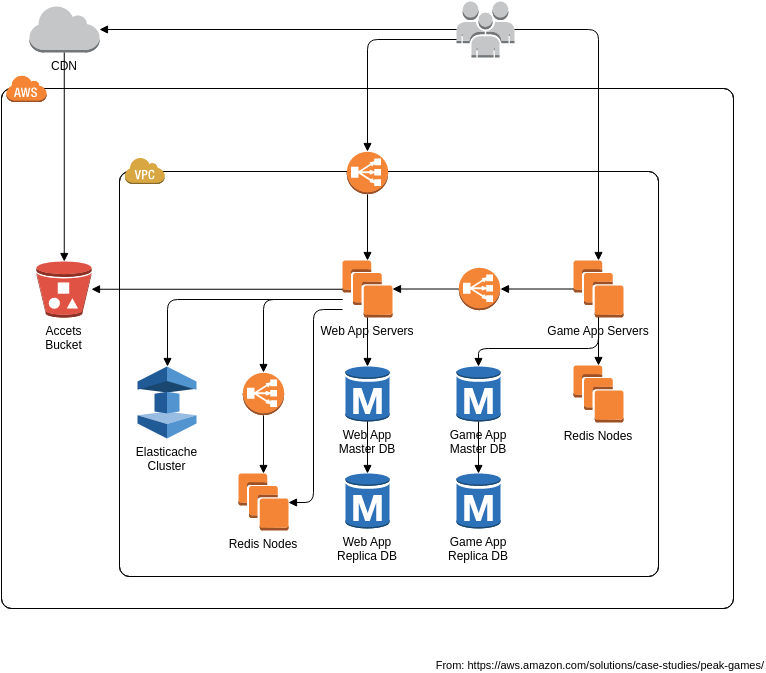
Choosing the right network architecture fundamentally shapes your game's capabilities and limitations.
Client-Server Architecture remains the industry standard for online games. The server acts as the authoritative source of truth, processing game logic and broadcasting updates to all connected clients. This approach provides strong anti-cheat protection and consistent state management, though it requires robust server infrastructure.
Peer-to-Peer (P2P) Architecture allows players to connect directly without a central server. While this reduces infrastructure costs and can offer lower latency for small groups, P2P systems struggle with synchronization in larger games and are vulnerable to cheating since no authoritative server validates actions.
Hybrid Models combine both approaches—using P2P for voice chat or non-critical data while maintaining server authority for gameplay state. Many modern games adopt this pattern to balance performance and security.
Player State Synchronization
Every player in an online game maintains a local representation of the game world. Keeping these representations synchronized across network delays is one of online game design's biggest challenges.
Client Prediction allows the local client to immediately respond to player input without waiting for server confirmation. When you press forward in an online shooter, your character moves instantly—the game predicts the outcome and later reconciles with the server's authoritative response.
Server Reconciliation handles the cases where client predictions differ from server reality. If the server determines you actually hit a wall or got hit by another player, it sends a correction that the client smoothly integrates.
Interpolation and Extrapolation smooth out the movement of other players despite receiving their position updates only 10-30 times per second. Interpolation renders entities slightly in the past using confirmed position data, while extrapolation predicts where fast-moving objects will be.
Real-Time Communication Protocols
The communication protocol you choose affects responsiveness, bandwidth usage, and implementation complexity.
UDP (User Datagram Protocol) sends data without guaranteed delivery or ordering. For fast-paced games where the latest data matters more than perfect reliability (like shooters or racing games), UDP's lower latency outweighs occasional packet loss.
TCP (Transmission Control Protocol) guarantees delivery and ordering but introduces latency when packets are lost and must be retransmitted. Turn-based games and persistent data often use TCP.
WebSocket provides full-duplex communication over standard HTTP connections, making it ideal for browser-based games. While technically TCP-based, modern WebSocket implementations offer excellent performance for real-time gameplay.
WebRTC enables peer-to-peer data channels and real-time audio/video communication directly in browsers, useful for voice chat and certain multiplayer architectures.
Lag Compensation Techniques
Network latency ("lag") is inevitable, but good design makes it imperceptible.
Snapshot Interpolation renders other players where they were 100-200ms ago based on confirmed server data, creating smooth movement despite irregular network updates.
Lag Compensation in Hitboxes rewinds the game state when processing hit detection. When you fire at an opponent, the server checks where that opponent was from your perspective (accounting for your latency), not where they are currently. This ensures your shots register when your aim appears accurate on your screen.
Rubberbanding Prevention carefully blends server corrections with client predictions. Harsh corrections create the "rubberband" effect where players snap backward—smooth blending makes corrections feel natural.
Essential Tools and Platforms for Online Game Design
The right tools dramatically reduce the complexity of online game development.
Game Engines with Built-in Networking
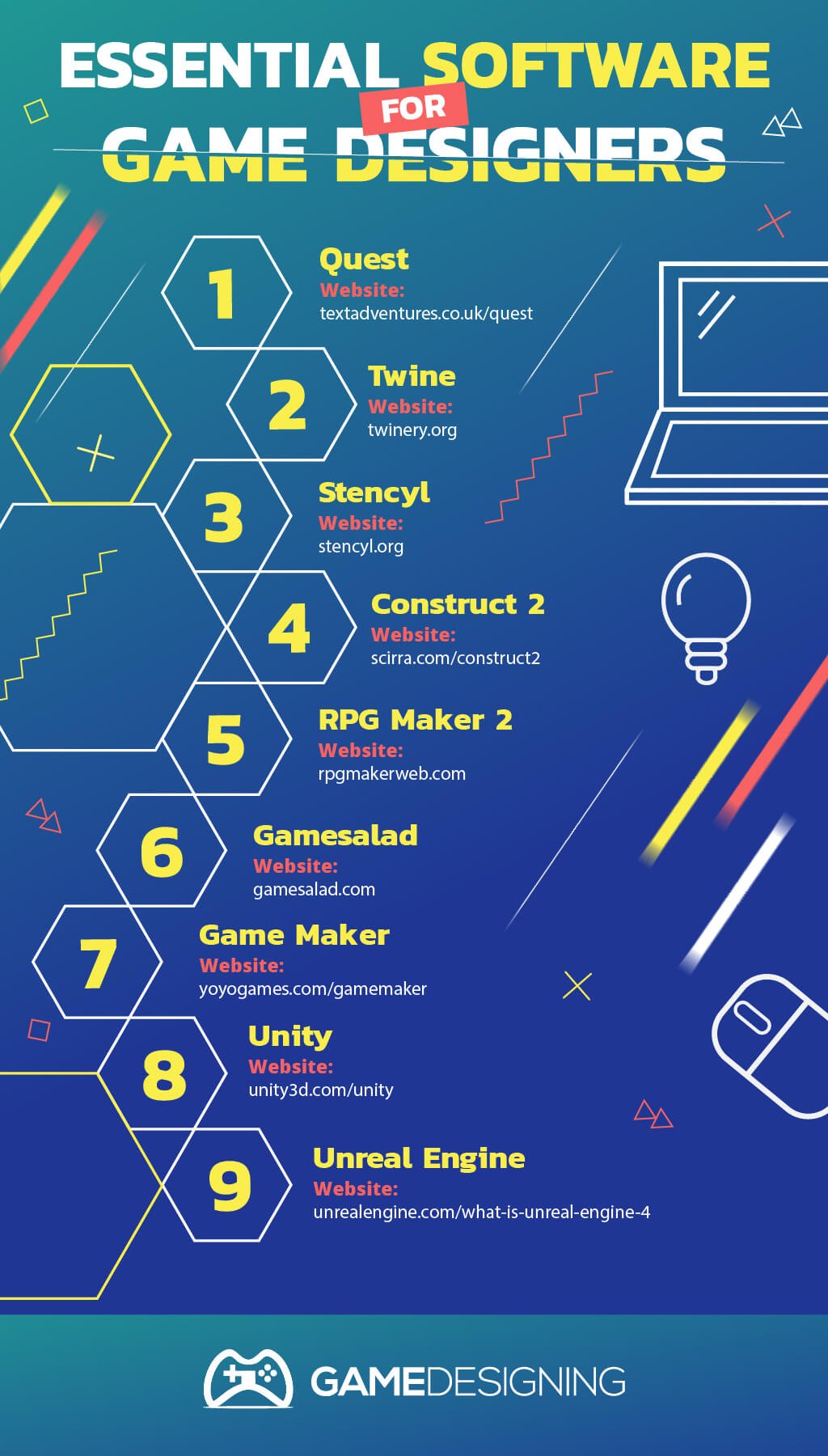
Unity provides comprehensive networking solutions through both legacy UNET (deprecated) and modern alternatives like Netcode for GameObjects, Mirror, and Photon Unity Networking. Unity's server-client architecture supports WebGL deployment for browser-based multiplayer games.
Unreal Engine includes built-in replication and client-server architecture optimized for high-performance multiplayer. Its Blueprint visual scripting makes network logic accessible without deep programming knowledge.
Godot offers high-level multiplayer API with both client-server and P2P support. The open-source engine provides NetworkedMultiplayerPeer for establishing connections and RPC (Remote Procedure Call) for synchronized function calls.
Web-Based Game Frameworks
For browser-accessible online games, specialized frameworks streamline development.
Three.js combined with Socket.io creates powerful 3D browser games with real-time networking. This JavaScript stack enables multiplayer experiences that run directly in web browsers without plugins.
Phaser excels at 2D browser games with integrated physics and asset management. Combined with WebSocket or Socket.io for networking, it's ideal for casual multiplayer web games.
Colyseus provides a multiplayer framework specifically designed for browser games, handling state synchronization and room management with minimal boilerplate.
Backend and Server Solutions
Online games need robust server infrastructure.
Photon offers cloud-hosted multiplayer servers with generous free tiers. It handles matchmaking, room management, and state synchronization across Unity, Unreal, and custom engines.
PlayFab (Microsoft) provides complete backend services including player authentication, leaderboards, analytics, and multiplayer server hosting.
Custom Node.js Servers using Socket.io or WS libraries give maximum flexibility for unique game mechanics. This approach requires more development time but offers complete control.
AI-Powered Game Development Platforms
SEELE brings AI-driven development to online game creation. The platform generates both Unity and Three.js (WebGL) games from natural language descriptions, including multiplayer functionality. When you need to prototype online game mechanics quickly or generate networked game templates, SEELE's AI can produce working multiplayer code in minutes rather than hours.
SEELE's Three.js engine support is particularly relevant for online games—WebGL deployment means players access your multiplayer game instantly through browsers without downloads or installations. The platform's natural language interface allows you to iterate on networking logic, player synchronization, and real-time mechanics through conversational refinement.
Steps to Get Started with Online Game Design
1. Define Your Multiplayer Model
Before writing code, clarify exactly how players will interact:
- Player count : 2-player versus, 4-player co-op, or massively multiplayer?
- Interaction model : Competitive, cooperative, or mixed?
- Session structure : Quick matches, persistent worlds, or hybrid?
- Platform : Desktop application, mobile, or browser-based?
These decisions drive your architecture and tool choices.
2. Start with Simple Prototypes
Build a minimal viable multiplayer experience to test your core mechanics:
- Create a basic game loop that works in single-player
- Add the simplest networking that could work (even if it's not scalable)
- Test with two players on the same local network
- Verify your core gameplay is fun before optimizing networking
Many developers make the mistake of overengineering networking before proving the gameplay is engaging.
3. Implement Core Networking
Once your prototype is validated, build proper networking:
- Choose your architecture pattern (client-server recommended for most cases)
- Implement player connection and disconnection handling
- Set up state synchronization for game objects
- Add interpolation for smooth movement
- Test with artificial latency (most tools include network simulation)
4. Add Game-Specific Features
With networking fundamentals working, layer in your unique gameplay:
- Game rules and win conditions
- Player progression and stats
- Matchmaking or lobby systems
- Chat and social features
- Spectator modes
5. Optimize and Scale
Polish your networking for production quality:
- Reduce bandwidth usage by sending only changed data
- Implement lag compensation for responsive feel
- Add server-side validation to prevent cheating
- Load test with expected player counts
- Set up monitoring and analytics
Common Challenges in Online Game Design
Handling Player Disconnections
Players will disconnect unexpectedly. Your design must account for this:
- Timeout detection to identify when a client has lost connection
- Grace periods allowing brief reconnections without penalty
- Bot replacements or pause systems in competitive games
- Save state mechanisms for persistent worlds
Preventing Cheating
Online games are constant targets for exploitation:
- Server-authoritative design where clients never fully control game state
- Input validation ensuring actions are legal before processing
- Rate limiting to prevent speed hacks and spam
- Encrypted communication to prevent packet manipulation
- Regular sanity checks on player data
Managing Game State Complexity
As online games grow, state management becomes exponentially complex:
- Interest management sending each player only relevant nearby data
- Spatial partitioning to efficiently process entities by region
- Delta compression sending only state changes rather than full snapshots
- Priority systems allocating bandwidth to high-importance updates
Balancing Gameplay Across Latencies
Players with different ping times shouldn't have fundamentally different experiences:
- Lag compensation to level the playing field
- Generous hitboxes and timing windows
- Gameplay mechanics that are naturally latency-tolerant
- Region-based matchmaking to group similar-latency players
The Future of Online Game Design
Online game design continues evolving with emerging technologies:
Cloud Gaming removes hardware barriers by running games on remote servers and streaming video to players. Services like Xbox Cloud Gaming and NVIDIA GeForce Now shift networking concerns from player-to-player communication to stream optimization.
AI-Driven NPC Interactions create dynamic content within online worlds. Advanced NPCs with conversational AI and adaptive behaviors make online environments feel more alive and reduce reliance on constant player-to-player interaction.
WebAssembly and WebGPU bring near-native performance to browser-based multiplayer games. These technologies enable more sophisticated online games accessible directly through URLs without app stores or downloads.
Blockchain and Decentralized Gaming explore player-owned economies and cross-game asset portability, though practical adoption remains in early stages.
Start Building Your Online Game
Online game design presents unique challenges, but modern tools and frameworks have made multiplayer development more accessible than ever. Whether you're building a browser-based casual multiplayer game or a competitive online arena, understanding networking fundamentals and choosing appropriate architecture sets the foundation for success.
The gap between concept and playable multiplayer prototype has narrowed dramatically. With AI-powered platforms like SEELE generating working Three.js games from descriptions, browser-based game frameworks providing robust networking, and cloud services eliminating infrastructure complexity, solo developers and small teams can now build engaging online experiences.
The most important step is starting simple. Create a basic multiplayer interaction, test it with real players, and iterate based on what's fun. Online game design is ultimately about creating compelling shared experiences—the technical complexity serves that creative goal.
Ready to start your online game project? Explore SEELE's AI-powered game generation at seeles.ai to rapidly prototype multiplayer mechanics and iterate on your vision.
